
Last updated on
Nov 6, 2026
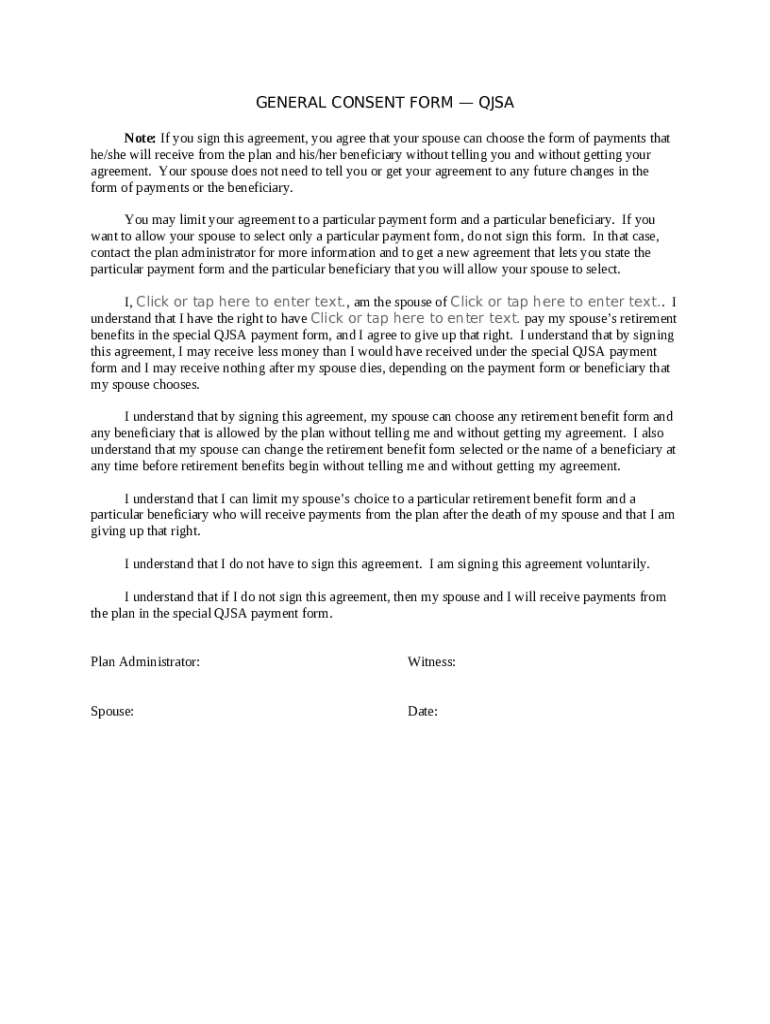
Get the free QJSA General Consent Form
We are not affiliated with any brand or entity on this form

Fill out
Complete the form online in a simple drag-and-drop editor.

eSign
Add your legally binding signature or send the form for signing.

Share
Share the form via a link, letting anyone fill it out from any device.

Export
Download, print, email, or move the form to your cloud storage.
Why pdfFiller is the best tool for your documents and forms


End-to-end document management
From editing and signing to collaboration and tracking, pdfFiller has everything you need to get your documents done quickly and efficiently.
Accessible from anywhere
pdfFiller is fully cloud-based. This means you can edit, sign, and share documents from anywhere using your computer, smartphone, or tablet.
Secure and compliant
pdfFiller lets you securely manage documents following global laws like ESIGN, CCPA, and GDPR. It's also HIPAA and SOC 2 compliant.
What is QJSA Consent
The QJSA General Consent Form is a legal document used by spouses to consent to their partner's retirement benefit choices and beneficiaries without prior agreement.
pdfFiller scores top ratings on review platforms




love it saved me paper on printing and hides my ugly hand writing
I use it alot but would like to know more about it
Eindelijk een applicatie die lekker werkt met Google Drive
I really like this, I am using it more than I thought I would. It has made everything very convenient. I also like the fact that the program remembers things that I've previously typed. It saves time for sure!
I've enjoyed editing a pdf calendar with my families birthday and anniversary dates to gift this Christmas. Editing was a snap and I have saved my work so I can add more info if needed.
Easy to use. After great frustration with other apps to fill in pdf forms, pdfFiller has been the easiest and most efficient method for me to complete forms.
Who needs QJSA Consent?
Explore how professionals across industries use pdfFiller.

QJSA Consent is needed by:
-
Spouses planning for retirement benefits
-
Estate planners and legal advisors
-
Beneficiaries of retirement plans
-
Financial planners
-
Individuals engaged in estate planning
-
Retirement plan administrators
Comprehensive Guide to QJSA Consent
What is the QJSA General Consent Form?
The QJSA General Consent Form is a crucial legal document that facilitates a spouse's consent to beneficiary choices made regarding retirement benefits. This form plays an essential role in estate planning by ensuring that spouses can consent to decisions without needing direct agreement, helping to prevent future disputes over retirement accounts. Required signatures are obtained from both the spouse and a witness, which further legitimizes the document and its stipulations.
Purpose and Benefits of the QJSA General Consent Form
Completing the QJSA General Consent Form carries significant benefits for individuals involved in estate planning. It allows a spouse to provide consent efficiently, meaning that complications arising from disagreements can be avoided. By securing a clear path for managing retirement benefits, the form protects these assets and aids in future estate planning efforts. Additionally, it mitigates potential legal issues that may occur if the form is neglected or improperly completed.
Key Features of the QJSA General Consent Form
The QJSA General Consent Form is designed with several essential components to facilitate easy completion. Key features include:
-
Fillable fields for entering personal and beneficiary information.
-
Specified signature requirements and roles, including the spouse, witness, and plan administrator.
-
Clear instructions and guidance to ensure accurate completion.
Who Needs the QJSA General Consent Form?
This form is indispensable for individuals who are actively engaging in estate planning and managing retirement accounts. Key users include:
-
Individuals looking to secure their estate and ensure their retirement benefits are effectively managed.
-
Beneficiary spouses who may need to provide consent for changes in retirement plans.
-
Cases where not using the form may introduce risks or disputes over entitlements.
How to Fill Out the QJSA General Consent Form Online (Step-by-Step)
Filling out the QJSA General Consent Form online can be done effectively through platforms such as pdfFiller. Here’s a step-by-step guide:
-
Access the form on pdfFiller’s platform.
-
Carefully enter all required personal and beneficiary information into the fillable fields.
-
Ensure that the spouse, witness, and any necessary parties sign the form appropriately.
-
Review the completed form for any common mistakes before submission.
Where to Submit the QJSA General Consent Form
Submission of the QJSA General Consent Form can be completed through various methods. Users can choose from:
-
Online submission directly via pdfFiller.
-
Mailing the completed form to the designated plan administrator.
It is vital to be aware of submission deadlines to ensure timely processing, and users should also consider any associated fees that may apply during the submission process.
Security and Compliance for the QJSA General Consent Form
Handling sensitive information is a priority when it comes to the QJSA General Consent Form. The platform, pdfFiller, employs robust security measures, including 256-bit encryption and adherence to data protection laws such as HIPAA and GDPR. Utilizing a secure platform ensures that users can trust that their information will be handled with the utmost confidentiality and care.
How to Correct or Amend the QJSA General Consent Form
In instances where changes are needed after submission, users can follow these steps to amend the form:
-
Identify and document any errors found in the submitted form.
-
Make the necessary corrections based on common rejection reasons.
-
Resubmit the corrected form according to prescribed guidelines.
Sample or Example of a Completed QJSA General Consent Form
To assist users in visualizing a properly completed form, a downloadable example of a completed QJSA General Consent Form is available. This example highlights key areas within the form and illustrates how each section should be filled out. Reviewing this completed form can serve as a valuable reference to what constitutes a correctly filled document.
Experience Seamless Form Filling with pdfFiller
Using pdfFiller for completing the QJSA General Consent Form offers numerous advantages. This platform streamlines the document management process, ensuring ease of use for estate planning documents. With high-level security features and positive user testimonials, pdfFiller stands out as a reliable choice for managing sensitive documents efficiently.
How to fill out the QJSA Consent
-
1.Begin by accessing the QJSA General Consent Form on pdfFiller. Search for the form in the pdfFiller library or upload it if you have a physical copy.
-
2.Once you have opened the form, familiarize yourself with the different fields available. Ensure all necessary fields are visible for completion.
-
3.Before you start filling out the form, gather all required information. This includes the names of the involved parties, retirement benefit details, and related beneficiary selections.
-
4.To fill in the information, click on each field and type in the appropriate data. Use the fillable checkboxes where applicable, especially for signing roles.
-
5.Review each section carefully after completion. Ensure that all information is accurate and complete to avoid processing delays.
-
6.Once satisfied, navigate to the review section on pdfFiller to check for any errors or missing information.
-
7.After reviewing, you can save your progress by clicking the save button. You can also download or submit the form directly through pdfFiller, selecting your preferred option.

Who needs to sign the QJSA General Consent Form?
The QJSA General Consent Form requires signatures from the spouse and a witness. The plan administrator's signature is not mandatory unless specified by the retirement plan.
Are there any eligibility requirements to use this form?
This form is primarily intended for spouses involved in retirement planning and should be completed in accordance with the specific retirement plan's requirements.
What supporting documents are needed for the QJSA General Consent Form?
Typically, no additional documents are required apart from the form itself. However, it is good practice to have related retirement plan documents readily available for reference.
How do I submit the QJSA General Consent Form?
You can submit the form directly through pdfFiller by selecting the submit option or by downloading it and submitting it as per your retirement plan’s guidelines.
What common mistakes should I avoid when filling out this form?
Ensure all fields are filled out accurately, particularly the signatures. Double-check the retirement benefit selections and beneficiary details to prevent errors.
Is notarization required for the QJSA General Consent Form?
No, notarization is not required for this form, making it easier to complete and submit without further legal formalities.
What is the processing time for the QJSA General Consent Form?
Processing times can vary depending on the retirement plan’s policies. It’s best to consult with the plan administrator for specific timelines regarding your submitted form.
Related Forms




Get the latest insights from our blog


If you believe that this page should be taken down, please follow our DMCA take down process
here
.
This form may include fields for payment information. Data entered in these fields is not covered by PCI DSS compliance.