
Last updated on
Nov 9, 2026

Employee Representation Regarding Use of Company Vehicle 2011 free printable template
pdfFiller is not affiliated with any government organization

Fill out
Complete the form online in a simple drag-and-drop editor.

eSign
Add your legally binding signature or send the form for signing.

Share
Share the form via a link, letting anyone fill it out from any device.

Export
Download, print, email, or move the form to your cloud storage.
Why pdfFiller is the best tool for your documents and forms


End-to-end document management
From editing and signing to collaboration and tracking, pdfFiller has everything you need to get your documents done quickly and efficiently.
Accessible from anywhere
pdfFiller is fully cloud-based. This means you can edit, sign, and share documents from anywhere using your computer, smartphone, or tablet.
Secure and compliant
pdfFiller lets you securely manage documents following global laws like ESIGN, CCPA, and GDPR. It's also HIPAA and SOC 2 compliant.
What is Employee Representation Regarding Use of Company Vehicle
The Employee Vehicle Use Representation Form is a document used by employees to report personal use of company vehicles for tax purposes.
pdfFiller scores top ratings on review platforms




Who needs Employee Representation Regarding Use of Company Vehicle?
Explore how professionals across industries use pdfFiller.

Employee Representation Regarding Use of Company Vehicle is needed by:
-
Employees utilizing company vehicles for personal use
-
Human Resources departments managing employee vehicle records
-
Tax professionals assisting employees with taxable income calculations
-
Employers ensuring compliance with IRS regulations
-
Payroll departments assessing tax implications of vehicle use
Comprehensive Guide to Employee Representation Regarding Use of Company Vehicle
What is the Employee Vehicle Use Representation Form?
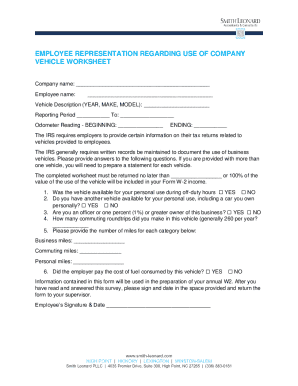
The Employee Vehicle Use Representation Form serves a crucial role in reporting personal use of company vehicles for tax purposes. This form is designed to collect essential information including vehicle details and odometer readings. Accurately completing this form helps in determining the taxable income resulting from utilizing a company vehicle for personal activities.
Key elements of the form include data about the vehicle, such as make, model, and year, along with odometer readings and any relevant details regarding personal usage. By utilizing the employee vehicle use form, companies can ensure compliance with IRS vehicle use reporting requirements.
Purpose and Benefits of the Employee Vehicle Use Representation Form
The primary objective of the Employee Vehicle Use Representation Form is to facilitate the accurate calculation of taxable income derived from personal usage of a company vehicle. By leveraging this form, employees and employers can maintain compliance with IRS regulations while avoiding potential tax issues.
Furthermore, utilizing the company vehicle tax form allows for clarity in financial reporting, thus contributing to a smoother tax filing process. This form serves as a safeguard for both employees and employers, ensuring all necessary tax obligations are met effectively.
Who Needs to Complete the Employee Vehicle Use Representation Form?
Circumstances that warrant the submission of this form include any instance of personal use of a company vehicle that could affect tax liabilities. Employers can specify which employees must complete this form based on their roles and vehicle usage policies.
Key Features of the Employee Vehicle Use Representation Form
The Employee Vehicle Use Representation Form includes several important sections designed for ease of use and accurate reporting. Key sections provide instructions and outline required fields such as employee information, vehicle specifics, and precise calculations to ensure compliance.
-
Instructions for completing the form
-
Fields for odometer readings
-
Calculation sections for personal use
-
Signature and date requirements
-
Reporting periods for vehicle usage
These elements are vital for comprehensive reporting and ensure that all necessary data is submitted for tax purposes.
How to Fill Out the Employee Vehicle Use Representation Form Online
Filling out the Employee Vehicle Use Representation Form online is facilitated through tools available on pdfFiller. Follow these straightforward steps to complete the form efficiently:
-
Access the form on pdfFiller's platform.
-
Input vehicle descriptions, including make and model.
-
Enter reporting periods and odometer readings.
-
Review all entries for accuracy.
-
Submit the form electronically or print for hard copy submission.
Make sure to have all necessary information on hand while completing the IRS vehicle use reporting form to ensure a smooth process.
Common Mistakes When Completing the Employee Vehicle Use Representation Form
While filling out the Employee Vehicle Use Representation Form, employees often make several common mistakes. Identifying these errors can help avoid complications with tax reporting.
-
Neglecting to fill out all required fields
-
Errors in odometer readings
-
Submitting without a signature
To mitigate these issues, it’s advisable for employees to double-check their submissions for complete accuracy before sending the form to their employers.
Submission Methods for the Employee Vehicle Use Representation Form
Employees have various options for submitting the completed Employee Vehicle Use Representation Form to their employers. These include:
-
Online submission through pdfFiller
-
Emailing the completed form
-
Mailing a hard copy
It is also recommended to track submissions to confirm that the employer has received the form, which can prevent any misunderstandings regarding compliance.
Why Use pdfFiller for Completing the Employee Vehicle Use Representation Form?
pdfFiller offers a comprehensive platform for completing the Employee Vehicle Use Representation Form with features tailored to user needs. Key benefits of using this platform include:
-
eSigning capabilities for faster processing
-
Secure document management to protect sensitive information
-
User-friendly interface for easy form completion
Utilizing pdfFiller enhances security and efficiency while managing employee vehicle use documentation.
What Happens After You Submit the Employee Vehicle Use Representation Form?
After submitting the Employee Vehicle Use Representation Form, employees may expect a series of follow-up actions from their employers. Employers might review the form to ensure all information is accurately reported and compliant with IRS guidelines.
If there are any discrepancies or mistakes found in the submission, employees can correct or amend their forms as needed, ensuring that tax liabilities are accurately addressed.
Start Your Employee Vehicle Use Representation Form Today
Begin the process of completing your Employee Vehicle Use Representation Form with pdfFiller today. The platform provides an effortless experience for managing your forms, making it simple to report personal vehicle use accurately and efficiently.
Enjoy the ease of use and accessibility of pdfFiller, ensuring your form is completed correctly for your tax reporting needs.
How to fill out the Employee Representation Regarding Use of Company Vehicle
-
1.Start by accessing pdfFiller and logging into your account. Locate the Employee Vehicle Use Representation Form in the templates section or upload it if you have your own copy.
-
2.Once the form opens, familiarize yourself with the layout. Use the navigation tools on pdfFiller to easily move between sections of the form.
-
3.Gather all necessary information before filling out the form. This includes your vehicle's description, odometer readings, and details regarding miles driven for personal and business purposes.
-
4.Begin filling in the employee information section with your name, position, and department as required. Ensure that all fields are completed with accurate and up-to-date information.
-
5.Proceed to the vehicle details section. Enter the vehicle description, including make, model, and year, along with the odometer readings for the start and end of the reporting period.
-
6.In the miles driven section, provide estimated miles for personal use and any business-related driving. If applicable, differentiate between different types of driving purposes using the indicated fields.
-
7.Review all entered information for accuracy. Utilize pdfFiller’s review features to double-check that all fields are filled and that data is correct.
-
8.Once reviewed, sign the form electronically by clicking on the signature field. Ensure the date aligns with your signature to validate the form.
-
9.Save the completed form by downloading it in your preferred format (PDF, DOC) or utilize pdfFiller's options to submit it directly to your employer via email or their preferred submission method.

Who must complete the Employee Vehicle Use Representation Form?
Employees who use company vehicles for personal purposes are required to complete the Employee Vehicle Use Representation Form. This helps ensure accurate tax reporting and compliance with IRS regulations.
What information do I need to provide when filling out the form?
You will need to provide comprehensive details about the vehicle, including make, model, odometer readings, and the number of miles driven for both personal and business purposes.
Is there a deadline for submitting this form?
While specific deadlines may vary by employer, it is essential to submit the Employee Vehicle Use Representation Form by the established due date specified by your Human Resources department, usually coinciding with tax reporting periods.
Can I submit the form electronically?
Yes, you can submit the form electronically through pdfFiller. After completion, you can download it or send it directly via email to your employer as per their submission process.
What are common mistakes to avoid while filling out the form?
Common mistakes include incomplete fields, inaccurate odometer readings, and failed to differentiate between business and personal use miles. Double-check all data before submitting.
Are there any fees associated with submitting this form?
There are typically no fees directly associated with the Employee Vehicle Use Representation Form itself. However, consult your HR department for any fees related to processing or additional documentation.
Do I need to attach any supporting documents with this form?
While it depends on your employer's requirements, you may need to provide additional documentation such as vehicle registration or justification for mileage reported. Confirm with your HR department for specifics.
Employee Representation Regarding Use of Company Vehicle Form Versions
Related Forms





Related Catalogs
Get the latest insights from our blog


If you believe that this page should be taken down, please follow our DMCA take down process
here
.
This form may include fields for payment information. Data entered in these fields is not covered by PCI DSS compliance.