
Last updated on
Oct 31, 2026
Get the free Contact Record Form
We are not affiliated with any brand or entity on this form

Fill out
Complete the form online in a simple drag-and-drop editor.

eSign
Add your legally binding signature or send the form for signing.

Share
Share the form via a link, letting anyone fill it out from any device.

Export
Download, print, email, or move the form to your cloud storage.
Why pdfFiller is the best tool for your documents and forms


End-to-end document management
From editing and signing to collaboration and tracking, pdfFiller has everything you need to get your documents done quickly and efficiently.
Accessible from anywhere
pdfFiller is fully cloud-based. This means you can edit, sign, and share documents from anywhere using your computer, smartphone, or tablet.
Secure and compliant
pdfFiller lets you securely manage documents following global laws like ESIGN, CCPA, and GDPR. It's also HIPAA and SOC 2 compliant.
What is Contact User Form
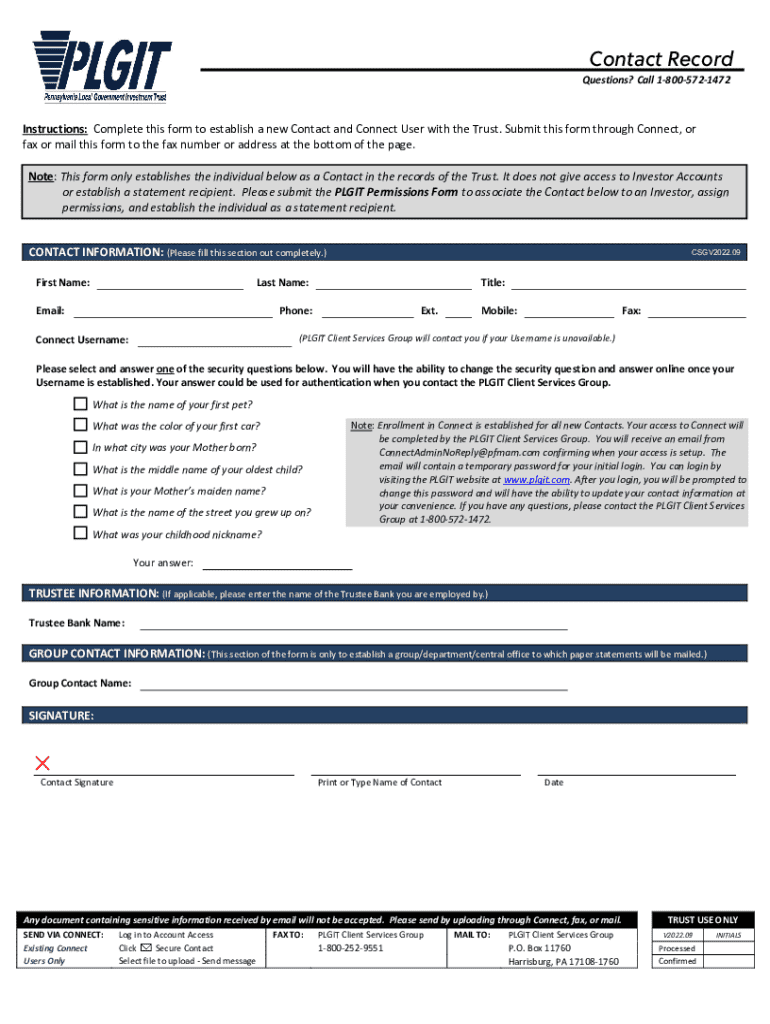
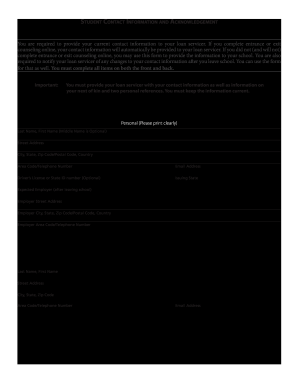
The Contact Record Form is a business document used by individuals to establish a new Contact and Connect User with the Trust.
pdfFiller scores top ratings on review platforms




SO FAR I LOVE THIS PROGRAM AND MY TEAM DOES AS WELL
Very easy and quick to use for creating the W2s I needed for a client.
Who needs Contact User Form?
Explore how professionals across industries use pdfFiller.

Contact User Form is needed by:
-
Business owners seeking to register new contacts.
-
Individuals needing connection for Trust services.
-
Organizations requiring updated contact information.
-
Clients needing to establish user profiles.
-
Professionals managing contact databases.
Comprehensive Guide to Contact User Form
What is the Contact Record Form?
The Contact Record Form serves as a crucial tool for establishing new contacts and connecting users with the Trust. This form collects essential personal information, including first name, last name, email, phone number, and answers to security questions, ensuring accurate record-keeping. It enables the organization to efficiently manage new contacts while maintaining a clear communication channel.
Purpose and Benefits of the Contact Record Form
Utilizing the Contact Record Form is vital for accurate business registration and compliance. By submitting this business contact form, users can ensure that their information is correctly recorded, which facilitates smooth operations and connectivity with the Trust. The form also aids in meeting regulatory requirements, enhancing both reliability and professionalism.
Key Features of the Contact Record Form
The Contact Record Form comes equipped with several key features that enhance its usability:
-
Essential fields include first name, last name, email, phone, and security questions.
-
A signature requirement ensures authenticity and accountability.
-
Submission options allow users to send the form via Connect, fax, or mail.
Who Needs the Contact Record Form?
The Contact Record Form is essential for a diverse range of users. Businesses aiming to register with the Trust, as well as individuals wishing to establish connections, will find this form necessary.
-
Ideal for new businesses seeking to comply with registration processes.
-
Individuals who need to connect with Trust services.
How to Fill Out the Contact Record Form Online
Filling out the Contact Record Form online requires careful preparation. Before starting, gather the necessary information to streamline the process.
-
Collect personal information: first name, last name, email, and phone number.
-
Clarify answers to any required security questions.
-
Navigate to the form and begin filling out each field, ensuring accuracy.
Reviewing and Submitting the Contact Record Form
After completing the form, a thorough review is essential to avoid errors. Users should follow a checklist before submission to ensure everything is correctly filled.
-
Verify that all mandatory fields are completed.
-
Check for spelling and contact information accuracy.
-
Choose your preferred submission method: Connect, fax, or mail.
What Happens After You Submit the Contact Record Form?
Submitting the Contact Record Form initiates a process managed by the PLGIT Client Services Group. Users can anticipate a confirmation and receive information on the status of their submission.
-
Processing time may vary; users should plan accordingly.
-
Tracking options are available for submitted forms.
Common Errors to Avoid When Submitting the Contact Record Form
To prevent delays in processing, users should be aware of common errors associated with the Contact Record Form. Paying attention to these details can enhance the submission experience.
-
Inaccurate or incomplete fields can lead to rejections.
-
Ensure the correct method of submission is chosen.
Security and Compliance of the Contact Record Form
Data security is paramount when handling personal information collected through the Contact Record Form. Users can trust that their data will be managed according to strict security practices.
-
pdfFiller employs 256-bit encryption to safeguard sensitive documents.
-
The platform complies with regulations such as HIPAA and GDPR.
Harness the Power of pdfFiller for Your Contact Record Form Needs
Leveraging pdfFiller allows for a seamless experience when managing the Contact Record Form. Users benefit from advanced tools that enhance the form-filling process.
-
Edit, fill, and eSign documents without needing additional downloads.
-
Access to user-friendly features that ensure compliance with submission requirements.
How to fill out the Contact User Form
-
1.Access pdfFiller and search for the Contact Record Form.
-
2.Once found, open the form to view its layout and fields.
-
3.Before starting, gather necessary personal information such as your first name, last name, email address, phone number, and answers to security questions.
-
4.Click on the first field and begin filling in your first name. Use your keyboard to type in the information.
-
5.Continue filling out all required fields, ensuring accuracy in your entries. If specific fields are optional, you may leave them blank.
-
6.For signature requirements, use the signature field to either draw your signature or upload an image of your signature.
-
7.After filling out all sections of the form, review your entries carefully for any errors or missing information.
-
8.Once you are satisfied with your form, utilize the pdfFiller options to save your completed form, or download it in your preferred format.
-
9.Finally, submit the form through the specified channels; you can fax or mail the completed document as instructed.

Who is eligible to fill out the Contact Record Form?
Individuals seeking to establish a connection with the Trust are eligible to complete the Contact Record Form. This includes new users or contacts looking to register their information.
What are the submission methods for the Contact Record Form?
The form can be submitted electronically through Connect, or physically by fax or mail. Ensure you follow the specific submission guidelines provided.
Are there deadlines for submitting the Contact Record Form?
The form has no specific deadlines mentioned in the metadata. However, it’s advisable to submit it as soon as possible to process your request without delays.
What supporting documents are required with the Contact Record Form?
The Contact Record Form does not mention the need for additional documents. However, ensure you have your personal information ready before filling it out.
How long does it take to process the Contact Record Form?
Processing times are not specified; however, typical response times can vary based on the volume of requests. It’s best to follow up with Client Services if you have concerns.
What common mistakes should be avoided when filling out the form?
Common mistakes include leaving required fields blank, misspelling names, and not signing the form. Double-check your entries to ensure accuracy before submission.
Can I fill out the Contact Record Form online?
Yes, you can fill out the Contact Record Form online using pdfFiller, which allows you to input information directly and submit electronically.
Related Forms




Related Catalogs
Get the latest insights from our blog


If you believe that this page should be taken down, please follow our DMCA take down process
here
.
This form may include fields for payment information. Data entered in these fields is not covered by PCI DSS compliance.