
Last updated on
Nov 6, 2026
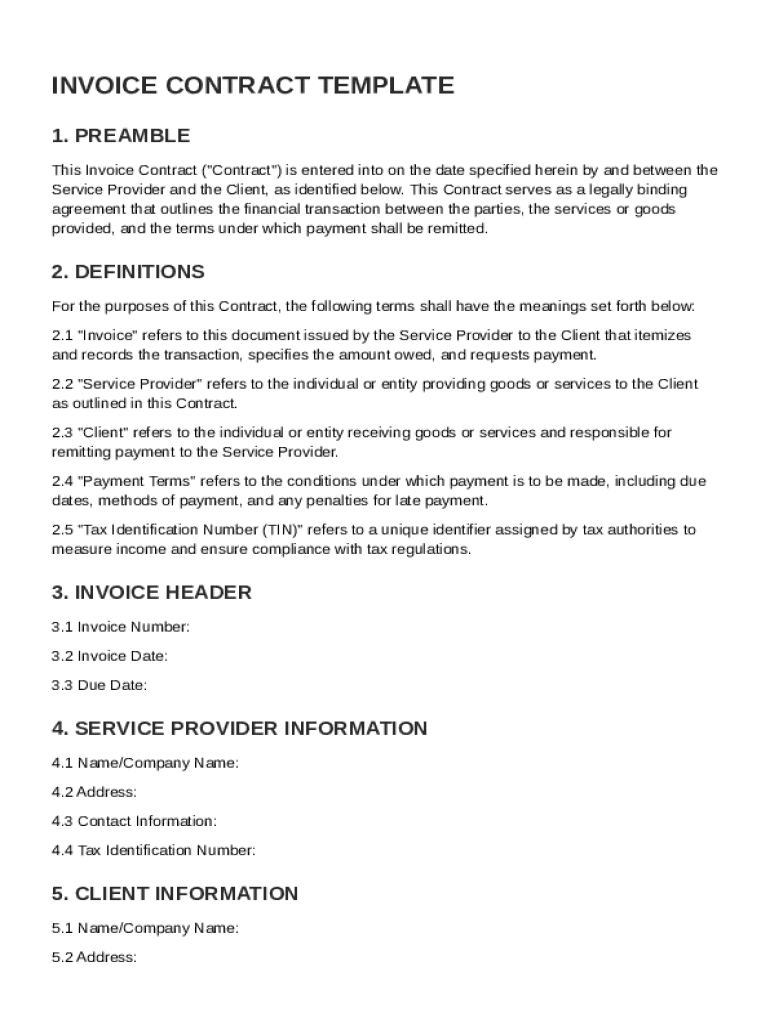
Invoice Contract Template free printable template
We are not affiliated with any brand or entity on this form

Fill out
Complete the form online in a simple drag-and-drop editor.

eSign
Add your legally binding signature or send the form for signing.

Share
Share the form via a link, letting anyone fill it out from any device.

Export
Download, print, email, or move the form to your cloud storage.
Why pdfFiller is the best tool for your documents and forms


End-to-end document management
From editing and signing to collaboration and tracking, pdfFiller has everything you need to get your documents done quickly and efficiently.
Accessible from anywhere
pdfFiller is fully cloud-based. This means you can edit, sign, and share documents from anywhere using your computer, smartphone, or tablet.
Secure and compliant
pdfFiller lets you securely manage documents following global laws like ESIGN, CCPA, and GDPR. It's also HIPAA and SOC 2 compliant.
What is Invoice Contract Template
The Invoice Contract Template is a service agreement used by service providers and clients to document financial transactions and payment terms.
pdfFiller scores top ratings on review platforms




love it, so helpful with forms and easy to use!
Worked better than I thought. I figured I'd just do the free trail and if it wasn't that great just drop it, but it's legitimately really good.
awesome......
Very easy to use and the choices of tools was comprehensive.
So much easier than trying to faff around figuring out the desktop programs. If you need PDF's filled in an easy, user friendly, timely manner, PDF filler is the right place for you.
It was free and it only cost me a lil…
It was free and it only cost me a lil over a buck to save to my computer for first time purchase of the 30 day free trial
Who needs Invoice Contract Template?
Explore how professionals across industries use pdfFiller.

Invoice Contract Template is needed by:
-
Freelancers requiring formal agreements with clients
-
Businesses providing services needing invoice documentation
-
Clients wanting accountability and clear payment terms
-
Contractors looking to outline service specifics and payment conditions
-
Legal professionals drafting business contracts
All you need to know about Invoice Contract Template
Discover detailed guidance on how to efficiently edit and fill out the Invoice Contract Template using pdfFiller's powerful tools.
How to edit Invoice Contract Template
pdfFiller makes it easy to edit your Invoice Contract Template, ensuring a smooth experience for all users.
-
Click on the 'Get form' button on this page to access the Invoice Contract Template.
-
Create an account with pdfFiller if you don’t already have one or log in using your existing credentials.
-
Once logged in, select the template you want to edit from your dashboard.
-
Utilize the intuitive editing tools to make any necessary changes to the text, fields, or overall layout.
-
After finishing your edits, save the document to your account for easy access and future modifications.
How to fill out Invoice Contract Template
Filling out the Invoice Contract Template is a straightforward process that can be easily accomplished with pdfFiller. By following these steps, you will ensure that all necessary information is accurately entered.
-
To obtain the Invoice Contract Template, click on the 'Get form' button on this page.
-
Log into your pdfFiller account or create a new account if you are a first-time user.
-
Select the Invoice Contract Template from your list of documents.
-
Carefully read through each section of the form to understand the required information.
-
Start filling in the necessary fields, ensuring all relevant data is accurately provided.
-
Double-check the entered information for completeness and accuracy.
-
Once satisfied, save the completed form back to your pdfFiller account.
-
If required, share the filled form with clients or collaborators directly from pdfFiller.
Gain comprehensive insights into the Invoice Contract Template, its purpose, and how to effectively use it for your business needs.
What is a Invoice Contract Template?
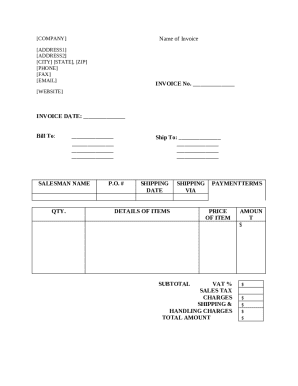
The Invoice Contract Template is a standardized document used by businesses to outline the terms and conditions of a transaction, including payment amounts, services provided, and both parties' responsibilities. It serves as a formal record that protects the interests of both the vendor and the client.
Definition and key provisions of a Invoice Contract Template
This section outlines essential elements that comprise an Invoice Contract Template, ensuring clarity and mutual understanding in financial transactions.
When is a Invoice Contract Template used?
An Invoice Contract Template is typically used in various business scenarios such as freelance services, product sales, and any transaction where a detailed account of the sale is necessary. It is crucial for record-keeping and provides legal protection in case of disputes.
Main sections and clauses of a Invoice Contract Template
The following are the primary components generally included in an Invoice Contract Template:
-
Invoice number
-
Date of issue
-
Seller's contact information
-
Buyer's contact information
-
Detailed description of goods/services provided
-
Total amount due
-
Payment terms
-
Signatures of both parties
What needs to be included in a Invoice Contract Template?
For the Invoice Contract Template to be effective, ensure that it contains the following key elements:
-
Accurate identification of the seller and buyer
-
Comprehensive details of the services/products provided
-
Clear stipulation of payment terms and due dates
-
Specific invoicing criteria, including taxes and additional charges, if applicable
-
Space for both parties' signatures to validate the agreement
How to fill out the Invoice Contract Template
-
1.To access the Invoice Contract Template on pdfFiller, go to the website and log in or create a free account if you don’t have one.
-
2.Once logged in, navigate to the search bar and type 'Invoice Contract Template' to find the document.
-
3.Click on the template from the results to open it in the pdfFiller editor.
-
4.Before completing the form, gather all necessary information such as invoice numbers, service descriptions, and accurate contact details.
-
5.Begin filling out the template by clicking on each fillable field. Use the toolbar on the right to adjust text size or formatting as needed.
-
6.Ensure you enter all relevant data, including the invoice date, due date, itemized list of goods/services, and both parties' contact information.
-
7.Double-check that all required fields are filled, especially those indicating payment terms and conditions.
-
8.Once you have completed the form, review it for accuracy by using the 'Preview' option to see the final layout before signing.
-
9.After review, save your work by clicking the 'Save' button or export it as a PDF by selecting 'Download' to keep a copy.
-
10.You can also share the completed form directly through email or submit it as per your requirements using pdfFiller’s secure submission features.

What is included in the Invoice Contract Template?
The Invoice Contract Template includes sections for invoice details, service provider and client information, description of goods/services, payment terms, terms and conditions, and signature lines for all parties involved.
Who needs to sign the Invoice Contract Template?
The Invoice Contract Template requires the signatures of the Service Provider and the Client. A Witness signature is optional and not mandated.
Do I need an attorney to use this template?
While you can fill out the Invoice Contract Template without legal assistance, consulting an attorney for significant transactions is advisable to ensure compliance with local laws.
Can I modify the Invoice Contract Template to suit my needs?
Yes, you can modify the Invoice Contract Template within pdfFiller's editor to accommodate specific needs or terms relevant to your agreement.
What payment methods can be indicated in the template?
The template allows you to specify various payment methods such as bank transfer, credit card, or cash, which should be clearly stated in the payment terms section.
How do I save and download the completed form?
To save or download the completed Invoice Contract Template, use the 'Save' option for online storage or press 'Download' to save it as a PDF on your device.
What if there are mistakes after signing the document?
If mistakes are found after signing, both parties should discuss the changes and then create an amended document or consider a formal addendum to rectify the agreement.
Related Forms

Get the latest insights from our blog


If you believe that this page should be taken down, please follow our DMCA take down process
here
.
This form may include fields for payment information. Data entered in these fields is not covered by PCI DSS compliance.