
Last updated on
Oct 31, 2026
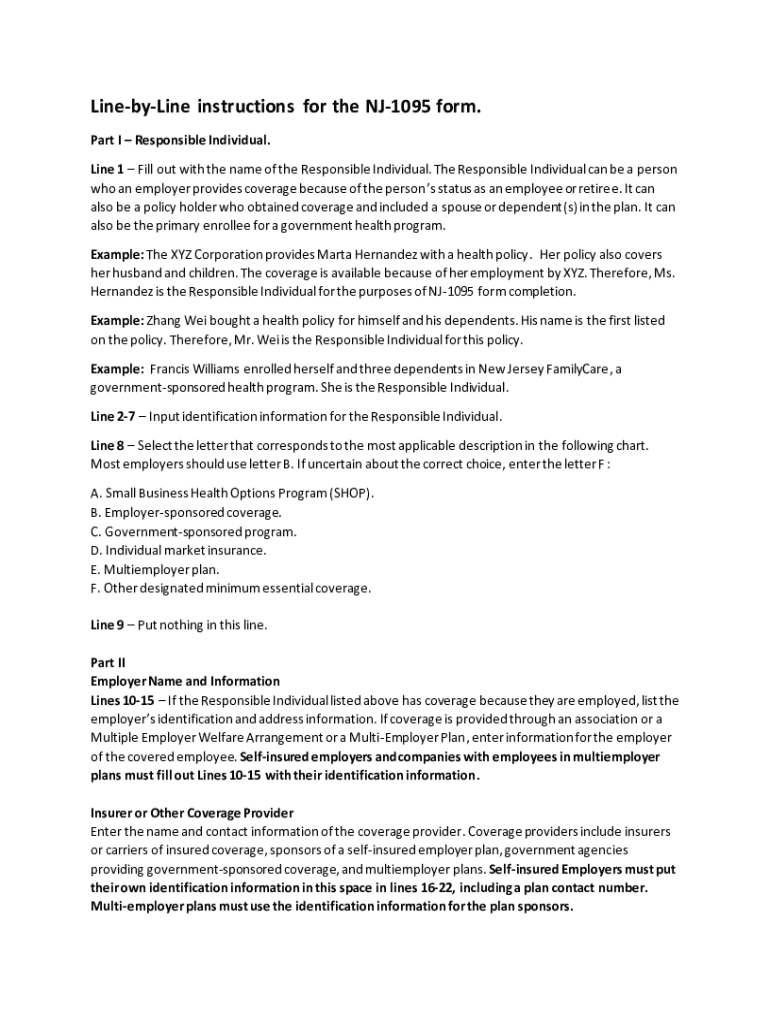
Get the free NJ-1095 Form
We are not affiliated with any brand or entity on this form

Fill out
Complete the form online in a simple drag-and-drop editor.

eSign
Add your legally binding signature or send the form for signing.

Share
Share the form via a link, letting anyone fill it out from any device.

Export
Download, print, email, or move the form to your cloud storage.
Why pdfFiller is the best tool for your documents and forms


End-to-end document management
From editing and signing to collaboration and tracking, pdfFiller has everything you need to get your documents done quickly and efficiently.
Accessible from anywhere
pdfFiller is fully cloud-based. This means you can edit, sign, and share documents from anywhere using your computer, smartphone, or tablet.
Secure and compliant
pdfFiller lets you securely manage documents following global laws like ESIGN, CCPA, and GDPR. It's also HIPAA and SOC 2 compliant.
What is NJ-1095 Form
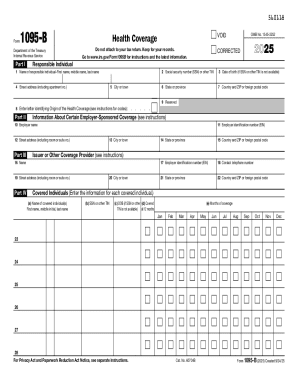
The NJ-1095 Form is a New Jersey government document used by responsible individuals to report health coverage information.
pdfFiller scores top ratings on review platforms




Who needs NJ-1095 Form?
Explore how professionals across industries use pdfFiller.

NJ-1095 Form is needed by:
-
Individuals enrolled in government health programs
-
Employers providing health coverage
-
Insurance policyholders
-
Healthcare providers confirming coverage
-
Tax professionals assisting clients with health reporting
Comprehensive Guide to NJ-1095 Form
What is the NJ-1095 Form?
The NJ-1095 form is a crucial document for reporting health coverage information in New Jersey. It is specifically designed for individuals and entities required to report such information. The form plays a significant role in health coverage reporting, ensuring compliance with state regulations mandated for insurers, employers, and health program participants.
Defined as a reporting form, the NJ-1095 must be completed by the Responsible Individual, who can include policy holders and enrollees in government health programs. This form also aids in maintaining accurate records for employers and the individuals they cover.
Purpose and Benefits of the NJ-1095 Form
The NJ-1095 form serves multiple purposes, primarily assisting individuals and businesses in adhering to state health insurance mandates. A well-completed form provides essential health coverage reporting that fosters transparency between insurance providers and the state.
Accurate reporting benefits both individuals and employers by simplifying tax submissions and avoiding penalties associated with non-compliance. Additionally, government-sponsored programs can utilize the accurate data to improve the efficiency of their services.
Who Needs to Fill Out the NJ-1095 Form?
The NJ-1095 form must be filled out by anyone identified as a Responsible Individual. This typically encompasses individuals enrolled in employer-sponsored coverage or those participating in governmental health programs.
Eligibility for completing this form generally includes individuals enrolled in qualifying health coverage plans. Scenarios often involve employers providing insurance benefits to employees or individuals receiving assistance through state-funded programs.
How to Fill Out the NJ-1095 Form Online (Step-by-Step)
Filling out the NJ-1095 form online is a straightforward process. Follow these steps to ensure accurate completion:
-
Access the form through your preferred online platform.
-
Begin with entering the name of the Responsible Individual and their identification information.
-
Input relevant employer details and coverage provider information.
-
List all individuals covered under the plan along with the corresponding months of coverage.
-
Review all sections thoroughly for accuracy before submission.
Common Errors and How to Avoid Them When Filling the NJ-1095 Form
Common errors while filling out the NJ-1095 form can lead to delays in processing. Frequent mistakes include incorrect identification details or forgotten fields. Identifying these errors early can save time and effort.
To prevent mistakes, consider the following tips:
-
Double-check the identification information for accuracy.
-
Review the form thoroughly before submission.
-
Keep a checklist of required fields to ensure all are filled out.
Submission Methods for the NJ-1095 Form
Submitting the NJ-1095 form can be done through various methods. Online submission options are readily available, and in-person drop-off locations may also be utilized if preferred.
It is essential to gather necessary documentation prior to submission. Keeping copies of the submitted forms is crucial for personal records and may be necessary for future discrepancies.
What Happens After You Submit the NJ-1095 Form?
Once the NJ-1095 form is submitted, it undergoes a review process. Typical timelines for processing can vary based on submission methods.
After submission, users should follow up to check the status of their application. Confirmation messages will provide insight into whether the submission was successful or if any issues arose during processing.
Security and Compliance When Using the NJ-1095 Form
Data privacy and security are vital when handling the NJ-1095 form. pdfFiller incorporates robust security measures, including 256-bit encryption, to protect sensitive information. Compliance with SOC 2 and HIPAA regulations ensures that personal health information remains secure.
Users are encouraged to use digital signature options to enhance data security and ensure compliance with best practices when managing sensitive documents.
Utilizing pdfFiller for Your NJ-1095 Form Needs
Using pdfFiller to complete the NJ-1095 form offers numerous advantages. The platform allows for efficient editing, eSigning, and storage, all from the convenience of a browser without requiring downloads.
Features of pdfFiller enhance the user experience, making the form-filling process seamless and straightforward. Leverage the platform to ensure a streamlined process for completing your NJ-1095 form.
How to fill out the NJ-1095 Form
-
1.Access pdfFiller and go to the Form Library. Search for 'NJ-1095 Form' to find the correct document.
-
2.Once found, click on the form to open it in the pdfFiller editor, allowing for interactive filling.
-
3.Before filling out the form, gather necessary identification information for the Responsible Individual, such as name, address, and Social Security number.
-
4.Identify the employer details, including name and address, and gather information about the coverage provider.
-
5.Begin filling out the relevant fields by entering the identification information of the Responsible Individual in the designated sections.
-
6.Next, fill in the employer's information accurately and provide complete details for the coverage provider.
-
7.List all individuals covered under the plan by entering their names and respective months of coverage in the provided fields.
-
8.Review each section of the form to ensure all entries are correct, particularly the names and identification numbers.
-
9.Once completed, utilize the review functionality to ensure the form meets all requirements.
-
10.After final review, save the form by clicking on the 'Save' button. You can also download it directly through pdfFiller for your records.
-
11.If required, submit the form electronically via pdfFiller or print it to send by mail. Ensure to keep a copy for your personal records.

Who needs to fill out the NJ-1095 Form?
The NJ-1095 Form must be completed by responsible individuals such as individuals covered under employer-sponsored plans, government programs, or insurance policyholders. Employers may also need it for reporting health coverage information.
What supporting documents do I need to complete this form?
To complete the NJ-1095 Form, you will need identification information for the Responsible Individual, employer details, and the coverage provider information, including dates and identification for all individuals covered under the plan.
What are the deadlines for submitting the NJ-1095 Form?
While specific deadlines can vary, most health coverage reporting forms should be completed and submitted before tax filing deadlines. It is advised to check the New Jersey state guidelines for any specific filing requirements.
How do I submit the NJ-1095 Form?
You can submit the NJ-1095 Form electronically through pdfFiller or print it out for physical submission. Ensure to follow any specific state or federal guidelines for submission procedures.
What are common mistakes to avoid when filling out the NJ-1095 Form?
Common mistakes include incorrect identification information, missing out individuals covered, and not verifying employer and coverage provider details. Always double-check entries for accuracy to avoid processing delays.
Is it necessary to notarize the NJ-1095 Form?
No, the NJ-1095 Form does not require notarization. However, it must be accurately completed to meet regulatory requirements for submission.
What is the processing time for the NJ-1095 Form?
Processing times can vary, but typically allow several weeks for the submission to be reviewed and processed. Check New Jersey state resources for specific timelines related to health coverage reporting.
Related Forms






Get the latest insights from our blog


If you believe that this page should be taken down, please follow our DMCA take down process
here
.
This form may include fields for payment information. Data entered in these fields is not covered by PCI DSS compliance.