
Last updated on
Oct 7, 2026
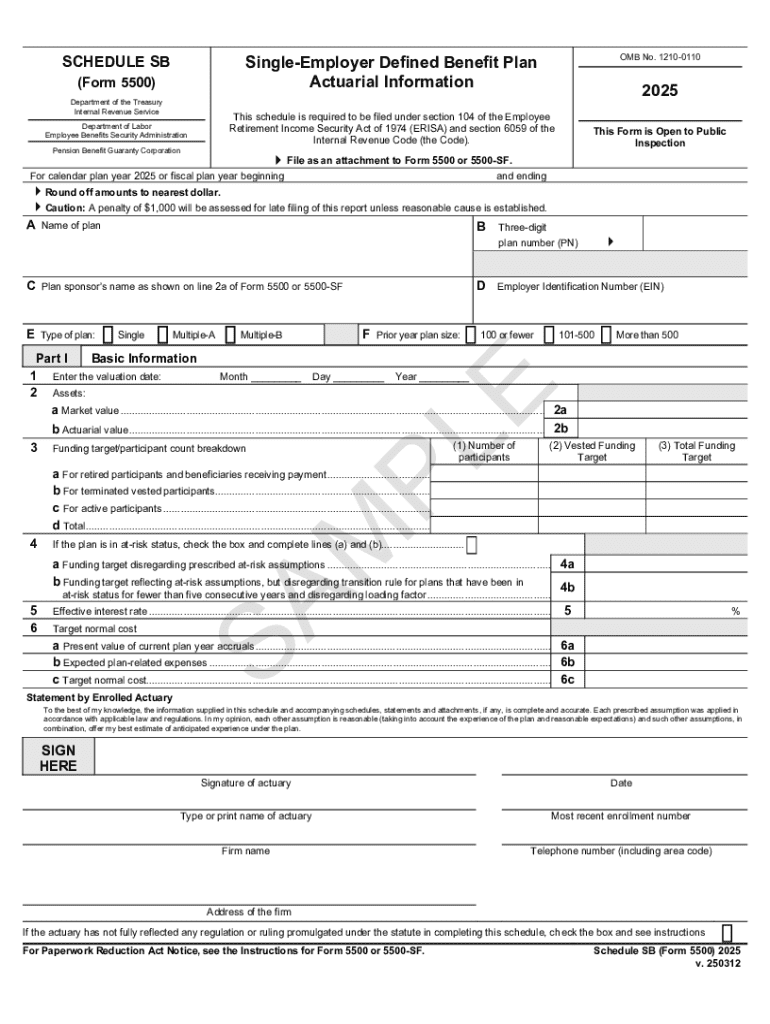
Get the free Schedule SB Single-Employer Defined Benefit Plan
We are not affiliated with any brand or entity on this form

Fill out
Complete the form online in a simple drag-and-drop editor.

eSign
Add your legally binding signature or send the form for signing.

Share
Share the form via a link, letting anyone fill it out from any device.

Export
Download, print, email, or move the form to your cloud storage.
Why pdfFiller is the best tool for your documents and forms


End-to-end document management
From editing and signing to collaboration and tracking, pdfFiller has everything you need to get your documents done quickly and efficiently.
Accessible from anywhere
pdfFiller is fully cloud-based. This means you can edit, sign, and share documents from anywhere using your computer, smartphone, or tablet.
Secure and compliant
pdfFiller lets you securely manage documents following global laws like ESIGN, CCPA, and GDPR. It's also HIPAA and SOC 2 compliant.
What is Schedule SB 2025
The Schedule SB (Form 5500) is an actuarial information form used by single-employers to report funding targets and actuarial assumptions for defined benefit plans under ERISA and the Internal Revenue Code.
pdfFiller scores top ratings on review platforms




Who needs Schedule SB 2025?
Explore how professionals across industries use pdfFiller.

Schedule SB 2025 is needed by:
-
Actuaries managing pension plans
-
Single-employer organizations offering defined benefit plans
-
Compliance officers in charge of ERISA regulations
-
Tax professionals advising on pension-related issues
-
Human resources departments overseeing retirement benefits
Comprehensive Guide to Schedule SB 2025
What is the Schedule SB Single-Employer Defined Benefit Plan?
The Schedule SB (Form 5500) is essential for single-employer defined benefit plans as it plays a significant role in pension planning. This form serves to report critical data regarding plan assets, funding targets, and actuarial assumptions, thereby ensuring compliance with ERISA and IRS requirements.
Form 5500 Schedule SB is specifically designed to capture vital information that helps plan sponsors maintain transparency and adhere to regulatory standards. This documentation is a key component in the overall administration and management of pension plans.
Purpose and Benefits of Using the Schedule SB Single-Employer Defined Benefit Plan
Filing the Schedule SB offers numerous benefits to plan sponsors. Accurate reporting enhances funding and compliance, which are crucial for the sustainability of defined benefit plans.
Using the form helps assess pension funding levels effectively, contributing to the actuarial soundness of the plans. Participants in the pension plan also stand to gain from these benefits, as they can rely on a well-structured and adequately funded retirement system.
Key Features of the Schedule SB Single-Employer Defined Benefit Plan
The Schedule SB encompasses several key sections that require careful attention. Among these, the valuation date and funding percentages are critical components.
Additionally, the form mandates the signature of an enrolled actuary, indicating the legitimacy of the reported data. Understanding the various fields, including those that require filling out, is vital to ensuring accurate submissions.
Who Needs to File the Schedule SB Single-Employer Defined Benefit Plan?
Stakeholders such as employers and plan administrators are required to file the Schedule SB. This form is necessary in various situations, particularly when the plan is subject to annual reporting obligations.
Entities must also meet specific eligibility criteria to ensure compliance with ERISA actuarial reporting standards, making it imperative for relevant parties to be informed about their responsibilities.
When and How to File the Schedule SB Single-Employer Defined Benefit Plan
Filing timelines for the Schedule SB align with the deadlines for Form 5500. Plan sponsors must adhere to these crucial deadlines to avoid penalties associated with late filing.
To file this form correctly, preparing a step-by-step process is vital. This includes detailed methods of submission, whether online e-filing or traditional mail.
Field-by-Field Instructions for Filling Out the Schedule SB Single-Employer Defined Benefit Plan
Completing the Schedule SB requires attention to several key fields, including how to enter the valuation date and funding percentages appropriately. Avoiding common errors during this process is essential for accurate reporting.
Resources are available for personnel who may need additional help navigating the form's requirements, ensuring a smoother filing experience.
How to Sign and Submit the Schedule SB Single-Employer Defined Benefit Plan
When it comes to signing the Schedule SB, understanding the differences between digital and wet signatures is crucial. Each submission method, whether through e-filing or traditional mail, has its own protocols.
Additionally, tracking the submission and confirming receipt is vital for maintaining compliance and ensuring that the filing is processed correctly.
What Happens After You Submit the Schedule SB Single-Employer Defined Benefit Plan?
After submission, users can expect a specific processing time before receiving updates on their filing status. It is important to know how to check application status and resolve potential issues that may arise post-filing.
Moreover, maintaining proper records is essential for compliance with the requirements associated with submitted forms.
Security and Compliance Considerations for the Schedule SB Single-Employer Defined Benefit Plan
When filing the Schedule SB, the security of sensitive information is paramount. pdfFiller offers robust security features that comply with HIPAA, GDPR, and other regulatory requirements.
Understanding secure document management practices is essential for ensuring the safety of pension filings and maintaining compliance throughout the filing process.
Maximize Your Filing Experience with pdfFiller
Utilizing pdfFiller's capabilities can greatly enhance the efficiency of completing and managing the Schedule SB. The platform offers valuable features such as editing and e-signing, which simplify the form-filling experience.
This cloud-based solution allows users to manage their tax forms with ease, inviting them to explore a free trial or learn more about the platform’s features.
How to fill out the Schedule SB 2025
-
1.Access pdfFiller and search for 'Schedule SB (Form 5500)'. You can use the search bar or browse the tax forms category.
-
2.Open the form by clicking on it. This will bring up the interactive editing interface.
-
3.Before filling out the form, gather all necessary information like the plan valuation date, current funding levels, and actuarial assumptions to streamline the process.
-
4.Navigate through the form using pdfFiller's fields. Click on a field to enter information, or check the applicable boxes. Ensure you enter the correct details as outlined in the form's instructions.
-
5.Review all entries for accuracy and completeness. Take your time to verify that each section is filled out according to ERISA guidelines.
-
6.Once completed, use the preview function to see your form as it will appear when submitted. Ensure that required signatures are included, particularly the signature of your actuary.
-
7.Save your progress periodically to avoid losing any entries. When you are ready to submit, choose the 'Download' option for a PDF copy or 'Submit' to send it directly to the required agency.
-
8.If you need a physical copy for your records, you can print the form directly from pdfFiller.

Who is required to file Schedule SB?
Entities offering single-employer defined benefit plans must file Schedule SB to comply with ERISA and IRS regulations.
What is the filing deadline for Schedule SB?
The Schedule SB must be filed alongside Form 5500, which typically has a deadline of the last day of the seventh month after the plan year ends, unless extended.
How should I submit the completed Schedule SB?
You submit the completed schedule as an attachment to Form 5500 or Form 5500-SF through the IRS e-filing system, or you can mail it to the IRS.
What supporting documents are needed with Schedule SB?
You typically need to include actuarial reports and any relevant documentation regarding plan funding targets and assumptions when filing.
What mistakes should I avoid when filling out Schedule SB?
Common mistakes include missing signatures, incorrect valuation dates, and failing to adhere to funding requirements outlined by ERISA.
How long does it take for the IRS to process Schedule SB?
Processing times can vary, but generally, the IRS processes Form 5500 and its attachments within several weeks after submission.
Is there a fee to file Schedule SB?
Filing Schedule SB does not incur a specific fee; however, you may need to consider costs associated with obtaining actuarial services if required.
Related Forms



Get the latest insights from our blog



If you believe that this page should be taken down, please follow our DMCA take down process
here
.
This form may include fields for payment information. Data entered in these fields is not covered by PCI DSS compliance.