
Last updated on
Oct 19, 2026
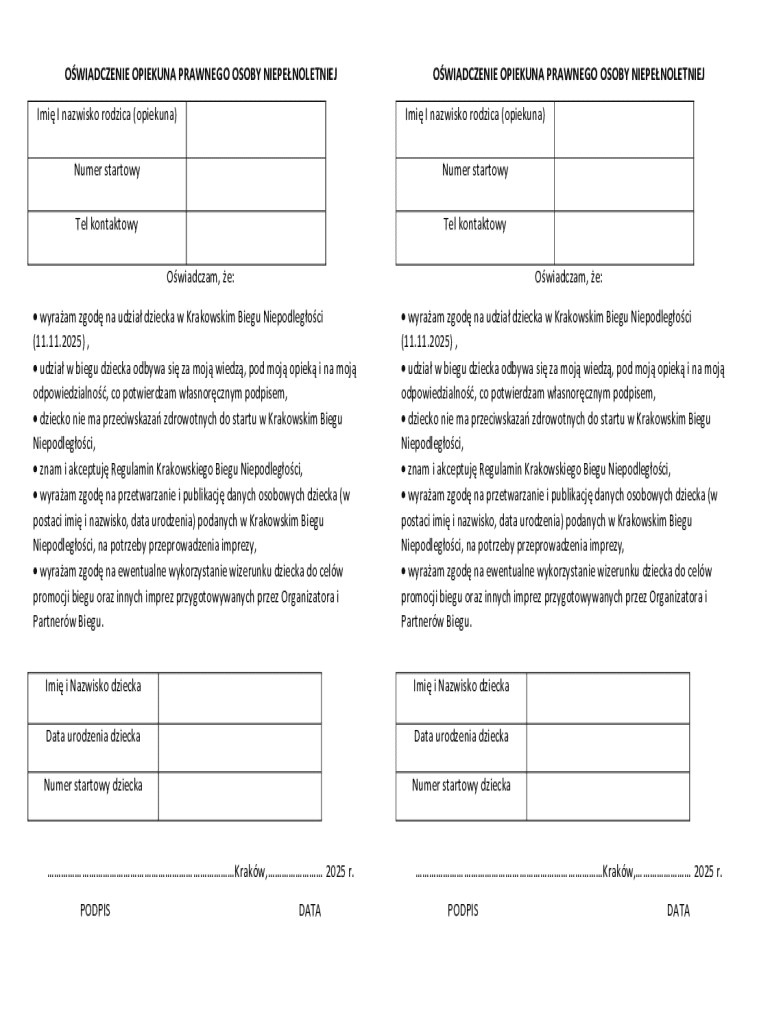
Get the free Legal Guardian Consent Form for Minor Participation
We are not affiliated with any brand or entity on this form

Fill out
Complete the form online in a simple drag-and-drop editor.

eSign
Add your legally binding signature or send the form for signing.

Share
Share the form via a link, letting anyone fill it out from any device.

Export
Download, print, email, or move the form to your cloud storage.
Why pdfFiller is the best tool for your documents and forms


End-to-end document management
From editing and signing to collaboration and tracking, pdfFiller has everything you need to get your documents done quickly and efficiently.
Accessible from anywhere
pdfFiller is fully cloud-based. This means you can edit, sign, and share documents from anywhere using your computer, smartphone, or tablet.
Secure and compliant
pdfFiller lets you securely manage documents following global laws like ESIGN, CCPA, and GDPR. It's also HIPAA and SOC 2 compliant.
What is Guardian Consent Form
The Legal Guardian Consent Form for Krakow Independence Run is a legal document used by guardians to grant permission for their minor child to participate in the Krakow Independence Run event.
pdfFiller scores top ratings on review platforms




Who needs Guardian Consent Form?
Explore how professionals across industries use pdfFiller.

Guardian Consent Form is needed by:
-
Legal guardians of minors participating in events
-
Event organizers requiring parental consent
-
Participants of the Krakow Independence Run
-
Schools or clubs involved in youth sports
-
Parents preparing children for running events
Comprehensive Guide to Guardian Consent Form
What is the Legal Guardian Consent Form for Krakow Independence Run?
The Legal Guardian Consent Form is crucial for ensuring that minors are legally permitted to participate in the Krakow Independence Run. This form serves as a written acknowledgment from a legal guardian, confirming their approval for a minor to engage in the event.
By defining the responsibilities of guardians, the form helps protect minors' rights while ensuring that event organizers handle the registration process smoothly. It is particularly important for legal guardians as it provides legal protection for both the minor and the event organizers.
Purpose and Benefits of the Legal Guardian Consent Form
The Legal Guardian Consent Form is necessary for several reasons, which include the legal acknowledgment of parental or guardian consent for participation. It protects both the event organizers and guardians by clarifying the permissions granted.
This form also streamlines the registration process for participants, ensuring all necessary consents are in place prior to the event. By having a clear framework, both parties can focus on the enjoyable experience of the Krakow Independence Run.
Who Needs the Legal Guardian Consent Form for Krakow Independence Run?
The form is essential for any legal guardian looking to enroll a minor in the Krakow Independence Run. A legal guardian is defined as someone with the legal authority to make decisions on behalf of the minor.
Situations requiring the form typically involve minors under the age of 18 who are participating in the event. Understanding the specific age ranges necessitating this consent is crucial to ensure compliance with the event’s participation requirements.
How to Fill Out the Legal Guardian Consent Form for Krakow Independence Run Online
Filling out the Legal Guardian Consent Form online involves several simple steps:
-
Access the form on the designated platform.
-
Enter the required information, such as the guardian’s contact details and the minor's health information.
-
Review all entries to ensure accurate data submission.
-
Submit the form electronically and save a copy for your records.
Common fields include the guardian's name, contact number, and the minor’s start number. To avoid mistakes, double-check all entered information before submission.
Required Documents and Supporting Materials
When submitting the Legal Guardian Consent Form, ensure that you include the following supporting materials:
-
Documentation verifying the guardian's relationship to the minor.
-
Copy of the minor's identification.
-
Any required health or authorization records.
These documents help validate the consent and ensure smooth processing of the registration.
Submission Methods for the Legal Guardian Consent Form
Completed forms can be submitted through various methods, ensuring convenience for all guardians:
-
Online submission via the designated portal.
-
Physical submission by mailing or delivering the form to the event organizers.
Be aware of submission deadlines to ensure the minor's participation and familiarize yourself with confirmation processes for tracking submissions.
Security and Compliance When Using the Legal Guardian Consent Form
Security is paramount when handling sensitive documents like the Legal Guardian Consent Form. pdfFiller implements robust security measures, including 256-bit encryption and compliance with GDPR and HIPAA regulations.
These protocols help protect the personal information of all parties involved while ensuring the safe submission of documents during the registration process.
What Happens After You Submit the Legal Guardian Consent Form
After submitting the Legal Guardian Consent Form, participants can expect a processing period before confirmation of their registration. Here’s what to anticipate:
-
Typically, processing may take several business days.
-
Track the status of your submission through the confirmation email or portal.
-
If any issues arise, contact the event organizers for assistance.
Staying informed through these steps ensures a smooth experience leading up to theevent.
Common Errors and How to Avoid Them When Completing the Legal Guardian Consent Form
To prevent delays or rejections, it’s vital to be aware of common mistakes when filling out the Legal Guardian Consent Form:
-
Incorrect or incomplete guardian information.
-
Failure to sign and date the form.
-
Omitting necessary supporting documentation.
Review the form thoroughly for accuracy and completeness before submission, as precision ensures compliance and timely processing.
Empower Your Participation in Krakow Independence Run with pdfFiller
Utilizing pdfFiller for your Legal Guardian Consent Form simplifies the entire process, allowing for easy form completion and submission. By leveraging this online platform, you benefit from user-friendly features that streamline document management.
In addition, pdfFiller prioritizes security, providing reassurance while handling sensitive forms. Discover how this platform can enhance your experience as you prepare for the Krakow Independence Run.
How to fill out the Guardian Consent Form
-
1.Access pdfFiller and search for the 'Legal Guardian Consent Form for Krakow Independence Run'. Ensure you are logged in to your account or create a new account if necessary.
-
2.Once opened, familiarize yourself with the layout. Locate the fillable fields designated for the guardian and child's information.
-
3.Before completing the form, gather necessary information including your full name, your contact number, and your child's details such as their name and assigned race number.
-
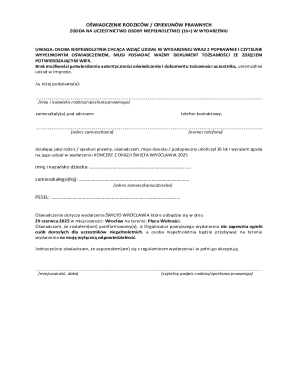
4.Start filling out the form by entering your name in the field labeled 'Imię I nazwisko rodzica (opiekuna)'. Use clear and accurate information.
-
5.Proceed to fill in your contact details in the field marked 'Tel kontaktowy'. Double-check for any typographical errors.
-
6.When you reach the 'Numer startowy', input your child's race number, ensuring it matches the registration confirmation.
-
7.Review all filled fields carefully for accuracy. Make sure to read any consent statements included in the form.
-
8.Once all information is complete and verified, find the signature line. Click on it to sign electronically, confirming your permission with 'potwierdzam własnoręcznym podpisem'.
-
9.After signing, review the entire document one last time. This is crucial to ensure all data is correct and consent is freely given.
-
10.Finally, save the completed form by clicking on the 'Save' option. You can download it or submit it directly through the pdfFiller platform as required by the event organizers.

Who is eligible to sign the Legal Guardian Consent Form?
Only legal guardians or parents of minors participating in the Krakow Independence Run are eligible to sign this form.
What information is required to complete the form?
You must provide your name, contact number, your child's name, and their race number. Ensure all details are accurate before submission.
How do I submit the completed consent form?
After completing the form on pdfFiller, you can download it to your device or submit it directly through the platform as specified by the event organizers.
Is there a deadline for submitting the form?
While specific deadlines may not be provided, it is best to submit the consent form well in advance of the Krakow Independence Run to avoid any last-minute issues.
What are common mistakes to avoid when completing the form?
Ensure every field is filled out completely and accurately. Common mistakes include misspelling names or omitting required details like race numbers.
What should I do if I encounter technical issues with the form?
If you face any problems while using pdfFiller, visit their support section for assistance or consider reaching out directly to customer support.
Will my child's information be kept confidential?
Yes, the form includes consent for data processing and guarantees that the information will be used solely for event-related purposes, including image usage for promotional activities.
Related Forms



Get the latest insights from our blog


If you believe that this page should be taken down, please follow our DMCA take down process
here
.
This form may include fields for payment information. Data entered in these fields is not covered by PCI DSS compliance.