
Last updated on
Oct 19, 2026
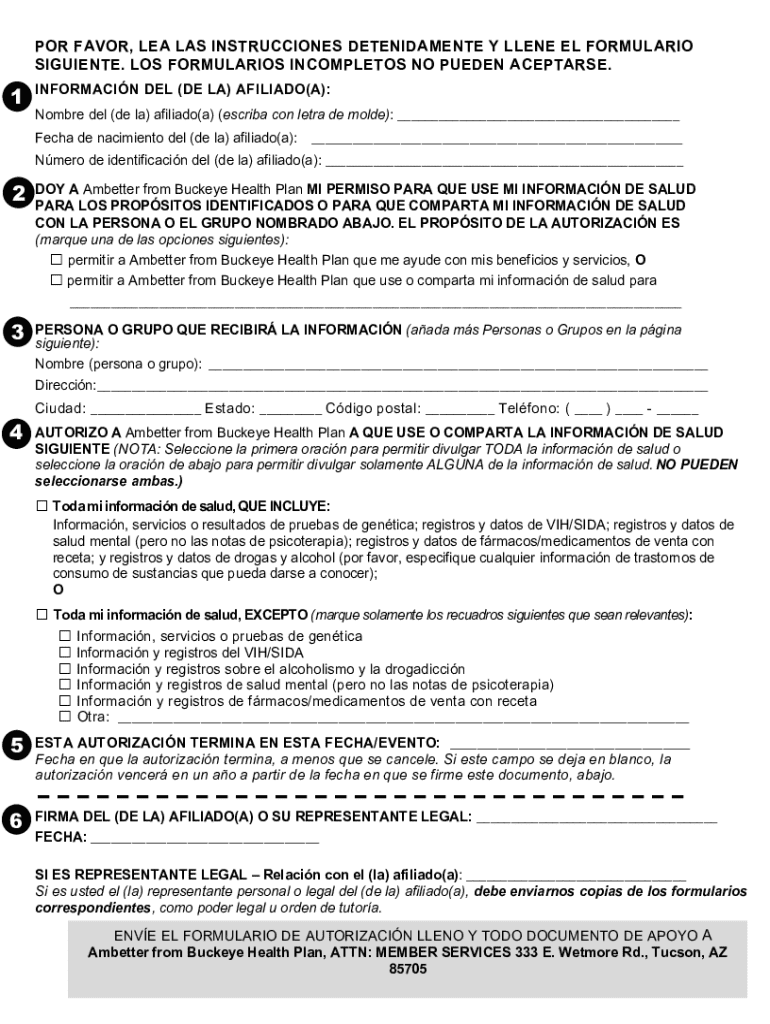
Get the free Authorization to Use and Disclose Health Information
We are not affiliated with any brand or entity on this form

Fill out
Complete the form online in a simple drag-and-drop editor.

eSign
Add your legally binding signature or send the form for signing.

Share
Share the form via a link, letting anyone fill it out from any device.

Export
Download, print, email, or move the form to your cloud storage.
Why pdfFiller is the best tool for your documents and forms


End-to-end document management
From editing and signing to collaboration and tracking, pdfFiller has everything you need to get your documents done quickly and efficiently.
Accessible from anywhere
pdfFiller is fully cloud-based. This means you can edit, sign, and share documents from anywhere using your computer, smartphone, or tablet.
Secure and compliant
pdfFiller lets you securely manage documents following global laws like ESIGN, CCPA, and GDPR. It's also HIPAA and SOC 2 compliant.
What is Health Info Authorization
The Authorization to Use and Disclose Health Information is a healthcare form used by members of Ambetter from Buckeye Health Plan to grant permission for sharing their health information.
pdfFiller scores top ratings on review platforms




Who needs Health Info Authorization?
Explore how professionals across industries use pdfFiller.

Health Info Authorization is needed by:
-
Members of Ambetter from Buckeye Health Plan
-
Healthcare providers requiring health information access
-
Legal representatives of patients
-
Insurance companies for claim processing
-
Medical facilities for treatment coordination
-
Researchers needing patient data for studies
Comprehensive Guide to Health Info Authorization
What is the Authorization to Use and Disclose Health Information?
The Authorization to Use and Disclose Health Information form allows Ambetter members to grant permission for sharing their health information. This form ensures that healthcare providers can access vital information for delivering informed medical care.
This authorization serves an essential role in facilitating effective communication among healthcare providers, thereby easing care coordination. The types of health information that might be included include medical history, treatment plans, and other pertinent health details.
Purpose and Benefits of the Authorization to Use and Disclose Health Information
Using the Authorization to Use and Disclose Health Information form is crucial for several reasons. It enables the sharing of health information, which is necessary for informed medical care.
Moreover, this authorization benefits members by streamlining communication among healthcare providers. Members also retain the right to revoke their authorization at any time, ensuring they maintain control over their health information.
Who Needs the Authorization to Use and Disclose Health Information?
This form is primarily designed for patients who are members of Ambetter from Buckeye Health Plan. Various situations necessitate the use of this authorization, such as when patients require specialist consultations or coordinated care among multiple providers.
Additionally, guardians or legal representatives may need to submit the authorization on behalf of minors or individuals unable to provide consent.
How to Fill Out the Authorization to Use and Disclose Health Information Online (Step-by-Step)
Filling out the online authorization form involves specific steps to ensure accuracy:
-
Begin by entering the "Nombre del (de la) afiliado(a)" and "Fecha de nacimiento del (de la) afiliado(a)." These fields are essential for identifying the member.
-
Review and select the appropriate checkboxes, which pertain to the information being shared and the parties involved.
-
Double-check all entered information for accuracy and completeness before submission.
Common Errors and How to Avoid Them
When completing the authorization form, users may encounter several frequent errors, such as incorrect personal details or missing required fields. To mitigate these issues:
-
Examine each section of the form to ensure all information is accurate.
-
Review the completed form for compliance with the requirements outlined in the instructions.
Where to Submit the Authorization to Use and Disclose Health Information
Members can submit the Authorization to Use and Disclose Health Information via multiple methods. Options typically include online submission through a designated portal or mailing the completed form to the appropriate address.
It is crucial to be aware of submission deadlines, as late filings may result in delays in processing. Keep track of your submission and request confirmation to ensure it has been received.
Security and Compliance for the Authorization to Use and Disclose Health Information
When handling sensitive health information, security is paramount. pdfFiller implements robust security measures, including 256-bit encryption and compliance with HIPAA regulations, to protect user data.
The platform prioritizes privacy and secure handling of completed forms, providing peace of mind for users submitting their health information.
How to Download, Save, and Print the Authorization to Use and Disclose Health Information
After completing the authorization form, users can easily download and save it in various formats. To ensure successful submission:
-
Ensure the form is printed correctly, maintaining the original layout for submission.
-
Keep a copy for personal records to track authorization status and for future reference.
Next Steps After Submitting the Authorization to Use and Disclose Health Information
Upon submitting the form, members can expect to receive notifications regarding the processing of their request. It’s advisable to check the authorization status periodically to ensure there are no issues.
In cases where there are potential issues with the submission or if amendments are needed, members should follow the provided guidelines to address these matters promptly.
Experience the Ease of Filling Out the Authorization to Use and Disclose Health Information with pdfFiller
Using pdfFiller to fill out the Authorization to Use and Disclose Health Information offers numerous conveniences. The platform provides user-friendly features, such as eSigning and editing tools, making the process straightforward and efficient.
Members are encouraged to utilize pdfFiller for their document management needs, enjoying the ease of handling important forms with confidence.
How to fill out the Health Info Authorization
-
1.To access the Authorization to Use and Disclose Health Information form on pdfFiller, visit their website and log in to your account. Use the search bar or navigate through the healthcare forms category to find the specific document.
-
2.Once you have opened the form, familiarize yourself with the fillable fields. Click on each field to enter relevant information such as your name, date of birth, and health information details. Ensure all entries are accurate.
-
3.Before starting, gather necessary information, including personal identification details, the purpose of the authorization, names of individuals or organizations who will receive your health information, and specify the types of health information needed.
-
4.As you fill in the form, utilize pdfFiller's features such as auto-fill and save buttons to streamline the process. Take your time to carefully review your entries to prevent mistakes.
-
5.After completing the authorization form, carefully review all information to ensure completeness and accuracy. Look for any required signatures or checkboxes that must be selected.
-
6.Once you are satisfied with your completed form, choose the save option to secure your document. You can also download it as a PDF or submit it directly through pdfFiller’s submission options based on your needs.

Who is eligible to complete this health information authorization form?
Eligibility to complete the Authorization to Use and Disclose Health Information form typically includes members of Ambetter from Buckeye Health Plan. Legal guardians or authorized representatives may also complete the form on behalf of members.
What information do I need to provide on this form?
You must provide personal information such as your name and date of birth, specify the purpose for granting authorization, list the recipients of the information, and indicate the types of health information to be disclosed.
How can I submit the completed authorization form?
You can submit the completed form via pdfFiller by utilizing the built-in submission functionalities or by downloading the completed document and mailing it directly to the relevant recipient or organization.
Can I revoke my authorization after submitting the form?
Yes, you can revoke your authorization at any time. It is advisable to submit a written notice of revocation to the organization or individual that you provided authorization to for health information disclosure.
Are there common mistakes to avoid when filling out this form?
Common mistakes include not providing complete information, overlooking necessary signatures, or failing to specify the purpose and recipients clearly. Double-check your entries before submission for accuracy.
Is notarization required for the authorization form?
No, the Authorization to Use and Disclose Health Information form does not require notarizing. However, be sure to follow any specific instructions provided for signing.
What is the typical processing time for this authorization?
The processing time for authorizations can vary. Generally, once submitted, it may take a few days for the recipient to act upon your authorization depending on their internal procedures.
Related Forms




Related Catalogs
Get the latest insights from our blog



If you believe that this page should be taken down, please follow our DMCA take down process
here
.
This form may include fields for payment information. Data entered in these fields is not covered by PCI DSS compliance.