
Last updated on
Oct 19, 2026
Get the free Prescriber Criteria Form
We are not affiliated with any brand or entity on this form

Fill out
Complete the form online in a simple drag-and-drop editor.

eSign
Add your legally binding signature or send the form for signing.

Share
Share the form via a link, letting anyone fill it out from any device.

Export
Download, print, email, or move the form to your cloud storage.
Why pdfFiller is the best tool for your documents and forms


End-to-end document management
From editing and signing to collaboration and tracking, pdfFiller has everything you need to get your documents done quickly and efficiently.
Accessible from anywhere
pdfFiller is fully cloud-based. This means you can edit, sign, and share documents from anywhere using your computer, smartphone, or tablet.
Secure and compliant
pdfFiller lets you securely manage documents following global laws like ESIGN, CCPA, and GDPR. It's also HIPAA and SOC 2 compliant.
What is Ogsiveo Criteria Form
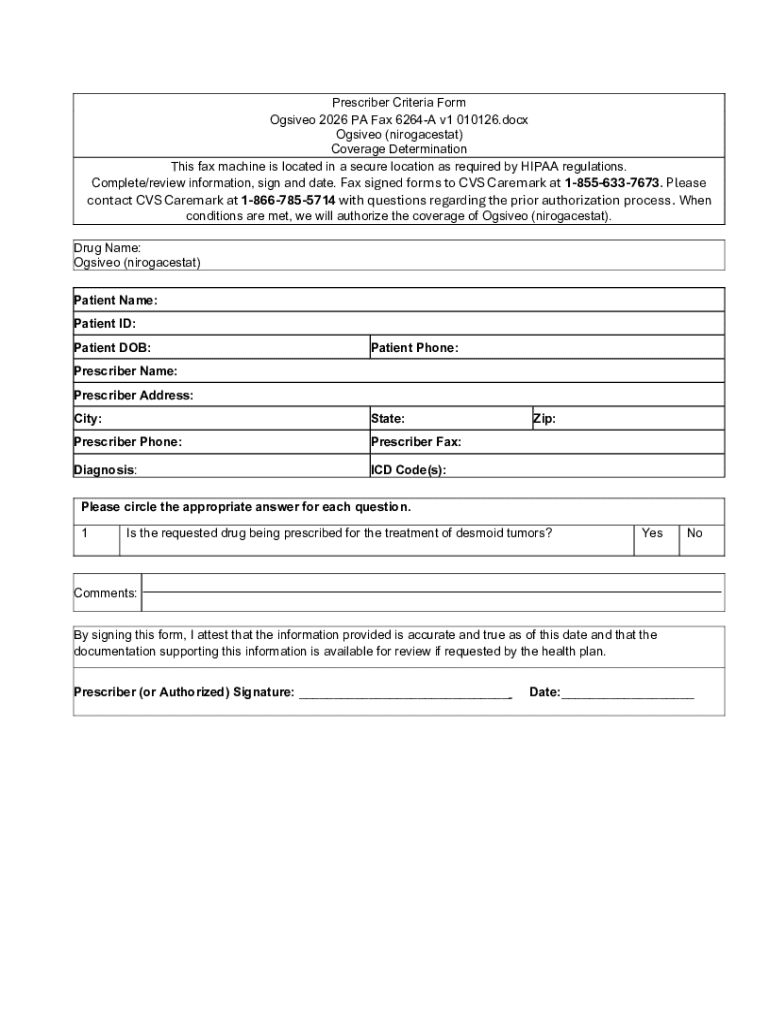
The Prescriber Criteria Form is a healthcare document used by prescribers to request coverage determination for the drug Ogsiveo (nirogacestat) in treating desmoid tumors.
pdfFiller scores top ratings on review platforms




Who needs Ogsiveo Criteria Form?
Explore how professionals across industries use pdfFiller.

Ogsiveo Criteria Form is needed by:
-
Healthcare providers prescribing Ogsiveo
-
Patients seeking prior authorization for medication
-
Insurance companies processing coverage requests
-
Clinical staff managing patient records
-
Pharmacists verifying prescription requirements
Comprehensive Guide to Ogsiveo Criteria Form
What is the Prescriber Criteria Form?
The Prescriber Criteria Form is essential in the healthcare industry for obtaining drug coverage, particularly for Ogsiveo (nirogacestat) in the treatment of desmoid tumors. This form plays a crucial role in the prior authorization process with CVS Caremark, ensuring that prescribers can effectively request the necessary coverage for their patients. Its proper use is vital for facilitating access to important medications.
Purpose and Benefits of the Prescriber Criteria Form
The purpose of the Prescriber Criteria Form is multifaceted, providing a streamlined way for healthcare providers to facilitate timely access to medications. The form is instrumental in ensuring appropriate drug coverage and authorization. One of the significant advantages of using this electronic solution is the efficiency it brings to the submission process, allowing prescribers to manage their workloads more effectively.
Key Features of the Prescriber Criteria Form
This form encompasses several key characteristics that help ensure accurate and comprehensive submissions. Important fields include:
-
Patient name and identification details
-
Prescriber’s contact information
-
Diagnosis specifics, including required ICD codes
-
Checkboxes for simplified responses (Yes/No)
-
A signature line for the prescriber to validate the information provided
Who Needs the Prescriber Criteria Form?
The primary users of the Prescriber Criteria Form are healthcare providers and clinics that specialize in treating patients with desmoid tumors. Any authorized prescriber must utilize this form under specific conditions to request coverage effectively. This includes situations where patients are seeking treatment with Ogsiveo and require prior authorization.
How to Fill Out the Prescriber Criteria Form Online (Step-by-Step)
Successfully filling out the Prescriber Criteria Form online involves several steps:
-
Access the electronic version of the form through the designated platform.
-
Fill in all required fields accurately, including patient and prescriber information.
-
Double-check the entered data for correctness to avoid common errors.
-
Ensure all mandatory sections are completed before submission.
-
Submit the form electronically and keep a copy for your records.
Submission Methods and Delivery of the Prescriber Criteria Form
The completed Prescriber Criteria Form must be faxed directly to CVS Caremark. Important instructions include:
-
Ensuring all supporting documents are included with your submission.
-
Following up to confirm receipt of the form and any required additional actions.
Security and Compliance for the Prescriber Criteria Form
When handling sensitive patient information on the Prescriber Criteria Form, it is paramount to ensure data integrity and privacy. Measures are implemented to comply with HIPAA and GDPR regulations, protecting patients’ rights. Additionally, users can be assured of the security features provided by pdfFiller when submitting forms online, safeguarding all personal data involved.
Utilizing pdfFiller to Complete the Prescriber Criteria Form
pdfFiller enhances the experience of completing the Prescriber Criteria Form by offering numerous features that simplify the process. Users can benefit from:
-
Robust editing options to tailor the form as needed.
-
eSigning capabilities for the secure and legal submission of the document.
-
Comprehensive document management tools to keep all files organized.
How to fill out the Ogsiveo Criteria Form
-
1.Start by accessing pdfFiller and searching for 'Prescriber Criteria Form.' Click on the form to open it in the editor.
-
2.Familiarize yourself with the interface. You will see various fillable fields related to patient and prescriber information.
-
3.Gather necessary information such as the patient's name, ID, date of birth, and contact details before you start filling out the form.
-
4.Begin with the 'Drug Name' field and enter 'Ogsiveo.' Proceed to fill in the patient's information, ensuring all details are accurate.
-
5.Next, fill in the prescriber’s information, including name, address, phone, and fax number. Be thorough to avoid any delays later.
-
6.Provide the diagnosis details along with relevant ICD codes. Check if any additional documentation is needed to support the diagnosis.
-
7.Use the checkboxes provided for 'Yes' or 'No' responses where applicable, ensuring consistency with the information given.
-
8.Once all sections are completed, take time to review the filled form for accuracy and completeness.
-
9.After confirming every detail is correct, finalize the form by adding your signature in the designated area.
-
10.Save your work by clicking on the 'Save' option in pdfFiller. You can also download the form in your preferred format or directly submit it as per instructions.

Who is eligible to use the Prescriber Criteria Form?
The Prescriber Criteria Form is intended for licensed prescribers seeking authorization for their patients to use Ogsiveo for treating desmoid tumors.
What is the deadline for submitting the form?
There is no specific deadline universally; however, it is advisable to submit the form promptly to ensure timely processing for medication authorization.
How should the form be submitted?
The completed form must be signed and faxed directly to CVS Caremark as part of the prior authorization process for medication coverage.
What supporting documents are required with the form?
Typically, you may need to provide the patient’s medical history and any additional diagnostic information that supports the medication request.
What are some common mistakes to avoid when filling out the form?
Ensure all information is accurate and matches supporting documents. Avoid leaving fields blank and verify that the form is signed before submission.
How long does it take to process this form?
Processing times may vary, but generally, it takes a few business days. Always check with CVS Caremark for any specific timelines.
What if I have concerns specific to the Prescriber Criteria Form?
For any specific concerns, it's best to contact CVS Caremark directly or consult with your healthcare compliance officer.
Related Forms



Get the latest insights from our blog


If you believe that this page should be taken down, please follow our DMCA take down process
here
.
This form may include fields for payment information. Data entered in these fields is not covered by PCI DSS compliance.