
Last updated on
Sep 30, 2026
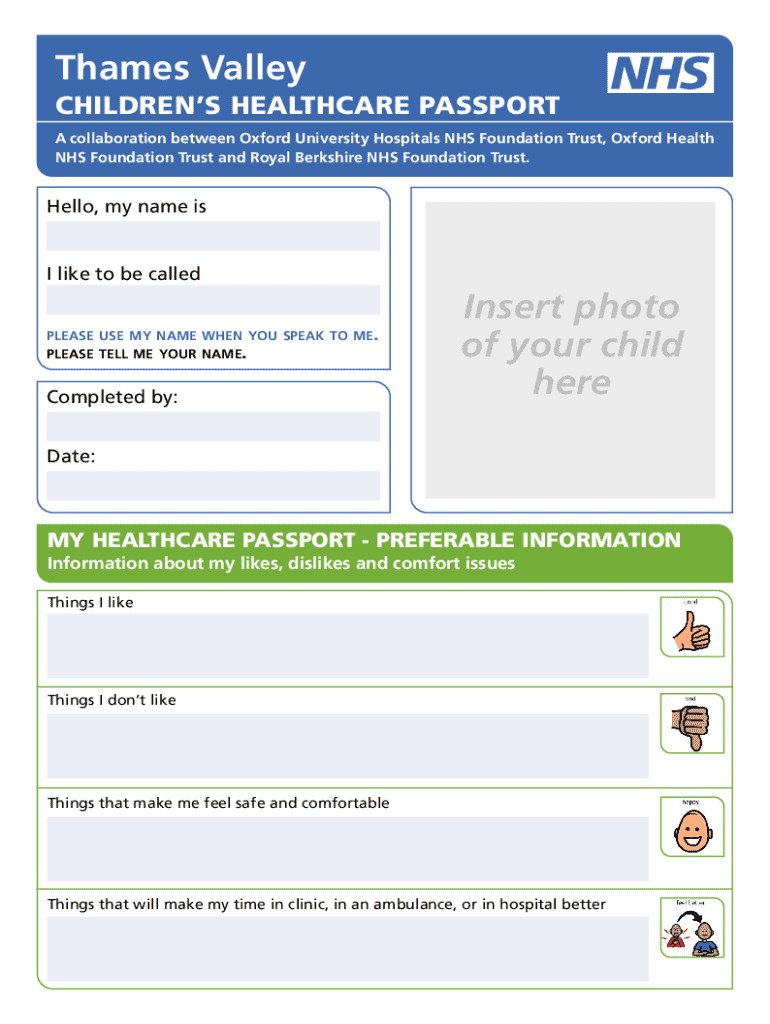
Get the free Thames Valley Children’s Healthcare Passport
We are not affiliated with any brand or entity on this form

Fill out
Complete the form online in a simple drag-and-drop editor.

eSign
Add your legally binding signature or send the form for signing.

Share
Share the form via a link, letting anyone fill it out from any device.

Export
Download, print, email, or move the form to your cloud storage.
Why pdfFiller is the best tool for your documents and forms


End-to-end document management
From editing and signing to collaboration and tracking, pdfFiller has everything you need to get your documents done quickly and efficiently.
Accessible from anywhere
pdfFiller is fully cloud-based. This means you can edit, sign, and share documents from anywhere using your computer, smartphone, or tablet.
Secure and compliant
pdfFiller lets you securely manage documents following global laws like ESIGN, CCPA, and GDPR. It's also HIPAA and SOC 2 compliant.
What is Healthcare Passport
The Thames Valley Children’s Healthcare Passport is a medical history form used by parents or carers to document essential healthcare information about a child.
pdfFiller scores top ratings on review platforms




Who needs Healthcare Passport?
Explore how professionals across industries use pdfFiller.

Healthcare Passport is needed by:
-
Parents or guardians of children requiring healthcare support
-
Healthcare professionals in Oxfordshire
-
Carers or guardians of children with special needs
-
Social workers involved in child welfare
-
Educational professionals supporting child health
Comprehensive Guide to Healthcare Passport
What is the Thames Valley Children’s Healthcare Passport?
The Thames Valley Children’s Healthcare Passport is a vital document designed to streamline the process of collecting essential healthcare information about children. By providing a structured format, it aids parents or carers in detailing their child's unique healthcare journey. Before filling out this child healthcare information form, simplicity and clarity are paramount; understanding what is required ensures accuracy and completeness.
Purpose and Benefits of the Thames Valley Children’s Healthcare Passport
This healthcare passport for children is significant because it guarantees personalized and appropriate care tailored to each child's needs in Oxfordshire. It records crucial aspects, such as medical history and communication preferences, ensuring that healthcare providers have the necessary insights for effective care. By having a clear documentation of these details, children receive the best possible support during their healthcare visits.
Key Features of the Thames Valley Children’s Healthcare Passport
The form contains several key components that facilitate comprehensive healthcare documentation. Key sections include:
-
Medical History: Documenting any pre-existing conditions.
-
Likes/Dislikes: Providing insight into what makes the child comfortable.
-
Specific Healthcare Needs: Highlighting any special medical or support requirements.
Fillable fields within the form include 'Date of Birth,' 'NHS Number,' and identifying information that allows for efficient communication with healthcare providers.
Who Needs the Thames Valley Children’s Healthcare Passport?
The primary audience for this form includes parents and carers of children, particularly those with healthcare needs. It is particularly beneficial for families with children who have special needs, as it captures vital healthcare information. Completing the form provides a foundation for healthcare professionals to deliver customized care based on documented preferences and requirements.
How to Fill Out the Thames Valley Children’s Healthcare Passport Online (Step-by-Step)
Completing the Thames Valley Children’s Healthcare Passport digitally ensures a hassle-free experience. Follow these simple steps:
-
Access the form using a PDF editing tool.
-
Fill in all required information in each section accurately.
-
Utilize options to save your progress periodically.
-
Review the completed form for any inaccuracies before submission.
-
Electronically sign the form to authenticate your submission.
Online capabilities allow users to manage and navigate the form effortlessly, making it a practical choice.
Common Errors and How to Avoid Them When Filling Out the Thames Valley Children’s Healthcare Passport
While filling out the form, users may encounter common errors. Here are key tips to ensure accuracy:
-
Double-check all entries, focusing on spelling and numerical accuracy.
-
Ensure that all required fields are completed to prevent submission delays.
-
Regularly refer to guidelines to avoid misunderstandings when filling out sections.
Reviewing the form thoroughly before submission can significantly reduce errors, enhancing the quality of the information provided.
Submission and Processing of the Thames Valley Children’s Healthcare Passport
Upon completion, users have several methods for submitting the form. Options for digital submission streamline the process, and users can track their documents after submission. Typical processing times are established, offering clarity on when the family can expect feedback or follow-up from healthcare providers.
Security and Privacy: Handling Sensitive Information on the Thames Valley Children’s Healthcare Passport
Security is a paramount concern when handling sensitive information like that included in the Thames Valley Children’s Healthcare Passport. pdfFiller employs robust security measures, such as 256-bit encryption, to protect sensitive data. Compliance with regulations such as HIPAA and GDPR ensures that all personal information is handled in a secure and confidential manner, giving users peace of mind.
Leverage pdfFiller for Effortless Form Management
Consider using pdfFiller to enhance your form-filling experience. The platform simplifies the process through easy editing, signing, and sharing capabilities. Being a cloud-based tool, it allows users to access documents from various devices, ensuring flexibility and convenience. Moreover, the platform's security features support users in managing sensitive documents seamlessly.
How to fill out the Healthcare Passport
-
1.Access the Thames Valley Children’s Healthcare Passport form on pdfFiller by visiting the website or using a direct link.
-
2.Once on pdfFiller, use the search bar to locate the form by typing the name directly. Click on the form to open it.
-
3.Before completing the form, gather necessary information such as the child’s personal details, medical history, and preferences to ensure a comprehensive submission.
-
4.Begin filling in the form by navigating to each field. Click on the field where you want to enter information, such as 'Name' or 'Date of Birth' and type the relevant information using your keyboard.
-
5.Utilize checkboxes where applicable, such as for 'EHCP' or 'ACP', to highlight relevant services or plans the child is involved with.
-
6.In sections like 'Things I like' and 'Things I don’t like', ensure you provide detailed and accurate information to help healthcare professionals understand the child's needs.
-
7.After completing all fields, review the information entered for accuracy and completeness. Pay special attention to medical history and preferences.
-
8.Once satisfied with the form, use the download or save option in pdfFiller to save a copy to your device or submit it electronically as instructed.
-
9.Follow any additional submission steps provided by pdfFiller or your healthcare provider to ensure the completed form reaches the appropriate recipient.

Who should fill out the Thames Valley Children’s Healthcare Passport?
The form should be filled out by parents, guardians, or carers responsible for a child’s healthcare, especially if they require specialized support.
What information do I need to complete the form?
You will need the child's personal details, medical history, preferences, and any specific support needs. Gathering this information beforehand can streamline the process.
Are there any deadlines for submitting the Healthcare Passport?
It’s advisable to fill out and submit the Healthcare Passport as soon as possible to ensure healthcare professionals have the necessary information for timely care.
How do I submit the completed form?
You can submit the completed form electronically through pdfFiller or according to the instructions provided by your healthcare provider or organization responsible for the healthcare services.
Are there common mistakes to avoid when filling out this form?
Ensure that all sections are completed accurately and avoid leaving any fields blank. Double-check for correct spelling of names and ensure all relevant information is included to prevent delays.
How long does it take to process the Healthcare Passport?
Processing times can vary based on the healthcare facility’s procedures. It's best to inquire directly with the relevant healthcare authority for specific timelines.
Is notarization required for the Thames Valley Children’s Healthcare Passport?
No, notarization is not required for this form. It should be completed by a parent or carer as per the guidance provided.
Related Forms




Get the latest insights from our blog


If you believe that this page should be taken down, please follow our DMCA take down process
here
.
This form may include fields for payment information. Data entered in these fields is not covered by PCI DSS compliance.