
Last updated on
Sep 30, 2026
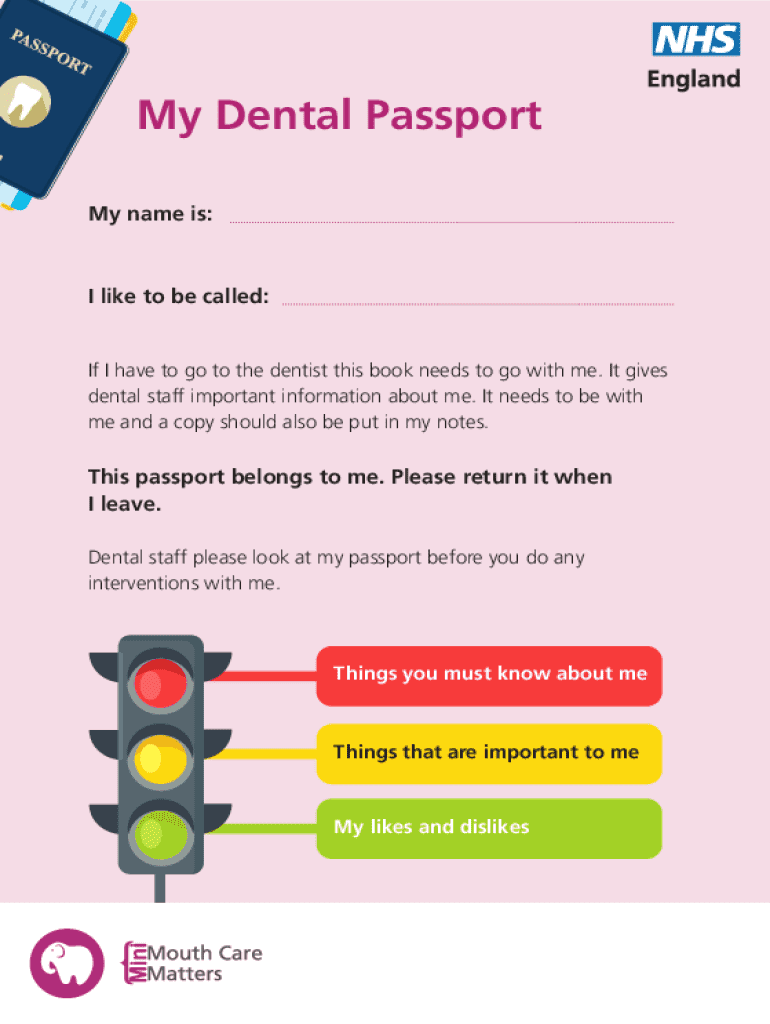
Get the free Dental Passport
We are not affiliated with any brand or entity on this form

Fill out
Complete the form online in a simple drag-and-drop editor.

eSign
Add your legally binding signature or send the form for signing.

Share
Share the form via a link, letting anyone fill it out from any device.

Export
Download, print, email, or move the form to your cloud storage.
Why pdfFiller is the best tool for your documents and forms


End-to-end document management
From editing and signing to collaboration and tracking, pdfFiller has everything you need to get your documents done quickly and efficiently.
Accessible from anywhere
pdfFiller is fully cloud-based. This means you can edit, sign, and share documents from anywhere using your computer, smartphone, or tablet.
Secure and compliant
pdfFiller lets you securely manage documents following global laws like ESIGN, CCPA, and GDPR. It's also HIPAA and SOC 2 compliant.
What is Dental Passport
The Dental Passport is a medical history form used by patients to provide dental staff with essential personal and medical information for improved care.
pdfFiller scores top ratings on review platforms




Who needs Dental Passport?
Explore how professionals across industries use pdfFiller.

Dental Passport is needed by:
-
Patients preparing for dental appointments
-
Dental clinics and practices requiring patient information
-
Healthcare providers managing patient medical histories
-
Caregivers assisting patients with medical documentation
-
Dentists and dental hygienists reviewing patient backgrounds
Comprehensive Guide to Dental Passport
What is the Dental Passport?
The Dental Passport is a vital medical history form that serves a crucial role in dental care. This document includes essential patient information, which helps dental staff provide tailored treatments. It systematically collects personal details, medical history, and allergy information, enabling effective communication between patients and dental professionals.
By utilizing the Dental Passport, patients can ensure that their dental staff is well-informed, leading to better treatment outcomes and a more efficient dental experience.
Purpose and Benefits of the Dental Passport
The Dental Passport holds significant importance for both patients and dental practices. It facilitates accurate and thorough collection of patient information, which can enhance the overall quality of care. By identifying allergies and specific support needs ahead of treatments, dental practices can create a safer environment for their patients.
This form boosts efficiency during dental appointments by streamlining the information-gathering process, allowing dental staff to devote more time to patient care instead of paperwork.
Key Features of the Dental Passport
The Dental Passport is designed with user-friendliness in mind, featuring essential elements that facilitate an effective filling process. Notably, the form includes fillable fields where patients can easily enter their personal and medical information.
The standardized format makes navigation simple for dental staff, and it includes helpful instructions to guide a thorough review before treatment begins. These features contribute to a more effective experience for both patients and providers.
Who Needs the Dental Passport?
Several groups benefit from the use of the Dental Passport. Primarily, patients who are seeking dental care need this form to ensure that their medical history is accurately recorded. Furthermore, family members may assist in completing the form for those who require additional support.
Dental practices themselves also greatly benefit as the Dental Passport enables them to perform thorough and efficient patient intake, leading to improved care delivery.
How to Fill Out the Dental Passport Online (Step-by-Step)
Completing the Dental Passport online is a straightforward process. Follow these step-by-step instructions to ensure accurate submission:
-
Access the Dental Passport form through pdfFiller.
-
Fill in all required fields, such as your name, date of birth, and allergies.
-
Review the instructions carefully to ensure each section is completed correctly.
-
Double-check all entries for accuracy before submitting the form.
-
Submit the form to your dental practice either digitally or as printed documentation.
Common Errors and How to Avoid Them
When filling out the Dental Passport, users often encounter common mistakes that can hinder the process. Missing information or providing incorrect details can lead to complications during dental treatments.
To minimize errors, it’s crucial to double-check all provided information. Utilizing the tools available through pdfFiller can help ensure that the form is filled out accurately and comprehensively.
How to Submit the Dental Passport
Submitting the Dental Passport is an essential step that can be accomplished in several ways. Patients can choose between digital submission using a secure platform like pdfFiller or submitting a physical copy to their dental practice.
It's important to be aware of any deadlines associated with submission and to confirm that the dental practice has received the form successfully once it has been submitted.
Security and Compliance for the Dental Passport
The safety of your sensitive information is a top priority when filling out the Dental Passport. pdfFiller incorporates robust security features, including encryption and compliance with regulations such as HIPAA and GDPR, to protect user data.
It is crucial to understand the importance of data privacy while handling medical forms and to follow recommended practices for safely storing and managing the completed Dental Passport.
Final Steps After Filling Out the Dental Passport
After completing the Dental Passport, there are several important final steps to consider. You may want to save a digital copy for your personal records or print the form for your dental appointment.
If any changes are needed after submission, it’s advisable to follow the guidance on how to amend the form to ensure the dental staff has the most accurate information.
Explore How pdfFiller Can Simplify Your Dental Passport Experience
Utilizing pdfFiller can significantly enhance your experience when filling out the Dental Passport. The platform's tools allow for easy editing, eSigning, and sharing of completed documents.
Creating a free account provides users with access to these beneficial functionalities, streamlining the entire process of managing the Dental Passport.
How to fill out the Dental Passport
-
1.To access the Dental Passport form on pdfFiller, visit the pdfFiller website and log into your account or create a new one.
-
2.Use the search bar to find 'Dental Passport' and select the form from the search results.
-
3.Once the form loads, start by clicking on the first blank field, typically labeled 'Patient Name', and input your details.
-
4.Continue filling in each required field, including contact information, medical history, and any allergies.
-
5.If you need to enter additional information, utilize the blank sections provided for notes or support needs.
-
6.Ensure the accuracy of the information you provide by cross-referencing with medical records or family information.
-
7.Review the completed form carefully, focusing on any missed fields or inaccuracies, prior to finalizing.
-
8.Once satisfied with your entries, look for the 'Save' option to store your form, or click 'Download' to keep a copy.
-
9.If you need to submit the form, check for submission links, or save it for printing to bring to your appointment.

Who needs to complete the Dental Passport?
Patients who are visiting a dental clinic should complete the Dental Passport to provide important medical and personal information to dental staff.
Is there a deadline for submitting the Dental Passport?
While there is no strict deadline, it is recommended to complete and submit the Dental Passport prior to your dental appointment to ensure proper care.
How do I submit the Dental Passport after filling it out?
The completed Dental Passport can be submitted online if your dental practice accepts digital submissions, or printed to bring physically to your appointment.
What common mistakes should I avoid when filling out the form?
Common mistakes include leaving fields blank, providing inaccurate details, or forgetting to review for completeness, which may lead to delays in care.
How long does it take to process the Dental Passport?
Processing times may vary, but generally, the Dental Passport is reviewed immediately upon receipt by dental staff during your appointment.
What supporting documents should I provide with the Dental Passport?
If applicable, accompanying documents include previous dental records, current medication lists, or any relevant medical history needed for comprehensive care.
Can someone help me fill out the form?
Yes, caregivers or family members can assist you in completing the Dental Passport to ensure that all necessary information is accurately provided.
Related Forms




Get the latest insights from our blog


If you believe that this page should be taken down, please follow our DMCA take down process
here
.
This form may include fields for payment information. Data entered in these fields is not covered by PCI DSS compliance.