
Last updated on
Oct 31, 2026
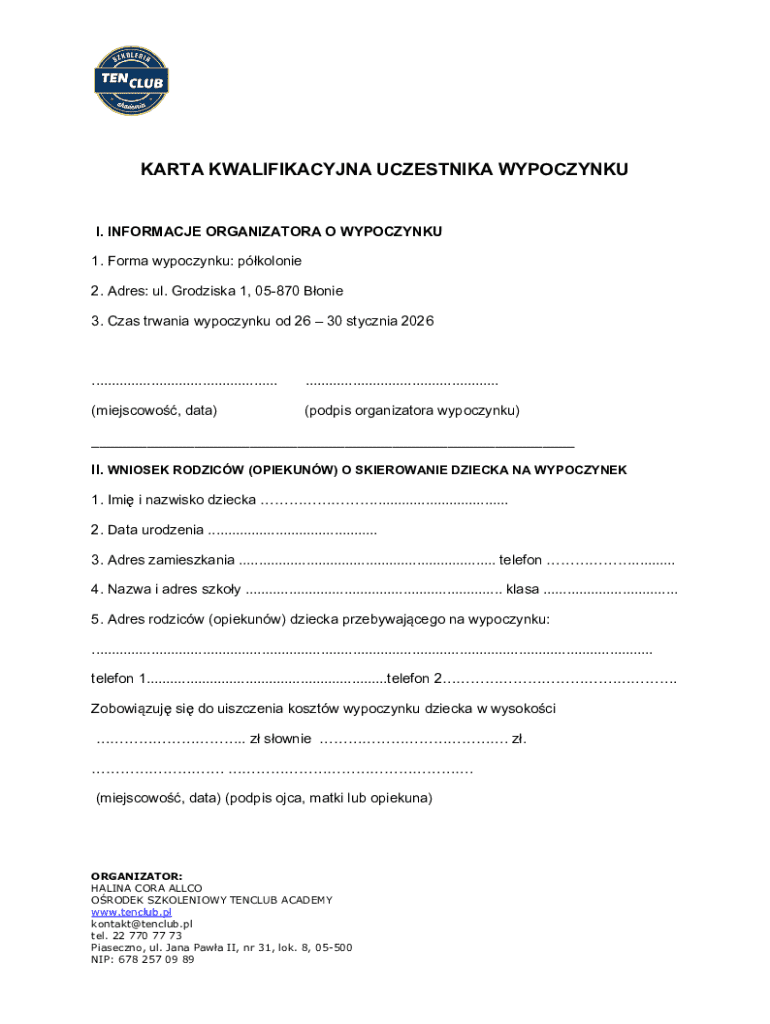
Get the free Child Camp Qualification Form
We are not affiliated with any brand or entity on this form

Fill out
Complete the form online in a simple drag-and-drop editor.

eSign
Add your legally binding signature or send the form for signing.

Share
Share the form via a link, letting anyone fill it out from any device.

Export
Download, print, email, or move the form to your cloud storage.
Why pdfFiller is the best tool for your documents and forms


End-to-end document management
From editing and signing to collaboration and tracking, pdfFiller has everything you need to get your documents done quickly and efficiently.
Accessible from anywhere
pdfFiller is fully cloud-based. This means you can edit, sign, and share documents from anywhere using your computer, smartphone, or tablet.
Secure and compliant
pdfFiller lets you securely manage documents following global laws like ESIGN, CCPA, and GDPR. It's also HIPAA and SOC 2 compliant.
What is Camp Qualification Form
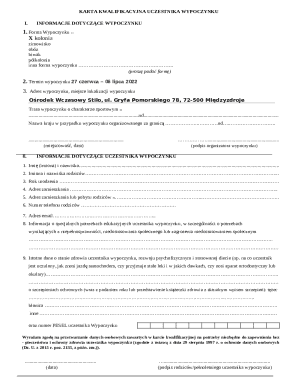
The Child Camp Qualification Form is a permission slip used by parents and guardians to provide essential information about a child attending a camp in Poland.
pdfFiller scores top ratings on review platforms




Who needs Camp Qualification Form?
Explore how professionals across industries use pdfFiller.

Camp Qualification Form is needed by:
-
Parents and guardians of children attending camps
-
Camp organizers requiring consent and information
-
Teachers and caregivers responsible for child supervision
-
Healthcare professionals providing health assessments
Comprehensive Guide to Camp Qualification Form
What is the Child Camp Qualification Form?
The Child Camp Qualification Form is a crucial document used in Poland for registering children for half-day camps scheduled from January 26 to January 30, 2026. This form is essential for ensuring a structured and efficient registration process.
Its primary purpose is to gather necessary information about the child, such as health details and vaccination records, which are vital for the safety and well-being of all participants. Parents and guardians will need to fill out this form accurately to ensure their child can attend the camp.
Benefits of the Child Camp Qualification Form
The Child Camp Qualification Form offers several advantages that streamline the registration process for camps. By consolidating essential information into one document, it reduces the need for multiple applications and fosters organization.
-
Health details and vaccination records ensure that all medical needs are addressed.
-
Signed consent from relevant authorities enhances safety and accountability.
This simplified approach benefits not only parents but also camp organizers, ensuring compliance with safety protocols.
Who Needs to Complete the Child Camp Qualification Form?
Several roles are involved in the completion of the Child Camp Qualification Form. The key signatories include:
-
Parents
-
Organizers
-
Teachers
-
Doctors
Each signature is essential to authenticate the application, providing layers of verification that enhance the safety of the camp environment. This collaborative effort ensures that parents or guardians play an active role in their child's registration.
Key Features of the Child Camp Qualification Form
This form is designed to gather critical information, with essential components such as the child's name, date of birth, and necessary health details. Specific fields may include checkboxes for health declarations and vaccination records.
-
Child's name and date of birth
-
Health details, including any allergies or medical conditions
-
Vaccination records
-
Signature fields for all required signatories
By ensuring all components are accurately filled out and signed, the integrity and validity of the form are maintained.
How to Fill Out the Child Camp Qualification Form Online
To complete the Child Camp Qualification Form through pdfFiller, follow these steps:
-
Access the form on pdfFiller.
-
Gather all necessary information, including child's health details and required signatures.
-
Fill in the form fields carefully, ensuring accuracy.
-
Utilize pdfFiller’s tools for editing and signing.
-
Submit the completed form as per instructions.
This process is designed to be intuitive and user-friendly, making it easy for parents to ensure their child’s spot in the camp.
Common Errors and How to Avoid Them
When completing the Child Camp Qualification Form, it’s essential to avoid common mistakes that can lead to processing delays. These may include missing signatures or inaccurate health information.
-
Double-check all personal and health details before submission.
-
Ensure all required signatures have been obtained.
-
Utilize pdfFiller's features to verify information and reduce errors.
By taking these precautions, parents can ensure a smoother registration process without unnecessary complications.
Submission Methods for the Child Camp Qualification Form
Once the Child Camp Qualification Form is completed, it must be submitted through the designated channels. Parents should check for the following:
-
Submission methods: online or in-person.
-
Deadlines for submission leading up to the camp dates.
-
Payment methods and any applicable fees.
Being aware of these details will help ensure timely registration for the camp.
Understanding the Importance of Security and Compliance
When filling out the Child Camp Qualification Form, users can rest assured about the security of their sensitive information. pdfFiller employs robust measures to protect personal and health data.
-
256-bit encryption safeguards user documents.
-
Compliance with GDPR ensures user privacy is maintained.
These security protocols not only protect users but also enhance trust in handling sensitive documents online.
What Happens After You Submit the Child Camp Qualification Form?
After submitting the Child Camp Qualification Form, parents can expect a few steps in the post-submission process. Typically, this involves:
-
Receiving confirmation of submission.
-
Tracking the processing status of the application.
-
Anticipating feedback regarding acceptance or the need for amendments if any issues arise.
Understanding this process helps parents stay informed and proactive regarding their child's camp registration status.
Empowering Parents with pdfFiller
Parents are encouraged to leverage pdfFiller’s capabilities for quick and efficient completion of the Child Camp Qualification Form. By using features such as editing, eSigning, and online sharing, the registration process is streamlined.
Taking advantage of these tools can significantly simplify the experience and enhance the likelihood of successful registration.
How to fill out the Camp Qualification Form
-
1.Access the Child Camp Qualification Form by navigating to the pdfFiller website and entering the form name in the search bar.
-
2.Once the form appears, click on it to open the interactive PDF editor.
-
3.Before starting, gather needed information, including your child's name, birth date, residence address, vaccination records, and health information.
-
4.Begin filling in the required fields in the form, starting with the child's full name and birth date in the designated sections.
-
5.Use the fillable fields to provide the address of residence, ensuring all details are accurate and complete.
-
6.Follow through to the health information section. Input any relevant health conditions or allergies that may affect your child during the camp.
-
7.Next, complete the vaccination record section by checking the corresponding boxes. Ensure consistency with your child's actual vaccination history.
-
8.The signature fields require signing by various roles. Click on the designated signature box for the parent/guardian, organizer, and teacher/caregiver to add digital signatures.
-
9.Review the entire form to ensure all required fields are filled and details are accurate. Look out for any overlooked sections or mistakes.
-
10.Once completed, save the form in your preferred format by selecting 'Download' or 'Save' from the options provided on pdfFiller.
-
11.If submission is required electronically, follow the site's guide to submit the filled-out form directly through pdfFiller. Otherwise, print the form for physical submission.

Who is eligible to complete the Child Camp Qualification Form?
The form should be completed by parents or guardians of minor children who are attending a camp in Poland. Teachers, caregivers, and camp organizers may also need to sign the form.
Are there any deadlines for submitting the Child Camp Qualification Form?
Deadlines for submission may vary by camp. It is advisable to submit the form well in advance of the camp date to ensure all requirements are met.
How should I submit the completed form?
You can submit your completed Child Camp Qualification Form either electronically through pdfFiller or by printing and delivering it physically to the camp organizer. Follow specific submission instructions provided by the camp.
What supporting documents do I need to provide with the form?
Along with the Child Camp Qualification Form, you may need to provide additional documents such as vaccination records and any medical forms that detail health concerns for your child.
What are some common mistakes to avoid when filling out the form?
Common mistakes include leaving fields blank, misspelling names, or failing to gather necessary documentation such as vaccination records. Double-checking for accuracy will help avoid these issues.
How long does it take for the form to be processed?
Processing times may differ by camp. It is advisable to submit your form as early as possible to allow sufficient time for reviews and any potential follow-up.
What should I do if I encounter issues with pdfFiller?
If you face any challenges while using pdfFiller, refer to their help center for troubleshooting tips or customer support for assistance with form-related inquiries.
Related Forms




Get the latest insights from our blog


If you believe that this page should be taken down, please follow our DMCA take down process
here
.
This form may include fields for payment information. Data entered in these fields is not covered by PCI DSS compliance.