
Last updated on
Oct 31, 2026
Get the free Statutory Declaration Form
We are not affiliated with any brand or entity on this form

Fill out
Complete the form online in a simple drag-and-drop editor.

eSign
Add your legally binding signature or send the form for signing.

Share
Share the form via a link, letting anyone fill it out from any device.

Export
Download, print, email, or move the form to your cloud storage.
Why pdfFiller is the best tool for your documents and forms


End-to-end document management
From editing and signing to collaboration and tracking, pdfFiller has everything you need to get your documents done quickly and efficiently.
Accessible from anywhere
pdfFiller is fully cloud-based. This means you can edit, sign, and share documents from anywhere using your computer, smartphone, or tablet.
Secure and compliant
pdfFiller lets you securely manage documents following global laws like ESIGN, CCPA, and GDPR. It's also HIPAA and SOC 2 compliant.
What is Statutory Declaration
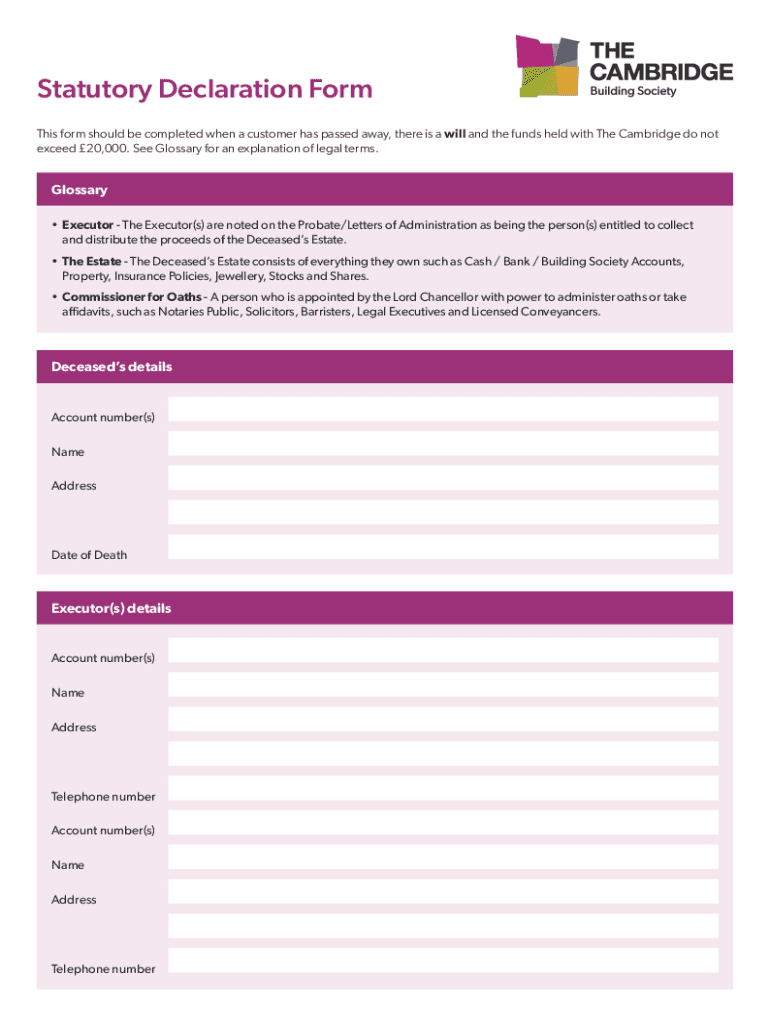
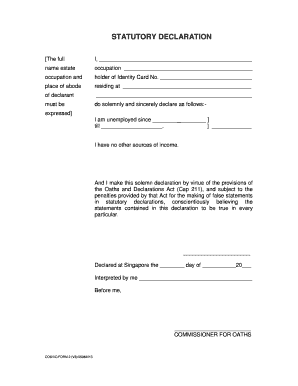
The Statutory Declaration Form is a legal document used by executors in the UK to declare details about a deceased person's estate and facilitate access to funds held in accounts not exceeding £20,000.
pdfFiller scores top ratings on review platforms




Who needs Statutory Declaration?
Explore how professionals across industries use pdfFiller.

Statutory Declaration is needed by:
-
Executors handling deceased estates
-
Commissioners for Oaths and Solicitors
-
Individuals managing small estate claims
-
Financial institutions processing claims
-
Beneficiaries seeking fund access
Comprehensive Guide to Statutory Declaration
What is the Statutory Declaration Form?
The Statutory Declaration Form is a vital legal document used in the United Kingdom. This form is typically required in situations where an individual has passed away with a will, and the total funds do not exceed £20,000. It serves as an estate declaration that allows executors to declare vital details about the deceased and manage estate-related matters smoothly.
Common usage includes situations involving probate and estate management. This form holds significant weight in legal contexts, ensuring that the executor's declarations are formally recognized.
Purpose and Benefits of the Statutory Declaration Form
The primary purpose of the Statutory Declaration Form is to provide legal standing to executors during estate management processes. By using this form, executors can facilitate the transfer of funds and settle the deceased’s affairs efficiently, avoiding potential legal complications.
Among its benefits, this declaration helps streamline processes, ensuring that estates below £20,000 can be handled without lengthy probate procedures. This fosters a smoother experience for the deceased's beneficiaries.
Who Needs to Use the Statutory Declaration Form?
The Statutory Declaration Form is essential for individuals directly involved in estate management, particularly the executors of a will. Executors are typically responsible for managing the estate, and this form is necessary when there are funds to distribute following the death of the individual.
Examples of situations in which this form may be applicable include when executors need to access a deceased's bank account to settle debts or distribute inheritances appropriately.
Eligibility Criteria for the Statutory Declaration Form
To file the Statutory Declaration Form, certain eligibility criteria must be met. Primarily, the estate must not exceed a total value of £20,000. Executors must also provide documented evidence, such as a copy of the will and a death certificate, to support their claim.
Furthermore, it is crucial that a will is in place, as lack of one may limit the legal options for the heirs trying to access the deceased’s assets.
How to Fill Out the Statutory Declaration Form Online
Completing the Statutory Declaration Form online is a straightforward process. Here’s a step-by-step guide:
-
Access pdfFiller's platform and locate the Statutory Declaration Form.
-
Fill in the required fields, such as the name, address, and date of death of the deceased.
-
Review the completed form for any errors or omissions.
-
Save or submit the form as needed.
Each key field in the document is designed to collect specific information crucial for the declaration, ensuring clarity and legally-binding effectiveness.
How to Sign and Notarize the Statutory Declaration Form
Notarization is a critical step in validating the Statutory Declaration Form. It is essential to obtain a signature from a Commissioner for Oaths or a Solicitor to authenticate the document.
It's important to understand the differences between digital signatures and wet signatures, as each may have varying acceptance levels depending on the context of use and the party requiring the form.
Required Documents and Supporting Materials
When submitting the Statutory Declaration Form, several supporting documents are necessary. These typically include:
-
Death certificate of the deceased.
-
Copy of the will, if available.
-
Any additional documentation that proves the executor's rights to manage the estate.
Completeness and accuracy in providing these documents help prevent delays in the processing of the declaration.
Submission Methods for the Statutory Declaration Form
Once the Statutory Declaration Form is fully completed, it can be submitted through various methods. This includes both postal and online submission options via platforms like pdfFiller.
Users should anticipate specific processing times and understand what to expect after submitting the form, which may vary based on the submission method chosen.
Security and Compliance for The Statutory Declaration Form
Handling sensitive documents like the Statutory Declaration Form necessitates robust security measures. pdfFiller employs 256-bit encryption to safeguard users’ data during the filling and submission process.
Moreover, the platform's compliance with GDPR and HIPAA regulations assures users of the safety and confidentiality of their information.
Effortless Completion with pdfFiller
Utilizing pdfFiller for completing the Statutory Declaration Form simplifies the process for users. From filling the form to notarization, pdfFiller streamlines each step to enhance user experience.
User testimonials highlight the effectiveness of the platform, reinforcing its trustworthiness for managing important legal documents.
How to fill out the Statutory Declaration
-
1.Access pdfFiller and search for the 'Statutory Declaration Form'.
-
2.Open the form in the pdfFiller interface to start editing.
-
3.Collect essential information including the deceased's name, address, and date of death before starting the form.
-
4.Begin filling out the relevant fields; use clear and accurate data to avoid errors.
-
5.Utilize the fillable fields for the executor's declaration and ensure all necessary sections are completed.
-
6.Confirm that signature lines are included for the executor and the Commissioner for Oaths or Solicitor.
-
7.Review the entire form for accuracy and completeness using the preview option.
-
8.Once satisfied, save your changes in pdfFiller to keep a copy of your form.
-
9.Download the completed form or use pdfFiller's submission options to send it directly to the relevant parties.

Who is eligible to use the Statutory Declaration Form?
The Statutory Declaration Form can be used by executors of estates in the UK, particularly where funds do not exceed £20,000.
What supporting documents are required to complete this form?
Typically, you will need the deceased's death certificate, the will, and any identification required by the Commissioner for Oaths or Solicitor.
How is the Statutory Declaration Form submitted?
After completing the form, it should be signed in front of a Commissioner for Oaths or Solicitor, who will notarize it before submission to financial institutions.
Is there a deadline for submitting the Statutory Declaration Form?
While specific deadlines may vary, it is advisable to submit the form promptly after the death to facilitate timely access to funds.
What common mistakes should be avoided when filling out the form?
Ensure all fields are accurately filled out, avoid missing signatures, and double-check that the form is notarized before submission.
What happens if there are errors on the Statutory Declaration Form?
Errors may lead to delays in processing, so it is crucial to review the form thoroughly before submission to correct any mistakes.
How long does it take to process the Statutory Declaration Form?
Processing times can vary based on the financial institution's policies, but allowing several weeks is advisable for any complications.
Related Forms





Get the latest insights from our blog


If you believe that this page should be taken down, please follow our DMCA take down process
here
.
This form may include fields for payment information. Data entered in these fields is not covered by PCI DSS compliance.