
Last updated on
Oct 7, 2026
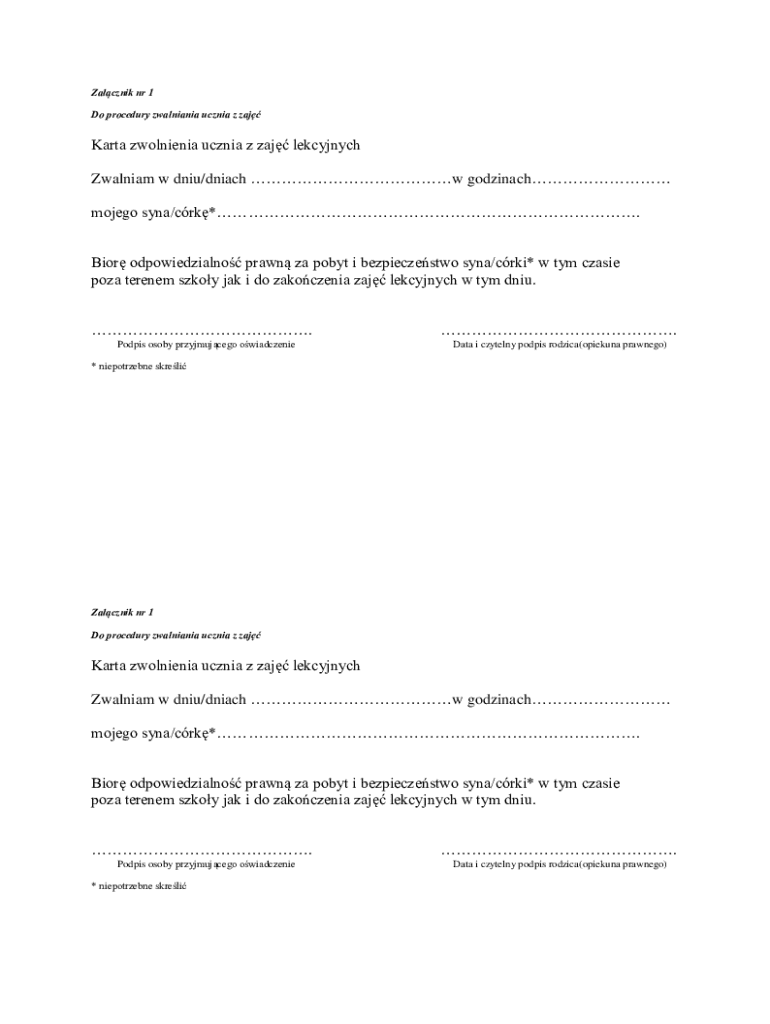
Get the free Student Release Form
We are not affiliated with any brand or entity on this form

Fill out
Complete the form online in a simple drag-and-drop editor.

eSign
Add your legally binding signature or send the form for signing.

Share
Share the form via a link, letting anyone fill it out from any device.

Export
Download, print, email, or move the form to your cloud storage.
Why pdfFiller is the best tool for your documents and forms


End-to-end document management
From editing and signing to collaboration and tracking, pdfFiller has everything you need to get your documents done quickly and efficiently.
Accessible from anywhere
pdfFiller is fully cloud-based. This means you can edit, sign, and share documents from anywhere using your computer, smartphone, or tablet.
Secure and compliant
pdfFiller lets you securely manage documents following global laws like ESIGN, CCPA, and GDPR. It's also HIPAA and SOC 2 compliant.
What is Release Form
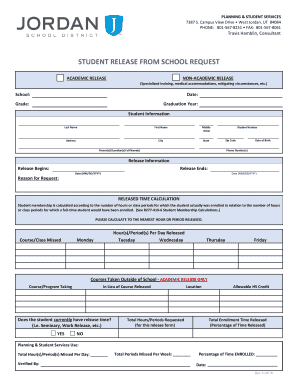
The Student Release Form is an educational document used by parents or legal guardians to temporarily release their child from school activities.
pdfFiller scores top ratings on review platforms




Who needs Release Form?
Explore how professionals across industries use pdfFiller.

Release Form is needed by:
-
Parents or legal guardians needing to release their child from school.
-
School representatives responsible for managing student activities.
-
Educational institutions requiring formal permission for student absence.
-
After-school program coordinators needing parental consent.
-
Legal guardians involved in student care.
Comprehensive Guide to Release Form
What is the Student Release Form?
The Student Release Form is a crucial document used by parents or legal guardians in Poland to legally acknowledge their responsibility for a child's safety while outside of school activities. This form is necessary when a child temporarily leaves school, ensuring parental consent for participation in specific events or activities. It serves the dual purpose of documenting this release and providing clear accountability.
Purpose and Benefits of the Student Release Form
The primary purpose of the Student Release Form is to establish a legal acknowledgment of responsibility by parents and guardians. It is applicable in various scenarios, such as school trips, extracurricular activities, and other events requiring parental consent. The benefits of using this form include:
-
Protecting the school from liability issues.
-
Providing parents peace of mind regarding their child's safety.
-
Ensuring clear communication between the school and families.
Who Needs the Student Release Form?
Primary users of the Student Release Form include parents and legal guardians who wish to authorize their child's participation in school-related activities. Situations that necessitate this form may include field trips, sporting events, or any occasion where the child will be under supervision outside the school premises. This ensures that all parties understand the child's whereabouts and responsibilities during that time.
How to Fill Out the Student Release Form Online
Filling out the Student Release Form online using the pdfFiller platform is straightforward. Follow these step-by-step instructions:
-
Access the pdfFiller website and locate the Student Release Form.
-
Enter the required dates and details accurately.
-
Provide the necessary signatures where indicated.
-
Gather all required documentation before starting to ensure smooth completion.
Pay special attention to the fields for dates and signatures to avoid any errors during submission.
Common Errors and How to Avoid Them
When completing the Student Release Form, some common errors might occur. These include:
-
Incorrect date entries.
-
Missing signatures from required parties.
-
Omitting essential information about the child’s activities.
To avoid these mistakes, consider the following tips:
-
Double-check all entries before submission.
-
Ensure all required fields are completed.
-
Validate the form's content with a second person if possible.
How to Sign the Student Release Form
The signing process for the Student Release Form varies depending on the nature of the signature required. Users can choose between digital signatures or traditional wet signatures. To eSign on the pdfFiller platform:
-
Select the eSignature option within the form.
-
Follow the prompts to create and place your digital signature.
-
If notarization is necessary, seek a licensed notary for verification.
Submission Methods for the Student Release Form
Once the Student Release Form is completed, users can submit it using various methods. Available submission options include both digital and paper formats:
-
Upload the completed form directly through pdfFiller.
-
Print the form and submit it physically at the school.
Remember to handle sensitive documents carefully during submission to maintain confidentiality.
What Happens After You Submit the Student Release Form?
After submitting the Student Release Form, the processing time may vary. Typically, schools provide a confirmation of receipt, which can take several days. To keep track of your submission status, you can:
-
Contact the school’s administration for updates.
-
Monitor for any follow-up communications or actions required on your part.
Importance of Document Security and Compliance
When handling the Student Release Form, it is critical to ensure document security. pdfFiller implements robust security measures, including 256-bit encryption, adhering to GDPR and HIPAA compliance. These practices protect sensitive information and uphold data protection policies, ensuring a safe experience for users.
Get Started with pdfFiller for Your Student Release Form
Users are encouraged to take advantage of pdfFiller for filling out the Student Release Form. This platform offers:
-
User-friendly tools for eSigning and editing forms.
-
Seamless sharing options to facilitate communication.
-
Comprehensive support to assist throughout the process.
Utilizing pdfFiller streamlines the completion and management of important educational forms.
How to fill out the Release Form
-
1.Start by accessing pdfFiller and logging into your account or creating a new one if you don't have one.
-
2.Use the search bar to find the Student Release Form and click on the form to open it.
-
3.Begin filling in the necessary fields by clicking on them, such as the child’s name, the specific date and time of the release, and your own personal details.
-
4.Gather all required information beforehand, including emergency contact details and any additional comments that may be necessary.
-
5.Ensure that you accurately complete all sections of the form, making sure that each field is filled out correctly to avoid delays.
-
6.Review the form carefully for any errors, confirming that the dates and names match what is required.
-
7.Once satisfied, save the form by clicking the save option, and choose the format you wish to save it in, such as PDF.
-
8.You can also download the completed form or submit it directly through pdfFiller by following the onscreen instructions.

Who needs to sign the Student Release Form?
The Student Release Form requires signatures from both the parent or legal guardian and a school representative to ensure that both parties acknowledge the release.
Is there a deadline for submitting the Student Release Form?
While specific deadlines may vary by school, it's advisable to submit the Student Release Form as soon as possible prior to the absence to ensure approval.
How can I submit the Student Release Form?
You can submit the Student Release Form via pdfFiller by directly sending it to the school representative or saving it for hand delivery, depending on the school’s requirements.
What supporting documents do I need for this form?
Typically, no supporting documents are required with the Student Release Form unless specified by your school. Always check with school guidelines for any additional requirements.
What common mistakes should I avoid when filling out the form?
Ensure that all information is accurate, especially dates and signatures, as incomplete or incorrect details can lead to processing delays or rejection of the form.
How long does it take for the Student Release Form to be processed?
Processing times can vary by institution, but the release should generally be confirmed within a few days, so it's best to submit the form well in advance.
Can the Student Release Form be notarized?
The Student Release Form does not require notarization, but checking with your institution for any specific requirements is always a good practice.
Related Forms




Get the latest insights from our blog


If you believe that this page should be taken down, please follow our DMCA take down process
here
.
This form may include fields for payment information. Data entered in these fields is not covered by PCI DSS compliance.