
Last updated on
Nov 5, 2026

Palmetto GBA Home Health Medical Record Audit Form 2015 free printable template
pdfFiller is not affiliated with any government organization

Fill out
Complete the form online in a simple drag-and-drop editor.

eSign
Add your legally binding signature or send the form for signing.

Share
Share the form via a link, letting anyone fill it out from any device.

Export
Download, print, email, or move the form to your cloud storage.
Why pdfFiller is the best tool for your documents and forms


End-to-end document management
From editing and signing to collaboration and tracking, pdfFiller has everything you need to get your documents done quickly and efficiently.
Accessible from anywhere
pdfFiller is fully cloud-based. This means you can edit, sign, and share documents from anywhere using your computer, smartphone, or tablet.
Secure and compliant
pdfFiller lets you securely manage documents following global laws like ESIGN, CCPA, and GDPR. It's also HIPAA and SOC 2 compliant.
What is Palmetto GBA Home Health Medical Record Audit Form
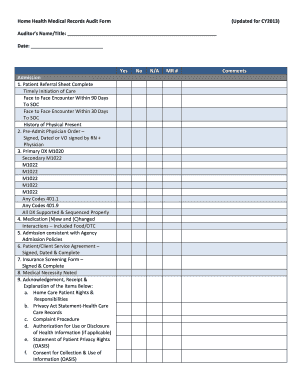
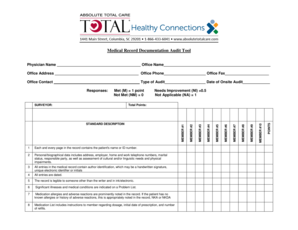
The Home Health Medical Record Audit Form is a medical record audit template used by healthcare providers to verify the accuracy and completeness of documentation for Medicare claims.
pdfFiller scores top ratings on review platforms




Who needs Palmetto GBA Home Health Medical Record Audit Form?
Explore how professionals across industries use pdfFiller.

Palmetto GBA Home Health Medical Record Audit Form is needed by:
-
Healthcare administrators managing home health services
-
Physicians conducting medical record audits
-
Non-physician practitioners involved in patient care
-
Billing personnel submitting Medicare claims
-
Regulatory auditors ensuring compliance with health documentation standards
Comprehensive Guide to Palmetto GBA Home Health Medical Record Audit Form
What is the Home Health Medical Record Audit Form?
The Home Health Medical Record Audit Form is crucial for auditing medical records related to home health services. Its primary purpose is to ensure compliance and accuracy in documentation, especially for Medicare claims. Auditing medical records helps healthcare providers maintain the quality of care while streamlining the reimbursement process.
The form encompasses several key components, including the plan of care, physician certification, nursing services, therapy services, and documentation for dependent services. Each component plays a vital role in providing a comprehensive view of the patient's care and verifying their eligibility for services.
Purpose and Benefits of the Home Health Medical Record Audit Form
This audit form is instrumental in ensuring that documentation adheres to regulatory standards, thus guaranteeing compliance. For healthcare providers, utilizing the home health medical record audit form promotes accuracy and reduces the risk of claim denials. Patients benefit as well, receiving improved care from compliant healthcare entities.
Additionally, the proper use of this form has considerable implications for Medicare reimbursement. Accurate and complete documentation supports quicker approvals and minimizes billing issues, ultimately leading to a more efficient claims process.
Key Features of the Home Health Medical Record Audit Form
The Home Health Medical Record Audit Form consists of various sections critical to documenting patient care accurately. Key features include:
-
Plan of care documentation
-
Nursing services details
-
Therapy services assessments
-
Dependent services verification
The form utilizes a mix of input fields such as checkboxes and text fields for easy completion. Clear instructions accompany each section to guide users in providing complete and accurate information.
Who Should Use the Home Health Medical Record Audit Form?
Healthcare professionals, particularly Physicians and Non-Physician Practitioners, are required to engage with the Home Health Medical Record Audit Form. Scenarios that necessitate the utilization of this form may include routine audits, patient admissions, and progress assessments.
Eligibility criteria for using the form typically involve possessing the necessary credentials to provide home health services and accurately complete the required documentation.
How to Fill Out the Home Health Medical Record Audit Form Online (Step-by-Step)
Filling out the Home Health Medical Record Audit Form online can be accomplished efficiently using pdfFiller. Follow these steps:
-
Access the form through the pdfFiller platform.
-
Fill in the required personal and patient information.
-
Complete each section diligently, adhering to the provided instructions.
-
Review all entries to verify accuracy and completeness.
-
Submit the form digitally, ensuring it is signed where necessary.
Best practices for completing the form include double-checking entries and utilizing available tips within pdfFiller to enhance the accuracy of your documentation.
Common Errors and How to Avoid Them When Completing the Form
Users often encounter several common errors while filling out the Home Health Medical Record Audit Form, such as incomplete sections, unclear handwriting, or missing signatures. To avoid these pitfalls, consider the following solutions:
-
Carefully read all instructions before starting.
-
Use digital tools to enhance clarity and legibility.
-
Confirm all required fields are filled out completely before submission.
Thoroughness in documentation and legibility are paramount to reducing the risk of rejections and ensuring smooth processing of claims.
Signature and Submission Requirements for the Home Health Medical Record Audit Form
When signing the Home Health Medical Record Audit Form, users have options for digital or wet signatures, depending on the submission method chosen. Understanding how to efficiently sign and submit the form is essential to prevent any delays.
Submission methods may include electronic transfer via pdfFiller or printing and mailing the form. Timely submission is critical to avoid complications with Medicare claims and ensure uninterrupted patient care.
Security and Compliance Considerations for Handling the Home Health Medical Record Audit Form
Using pdfFiller to manage the Home Health Medical Record Audit Form comes with significant data protection measures. The platform adheres to strict HIPAA compliance, ensuring the confidentiality of sensitive patient information.
Each user must take precautions to uphold patient confidentiality, which is vital for maintaining trust and complying with health regulations.
What Happens After You Submit the Home Health Medical Record Audit Form?
Once the Home Health Medical Record Audit Form is submitted, users can expect a structured processing timeline. Confirmation of receipt should occur shortly after submission, allowing for tracking of the document's status.
Understanding the common reasons for rejection, such as incomplete information or discrepancies, can prepare users for potential follow-up steps necessary to resolve any issues.
Enhance Your Document Management Experience with pdfFiller
Utilizing pdfFiller enhances the experience of completing the Home Health Medical Record Audit Form, offering efficiency and ease of use. Users can take advantage of features such as eSigning, editing tools, and document security to streamline their processes.
The platform's robust security measures ensure that sensitive documents are handled safely, providing users with peace of mind throughout their form completion journey.
How to fill out the Palmetto GBA Home Health Medical Record Audit Form
-
1.Access the Home Health Medical Record Audit Form by visiting pdfFiller's website. Use the search bar to find the form by its name and click to open it in the editor.
-
2.Familiarize yourself with pdfFiller's interface. Locate the toolbar at the top, which contains tools to add text, checkboxes, and other necessary elements for filling the form.
-
3.Before you begin filling out the form, gather all relevant documentation, such as patient records and plans of care, to ensure that you have all the necessary information on hand.
-
4.Start filling in the form by entering patient information in the designated fields. Use the text tool to type responses in blank fields where required.
-
5.Utilize the checkboxes provided in the form to indicate 'Yes', 'No', or 'N/A' for questions regarding the plan of care, certification, and other requirements.
-
6.After completing all sections, carefully review the form for legibility and completeness. Make sure all fields are properly filled out to avoid potential submission issues.
-
7.Once satisfied with your entries, save your progress. Use the save feature to download the completed form to your device or store it directly in pdfFiller's cloud storage.
-
8.For finalizing and submitting the form, choose the option to download a copy for your records or opt for direct submission to the appropriate Medicare body through pdfFiller.

Who is eligible to use the Home Health Medical Record Audit Form?
The form is intended for healthcare providers, including physicians and non-physician practitioners involved in home health services, as part of the Medicare claims process.
What are the deadlines for submitting this form?
Submission deadlines can vary based on the specific Medicare claim policies. It's crucial to refer to Medicare guidelines or consult your billing department for specific timelines.
How can I submit the completed Home Health Medical Record Audit Form?
You can submit the completed form either by downloading it and sending it through your organization's Medicare submission platform or directly through pdfFiller if such an option is available.
What supporting documents do I need when filling out this form?
You should have ready access to patient medical records, plans of care, and related documentation necessary to provide accurate and complete information on the audit form.
What are common mistakes to avoid when completing this form?
Common mistakes include overlooking required fields, providing illegible handwriting, or selecting incorrect checkboxes. Double-check all entries for accuracy before submission.
How long does it typically take to process this form?
Processing times may vary, but it generally depends on the Medicare processing schedule and the accuracy of documentation submitted. Expect delays if there are any errors.
Are there fees associated with using this form?
There are typically no fees for filling out the Home Health Medical Record Audit Form itself, but there may be costs associated with submitting claims to Medicare if errors occur.
Palmetto GBA Home Health Medical Record Audit Form Form Versions
Related Forms



Get the latest insights from our blog


If you believe that this page should be taken down, please follow our DMCA take down process
here
.
This form may include fields for payment information. Data entered in these fields is not covered by PCI DSS compliance.