
Last updated on
Oct 31, 2026
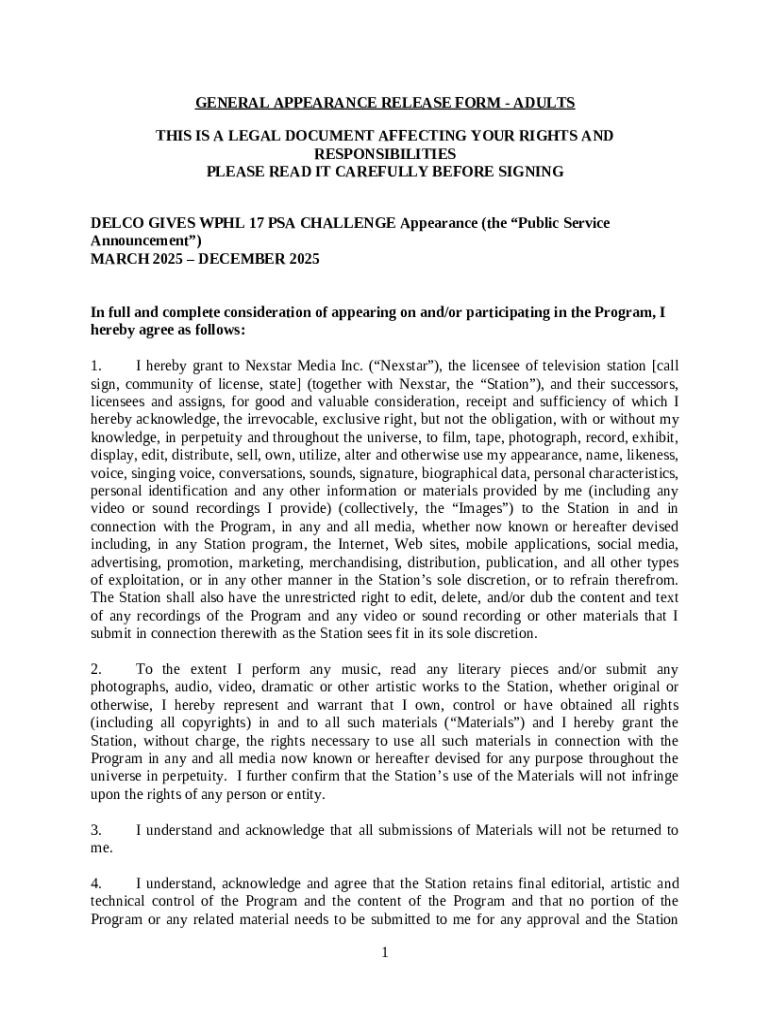
Get the free General Appearance Release Form - Adults
We are not affiliated with any brand or entity on this form

Fill out
Complete the form online in a simple drag-and-drop editor.

eSign
Add your legally binding signature or send the form for signing.

Share
Share the form via a link, letting anyone fill it out from any device.

Export
Download, print, email, or move the form to your cloud storage.
Why pdfFiller is the best tool for your documents and forms


End-to-end document management
From editing and signing to collaboration and tracking, pdfFiller has everything you need to get your documents done quickly and efficiently.
Accessible from anywhere
pdfFiller is fully cloud-based. This means you can edit, sign, and share documents from anywhere using your computer, smartphone, or tablet.
Secure and compliant
pdfFiller lets you securely manage documents following global laws like ESIGN, CCPA, and GDPR. It's also HIPAA and SOC 2 compliant.
What is Appearance Release Form
The General Appearance Release Form - Adults is a legal document used by individuals to grant Nexstar Media Inc. rights for their appearance in a public service announcement.
pdfFiller scores top ratings on review platforms




Who needs Appearance Release Form?
Explore how professionals across industries use pdfFiller.

Appearance Release Form is needed by:
-
Participants in public service announcements
-
Media production companies
-
Legal advisors for media contracts
-
Individuals appearing in advertisements
-
Talent agencies representing adult participants
-
Nonprofit organizations conducting PSA campaigns
Comprehensive Guide to Appearance Release Form
What is the General Appearance Release Form - Adults?
The General Appearance Release Form - Adults serves a significant role in media participation, particularly for programs organized by Nexstar Media Inc. This legal document allows individuals to grant rights related to their appearance and likeness, ensuring that their contribution is appropriately authorized. By completing this form, participants acknowledge the importance of their rights in connection with public service announcements (PSAs), which aim to inform and engage the community.
-
Defines the General Appearance Release Form - Adults as a binding agreement.
-
Clarifies the necessity of granting rights to Nexstar Media Inc. and its affiliates.
-
Explains how the form is integral to PSAs.
Purpose and Benefits of the General Appearance Release Form - Adults
Filling out the General Appearance Release Form - Adults provides multiple benefits for participants. Primarily, it offers legal protection regarding their likeness and image, safeguarding individuals from unauthorized usage. Additionally, this form allows for smooth and regulated participation in various media programs, contributing to the efficient operation of PSAs while protecting the media entity from liability.
-
Ensures legal protection for likeness and image rights.
-
Facilitates hassle-free participation in media programs, including PSAs.
-
Details the release from liability for Nexstar Media.
Who Needs the General Appearance Release Form - Adults?
The target audience for the General Appearance Release Form - Adults primarily includes individuals participating in media programs or PSAs. This group encompasses not only residents but also specific eligibility criteria, particularly in New York, where the form is governed by state laws. Furthermore, there are distinct waiver conditions for participants who are residents of California.
-
Individuals involved in media programs and PSAs.
-
Explanation of New York residency eligibility requirements.
-
Inclusion of waiver conditions for California residents.
How to Fill Out the General Appearance Release Form - Adults Online
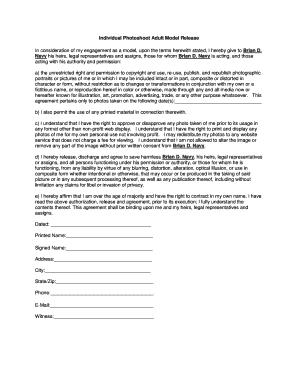
Filling out the General Appearance Release Form - Adults online involves several straightforward steps. Participants should carefully complete all required fillable fields, including 'Signature', 'Printed Name', 'Phone', and additional contact information. It is essential to read all instructions thoroughly before signing to ensure accuracy and completeness of the information provided.
-
Complete fields such as 'Signature:', 'Date:', and 'Printed Name:'.
-
Follow crucial instructions like 'PLEASE READ IT CAREFULLY BEFORE SIGNING'.
-
Tips for verifying the accuracy of information filled out.
Common Errors and How to Avoid Them While Filling Out the General Appearance Release Form - Adults
Participants often encounter several common errors when completing the General Appearance Release Form - Adults. Awareness of these pitfalls can lead to a smoother submission process. It is vital to review each section for accuracy and ensure no fields are overlooked, thereby increasing the likelihood of a successful application.
-
Watch for common errors such as missing signatures or incorrect contact information.
-
Field-specific tips to enhance accuracy in form completion.
-
Importance of reviewing the entire form before submission.
How to Sign the General Appearance Release Form - Adults
Understanding the signing requirements is essential for valid submission of the General Appearance Release Form - Adults. Participants can choose between a digital signature or a wet signature, with an increasing trend towards digital signing for its convenience and security. Compliance with legal standards regarding signatures is assured through proper methods of signing.
-
Explain the distinction between digital signatures and wet signatures.
-
Cultural trend towards digital signing highlights its benefits.
-
Confirmation of signing must meet legal standards for document validity.
Submission Methods and Where to Send the General Appearance Release Form - Adults
Participants have various options for submitting the completed General Appearance Release Form - Adults. Users should be aware of the submission methods provided, including digital avenues and physical mailing options. Additionally, it is crucial to understand where to send the form and any relevant deadlines to ensure timely processing.
-
Detail the submission methods available (both digital and physical).
-
Provide important addresses for sending the form after completion.
-
Information on deadlines and tracking options for submissions.
Security and Compliance When Using the General Appearance Release Form - Adults
Data security and compliance are paramount when using the General Appearance Release Form - Adults. pdfFiller ensures the protection of personal information through advanced security measures, including 256-bit encryption. Moreover, compliance with regulations such as GDPR and HIPAA underscores the company's commitment to maintaining user privacy throughout the submission process.
-
Outline security measures implemented by pdfFiller, including encryption.
-
Importance of compliance with GDPR and HIPAA for personal data handling.
-
Assurance of data privacy during the form submission process.
What Happens After You Submit the General Appearance Release Form - Adults?
After submission of the General Appearance Release Form - Adults, participants can expect a defined post-submission process. This includes information regarding processing times and the anticipated confirmation notifications from Nexstar Media. Additionally, guidelines for follow-up inquiries are provided to assist participants in navigating any potential issues.
-
Overview of the expected processing times and notifications post-submission.
-
Details on communication from Nexstar Media following submission.
-
Guidelines for follow-up procedures if necessary.
Empowering Your Media Participation with pdfFiller
Choosing pdfFiller for managing the General Appearance Release Form - Adults enhances media participation experiences. The platform offers user-friendly features that simplify filling and signing documents, underscoring its reliability for sensitive document handling. Users are encouraged to leverage pdfFiller for efficient document management.
-
User-friendly features for filling and signing documents.
-
Importance of using a reliable platform for sensitive documents.
-
Encouragement to try pdfFiller for effortless management of the General Appearance Release Form - Adults.
How to fill out the Appearance Release Form
-
1.To access the General Appearance Release Form - Adults on pdfFiller, navigate to the pdfFiller website and use the search bar to find the form by entering its name.
-
2.Once the form is displayed, click on it to open it in the pdfFiller editor. You will see the form presented with fillable fields ready for completion.
-
3.Before filling out the form, gather all necessary information such as your full name, address, contact number, email address, and the date. Make sure you have these details handy to streamline the filling process.
-
4.Start by clicking on each fillable field to input the required information. Use pdfFiller's tools to insert text accurately into fields labeled 'Signature:', 'Date:', 'Printed Name:', 'Phone:', 'Address:', and 'Email:'.
-
5.As you complete the form, adhere to any additional instructions provided, such as reading the complete text and understanding the waiver processes involved with the form's use.
-
6.Once all fields are filled in, take a moment to review each section. Ensure that all entered data is accurate and reflects the information you provided. Check for any potential errors or omissions.
-
7.To finalize the form, look for the option to save your work. You can save it directly on pdfFiller, download it to your device, or if required, submit it through any specified method provided by your organization.

Who is eligible to use the General Appearance Release Form - Adults?
Eligible individuals are adults participating in public service announcements or media appearances, as well as their legal representatives if necessary. Ensure you understand your rights and obligations under the form.
What are the deadlines for submitting this form?
Deadlines for submitting the General Appearance Release Form often depend on the specific project or media company. It's advisable to submit the form as soon as possible to avoid complications with participation.
How should I submit the completed form?
The completed form should be submitted according to the instructions provided by Nexstar Media Inc. This may include email submission, uploading through a web portal, or physically handing it in during your participation.
What supporting documents are required for this form?
Typically, no additional supporting documents are required for the General Appearance Release Form - Adults. However, it’s wise to check with your media contact if any identification or proof of age is necessary.
What common mistakes should I avoid when filling out the form?
Common mistakes include leaving fields blank, not following the instructions, and submitting the form without a signature. Always double-check your entries for accuracy.
How long does it take to process this form?
Processing times can vary. In most cases, it takes a few business days to be reviewed if submitted correctly. For urgent issues, contact Nexstar Media Inc. directly.
Is notarization required for this form?
No, notarization is not required for the General Appearance Release Form - Adults. It is sufficient to sign the form as specified within.
Related Forms


Get the latest insights from our blog


If you believe that this page should be taken down, please follow our DMCA take down process
here
.
This form may include fields for payment information. Data entered in these fields is not covered by PCI DSS compliance.