
Last updated on
Oct 31, 2026
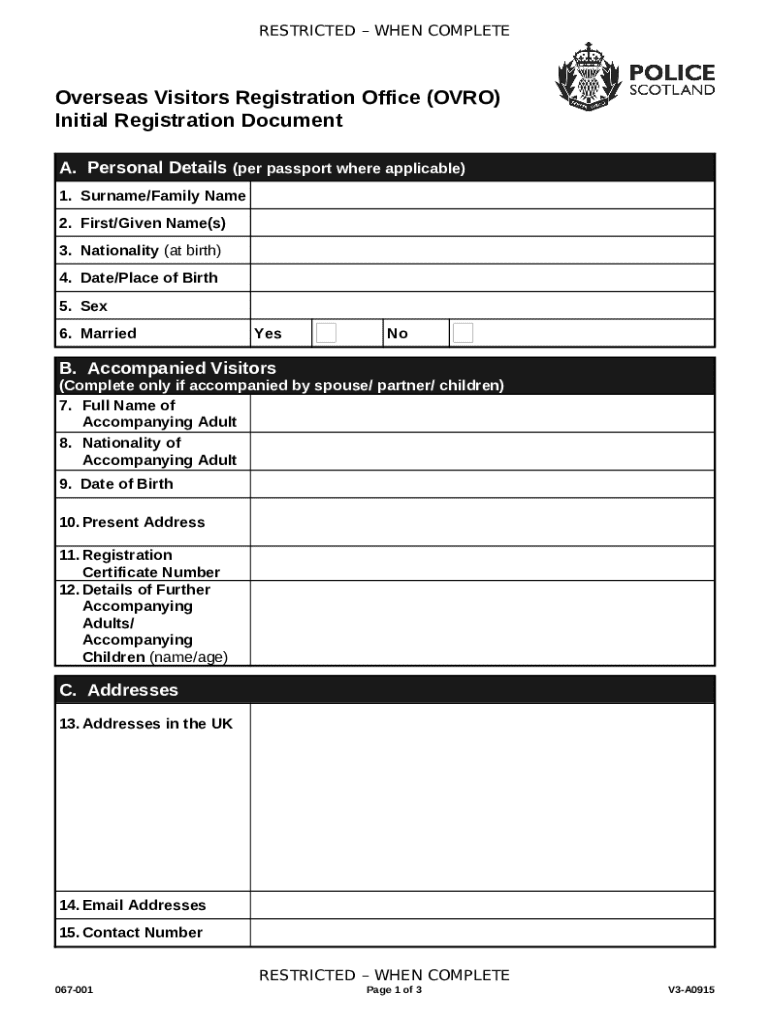
Get the free UK Overseas Visitors Registration Form
We are not affiliated with any brand or entity on this form

Fill out
Complete the form online in a simple drag-and-drop editor.

eSign
Add your legally binding signature or send the form for signing.

Share
Share the form via a link, letting anyone fill it out from any device.

Export
Download, print, email, or move the form to your cloud storage.
Why pdfFiller is the best tool for your documents and forms


End-to-end document management
From editing and signing to collaboration and tracking, pdfFiller has everything you need to get your documents done quickly and efficiently.
Accessible from anywhere
pdfFiller is fully cloud-based. This means you can edit, sign, and share documents from anywhere using your computer, smartphone, or tablet.
Secure and compliant
pdfFiller lets you securely manage documents following global laws like ESIGN, CCPA, and GDPR. It's also HIPAA and SOC 2 compliant.
What is UK Visitor Registration
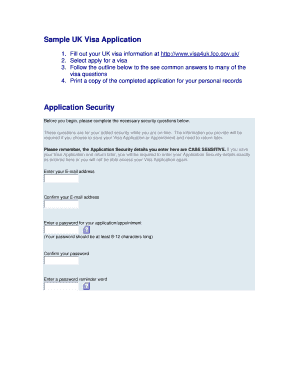
The UK Overseas Visitors Registration Form is a government document used by visitors to the United Kingdom to register personal and visa information.
pdfFiller scores top ratings on review platforms




Who needs UK Visitor Registration?
Explore how professionals across industries use pdfFiller.

UK Visitor Registration is needed by:
-
International visitors arriving in the UK
-
Tourists needing to register for residency
-
Students enrolling in UK educational institutions
-
Employees on work visas in the UK
-
Family members accompanying UK visa holders
Comprehensive Guide to UK Visitor Registration
What is the UK Overseas Visitors Registration Form?
The UK Overseas Visitors Registration Form is a vital document in the UK immigration process. It requires essential personal details such as name, nationality, and passport information to aid in the registration of overseas visitors. By completing this form, users are recognized officially, which is crucial for their lawful stay in the UK and access to relevant services.
-
Description of the form and its role in the immigration process.
-
Information on personal details needed for registration.
-
Importance of registration for all overseas visitors.
Purpose and Benefits of the UK Overseas Visitors Registration Form
This form serves multiple purposes that significantly benefit international visitors. By registering, individuals can ensure they are compliant with UK immigration regulations, leading to a lawful stay. Proper documentation not only facilitates their time in the UK but also supports future travel or residency applications.
-
Advantages of registration include lawful stay and service access.
-
Discussion on compliance requirements.
-
Benefits for future residency applications.
Who Needs the UK Overseas Visitors Registration Form?
The target audience for this form includes various groups, such as tourists, students, and temporary workers. Each group falls under specific regulations that necessitate their registration with the UK authorities, especially for longer stays or specific visa types where registration is mandatory.
-
Tourists visiting the UK.
-
Students enrolled in educational institutions.
-
Temporary workers on specific visas.
-
Extended stays requiring registration.
Eligibility Criteria for the UK Overseas Visitors Registration Form
To qualify for this form, applicants must meet certain nationality and residency requirements. Additionally, there are specific age limitations and documentation requirements, such as a valid passport and visa. Certain exceptions apply, for instance, to special diplomats, who may have different registration protocols.
-
Nationality requirements that must be met.
-
Age limitations and documentation needs.
-
Exemptions for certain categories of visitors.
How to Fill Out the UK Overseas Visitors Registration Form Online (Step-by-Step)
Filling out the UK Overseas Visitors Registration Form online is a straightforward process. Start by accessing the official site to find the form, and proceed to complete key fields like 'Surname/Family Name' and 'Date of Birth'. Follow the guidelines to ensure you attach all required documents and photographs as per the specifications.
-
Access the online form on the official website.
-
Fill in personal details such as 'Surname/Family Name' and 'Date of Birth'.
-
Attach required supporting documents and photographs.
-
Double-check all fields for accuracy before submission.
Common Errors and How to Avoid Them
Accuracy is paramount when filling out the UK Overseas Visitors Registration Form. Common mistakes include missing signatures and incorrect document attachments. To avoid these, it is vital to double-check each field and ensure that all information is legible and formatted correctly before submission.
-
Frequent mistakes to watch for include missing signatures.
-
Incorrect or incomplete document attachments.
-
Importance of ensuring legibility in submissions.
Submitting the UK Overseas Visitors Registration Form
Submitting your completed form can be done through various methods depending on the required registration process. You may choose between online submission and postal options. Be aware of any associated fees and select the payment methods appropriate for your submission route.
-
Online submission procedures.
-
Postal submission requirements and addresses.
-
Fee structures and payment methods.
What Happens After You Submit the UK Overseas Visitors Registration Form
Once the form has been submitted, applicants will receive confirmation of receipt. Understanding processing times is crucial, as this can vary. If delays occur or corrections are necessary post-submission, knowing how to check application status becomes essential to manage your expectations effectively.
-
Confirmation of receipt and typical processing times.
-
How to check the status of your application.
-
Steps to take if corrections are needed.
Security and Compliance with the UK Overseas Visitors Registration Form
Data security is a major concern when submitting personal information via the UK Overseas Visitors Registration Form. This process is governed by strict UK laws that prioritize visitor privacy. Comprehensive data protection measures are in place, ensuring the responsibility lies with service providers like pdfFiller to handle forms securely.
-
Details on data protection measures during submission.
-
Relevance of UK laws for visitor registration security.
-
Role of pdfFiller in secure form handling.
Discover How pdfFiller Makes Filling Out the UK Overseas Visitors Registration Form Easy
pdfFiller enhances the form-filling experience for users by providing a suite of features designed for ease and security. The user-friendly interface allows for editing, filling, and eSigning documents, streamlining the registration process. Users are encouraged to explore these capabilities and start their registration process seamlessly on the platform.
-
Features of pdfFiller that simplify form filling.
-
Security measures ensuring document safety.
-
User-friendly interface for an efficient experience.
How to fill out the UK Visitor Registration
-
1.To access the UK Overseas Visitors Registration Form on pdfFiller, navigate to the platform and search for the form using its title or keywords like 'UK Visitor Registration'.
-
2.After locating the form, click to open it in the pdfFiller editor. You will see an editable version of the form displayed on your screen.
-
3.Before starting, gather all necessary information such as your full name, nationality, date of birth, passport number, and visa details.
-
4.Begin completing the form by clicking on each blank field. Use the keyboard to input your personal details in the designated areas like name, passport information, and date of birth.
-
5.Make sure to fill out the 'Signature Or Mark Of Applicant' field using the tools provided by pdfFiller. You can use the signature feature to create or upload your signature.
-
6.Carefully read the instructions provided within the form, as they guide you on additional fields to complete if you are accompanied by family members.
-
7.Once you have filled out all required fields, review your entries for accuracy and completeness using pdfFiller's preview function.
-
8.After reviewing, save your progress by using the save feature. You can download the form as a PDF, or submit it directly through pdfFiller if applicable.
-
9.Ensure you have attached any required supporting documents and photographs before finalizing the submission.

Who needs to fill out the UK Overseas Visitors Registration Form?
This form is essential for international visitors to the UK, including tourists, students, and employees on work visas, to legally register their information and stay in compliance with immigration regulations.
What information do I need to provide when completing this form?
You will need to provide personal information including your full name, nationality, date of birth, passport number, visa details, and, if necessary, details related to any accompanying family members.
Where can I submit the completed UK Overseas Visitors Registration Form?
Once completed, you can submit the form through pdfFiller by following the on-screen instructions. Alternatively, you may need to print and submit it to the relevant UK authorities, as per their guidelines.
Are there any fees associated with this registration?
Typically, there is a registration fee required along with the submission of this form. Be sure to check the official regulations or guidelines regarding the exact fee amount.
What are common mistakes to avoid when filling out the form?
Common mistakes include incomplete fields, inaccurate personal details, and failing to review the form before submission. Always double-check your information for accuracy.
How long does it take to process the registration after submission?
Processing times can vary depending on the submitted documents and local procedures. It's advisable to allow several weeks for processing and to check with the relevant authority for specific details.
What supporting documents are needed with the form?
You should attach a valid passport, visa documents, and any relevant employment or student status proof as instructed in the registration process.
Related Forms






Get the latest insights from our blog


If you believe that this page should be taken down, please follow our DMCA take down process
here
.
This form may include fields for payment information. Data entered in these fields is not covered by PCI DSS compliance.