
Last updated on
Oct 31, 2026

Get the free Non-Network UB-04 Signature Form
We are not affiliated with any brand or entity on this form

Fill out
Complete the form online in a simple drag-and-drop editor.

eSign
Add your legally binding signature or send the form for signing.

Share
Share the form via a link, letting anyone fill it out from any device.

Export
Download, print, email, or move the form to your cloud storage.
Why pdfFiller is the best tool for your documents and forms


End-to-end document management
From editing and signing to collaboration and tracking, pdfFiller has everything you need to get your documents done quickly and efficiently.
Accessible from anywhere
pdfFiller is fully cloud-based. This means you can edit, sign, and share documents from anywhere using your computer, smartphone, or tablet.
Secure and compliant
pdfFiller lets you securely manage documents following global laws like ESIGN, CCPA, and GDPR. It's also HIPAA and SOC 2 compliant.
What is UB-04 Signature Form
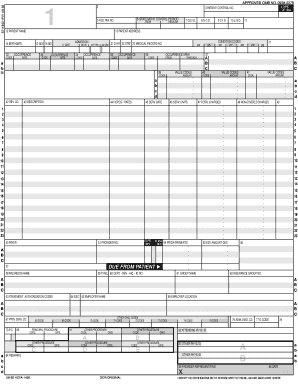
The Non-Network UB-04 Signature Form is a medical billing document used by healthcare providers to authorize claim submissions to TRICARE in South Carolina.
pdfFiller scores top ratings on review platforms




Who needs UB-04 Signature Form?
Explore how professionals across industries use pdfFiller.

UB-04 Signature Form is needed by:
-
Healthcare providers submitting TRICARE claims
-
Billing departments in medical facilities
-
Authorized representatives responsible for healthcare claims
-
Insurance coordinators managing TRICARE claims
-
Administrative staff of non-network facilities
-
Compliance officers ensuring documentation accuracy
Comprehensive Guide to UB-04 Signature Form
What is the Non-Network UB-04 Signature Form?
The Non-Network UB-04 Signature Form is a vital document in the healthcare sector, specifically designed to facilitate claim submissions for non-network providers. This form is crucial for healthcare providers dealing with TRICARE claims as it authorizes PGBA, LLC / Health Net Federal Services to act on their behalf. The form encompasses essential fields such as the facility name and the signature of the authorized representative, ensuring compliance with the TRICARE Operations Manual.
Purpose and Benefits of the Non-Network UB-04 Signature Form
This form plays a critical role in streamlining healthcare billing processes. By completing the Non-Network UB-04 Signature Form, healthcare providers grant permission for PGBA, LLC / Health Net Federal Services to submit claims efficiently. This not only simplifies the claims process for providers but also enhances the experience for patients by ensuring timely reimbursements. Additionally, using this form helps maintain adherence to TRICARE Operations Manual requirements.
Who Needs the Non-Network UB-04 Signature Form?
Healthcare providers engaged with non-network TRICARE claims are the primary audience for this form. Eligibility criteria for completing the form include being an authorized provider under TRICARE guidelines. It is essential for providers to have an authorized representative sign the Non-Network UB-04 Signature Form to validate the submitted claims and ensure proper processing.
How to Fill Out the Non-Network UB-04 Signature Form Online
Completing the Non-Network UB-04 Signature Form online involves several clear steps:
-
Access the online form and begin entering your information.
-
Fill out each required field, including facility name and tax identification number.
-
Carefully review each entry for accuracy.
-
Complete the authorized representative section with a signature.
-
Utilize the validation checklist provided to ensure completeness.
Submission Methods for the Non-Network UB-04 Signature Form
There are multiple methods available for submitting the completed Non-Network UB-04 Signature Form:
-
Online submission through the designated portal.
-
Mailing the form directly to the appropriate claims processing center.
-
Verify the status of your submission through established tracking options.
Providers should also be aware of all relevant deadlines and be mindful of the expected processing times for their submissions.
Common Errors and How to Avoid Them
When filling out the Non-Network UB-04 Signature Form, several common mistakes can lead to delays or denials. Here are tips for ensuring accuracy:
-
Double-check all required fields for completeness.
-
Ensure the authorized representative’s signature is included.
-
Be mindful of deadlines to avoid submission issues.
Recognizing and avoiding these pitfalls can prevent the potential consequences associated with errors on the form.
Importance of Security in Submitting the Non-Network UB-04 Signature Form
Handling sensitive information securely is paramount when submitting the Non-Network UB-04 Signature Form. pdfFiller’s secure platform utilizes 256-bit encryption, ensuring compliance with both HIPAA and GDPR regulations. Protecting user data is essential, and it is recommended to always manage and submit healthcare documents through secure channels.
Sample of a Completed Non-Network UB-04 Signature Form
Reviewing a sample Non-Network UB-04 Signature Form can provide clarity and guidance:
-
Highlighted fields will show where information is required.
-
The sample demonstrates what a completed form looks like to aid understanding.
-
Use this reference to ensure your form aligns with acceptable standards.
Getting Started with pdfFiller for the Non-Network UB-04 Signature Form
pdfFiller offers valuable services to assist users in completing the Non-Network UB-04 Signature Form. The platform allows for easy editing and secure eSigning:
-
Utilize cloud-based tools for increased efficiency and flexibility.
-
Follow simple steps to navigate the pdfFiller interface effectively.
By leveraging these capabilities, users can simplify their form-filling experience and ensure compliance with healthcare standards.
How to fill out the UB-04 Signature Form
-
1.Access the Non-Network UB-04 Signature Form by visiting pdfFiller and searching for the form name.
-
2.Once the form appears, click on it to open it in the pdfFiller editor.
-
3.Before completing the form, gather necessary information such as your Facility Name, Facility Tax Identification Number, and any required authorization signatures.
-
4.Begin filling in the fields by clicking on each blank space and typing in the relevant information directly.
-
5.Utilize the options for checkboxes and ensure that all required fields are completed accurately.
-
6.As you proceed, refer to the explicit instructions provided within the form for guidance on what information is needed in each field.
-
7.After all sections are filled out, review the entire form to ensure that no information is omitted or contains errors.
-
8.You can use pdfFiller's tools to preview the completed form and make any last-minute adjustments.
-
9.Once satisfied with the information, save your work to your pdfFiller account or download a copy to your device.
-
10.If necessary, submit the form according to TRICARE submission guidelines, ensuring to keep a copy for your records.

Who is eligible to use the Non-Network UB-04 Signature Form?
The Non-Network UB-04 Signature Form is primarily for healthcare providers and authorized representatives submitting TRICARE claims in South Carolina.
What information is required to complete the form?
Essential information includes the Facility Name, Facility Tax Identification Number, and an authorized representative's signature confirming the details.
How do I submit the completed form?
The completed form can be submitted according to TRICARE's claim submission procedures, which may involve direct online submission or mailing.
Are there deadlines associated with submitting this form?
Yes, TRICARE has specific deadlines for claim submissions. Ensure to check with TRICARE guidelines to avoid late submissions.
What common mistakes should I avoid when filling out the form?
Ensure all fields are filled correctly and fully. Common mistakes include incomplete fields, missing signatures, or incorrect facility information.
How can I verify if my submission was successful?
After submitting the form, check for confirmation from TRICARE or use their claim tracking services to verify processing status.
Are there any fees associated with submitting the Non-Network UB-04 Signature Form?
Typically, there are no fees for submitting the form itself; however, providers should verify any potential fees related to their claim submissions with TRICARE.
Related Forms





Get the latest insights from our blog


If you believe that this page should be taken down, please follow our DMCA take down process
here
.
This form may include fields for payment information. Data entered in these fields is not covered by PCI DSS compliance.