
Last updated on
Oct 31, 2026
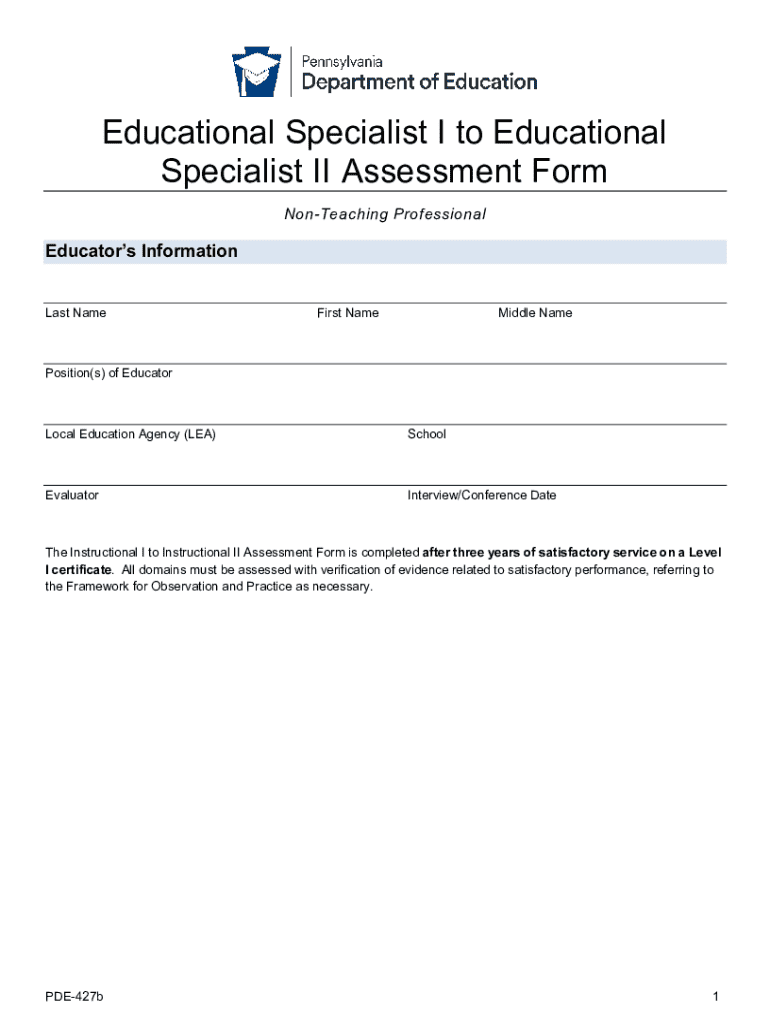
Get the free Educational Specialist I to II Assessment Form
We are not affiliated with any brand or entity on this form

Fill out
Complete the form online in a simple drag-and-drop editor.

eSign
Add your legally binding signature or send the form for signing.

Share
Share the form via a link, letting anyone fill it out from any device.

Export
Download, print, email, or move the form to your cloud storage.
Why pdfFiller is the best tool for your documents and forms


End-to-end document management
From editing and signing to collaboration and tracking, pdfFiller has everything you need to get your documents done quickly and efficiently.
Accessible from anywhere
pdfFiller is fully cloud-based. This means you can edit, sign, and share documents from anywhere using your computer, smartphone, or tablet.
Secure and compliant
pdfFiller lets you securely manage documents following global laws like ESIGN, CCPA, and GDPR. It's also HIPAA and SOC 2 compliant.
What is Specialist Assessment Form
The Educational Specialist I to II Assessment Form is a document used by educational professionals in Pennsylvania to evaluate the performance of non-teaching educational specialists.
pdfFiller scores top ratings on review platforms




Who needs Specialist Assessment Form?
Explore how professionals across industries use pdfFiller.

Specialist Assessment Form is needed by:
-
Educators seeking advancement to Level II certification
-
Evaluators responsible for performance assessments
-
School administrators overseeing educational assessments
-
Educational institutions conducting performance reviews
-
HR departments managing staff evaluations
Comprehensive Guide to Specialist Assessment Form
What is the Educational Specialist I to II Assessment Form?
The Educational Specialist I to II Assessment Form is a critical tool for evaluating educational specialists in Pennsylvania. Its significance lies in assessing the proficiency and capabilities of educators across various domains. The four domains evaluated include Planning and Preparation, Educational Environment, Delivery of Service, and Professional Development. By focusing on these areas, the form plays an essential role in the overall educator performance evaluation process.
Purpose and Benefits of the Educational Specialist I to II Assessment Form
This assessment form not only tracks educational performance but is also pivotal in promoting professional development and career progression for educators. By utilizing a standardized evaluation process, both educators and evaluators benefit, fostering a culture of continuous improvement. Such an approach ensures that educational specialists receive constructive feedback, guiding them in their professional journey.
Key Features of the Educational Specialist I to II Assessment Form
-
The form includes multiple fillable fields and checkboxes tailored for comprehensive assessments.
-
It comes with clear and easy-to-follow instructions to facilitate the completion process.
-
Emphasizes evidence collection to substantiate satisfactory performance within the assessed domains.
Who Needs the Educational Specialist I to II Assessment Form?
This form is essential for various stakeholders, including educators seeking to transition from Level I to Level II certification. Evaluators who assess these forms also play a crucial role in the process. Understanding the target audience ensures that the evaluation aligns with the needs of both educators and the assessment criteria set forth by the state.
How to Fill Out the Educational Specialist I to II Assessment Form Online
-
Navigate to the form available on pdfFiller's website.
-
Fill out the required fields accurately, ensuring all information is up to date.
-
Review each section to confirm completeness before submission.
-
Save and submit the form electronically for processing.
Common Errors and How to Avoid Them
-
Failing to provide accurate details can lead to rejection, so double-check all information.
-
Missing signatures from required roles may delay processing, so ensure all parties sign.
-
Inaccurate formatting or incomplete fields result in common rejection reasons.
Submission Methods for the Educational Specialist I to II Assessment Form
Once completed, the Educational Specialist I to II Assessment Form can be submitted through multiple channels. Users have the option to submit the form electronically or by mail. It is important to include all necessary documents alongside the form to ensure a smooth submission process.
Security and Compliance for the Educational Specialist I to II Assessment Form
pdfFiller prioritizes the security and confidentiality of users’ sensitive information when handling this assessment form. The platform adheres to strict compliance standards, including HIPAA and GDPR, ensuring that user data is protected during the completion and submission processes.
Leveraging pdfFiller for the Educational Specialist I to II Assessment Form
Utilizing pdfFiller to complete the Educational Specialist I to II Assessment Form streamlines the entire process. Users can take advantage of features such as online editing, eSigning, and easy document management, facilitating both efficiency and security in managing educational forms.
Final Thoughts on Completing the Educational Specialist I to II Assessment Form
Accurate completion and timely submission of the Educational Specialist I to II Assessment Form are paramount. By leveraging resources available at pdfFiller, users can simplify the process and ensure they meet all requirements for successful evaluation. This approach ultimately enhances the effectiveness of educator performance evaluations across Pennsylvania.
How to fill out the Specialist Assessment Form
-
1.Access the Educational Specialist I to II Assessment Form on pdfFiller by searching for the document in the search bar or navigating through the education forms section.
-
2.Once the form is opened, familiarize yourself with its layout. Look for fillable fields and instructions provided on each section of the form.
-
3.Before filling out the form, gather necessary information such as the educator's service records, evidence of performance related to the four assessment domains, and any previous evaluations.
-
4.Start completing the form by clicking on the appropriate fillable fields. Use the pdfFiller tools to input text and checkboxes for the assessment requirements specified in the form.
-
5.Review the completed sections carefully to ensure all information is accurate and aligns with the required documentation.
-
6.Finalize the form by signing in the designated areas. Ensure that all required signatures are collected based on your role (Educator or Evaluator).
-
7.Once the form is complete, save your changes and download the document in your preferred format, or submit through pdfFiller directly via email or by exporting to required submission platforms.

Who is eligible to use the Educational Specialist I to II Assessment Form?
The form is designed for non-teaching educational professionals in Pennsylvania who are seeking advancement from Level I to Level II certification, as well as evaluators conducting assessments.
What are the deadlines for submitting the Educational Specialist Assessment Form?
There are typically no fixed deadlines. However, it's advisable to submit the form after three years of service on a Level I certificate to ensure timely evaluation for advancement.
How should I submit the completed Educational Specialist Assessment Form?
The completed form can be saved, downloaded, or submitted through pdfFiller via email or other platforms as specified by your educational institution's procedures.
What supporting documents are required when submitting this form?
You may need to provide evidence of satisfactory performance across the four assessment domains, including documentation of professional development activities and previous evaluations.
What common mistakes should I avoid when filling out the form?
Ensure all fields are filled correctly, avoid leaving required fields blank, and check that all signatures are obtained before submission to prevent processing delays.
How long does it take to process the Educational Specialist Assessment Form?
Processing times can vary based on the school or district. Typically, you can expect a response within a few weeks to a couple of months.
What if I have questions about completing the form?
If you have questions, refer to the instructions provided within the form or contact your institution's HR department or evaluator for clarification.
Related Forms




Get the latest insights from our blog


If you believe that this page should be taken down, please follow our DMCA take down process
here
.
This form may include fields for payment information. Data entered in these fields is not covered by PCI DSS compliance.