
Last updated on
Oct 31, 2026
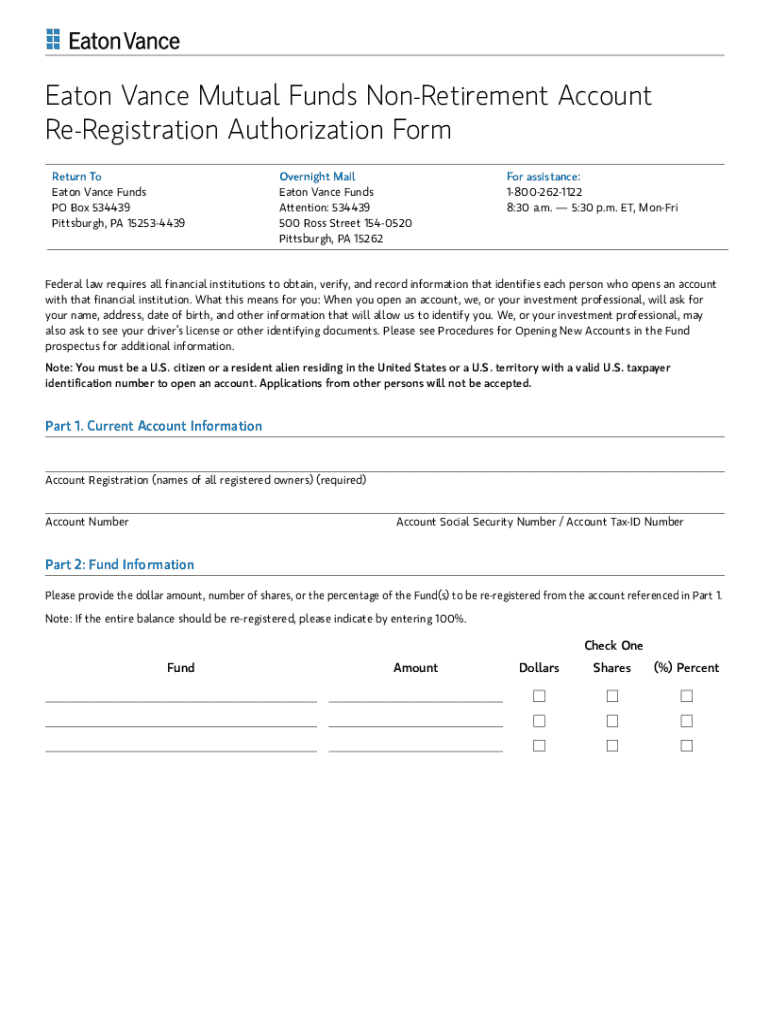
Get the free Eaton Vance Mutual Funds Non-Retirement Account Re-Registration Authorization Form
We are not affiliated with any brand or entity on this form

Fill out
Complete the form online in a simple drag-and-drop editor.

eSign
Add your legally binding signature or send the form for signing.

Share
Share the form via a link, letting anyone fill it out from any device.

Export
Download, print, email, or move the form to your cloud storage.
Why pdfFiller is the best tool for your documents and forms


End-to-end document management
From editing and signing to collaboration and tracking, pdfFiller has everything you need to get your documents done quickly and efficiently.
Accessible from anywhere
pdfFiller is fully cloud-based. This means you can edit, sign, and share documents from anywhere using your computer, smartphone, or tablet.
Secure and compliant
pdfFiller lets you securely manage documents following global laws like ESIGN, CCPA, and GDPR. It's also HIPAA and SOC 2 compliant.
What is Eaton Vance Re-Registration Form
The Eaton Vance Mutual Funds Non-Retirement Account Re-Registration Authorization Form is a financial document used by account holders to re-register mutual fund accounts.
pdfFiller scores top ratings on review platforms




Who needs Eaton Vance Re-Registration Form?
Explore how professionals across industries use pdfFiller.

Eaton Vance Re-Registration Form is needed by:
-
Individual Shareholders seeking to manage their investment accounts
-
Attorneys-in-Fact needing to authorize account changes
-
Custodians managing assets for dependents or minors
-
Executors of estates overseeing fund transfers
-
Former Minors transitioning to adult investment management
-
Joint Tenants jointly managing property and investments
-
Successor Trustees administering trusts and investments
Comprehensive Guide to Eaton Vance Re-Registration Form
What is the Eaton Vance Mutual Funds Non-Retirement Account Re-Registration Authorization Form?
The Eaton Vance Mutual Funds Non-Retirement Account Re-Registration Authorization Form is an essential document for the re-registration of mutual fund accounts. This form streamlines the process of transferring funds to either existing or new accounts at Eaton Vance.
Its importance cannot be overstated, as it ensures that account information remains accurate and up to date. Completing this form requires obtaining signatures along with Medallion Signature Guarantees from authorized personnel.
Purpose and Benefits of the Eaton Vance Mutual Funds Non-Retirement Account Re-Registration Authorization Form
Completing the Eaton Vance Mutual Funds Non-Retirement Account Re-Registration Authorization Form offers multiple benefits, notably in maintaining precise account information. Accurate re-registration facilitates better account management and helps in avoiding future discrepancies.
One of the advantages includes the efficiency of using a platform like pdfFiller, which offers features that simplify filling out the form. Users can complete their submissions more quickly, thus enhancing their overall account management experience.
Who Needs the Eaton Vance Mutual Funds Non-Retirement Account Re-Registration Authorization Form?
The need for the Eaton Vance Mutual Funds Non-Retirement Account Re-Registration Authorization Form extends to several roles. These include:
-
Shareholders
-
Attorneys-in-Fact
-
Executors
-
Co-owners or joint tenants
Each of these roles is vital in the re-registration process, ensuring that the correct parties authorize the changes. Eligibility criteria may vary for each role, dictating who is authorized to complete and sign the form.
How to Complete the Eaton Vance Mutual Funds Non-Retirement Account Re-Registration Authorization Form Online (Step-by-Step)
Filling out the Eaton Vance Mutual Funds Non-Retirement Account Re-Registration Authorization Form online using pdfFiller can be accomplished through several steps:
-
Access the form and identify key sections where required information will go.
-
Fill in personal and account details, ensuring all required fields are completed.
-
Obtain and insert the necessary Medallion Signature Guarantees.
-
Utilize pdfFiller features for easy submission and eSigning.
This approach simplifies the process and minimizes errors entirely, ensuring a smooth submission.
Common Errors and How to Avoid Them When Completing the Form
While filling out the Eaton Vance Mutual Funds Non-Retirement Account Re-Registration Authorization Form, users may encounter common pitfalls. Some frequent errors include:
-
Missing signatures in required fields.
-
Incorrectly filled account information, leading to potential mismatches.
To help avoid such mistakes, double-checking entries before submission is vital. Additionally, understand the significance of the Medallion Signature Guarantee; ensure it is included whenever necessary.
How to Submit the Eaton Vance Mutual Funds Non-Retirement Account Re-Registration Authorization Form
Submission of the completed Eaton Vance Mutual Funds Non-Retirement Account Re-Registration Authorization Form can be achieved through various methods:
-
Submitting the form in person at designated locations.
-
Utilizing electronic submission methods when applicable.
It is important to pay attention to any associated fees and deadlines to ensure timely processing. Check specific guidelines for pricing and submission timelines to avoid complications.
What Happens After You Submit the Eaton Vance Mutual Funds Non-Retirement Account Re-Registration Authorization Form?
Once the form is submitted, users can confirm their submission and track its status through established channels. Understanding the possible outcomes is crucial, as this may involve dealing with corrections or rejections.
Users should anticipate delays in feedback, so remaining patient during the processing period is advisable. Stay informed about any communications from Eaton Vance as follow-up may be required.
Security and Compliance When Using the Eaton Vance Mutual Funds Non-Retirement Account Re-Registration Authorization Form
Security is paramount when dealing with sensitive documents like the Eaton Vance Mutual Funds Non-Retirement Account Re-Registration Authorization Form. pdfFiller employs robust security measures, including 256-bit encryption, to safeguard user information.
Additionally, pdfFiller ensures compliance with regulations such as HIPAA and GDPR, giving users peace of mind regarding the privacy of their personal and financial details throughout the process.
Enhance Your Form Filling Experience with pdfFiller
Utilizing pdfFiller provides a significant advantage for users completing the Eaton Vance Mutual Funds Non-Retirement Account Re-Registration Authorization Form. Its user-friendly interface enhances the efficiency of filling, editing, and eSigning documents.
Additional functionalities offered by pdfFiller, such as document organization and sharing capabilities, further streamline the entire process. Trusting pdfFiller with form completion enhances overall user satisfaction, enabling simple document management.
How to fill out the Eaton Vance Re-Registration Form
-
1.To begin, navigate to pdfFiller and locate the Eaton Vance Mutual Funds Non-Retirement Account Re-Registration Authorization Form in the search bar.
-
2.Once you find the form, click on it to open and access the fillable interface provided by pdfFiller.
-
3.Before filling out the document, gather necessary information, including your current account details, fund names, and any signatures required in the Medallion Signature Guarantee.
-
4.Begin completing the form by providing your account registration details in the designated fields, ensuring each name entry matches your official documentation.
-
5.Continue filling in the sections that require fund details, checking the options that correspond to your specific re-registration needs throughout the interface.
-
6.Make sure to sign in the appropriate signature field and date the document as instructed, ensuring accuracy to prevent processing delays.
-
7.Once all fields are completed, thoroughly review the information entered to ensure there are no typos or missing details.
-
8.After reviewing, you can save your form, download a copy, or submit directly through pdfFiller in accordance with your needs.

Who is eligible to use the Eaton Vance Mutual Funds Re-Registration Form?
The form is intended for current shareholders, authorized representatives such as Attorneys-in-Fact, Custodians, Executors, and others involved in fund management who need to re-register a mutual fund account.
What documents might I need to submit with this form?
You may need to include proof of identification and a Medallion Signature Guarantee from a financial institution, especially if you are transferring funds or changing account ownership.
How can I submit the completed re-registration form?
Completed forms can be submitted directly through pdfFiller or printed and mailed to Eaton Vance, depending on their submission policies.
Are there any deadlines for submitting this re-registration form?
It is advisable to submit the form as soon as possible to avoid delays in your investment transactions, especially if there are upcoming fund deadlines.
What common mistakes should I avoid when filling out this form?
Ensure that all names and signatures match exactly with your official documents, and double-check all fields for accuracy to prevent processing errors.
How long does it take to process the Eaton Vance re-registration form?
Processing times can vary, but it typically takes between 5 to 10 business days. Please allow additional time for any discrepancies or required follow-up.
Is notarizing the document necessary?
No, this form does not require notarization, but it does require Medallion Signature Guarantees for authorized signatures.
Related Forms





Get the latest insights from our blog


If you believe that this page should be taken down, please follow our DMCA take down process
here
.
This form may include fields for payment information. Data entered in these fields is not covered by PCI DSS compliance.