
Last updated on
Oct 31, 2026
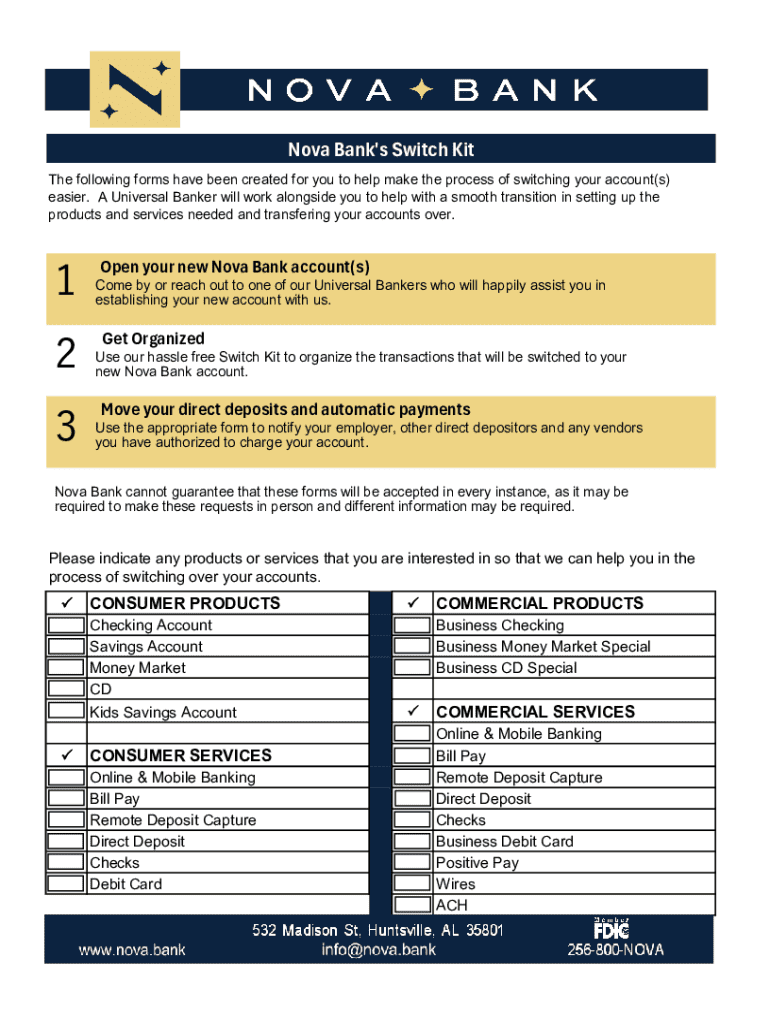
Get the free Nova Bank Switch Kit
We are not affiliated with any brand or entity on this form

Fill out
Complete the form online in a simple drag-and-drop editor.

eSign
Add your legally binding signature or send the form for signing.

Share
Share the form via a link, letting anyone fill it out from any device.

Export
Download, print, email, or move the form to your cloud storage.
Why pdfFiller is the best tool for your documents and forms


End-to-end document management
From editing and signing to collaboration and tracking, pdfFiller has everything you need to get your documents done quickly and efficiently.
Accessible from anywhere
pdfFiller is fully cloud-based. This means you can edit, sign, and share documents from anywhere using your computer, smartphone, or tablet.
Secure and compliant
pdfFiller lets you securely manage documents following global laws like ESIGN, CCPA, and GDPR. It's also HIPAA and SOC 2 compliant.
What is Switch Kit
The Nova Bank Switch Kit is a set of business forms used by customers to transfer their accounts and services to Nova Bank.
pdfFiller scores top ratings on review platforms




Who needs Switch Kit?
Explore how professionals across industries use pdfFiller.

Switch Kit is needed by:
-
Individuals switching banks for better services.
-
Businesses transferring their banking relationships.
-
Customers needing to close old accounts.
-
Anyone requesting direct deposit changes.
-
Clients requiring automatic payment updates.
-
Account holders at competing banks considering a switch.
Comprehensive Guide to Switch Kit
What is the Nova Bank Switch Kit?
The Nova Bank Switch Kit is a comprehensive solution to help users transition their bank accounts to Nova Bank. It is designed to facilitate the process of transferring banking services, ensuring a seamless experience for individuals and businesses alike. The kit includes essential forms such as the bank account transfer form, direct deposit change requests, and automatic payment change requests, which are necessary when initiating the transition to Nova Bank.
Purpose and Benefits of Using the Nova Bank Switch Kit
Utilizing the Nova Bank Switch Kit offers several notable benefits, primarily the convenience of managing your banking transition efficiently. The kit streamlines account transfers, making it easier for both individuals and businesses to switch their banking services. By providing digital tools like pdfFiller, users can fill out their forms quickly and accurately, reducing the likelihood of errors that can occur with traditional paper forms.
Moreover, switching to Nova Bank opens up new opportunities for enhanced banking services and customer support tailored to meet diverse financial needs.
Key Features of the Nova Bank Switch Kit
The Nova Bank Switch Kit boasts an array of features designed to facilitate a smooth bank account transfer. Key forms included in the kit are:
-
Direct deposit change request
-
Automatic payment change request
-
Authorization to close account
Each form contains fillable fields requiring essential information such as name, signature, and contact details. Clear instructions guide users on submitting these forms to the appropriate companies, ensuring a hassle-free transition to Nova Bank.
Who Needs the Nova Bank Switch Kit?
The Nova Bank Switch Kit is beneficial for both individuals and businesses considering a change in their banking services. This kit is particularly useful in scenarios where users relocate to areas serviced by Nova Bank or seek to improve their financial management. Anyone looking to simplify their banking transition can leverage the kit's resources for better efficiency.
How to Fill Out the Nova Bank Switch Kit Online (Step-by-Step)
Filling out the Nova Bank Switch Kit online is straightforward. Follow these steps using pdfFiller:
-
Access the Nova Bank Switch Kit using the pdfFiller platform.
-
Input your personal information in the designated fields, including name, address, and phone number.
-
Review each field carefully to ensure accuracy, paying attention to required signatures.
-
Save your filled forms securely before submission.
Double-check your entries to avoid any mistakes that could delay your banking transition.
Submission Methods for the Nova Bank Switch Kit
Once the forms are completed, users can submit them through various methods. Forms can be submitted electronically via email or uploaded directly to the Nova Bank's portal. For those preferring traditional methods, mailing instructions are included with the forms, specifying the correct addresses for each service provider. This provides users with flexibility in how they choose to complete their bank account transfer.
What Happens After Submitting the Nova Bank Switch Kit?
After submitting the Nova Bank Switch Kit, users can expect a confirmation of receipt from the bank. Typically, processing takes a few business days. During this period, customers have the opportunity to track their submission status through the bank's customer service channels, ensuring transparency throughout the transition process.
Common Errors to Avoid When Using the Nova Bank Switch Kit
To ensure a smooth transition, it's crucial to avoid common pitfalls when using the Nova Bank Switch Kit. Frequent errors include:
-
Incomplete fields that result in processing delays.
-
Submitting forms without required signatures.
Reviewing your forms for accuracy and completeness is essential. Consider using checklists to validate that all necessary information has been filled in correctly before submission.
Security and Compliance When Using the Nova Bank Switch Kit
When dealing with sensitive information, users can trust the security provided by pdfFiller. The platform utilizes robust encryption and complies with standards like HIPAA and GDPR to protect your data. Safeguarding your personal and financial information is paramount throughout the form-filling process, ensuring peace of mind when submitting sensitive documents.
Elevate Your Banking Experience with pdfFiller
Using pdfFiller to complete the Nova Bank Switch Kit enhances the overall user experience. The platform offers numerous advantages, such as intuitive editing features and secure eSigning. Transitioning to Nova Bank has never been easier, thanks to the convenience of filling out your forms online through pdfFiller's reliable and efficient system.
How to fill out the Switch Kit
-
1.Access the Nova Bank Switch Kit by visiting pdfFiller and using the search bar to locate the form.
-
2.Open the form in pdfFiller's editor, where you can see all the fillable fields clearly displayed.
-
3.Gather the necessary information before starting, including your account details, personal identification, and any required signatures.
-
4.Begin filling in the fields by clicking on each section. Use the 'Text' tool for details like 'Name', 'Address', and 'Phone Number'.
-
5.For checkboxes related to products or services, simply click to select your preferred options.
-
6.Review the instructions on the document carefully to ensure you have filled in all required information accurately.
-
7.After completing all fields, double-check for any errors or missing information before proceeding to finalize the form.
-
8.Once satisfied with your entries, click on the save option to retain a copy of the form.
-
9.Choose to download the completed form for your records or click the 'Submit' option if you need to send it electronically.

Who can use the Nova Bank Switch Kit?
The Nova Bank Switch Kit is available for individuals and businesses looking to transfer their accounts and services to Nova Bank from another financial institution.
What forms are included in the Nova Bank Switch Kit?
The kit includes forms for opening new accounts, transferring direct deposits, changing automatic payments, and closing old accounts.
Do I need to submit any supporting documents along with the form?
Typically, you may need to provide personal identification and account information to process your switch effectively.
How do I submit the completed Nova Bank Switch Kit?
After completing the form, you can submit it electronically through pdfFiller or print it out to send to the relevant banks.
Are there any processing fees associated with using the Nova Bank Switch Kit?
Generally, there are no fees for using the switch kit itself, but your bank may have fees related to account transfers.
What are common mistakes to avoid when filling out this form?
Ensure all personal information is accurate, double-check for missing signatures, and confirm that you have selected the correct checkbox options.
How long does it take to process the account transfer?
Processing times can vary, but it typically takes a few days to a week, depending on the banks involved and the specific circumstances.
Related Forms



Get the latest insights from our blog


If you believe that this page should be taken down, please follow our DMCA take down process
here
.
This form may include fields for payment information. Data entered in these fields is not covered by PCI DSS compliance.