
Last updated on
Oct 31, 2026
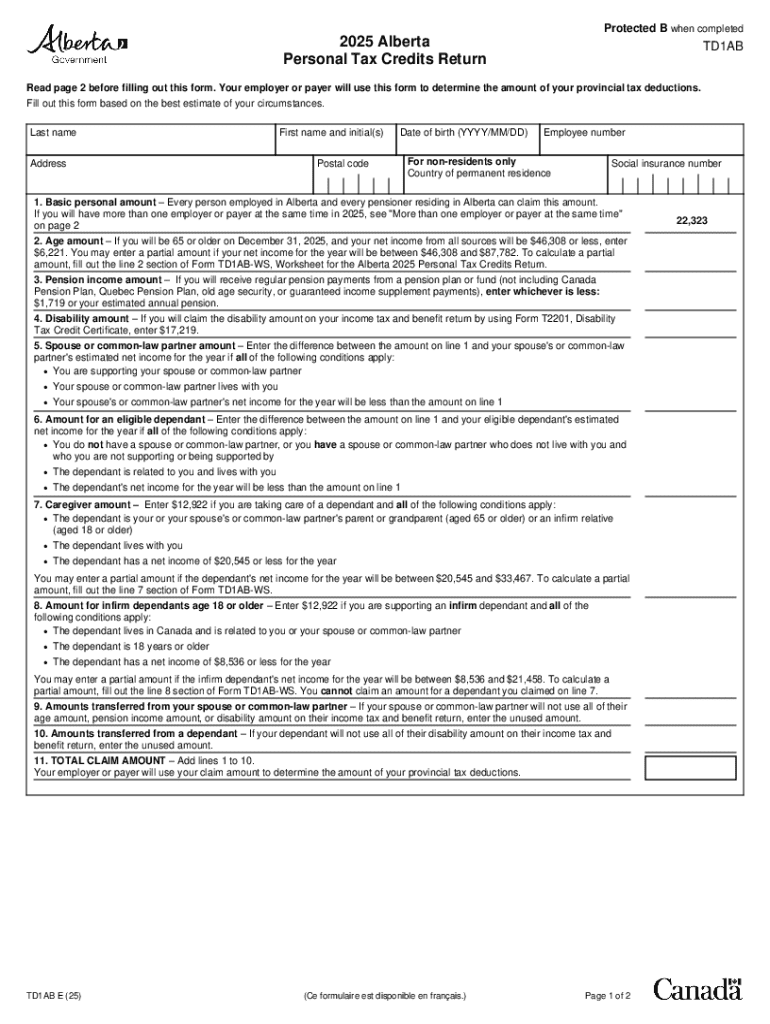
Get the free Alberta TD1AB Personal Tax Credits Return
We are not affiliated with any brand or entity on this form

Fill out
Complete the form online in a simple drag-and-drop editor.

eSign
Add your legally binding signature or send the form for signing.

Share
Share the form via a link, letting anyone fill it out from any device.

Export
Download, print, email, or move the form to your cloud storage.
Why pdfFiller is the best tool for your documents and forms


End-to-end document management
From editing and signing to collaboration and tracking, pdfFiller has everything you need to get your documents done quickly and efficiently.
Accessible from anywhere
pdfFiller is fully cloud-based. This means you can edit, sign, and share documents from anywhere using your computer, smartphone, or tablet.
Secure and compliant
pdfFiller lets you securely manage documents following global laws like ESIGN, CCPA, and GDPR. It's also HIPAA and SOC 2 compliant.
What is TD1AB 2025
The Alberta TD1AB Personal Tax Credits Return is a form used by employees in Alberta to determine their provincial tax deductions.
pdfFiller scores top ratings on review platforms




Who needs TD1AB 2025?
Explore how professionals across industries use pdfFiller.

TD1AB 2025 is needed by:
-
Employees working in Alberta
-
Individuals filing provincial taxes in Canada
-
New employees requiring tax credit information
-
Employers needing documentation for payroll
-
Tax consultants advising clients on deductions
Comprehensive Guide to TD1AB 2025
What is the Alberta TD1AB Personal Tax Credits Return?
The Alberta TD1AB Personal Tax Credits Return is a crucial form designed for employees in Alberta. This document allows individuals to claim personal tax credits, directly impacting their tax deductions. Understanding how the Alberta TD1AB form operates is essential for maximizing tax benefits, ultimately affecting net income and financial planning.
By accurately completing the Alberta personal tax credits return, employees can ensure they receive the appropriate deductions based on their unique circumstances. This form acts as a foundational tool in Alberta's tax landscape, facilitating better financial management for hardworking individuals.
Purpose and Benefits of the Alberta TD1AB Personal Tax Credits Return
The primary purpose of the Alberta TD1AB form is to empower employees to optimize their tax deductions. Accurately completing this form can significantly enhance take-home income, enabling individuals to minimize their tax liabilities. This benefit is particularly important in 2025 as tax regulations evolve.
Employees who take the time to fill out their tax forms carefully can take full advantage of available credits tailored to their financial situation. Understanding this form's benefits fosters a proactive approach to personal finance management in Alberta.
Who Needs the Alberta TD1AB Personal Tax Credits Return?
This form is essential for various employees in Alberta. Individuals starting a new job, experiencing changes in family status, or receiving specific types of income must complete the Alberta TD1AB Personal Tax Credits Return. Knowing who needs the Canada tax form helps clarify its significance.
Additionally, understanding life events that may necessitate the completion of this form ensures employees maintain compliance with tax regulations and maximize their entitled deductions.
Key Features of the Alberta TD1AB Personal Tax Credits Return
The Alberta TD1AB form encompasses several key features crucial for accurate completion. Employees must provide personal information, including their name, date of birth, and Social Insurance Number. Details about income and dependents are also required to complete the form effectively.
-
Personal Information
-
Income Details
-
Dependent Claims
-
Specific Checkboxes for Tax Credits
Understanding these elements allows users to navigate the form with ease and precision.
How to Fill Out the Alberta TD1AB Personal Tax Credits Return Online (Step-by-Step)
Filling out the Alberta TD1AB form online is made simple with pdfFiller. Follow these steps to complete the form efficiently:
-
Access the Alberta TD1AB form through pdfFiller's platform.
-
Fill in personal information accurately, ensuring all fields are completed.
-
Enter your Social Insurance Number and provide any claim for dependents.
-
Review the form for any inconsistencies or errors.
-
Sign and submit the form directly to your employer or payer.
Utilizing pdfFiller’s platform enhances the user experience, providing support for filling out even the most confusing fields.
Common Mistakes to Avoid When Completing the Alberta TD1AB Personal Tax Credits Return
Filling out the Alberta TD1AB form can present several common pitfalls. Frequent errors may result in delayed processing or rejection of submissions. Key mistakes to avoid include:
-
Incorrect personal information entries.
-
Failure to claim dependents accurately.
To ensure a smooth submission process, users should double-check all information before finalizing their forms.
Where to Submit the Alberta TD1AB Personal Tax Credits Return
Once the Alberta TD1AB form is completed, it must be submitted properly. Employees can submit the form directly to their employer or through specified online systems. It’s crucial to be aware of any deadlines for submission, as these can vary based on individual circumstances and regulatory updates.
-
Direct submission to employer
-
Online submission options
-
Awareness of submission deadlines
Understanding the submission process ensures compliance with Alberta’s tax regulations.
Post-Submission: What Happens After You File the Alberta TD1AB Personal Tax Credits Return?
After submitting the Alberta TD1AB form, it’s essential to be aware of what follows. Users can typically track the status of their submission through their employer's payroll system. If the form is accepted, employees will notice the impact on their tax deductions.
In cases of issues arising from the submission, having knowledge of next steps is vital for resolving any discrepancies quickly.
Security and Compliance for the Alberta TD1AB Personal Tax Credits Return
Data security is paramount when handling sensitive tax documents like the Alberta TD1AB form. pdfFiller ensures user data is protected with robust security measures, including encryption and compliance with regulations such as HIPAA and GDPR. This commitment to security helps users feel safer when submitting their personal information online.
Use pdfFiller to Simplify Your Alberta TD1AB Personal Tax Credits Return Process
For a hassle-free experience in filling out the Alberta TD1AB form, turning to pdfFiller is an excellent choice. The platform offers intuitive features that make completing the form straightforward, allowing users to create, edit, and manage their documents within a secure online environment.
Choosing pdfFiller enhances your ability to manage your Alberta TD1AB form effectively, contributing to a smoother tax filing experience.
How to fill out the TD1AB 2025
-
1.Begin by accessing pdfFiller and searching for the Alberta TD1AB Personal Tax Credits Return form.
-
2.Once the form is open, familiarize yourself with the layout, including headings and blank fields.
-
3.Gather the necessary information: your personal details like name, date of birth, and social insurance number, as well as income information and dependent details.
-
4.In pdfFiller, click on the respective fields to enter your personal information accurately.
-
5.Use the provided checkboxes to indicate dependents and any claims for tax credits as required.
-
6.Review each section carefully to ensure that no information is missing or incorrect.
-
7.Once all fields are filled, double-check your inputs for accuracy and completeness.
-
8.Finalize the form by clicking on the 'Save' button to store your progress.
-
9.Download the completed form in your preferred format or submit it via email to your employer directly through pdfFiller.

Who is eligible to complete the Alberta TD1AB Personal Tax Credits Return?
Any employee working in Alberta who wishes to determine their provincial tax deductions is eligible to complete this form. It's crucial for employees to provide accurate information about their financial situation and dependents.
What is the deadline for submitting the Alberta TD1AB form?
The Alberta TD1AB Personal Tax Credits Return should be submitted to your employer as soon as you start a new job or when your personal tax situation changes. Timely submission ensures appropriate deductions from your paychecks.
How do I submit the completed form to my employer?
After completing the Alberta TD1AB form on pdfFiller, you can either print the form to deliver it in person or use the 'Send via Email' feature to submit it electronically to your employer.
What supporting documents do I need with the TD1AB form?
While specific supporting documents aren't required for the TD1AB form itself, you should have your Social Insurance Number and any relevant tax credit information available for accurate completion.
What are common mistakes to avoid when filling out the Alberta TD1AB form?
Common mistakes include incorrect personal information, leaving sections blank, and misunderstanding the eligibility for claims. Always double-check your entries before submission.
How long does it take to process the Alberta TD1AB form?
The TD1AB form does not undergo formal processing; however, once submitted, your employer will use the information to adjust your tax deductions in the payroll system.
What if I need to make changes to my TD1AB form later?
If there are changes in your personal situation, you should complete a new Alberta TD1AB form and submit it to your employer to ensure that your tax deductions remain accurate.
Related Forms



Get the latest insights from our blog


If you believe that this page should be taken down, please follow our DMCA take down process
here
.
This form may include fields for payment information. Data entered in these fields is not covered by PCI DSS compliance.