
Last updated on
Oct 31, 2026
Get the free Massachusetts Immunization Records Form
We are not affiliated with any brand or entity on this form

Fill out
Complete the form online in a simple drag-and-drop editor.

eSign
Add your legally binding signature or send the form for signing.

Share
Share the form via a link, letting anyone fill it out from any device.

Export
Download, print, email, or move the form to your cloud storage.
Why pdfFiller is the best tool for your documents and forms


End-to-end document management
From editing and signing to collaboration and tracking, pdfFiller has everything you need to get your documents done quickly and efficiently.
Accessible from anywhere
pdfFiller is fully cloud-based. This means you can edit, sign, and share documents from anywhere using your computer, smartphone, or tablet.
Secure and compliant
pdfFiller lets you securely manage documents following global laws like ESIGN, CCPA, and GDPR. It's also HIPAA and SOC 2 compliant.
What is Immunization Records Form
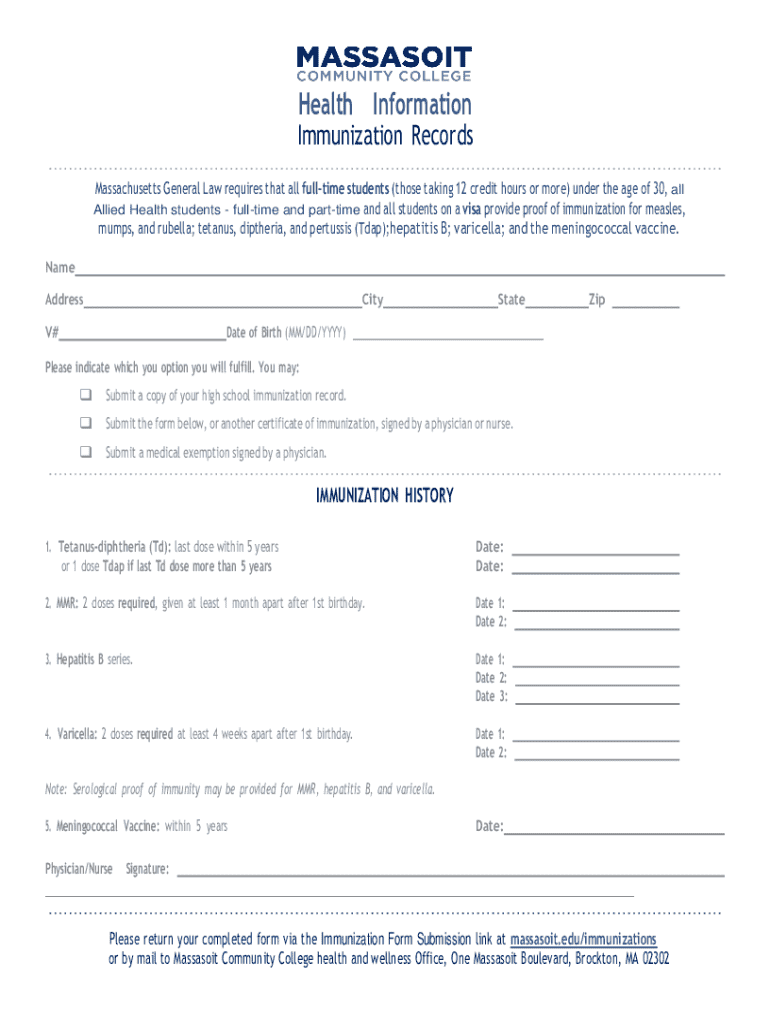
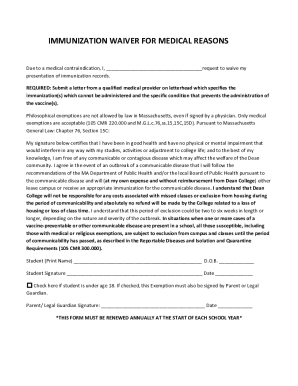
The Massachusetts Immunization Records Form is a Medical Consent document used by students to provide proof of required immunizations as mandated by Massachusetts General Law.
pdfFiller scores top ratings on review platforms




Who needs Immunization Records Form?
Explore how professionals across industries use pdfFiller.

Immunization Records Form is needed by:
-
Students at Massasoit Community College
-
Healthcare providers for immunization verification
-
College admissions staff for record keeping
-
Parents or guardians submitting on behalf of minors
-
Nurses and physicians signing the form
Comprehensive Guide to Immunization Records Form
What is the Massachusetts Immunization Records Form?
The Massachusetts Immunization Records Form is a critical document used primarily by students at Massasoit Community College to demonstrate compliance with immunization requirements. This form is not only essential for enrollment but also plays a significant role in maintaining health standards within the college community. Under Massachusetts General Law, the form serves a legal purpose, ensuring that students meet required vaccination criteria.
Purpose and Benefits of the Massachusetts Immunization Records Form
The Massachusetts Immunization Records Form serves several important purposes. Firstly, it ensures that college students comply with state immunization requirements, which is crucial for their enrollment and continued attendance. Additionally, the form aids educational institutions in tracking the health and wellness of their students, fostering a healthier environment. By promoting vaccinations, it also safeguards community health, thereby benefiting all members of the college.
Key Features of the Massachusetts Immunization Records Form
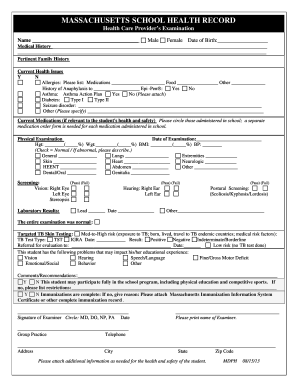
This form contains specific details necessary for proper submission. Essential information includes:
-
Name of the student
-
Address
-
Date of birth
-
Immunization dates for various vaccines
Moreover, a signature from a physician or nurse is required to validate the form. Students can submit the completed form through various methods, including online and by mail, making it accessible and convenient.
Who Needs the Massachusetts Immunization Records Form?
The Massachusetts Immunization Records Form is specifically designed for students attending Massasoit Community College and similar institutions. Individuals required to provide proof of vaccinations must ensure they submit this form. It is important to understand the guidelines that outline what constitutes acceptable proof of immunization to avoid issues during the submission process.
When and How to Submit the Massachusetts Immunization Records Form?
Submission deadlines for incoming students are critical to understand to ensure compliance. Students should carefully fill out the Massachusetts Immunization Records Form to avoid common mistakes. They have several submission options available:
-
Online submission
-
Mailing the form
-
In-person delivery
Each method has its advantages, allowing students to choose the option that best suits their needs.
Filling Out the Massachusetts Immunization Records Form Online (Step-by-Step)
Completing the Massachusetts Immunization Records Form online is a straightforward process. Follow these steps to fill out each section effectively:
-
Access the form online through the designated link.
-
Input the required details accurately, including name, address, and immunization dates.
-
Review the information entered to ensure correctness before submission.
Validating the information is essential to prevent common errors, which can lead to delays in processing the form.
How to Sign the Massachusetts Immunization Records Form?
Signing the Massachusetts Immunization Records Form involves understanding the distinctions between different types of signatures. Students can opt for:
-
Digital signatures through eSigning platforms
-
Wet signatures that can be printed and signed
Regardless of the method chosen, it is vital to ensure that the signature from a physician or nurse includes all necessary validation details to complete the form accurately.
Security and Compliance for Submitting Your Massachusetts Immunization Records Form
When submitting the Massachusetts Immunization Records Form, users can have peace of mind regarding the security of their sensitive information. The submission platform utilizes 256-bit encryption, ensuring compliance with HIPAA and GDPR regulations. Users should prioritize submitting their information through trusted and secure channels.
Here are some tips for protecting personal information while submitting forms:
-
Use secure internet connections
-
Avoid public Wi-Fi for sensitive transactions
Common Issues and Solutions When Filing the Massachusetts Immunization Records Form
Students may face various challenges during the filing process of the Massachusetts Immunization Records Form. Common reasons for rejection include:
-
Incomplete information
-
Lack of required signatures
It’s crucial to know how to correct or amend the form after submission if needed. For assistance, students can contact the health office for further support.
Get Started with Your Massachusetts Immunization Records Form Using pdfFiller
Utilizing pdfFiller to complete the Massachusetts Immunization Records Form offers numerous advantages. This platform allows for seamless editing, signing, and submission of the form, making the process user-friendly. Additionally, pdfFiller provides access to various templates and features that enhance the user experience while ensuring the security of sensitive documents.
How to fill out the Immunization Records Form
-
1.Access the Massachusetts Immunization Records Form on pdfFiller by searching for it in the template library or using a direct link provided by the college.
-
2.Open the form in pdfFiller and familiarize yourself with its layout, noting the required fields like name, address, date of birth, and immunization details.
-
3.Gather all necessary immunization records and personal information you will need to fill out the form, including specific vaccination dates and types.
-
4.Begin filling in the fields by clicking on each blank area; type your information in the designated boxes. If a field requires a date, use the date picker to select the correct date.
-
5.Ensure that the name and date of birth correspond with your official documents to avoid discrepancies.
-
6.Once all required fields are completed, review the form for accuracy. Make sure all information is entered correctly and matches your records.
-
7.After finalizing the entries, locate the signature line and ensure it is ready for a physician or nurse's signature.
-
8.Save your completed form by selecting the 'Save' option in the pdfFiller interface. You can also download it to your device as a PDF.
-
9.To submit the form, choose the relevant submission option. You can either send it directly through pdfFiller or prepare it for mailing to the college health and wellness office.

Who is eligible to use the Massachusetts Immunization Records Form?
The form is primarily for students enrolled at Massasoit Community College who need to provide proof of immunizations for compliance with Massachusetts law.
What are the deadlines for submitting this form?
Students should check with the Massasoit Community College academic calendar for specific submission deadlines related to enrollment or immunization requirements.
How should I submit the Massachusetts Immunization Records Form?
The form can be submitted either via mail to the health and wellness office or electronically through the designated link provided by the college, depending on the guidelines.
What supporting documents do I need to provide with this form?
You will need to provide your immunization records, which should include dates and types of vaccines administered, along with the signed form from a healthcare provider.
What common mistakes should I avoid when filling out the form?
Ensure that all information is accurate and matches your official records. Double-check spelling, dates, and make sure to secure the physician or nurse's signature before submission.
How long does it take to process the submitted form?
Processing times may vary based on the college’s workload, but typically, you can expect a response within a few weeks after submission.
Can I modify the form after I submit it?
Once submitted, it is generally difficult to modify. If changes are needed, contact the health and wellness office directly for guidance on how to proceed.
Related Forms





Get the latest insights from our blog


If you believe that this page should be taken down, please follow our DMCA take down process
here
.
This form may include fields for payment information. Data entered in these fields is not covered by PCI DSS compliance.