
Last updated on
Oct 31, 2026
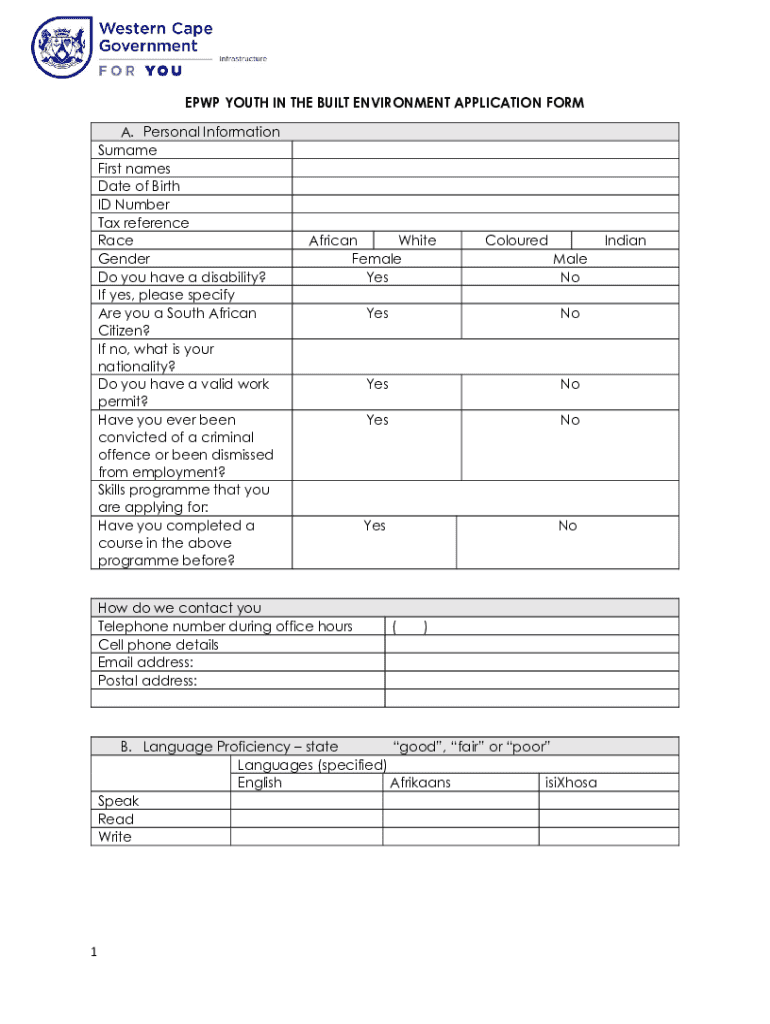
Get the free EPWP Youth Built Environment Application Form
We are not affiliated with any brand or entity on this form

Fill out
Complete the form online in a simple drag-and-drop editor.

eSign
Add your legally binding signature or send the form for signing.

Share
Share the form via a link, letting anyone fill it out from any device.

Export
Download, print, email, or move the form to your cloud storage.
Why pdfFiller is the best tool for your documents and forms


End-to-end document management
From editing and signing to collaboration and tracking, pdfFiller has everything you need to get your documents done quickly and efficiently.
Accessible from anywhere
pdfFiller is fully cloud-based. This means you can edit, sign, and share documents from anywhere using your computer, smartphone, or tablet.
Secure and compliant
pdfFiller lets you securely manage documents following global laws like ESIGN, CCPA, and GDPR. It's also HIPAA and SOC 2 compliant.
What is EPWP Application Form
The EPWP Youth Built Environment Application Form is an employment application used by individuals applying for the Expanded Public Works Programme (EPWP) skills programme in South Africa.
pdfFiller scores top ratings on review platforms




Who needs EPWP Application Form?
Explore how professionals across industries use pdfFiller.

EPWP Application Form is needed by:
-
Youth individuals seeking employment opportunities in South Africa.
-
Applicants interested in the EPWP skills programme.
-
Students or graduates in the built environment field.
-
Job seekers looking to enhance their qualifications.
-
Organizations supporting youth employment initiatives.
Comprehensive Guide to EPWP Application Form
What is the EPWP Youth Built Environment Application Form?
The EPWP Youth Built Environment Application Form serves as a crucial instrument for young individuals seeking to participate in the Expanded Public Works Programme (EPWP) in South Africa. This application form outlines the necessary personal information required from applicants and facilitates the process of eSigning to ensure the validity of submissions. The significance of this form lies in its role in connecting youth with opportunities aimed at skill enhancement and employment within the built environment.
The form includes fields for essential details, such as an applicant's name, date of birth, and ID number, ensuring a smooth application process for participants applying to this valuable skills programme.
Purpose and Benefits of the EPWP Youth Built Environment Application Form
Submitting the EPWP Youth Built Environment Application Form opens doors for individuals to gain practical skills and find employment opportunities in South Africa. The advantages of using this form extend beyond the initial application, as it serves as a gateway to the broader goals of the EPWP.
-
Access to training programs aimed at developing skills in the built environment.
-
Enhanced employment prospects through hands-on experience.
-
Fostering youth development within local communities.
Overall, the form is instrumental in empowering youth to transition into the workforce effectively.
Key Features of the EPWP Youth Built Environment Application Form
The EPWP Youth Built Environment Application Form includes several critical elements designed to gather comprehensive information from applicants. Key features of the form consist of:
-
Fillable fields such as 'Surname', 'First names', 'Date of Birth', and 'ID Number'.
-
A declaration section where applicants must provide their signature and date to verify information.
-
Checkboxes for language proficiency and educational qualifications relevant to the application process.
Who Needs the EPWP Youth Built Environment Application Form?
The target audience for the EPWP Youth Built Environment Application Form includes young individuals interested in enhancing their skills in the construction and related sectors. Potential applicants may vary in age and educational backgrounds, often comprising:
-
Young people aged between 18 and 35 years.
-
Those seeking opportunities to improve their employability through the EPWP skills programme.
-
Beneficiaries who aim to contribute positively to their communities and local businesses.
Eligibility Criteria for the EPWP Youth Built Environment Application Form
To successfully submit the EPWP Youth Built Environment Application Form, applicants must meet certain eligibility criteria. These requirements include:
-
Specific age limits ranging from 18 to 35 years old.
-
Educational qualifications relevant to the skills programme.
-
Necessary documentation such as proof of qualifications for identity verification.
Additionally, applicants are encouraged to check local employment initiatives that may offer further guidance and support.
How to Fill Out the EPWP Youth Built Environment Application Form Online (Step-by-Step)
Filling out the EPWP Youth Built Environment Application Form online is a straightforward process. Here are the steps to guide you:
-
Access the form via pdfFiller.
-
Navigate through the fillable sections for personal information.
-
Complete each section accurately, ensuring all details are correct.
-
Review your information before submitting the application.
Accuracy in personal information is crucial to avoid delays in processing your application.
Common Errors and How to Avoid Them
Applicants may encounter frequent mistakes while filling out the EPWP Youth Built Environment Application Form. Common errors include:
-
Omitting mandatory fields, leading to incomplete applications.
-
Providing inaccurate personal information, resulting in verification issues.
Utilizing editing tips available on pdfFiller can help ensure correctness and completeness of submissions.
How to Sign the EPWP Youth Built Environment Application Form
Signing the EPWP Youth Built Environment Application Form is an essential step in the application process. Applicants can choose between:
-
Digital signatures, which streamline the submission process without needing physical documentation.
-
Traditional signatures, which may require scanning for electronic submission.
The eSigning process through pdfFiller is straightforward and vital for the processing of personal information, ensuring compliance and validation.
Security and Compliance for the EPWP Youth Built Environment Application Form
Security is a priority when handling personal information on the EPWP Youth Built Environment Application Form. Key measures include:
-
256-bit encryption to protect sensitive data.
-
Compliance with GDPR and HIPAA standards to ensure information safety.
This commitment to security reinforces the confidentiality of personal information during processing.
Why Use pdfFiller for Your EPWP Youth Built Environment Application?
Utilizing pdfFiller for the EPWP Youth Built Environment Application ensures that applicants benefit from a user-friendly platform. Notable features include:
-
Easy editing and filling of forms directly within the browser.
-
Options for saving and sharing completed documents effortlessly.
These capabilities enhance the overall document management and eSigning experience, making it preferable for applicants.
How to fill out the EPWP Application Form
-
1.Access the EPWP Youth Built Environment Application Form on pdfFiller by searching for its title in the pdfFiller search bar.
-
2.Once opened, familiarize yourself with the form's layout and the fillable fields to ensure smooth navigation.
-
3.Gather necessary information before filling out the form, including your personal details, qualifications, work experience, and references.
-
4.Begin by entering your personal information in the designated fields, such as 'Surname', 'First Names', 'Date of Birth', and 'ID Number'.
-
5.Next, provide details on your language proficiency, using the checkboxes as necessary to indicate your skills.
-
6.Proceed to include your qualifications and work experience by filling out the appropriate sections, detailing your prior employment history and relevant educational background.
-
7.Make sure to double-check all entered information for accuracy and completeness.
-
8.Once the form is complete, navigate to the declaration section where you need to sign and date the document.
-
9.Review the entire form, ensuring every section is filled correctly and you have not missed any required fields.
-
10.Finally, choose to save your completed application on pdfFiller, and you can either download it or submit it through the platform, following any additional submission guidance provided.

Who is eligible to apply using the EPWP Youth Built Environment Application Form?
Eligibility for the EPWP Youth Built Environment Application Form includes youth individuals looking for employment in South Africa and those interested in the Expanded Public Works Programme skills programme.
What information do I need to complete the form?
You need to gather personal details, such as your name, date of birth, ID number, educational qualifications, work experience, and references before starting to fill out the form.
How do I submit the completed application form?
After completing the EPWP Youth Built Environment Application Form on pdfFiller, you can save it as a PDF, download it to your device, or submit it directly through the platform as guided.
What are common mistakes to avoid when filling out the form?
Common mistakes include omitting required fields, providing incorrect information, and forgetting to sign and date the form in the relevant section. Always review your completed application carefully.
Is notarization required for this application form?
No, notarization is not required for the EPWP Youth Built Environment Application Form, making the submission process simpler for applicants.
What should I do if I have questions while filling out the form?
If you have questions while completing the EPWP Youth Built Environment Application Form, consult the instructions provided on the pdfFiller platform or seek assistance from a trusted mentor or advisor.
What processing times should I expect after submitting the form?
Processing times for the EPWP applications may vary. It is advisable to check with the EPWP program for specific timelines or follow-up guidance after submission.
Related Forms


Get the latest insights from our blog


If you believe that this page should be taken down, please follow our DMCA take down process
here
.
This form may include fields for payment information. Data entered in these fields is not covered by PCI DSS compliance.