
Last updated on
Oct 31, 2026
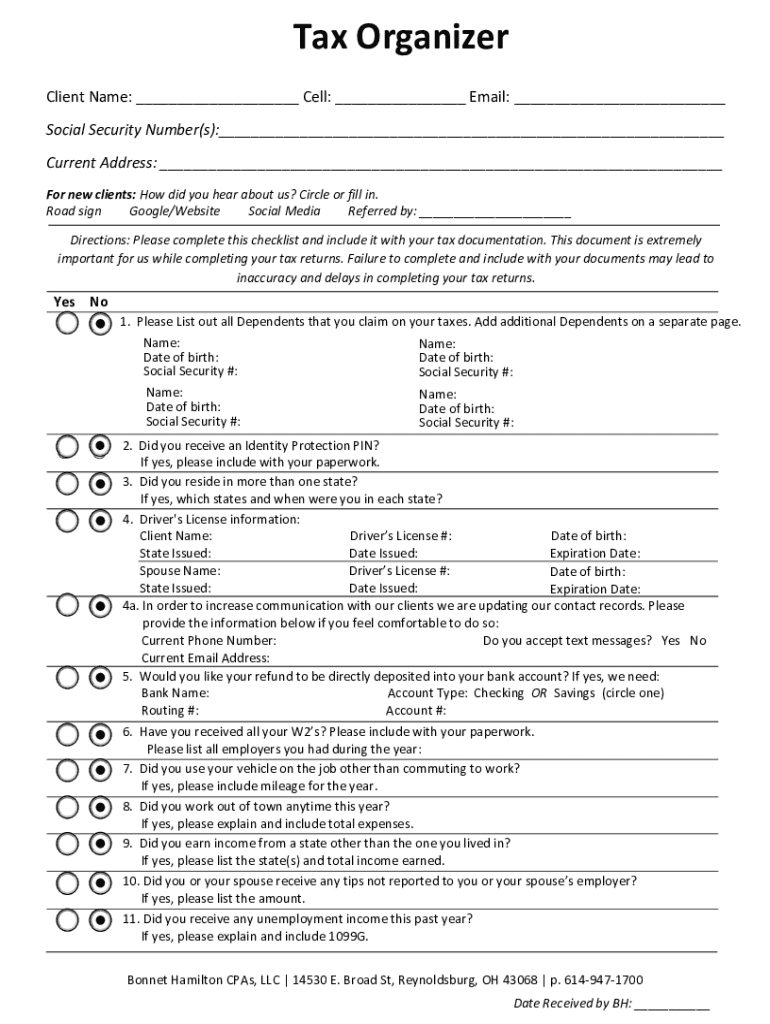
Get the free Tax Organizer Form
We are not affiliated with any brand or entity on this form

Fill out
Complete the form online in a simple drag-and-drop editor.

eSign
Add your legally binding signature or send the form for signing.

Share
Share the form via a link, letting anyone fill it out from any device.

Export
Download, print, email, or move the form to your cloud storage.
Why pdfFiller is the best tool for your documents and forms


End-to-end document management
From editing and signing to collaboration and tracking, pdfFiller has everything you need to get your documents done quickly and efficiently.
Accessible from anywhere
pdfFiller is fully cloud-based. This means you can edit, sign, and share documents from anywhere using your computer, smartphone, or tablet.
Secure and compliant
pdfFiller lets you securely manage documents following global laws like ESIGN, CCPA, and GDPR. It's also HIPAA and SOC 2 compliant.
What is Tax Organizer
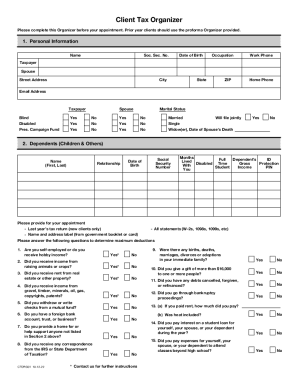
The Tax Organizer Form is a checklist used by clients to gather and organize their tax documentation for preparation by Bonnet Hamilton CPAs, LLC.
pdfFiller scores top ratings on review platforms




Who needs Tax Organizer?
Explore how professionals across industries use pdfFiller.

Tax Organizer is needed by:
-
Individuals preparing their annual taxes
-
Self-employed professionals needing tax documentation
-
Families with dependents seeking tax deductions
-
Small business owners managing income sources
-
Tax preparers looking for organized client information
-
Clients of Bonnet Hamilton CPAs, LLC needing document submission
Comprehensive Guide to Tax Organizer
What Is the Tax Organizer Form?
The Tax Organizer Form is a crucial checklist used by clients to gather and organize their tax documentation for preparation. This tax documentation form streamlines the tax preparation process by establishing a clear format for personal information, deductions, and other necessary tax details. Clients benefit significantly as it aids them in structuring their materials effectively, ensuring nothing is overlooked in their tax return journey.
Key sections of the form include personal information and a detailed account of eligible deductions, which simplify data organization. Utilizing the tax preparation checklist empowers clients to enhance their organization and accuracy during tax season.
Purpose and Benefits of the Tax Organizer Form
The purpose of the Tax Organizer Form extends beyond mere organization; it significantly boosts the efficiency and accuracy of the tax return process. By minimizing errors through structured guidance, the form ensures that all required information is collected comprehensively. This feature serves to save valuable time for both clients and tax professionals.
Utilizing this tax preparation form allows taxpayers to achieve a systematic approach to their organization, which is essential for a smooth tax filing experience. The benefits of thorough tax organizing enhance overall compliance and reduce the likelihood of audits.
Key Features of the Tax Organizer Form
The Tax Organizer Form is designed with user-friendliness in mind, featuring fillable fields and checkboxes that facilitate seamless completion. Its structured layout guides users on the crucial information they need to provide, enhancing comprehension and user experience.
Additionally, the form comes with detailed instructions for completion and highlights common pitfalls to avoid, which further boost accuracy and confidence in the filing process. Utilizing the tax checklist features makes the entire experience straightforward and efficient.
Who Should Use the Tax Organizer Form?
This form is particularly beneficial for homeowners, self-employed individuals, and families claiming dependents who need to document their tax information meticulously. Ohio residents can find this especially relevant due to specific state requirements that may apply.
Taxpayers facing complex financial scenarios, such as multiple income sources or unusual deductions, will greatly benefit from using the tax preparation form to ensure comprehensive documentation. This audience can enhance their tax filing experience and minimize potential stress.
How to Fill Out the Tax Organizer Form Online (Step-by-Step)
To complete the Tax Organizer Form online using pdfFiller, follow these step-by-step instructions:
-
Access the form on pdfFiller.
-
Complete the fillable fields with your personal information, including income and deductions.
-
Check all entries for accuracy before saving.
-
Utilize available tools to save or edit your form as needed.
-
Finalize the form for submission.
Each of these steps is crucial for ensuring that the tax organizer pdf is filled out correctly, thereby streamlining your tax preparation checklist.
Review and Validation Checklist
After filling out your Tax Organizer Form, it's essential to double-check for accuracy. Use the following checklist to ensure all information is complete:
-
Verify personal information is correct.
-
Check for completeness of all income sources and deductions.
-
Compare entries against supporting documentation.
-
Look for common errors such as omitted information or typos.
Validating your information ensures that your submission meets quality standards, enhancing the likelihood of a smooth processing experience.
How to Submit the Tax Organizer Form
When you're ready to submit the Tax Organizer Form, various delivery methods are available. You can opt for electronic submission through pdfFiller, or choose traditional mail based on your preference.
For tracking your submission, keep a record of confirmation emails or mail receipts. It's also vital to be aware of any associated fees or upcoming deadlines for filing your taxes.
Security and Compliance for the Tax Organizer Form
Protecting your sensitive tax information is paramount; therefore, pdfFiller employs robust security protocols that include encryption and adherence to compliance standards. The platform prioritizes privacy and data protection throughout the tax preparation process.
It's crucial to retain your tax documentation safely, ensuring all records remain secure against unauthorized access. Understanding these security measures fosters confidence during a critical financial task.
Why Choose pdfFiller for Your Tax Organizer Form
Choosing pdfFiller for filling out the Tax Organizer Form offers numerous advantages, such as seamless online editing and eSigning capabilities. This platform’s user-friendly interface accommodates all skill levels, making the tax preparation form process accessible to everyone.
Additionally, the benefits of cloud storage and organizational tools post-completion make it an efficient choice for managing your tax documents easily.
Experience Hassle-Free Tax Preparation Today
Engage with pdfFiller to simplify your tax preparations and start filling out the Tax Organizer Form directly. The platform allows for hassle-free management of your forms digitally, enhancing your efficiency.
A proficient approach to tax organization leads to a significantly smoother tax filing experience, ensuring you are prepared for whatever tax season brings.
How to fill out the Tax Organizer
-
1.To access the Tax Organizer Form on pdfFiller, visit the pdfFiller website and use the search bar to find the 'Tax Organizer Form'. Click on the form to open it in the editor.
-
2.Once the form is open, navigate through the sections by scrolling or using the outline if available. Each section has fillable fields where you can enter your information, and boxes for checkmarks.
-
3.Before starting, gather your necessary tax information, including personal details, dependent information, various income sources, and possible deductions or credits you might qualify for.
-
4.Begin filling out each section, ensuring you enter accurate data in the appropriate fields. Utilize the instructions provided within the form for guidance on what to include.
-
5.After completing all sections, take a moment to review all the information entered. Check for any missing areas, and ensure that all data is correct to avoid errors during tax filing.
-
6.Once you're satisfied with the filled-out form, utilize the options available on pdfFiller to save your progress, download the completed form to your device, or submit it directly to your CPA.
-
7.If you choose to save the form on pdfFiller, make sure to select the correct format. For submitting, follow the instructions for your CPA's preferred method, which may include email or direct upload.

Who should use the Tax Organizer Form?
The Tax Organizer Form is ideal for individuals, families, and small business owners who need to gather their tax documentation in an organized manner to facilitate accurate tax return preparation.
Are there any deadlines to submit the Tax Organizer Form?
While the form itself does not have a submission deadline, it is critical to complete and provide it to your tax preparer as soon as possible to ensure your taxes are filed on time.
What information do I need to fill out the Tax Organizer Form?
You will need personal information, details about dependents, income sources (such as W-2s and 1099s), information on deductions, and any other applicable tax-related data to complete the form.
How do I submit the completed Tax Organizer Form?
After filling out the form, you can submit it by downloading the completed PDF and sending it via email, or following your CPA's specific submission instructions for direct upload.
What are some common mistakes to avoid when filling out the form?
Common mistakes include forgetting to include all income sources, missing signatures, not checking for typos, or neglecting to review all sections before submission. Ensure thorough checks to avoid these errors.
What is the processing time for my tax return after using this form?
Processing time for tax returns can vary based on your CPA’s workload and the complexity of your taxes. However, filing organized documentation like the Tax Organizer Form typically helps speed up the process.
Is notarization required for the Tax Organizer Form?
No, notarization is not required for the Tax Organizer Form. It is meant as an organizational tool and does not need notarization for submission.
Related Forms




Get the latest insights from our blog


If you believe that this page should be taken down, please follow our DMCA take down process
here
.
This form may include fields for payment information. Data entered in these fields is not covered by PCI DSS compliance.