
Last updated on
Oct 31, 2026
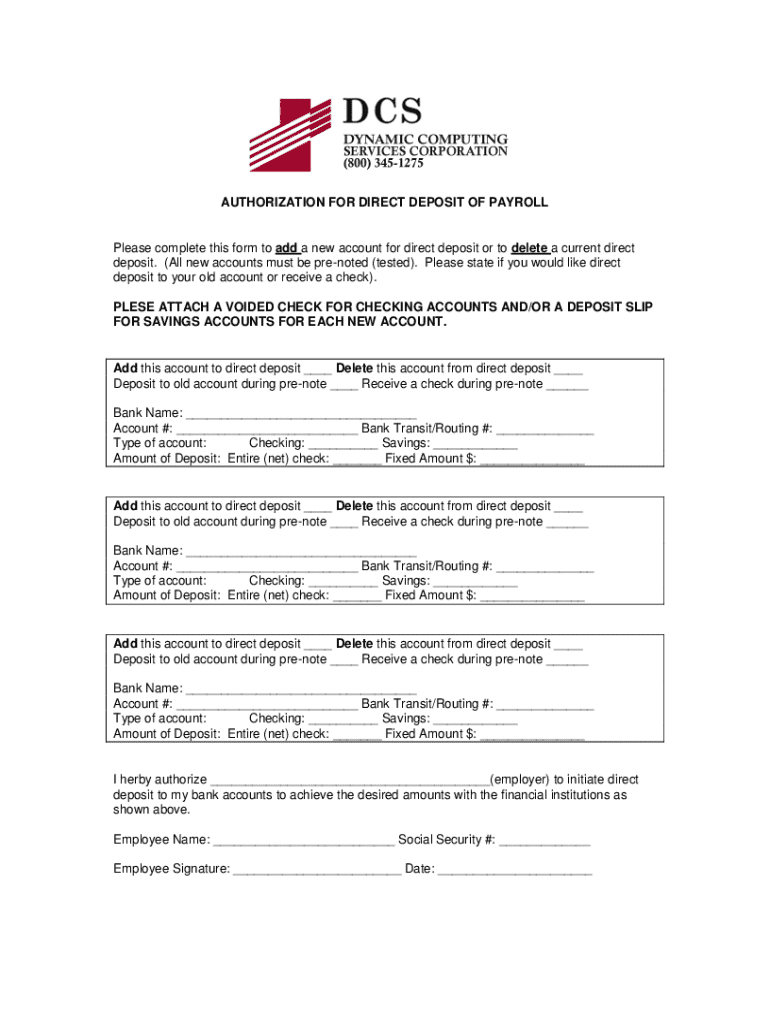
Get the free Authorization for Direct Deposit of Payroll
We are not affiliated with any brand or entity on this form

Fill out
Complete the form online in a simple drag-and-drop editor.

eSign
Add your legally binding signature or send the form for signing.

Share
Share the form via a link, letting anyone fill it out from any device.

Export
Download, print, email, or move the form to your cloud storage.
Why pdfFiller is the best tool for your documents and forms


End-to-end document management
From editing and signing to collaboration and tracking, pdfFiller has everything you need to get your documents done quickly and efficiently.
Accessible from anywhere
pdfFiller is fully cloud-based. This means you can edit, sign, and share documents from anywhere using your computer, smartphone, or tablet.
Secure and compliant
pdfFiller lets you securely manage documents following global laws like ESIGN, CCPA, and GDPR. It's also HIPAA and SOC 2 compliant.
What is Direct Deposit Form
The Authorization for Direct Deposit of Payroll is a form used by employees to set up or modify direct deposit instructions for their payroll.
pdfFiller scores top ratings on review platforms




Who needs Direct Deposit Form?
Explore how professionals across industries use pdfFiller.

Direct Deposit Form is needed by:
-
Employees seeking direct deposit for payroll payments
-
HR departments managing payroll and employee compensation
-
Employers requiring documentation for direct deposit setup
-
Payroll professionals handling employee financial information
-
Financial institutions verifying account details for direct deposits
Comprehensive Guide to Direct Deposit Form
What is the Authorization for Direct Deposit of Payroll?
The Authorization for Direct Deposit of Payroll is a vital form that allows employees to request that their salaries or wages be directly deposited into their bank accounts. This payroll deposit form streamlines the process of salary disbursement, ensuring timely and secure payments. To complete this authorization, employees must provide their bank account details and any necessary authorizations required by their employer.
-
Definition of the Authorization for Direct Deposit of Payroll.
-
Description of its role in payroll processing.
-
Mention the need for bank account details and required authorizations.
Purpose and Benefits of the Authorization for Direct Deposit
Utilizing the payroll direct deposit form offers numerous advantages for employees, enhancing their overall payroll experience. By receiving payment directly into their bank accounts, employees can enjoy greater convenience and security. Moreover, employees have the ability to modify their existing direct deposit setups as required, ensuring that their payment preferences are always met.
-
Benefits of receiving payroll directly into a bank account.
-
Convenience and security of direct deposits.
-
Clarity on modifying existing direct deposit setups.
Who Needs the Authorization for Direct Deposit of Payroll?
This authorization form is essential for any employee who wishes to manage their payroll payments electronically. New employees, those changing bank accounts, or individuals needing to update their deposit details are encouraged to complete this employee payroll form. The authorization is critical in ensuring that the right parties are involved in the payroll process.
-
Explanation of who qualifies as an employee needing this form.
-
Situations that necessitate its completion (e.g., new employees, account changes).
-
Overview of roles involved and the importance of authorization.
How to Fill Out the Authorization for Direct Deposit of Payroll Online (Step-by-Step)
Completing the direct deposit form accurately is crucial for successful payroll processing. Before filling out the form, employees should gather all required information to expedite the process. The instructions below provide a step-by-step guide to help employees fill in each relevant field correctly, ensuring that all details, such as account number and bank name, are accurate.
-
Gather necessary banking information, including account type and number.
-
Access the direct deposit form and fill out your personal details.
-
Provide the bank information required and verify its accuracy.
-
Sign the form to authorize the direct deposit setup.
Required Documents and Supporting Materials
Employees must attach specific supporting documents to complete the authorization for direct deposit. Primary requirements include a voided check or deposit slip to verify the banking information provided. It may also be necessary to provide identification or employment details to ensure compliance with internal HR or payroll policies.
-
Requirement of attaching a voided check or deposit slip for verification.
-
Identification or employment details that may be required.
-
How to ensure compliance with internal HR or payroll policies.
Common Errors and How to Avoid Them
Filling out the payroll direct deposit form can be straightforward; however, employees often make common errors that can delay processing. Identifying these frequent mistakes is essential for ensuring a smoother experience. By double-checking bank details and signatures before submission, employees can prevent errors that might lead to complications.
-
List common fields where users often make mistakes.
-
Importance of double-checking bank details and signatures.
-
Provide recommendations for a review process before submission.
How to Sign the Authorization for Direct Deposit of Payroll
Signing the authorization form is a vital step in the process. Employees need to understand the difference between digital signatures and wet signatures and how each can be applied. Using tools like pdfFiller, employees can easily eSign the document, ensuring it is valid and processed efficiently.
-
Difference between digital signature and wet signature requirements.
-
Steps on how to eSign the document using pdfFiller.
-
Importance of completing the signature for the form's validity.
Where to Submit the Authorization for Direct Deposit of Payroll
Once the authorization form has been filled out and signed, employees have several options for submission. Depending on employer requirements, submissions can be made online or delivered physically to the payroll department. Timelines for submission are also important, so employees should familiarize themselves with processing considerations and follow up appropriately.
-
Options for online submission versus physical delivery.
-
Timelines for submission and processing considerations.
-
How to follow up on the processing status.
Security and Compliance for Direct Deposits
Managing payroll forms such as the direct deposit authorization requires a focus on security and compliance. Utilizing platforms like pdfFiller, which employ robust security measures such as 256-bit encryption, ensures the protection of sensitive banking and personal information. Employees are advised to store completed forms securely to safeguard their data.
-
Overview of pdfFiller's security features (256-bit encryption, HIPAA, GDPR compliance).
-
Importance of data protection for sensitive banking and personal information.
-
Tips for securely storing completed forms and sensitive documents.
Experience Seamless Form Filling with pdfFiller
For a smooth and efficient form completion process, employees can leverage the robust features offered by pdfFiller. This platform provides essential tools for form editing, eSigning, and secure submission, enhancing the overall payroll experience while ensuring that sensitive data remains protected.
-
Benefits of using pdfFiller’s editing tools for form completion.
-
How pdfFiller enhances the digital signing and submission process.
-
Relevant security measures that ensure peace of mind when filling forms.
How to fill out the Direct Deposit Form
-
1.To access the Authorization for Direct Deposit of Payroll form on pdfFiller, visit the website and use the search bar to find the form by its name.
-
2.Once located, click on the form to open it in the pdfFiller editor, where you can begin filling in the necessary fields.
-
3.Before starting to fill out the form, gather the required information such as your bank's name, account number, type of account, and a voided check or deposit slip for verification.
-
4.Begin by entering your bank's name in the designated field, followed by your account number and the type of account, either checking or savings.
-
5.As you fill out the form, utilize the provided checkboxes and fields to ensure you complete all necessary sections, including the employee signature.
-
6.After completing the form, carefully review all entries to confirm they are accurate and legible to avoid any processing delays.
-
7.Once satisfied with the information provided, you can save your work directly on pdfFiller, download a copy, or submit the form through the platform.

What are the eligibility requirements for this form?
To use the Authorization for Direct Deposit of Payroll form, you must be an employee of the organization offering direct deposit services. Ensure you have a valid bank account that can receive payroll deposits.
What documents do I need to submit with this form?
It is essential to attach a voided check or deposit slip to the Authorization for Direct Deposit of Payroll form. This is necessary for your employer or HR department to verify your bank account details.
How do I submit the completed form?
After filling out the Authorization for Direct Deposit of Payroll form on pdfFiller, you can submit it directly through the platform. Alternatively, you may download and print it to submit it to your HR department via email or in person.
Are there any common mistakes to avoid when filling out this form?
Common mistakes include entering incorrect bank account numbers, failing to sign the form, or not attaching the required voided check. Double-check all entries for accuracy before submission.
What is the processing time for direct deposit setup?
Processing times for setting up direct deposit can vary by employer, but it generally takes one to two pay cycles after submitting the Authorization for Direct Deposit of Payroll form for the setup to be completed.
Can this form be used for multiple bank accounts?
Typically, the Authorization for Direct Deposit of Payroll form is designed for one bank account. If you need to set up multiple accounts, check with your employer for their specific procedures.
What should I do if I want to change my direct deposit information?
To change your direct deposit information, you will need to complete a new Authorization for Direct Deposit of Payroll form and submit it to your HR department with the updated banking details.
Related Forms




Get the latest insights from our blog


If you believe that this page should be taken down, please follow our DMCA take down process
here
.
This form may include fields for payment information. Data entered in these fields is not covered by PCI DSS compliance.