
Last updated on
Oct 31, 2026
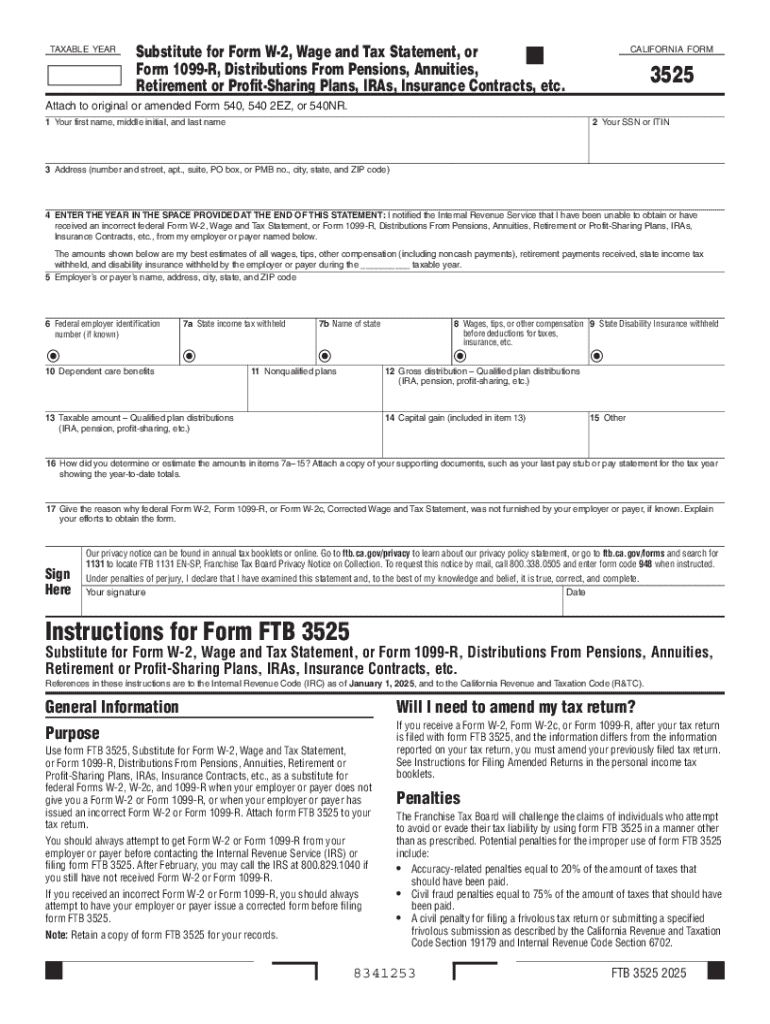
Get the free California Form FTB 3525
We are not affiliated with any brand or entity on this form

Fill out
Complete the form online in a simple drag-and-drop editor.

eSign
Add your legally binding signature or send the form for signing.

Share
Share the form via a link, letting anyone fill it out from any device.

Export
Download, print, email, or move the form to your cloud storage.
Why pdfFiller is the best tool for your documents and forms


End-to-end document management
From editing and signing to collaboration and tracking, pdfFiller has everything you need to get your documents done quickly and efficiently.
Accessible from anywhere
pdfFiller is fully cloud-based. This means you can edit, sign, and share documents from anywhere using your computer, smartphone, or tablet.
Secure and compliant
pdfFiller lets you securely manage documents following global laws like ESIGN, CCPA, and GDPR. It's also HIPAA and SOC 2 compliant.
What is FTB 3525 2025
The California Form FTB 3525 is a state tax document used by taxpayers to report wages and other compensation when federal Forms W-2 or 1099-R are unavailable or incorrect.
pdfFiller scores top ratings on review platforms




Who needs FTB 3525 2025?
Explore how professionals across industries use pdfFiller.

FTB 3525 2025 is needed by:
-
California taxpayers reporting income.
-
Employers who need to provide wage information.
-
Individuals lacking federal tax forms.
-
Tax professionals assisting clients in California.
-
Residents filing amendments to Form 540.
Comprehensive Guide to FTB 3525 2025
What is the California Form FTB 3525?
The California Form FTB 3525 serves as a substitute for the federal Form W-2 and Form 1099-R. This form is crucial for accurately reporting wages and state income, making it essential for taxpayers in California. Unlike other tax forms, the FTB 3525 is designed specifically for California residents, addressing unique reporting requirements that may arise in the state.
Purpose and Benefits of the California Form FTB 3525
The primary purpose of the California Form FTB 3525 is to provide an alternative for taxpayers who do not receive their W-2 or 1099-R forms from employers or payers. When these traditional forms are missing or inaccurate, the FTB 3525 helps ensure that income is reported correctly. Benefits of using this form include enhanced accuracy in reporting income and mitigating the risk of penalties from the California Franchise Tax Board. Not utilizing this form correctly can lead to serious repercussions, such as back taxes and interest on unpaid amounts.
Who Needs the California Form FTB 3525?
The California Form FTB 3525 is essential for various taxpayers including employees and retirees. Individuals who have not received W-2 or 1099-R documents from their employers or other payers fall within this target audience. Eligibility extends to those who might face issues like misreported income or those in special circumstances where traditional forms are unavailable. Identifying misconceptions around the form can help clarify its necessity.
How to Fill Out the California Form FTB 3525 Online
Filling out the California Form FTB 3525 online involves several steps:
-
Access the form on a designated platform and enter your personal information, including your name and Social Security Number (SSN).
-
Accurately complete the fields related to your employer’s or payer's information.
-
Review the fillable fields carefully to avoid errors common in reporting, particularly those requiring precise input.
Attention to detail is crucial. Common mistakes often arise from incorrect entries in essential fields, so validating your inputs is recommended before submission.
Submission Methods for the California Form FTB 3525
To submit the completed California Form FTB 3525, you have multiple submission options:
-
Electronically through applicable tax software or platforms.
-
By mail, ensuring you adhere to the correct mailing address.
It's important to file the form along with the original or amended Form 540 or other related forms by the established deadlines to avoid potential fees associated with late submissions.
Common Errors and How to Avoid Them
Taxpayers frequently encounter several pitfalls when completing the California Form FTB 3525. Some of the most common errors include:
-
Incorrect personal information entries, such as name misspellings or wrong SSNs.
-
Omissions of essential details related to income or employer information.
To prevent these mistakes, consider implementing a review checklist that covers all key areas to validate the form before submission, ensuring compliance with reporting requirements.
Security and Compliance for the California Form FTB 3525
When handling the California Form FTB 3525, it's vital to prioritize security. Platforms like pdfFiller employ 256-bit encryption to protect personal data. Compliance with regulations such as HIPAA and GDPR is also crucial to ensure that sensitive information remains secure when submitted. Users are encouraged to maintain privacy standards to safeguard their information.
How pdfFiller Can Help with the California Form FTB 3525
pdfFiller offers a range of features that simplify the process of completing the California Form FTB 3525. The user-friendly interface allows for easy filling and editing of forms online. Additional capabilities such as eSigning and secure document management enhance the efficiency and security of handling the form. Users can also take advantage of tools aimed at validation and saving their progress without hassle.
Next Steps After Filing the California Form FTB 3525
After submitting the California Form FTB 3525, it is important to track the submission status through the relevant channels. If corrections are necessary post-filing, know the steps to amend your submission. Additionally, keep records of all submitted forms for future reference, which helps maintain accurate financial documentation.
Complete Your California Form FTB 3525 Easily with pdfFiller
Utilizing pdfFiller for your California Form FTB 3525 needs can streamline the entire process. Users have reported improved satisfaction due to the ease of use, security measures, and efficiency provided by the platform. Start filling out your form today for a simplified tax filing experience.
How to fill out the FTB 3525 2025
-
1.Access pdfFiller and search for 'California Form FTB 3525'. Open the form to begin filling it out digitally.
-
2.Use the menu on the left side to navigate the form. Click on each fillable field to enter your information.
-
3.Before you start completing the form, gather all necessary documents, including your previous tax returns and any income statements.
-
4.Begin filling in required fields, such as your name, Social Security Number (SSN) or ITIN, and employer's information. Be diligent in ensuring all details are accurate.
-
5.After completing the form, take time to review each section. Check for any errors or missing information to avoid common mistakes.
-
6.Finalize your form by adding your signature and the date in the designated fields. Ensure all required fields are completed.
-
7.Once finalized, save your filled form. You can either download it for your records or submit it directly to the California FTB using the provided options on pdfFiller.

Who needs to file California Form FTB 3525?
California Form FTB 3525 is needed by taxpayers who received no federal W-2 or 1099-R forms or received incorrect ones. It's crucial for reporting income accurately for state taxation.
What are the deadlines for submitting this form?
The FTB 3525 should be submitted along with the original or amended Form 540 by the state tax filing deadline, typically April 15, unless you file for an extension.
What supporting documents do I need to submit with this form?
When submitting Form FTB 3525, attach any relevant documents supporting your income claims, including pay stubs or correspondence from your employer regarding missing federal forms.
How can I avoid common mistakes when filling out the form?
To avoid mistakes, double-check all entries for accuracy, confirm that you've included all required information, and ensure your signature is properly affixed to avoid processing delays.
What is the processing time for Form FTB 3525?
Processing times can vary. Generally, it may take several weeks for the California FTB to process any submitted tax returns including Form FTB 3525.
Can I submit the form electronically?
Yes, you can submit California Form FTB 3525 electronically through approved e-filing platforms. Ensure you have followed the instructions for electronic submission carefully.
Is notarization required for this form?
No, notarization is not required for California Form FTB 3525. However, you must sign the form under penalties of perjury to certify its accuracy.
Related Forms




Get the latest insights from our blog



If you believe that this page should be taken down, please follow our DMCA take down process
here
.
This form may include fields for payment information. Data entered in these fields is not covered by PCI DSS compliance.