
Last updated on
Oct 19, 2026
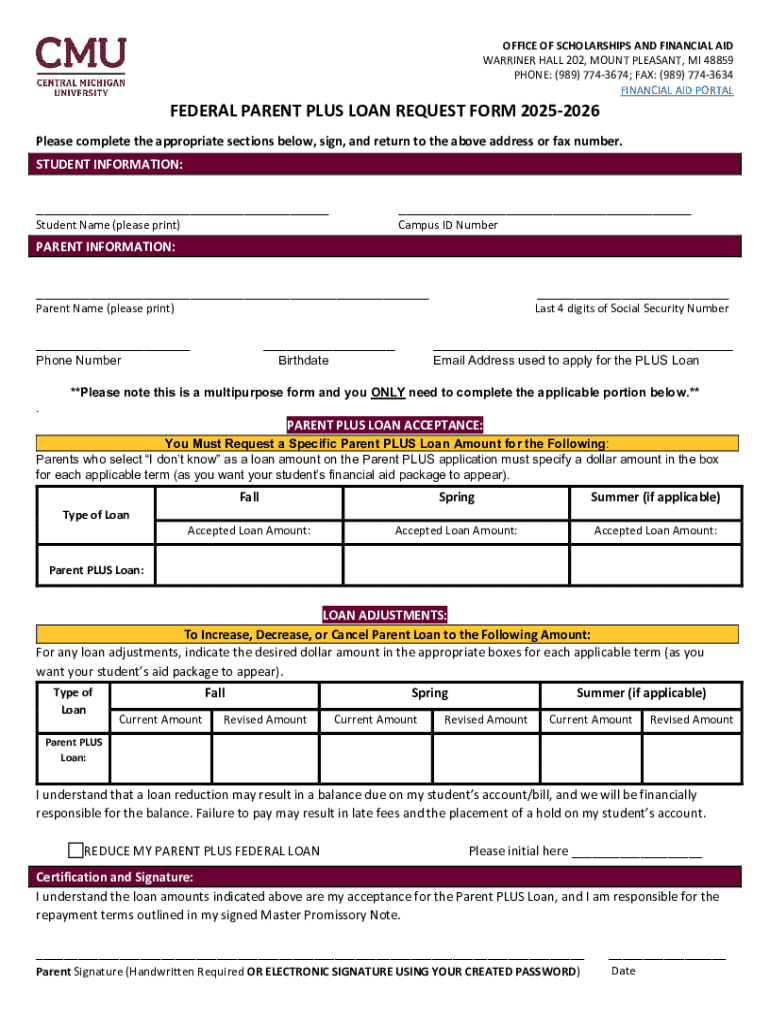
Get the free Federal Parent PLUS Loan Request Form 2025-2026
We are not affiliated with any brand or entity on this form

Fill out
Complete the form online in a simple drag-and-drop editor.

eSign
Add your legally binding signature or send the form for signing.

Share
Share the form via a link, letting anyone fill it out from any device.

Export
Download, print, email, or move the form to your cloud storage.
Why pdfFiller is the best tool for your documents and forms


End-to-end document management
From editing and signing to collaboration and tracking, pdfFiller has everything you need to get your documents done quickly and efficiently.
Accessible from anywhere
pdfFiller is fully cloud-based. This means you can edit, sign, and share documents from anywhere using your computer, smartphone, or tablet.
Secure and compliant
pdfFiller lets you securely manage documents following global laws like ESIGN, CCPA, and GDPR. It's also HIPAA and SOC 2 compliant.
What is Parent PLUS Loan Form
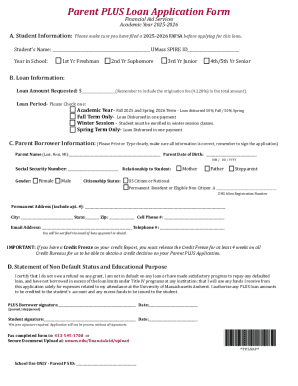
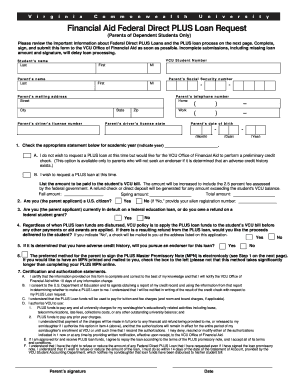
The Federal Parent PLUS Loan Request Form 2025-2026 is a financial aid application used by parents to request a Parent PLUS Loan for their student's educational expenses.
pdfFiller scores top ratings on review platforms




Who needs Parent PLUS Loan Form?
Explore how professionals across industries use pdfFiller.

Parent PLUS Loan Form is needed by:
-
Parents of college students seeking financial aid
-
Financial aid administrators in educational institutions
-
Students applying for federal financial aid packages
-
Educational consultants assisting families with funding options
-
Individuals involved in loan management or advising
Comprehensive Guide to Parent PLUS Loan Form
What is the Federal Parent PLUS Loan Request Form 2
The Federal Parent PLUS Loan Request Form is a crucial document for parents seeking financial assistance to support their dependent undergraduate child's education. This form plays a vital role in student financial aid packages, enabling parents to apply for loans specifically designed for educational expenses.
It allows parents to take an active role in securing funding, ensuring that they understand the terms and conditions of loan acceptance. By filling out the parent plus loan form 2, parents can manage their child's educational financing more effectively.
Purpose and Benefits of the Federal Parent PLUS Loan Request Form 2
This form serves several essential purposes, primarily helping parents to secure financial aid for their child's education. By using the federal parent plus loan request, parents gain flexibility in specifying how much to borrow per term, allowing them to tailor loans according to their financial needs.
The form also simplifies the process of accepting or adjusting the loan amounts, making it more user-friendly for parents navigating the complexities of financial aid applications.
Who Needs the Federal Parent PLUS Loan Request Form 2
The primary audience for the Federal Parent PLUS Loan Request Form includes parents of dependent undergraduate students. Any parent looking to bridge financial gaps in their child's education would benefit from submitting this form.
Specific situations that may necessitate form submission include when a student’s financial aid package falls short or when parents want to cover additional educational expenses. Understanding the student dependency status is critical, as it directly affects eligibility for the loan.
Eligibility Criteria for the Federal Parent PLUS Loan Request Form 2
To apply for a Parent PLUS Loan, parents must meet certain eligibility criteria. This includes being the biological or adoptive parent of a dependent undergraduate student who is enrolled at least half-time in an eligible program.
The student's enrollment status significantly impacts eligibility, as full-time students typically have more funding options. Additionally, parents must demonstrate adequate creditworthiness to qualify for the loan, which plays a critical role in the approval process.
How to Fill Out the Federal Parent PLUS Loan Request Form 2 Online (Step-by-Step)
Filling out the Federal Parent PLUS Loan Request Form online can be straightforward when following these steps:
-
Access the online form through your educational institution's financial aid portal.
-
Provide necessary student and parent information accurately.
-
Specify the loan amount desired for each term.
-
Review all entered information to confirm its accuracy.
-
Ensure you sign and date the form before submission.
Pay attention to loan amount specifications for each term, as this will help in determining the total loan package required for educational expenses.
Review and Validation Checklist for the Federal Parent PLUS Loan Request Form
Before submitting the Federal Parent PLUS Loan Request Form, it's critical to validate the document for accuracy. Here are common errors to check:
-
Ensure that all fields are filled out completely, including student and parent information.
-
Verify that the date and signature are included where required.
-
Check loan amounts to confirm they align with what is needed for educational expenses.
Confirming that all required information is provided can help expedite the processing of the loan request.
Submission Methods for the Federal Parent PLUS Loan Request Form 2
Parents have several options for submitting the completed Federal Parent PLUS Loan Request Form. They can either submit it online through the financial aid portal or send it by mail to the Office of Scholarships and Financial Aid.
It's essential to be mindful of submission deadlines, as timely filing can significantly impact loan approval and disbursement processes.
What Happens After You Submit the Federal Parent PLUS Loan Request Form 2
Upon submitting the Federal Parent PLUS Loan Request Form, parents can expect to receive confirmation of their loan request. Tracking the status of the application is vital, as it provides insights into processing timelines and decision-making.
Typically, parents will be informed of the loan decision within a few weeks, including information about loan terms and conditions.
Security and Compliance with the Federal Parent PLUS Loan Request Form 2
When using the Federal Parent PLUS Loan Request Form, security is a top priority. pdfFiller ensures that document handling is secure, utilizing 256-bit encryption and compliance with regulations such as HIPAA and GDPR.
This adherence to privacy laws is crucial in maintaining confidentiality while filling out forms, giving users peace of mind regarding their sensitive information.
Get Started with pdfFiller for Your Federal Parent PLUS Loan Request Form 2
Utilizing pdfFiller can enhance the experience of filling out the Federal Parent PLUS Loan Request Form. The platform simplifies the editing, signing, and submission of documents seamlessly.
With its cloud-based features, pdfFiller allows parents to manage their documents efficiently, ensuring that form completion is both quick and convenient.
How to fill out the Parent PLUS Loan Form
-
1.Access the Federal Parent PLUS Loan Request Form 2025-2026 on pdfFiller by searching for the form name in the tool’s search bar.
-
2.Open the form to view the fields that require completion for both parent and student information.
-
3.Gather necessary information such as the student's Social Security number, the amount you wish to request for each term, and your own personal details.
-
4.Fill in the student information fields, including name, date of birth, and student ID, ensuring accuracy to avoid processing delays.
-
5.Complete the parent section with your details, including contact information and financial data required for the loan.
-
6.Use the checkboxes in the form to specify any adjustments to the loan amount requested. Ensure each adjustment reflects your needs.
-
7.Verify that all necessary fields are completed before proceeding to the signature section.
-
8.Provide your signature and the date on the designated lines to validate the request.
-
9.Save your completed form on pdfFiller. You can opt to download it as a PDF or save it to your account for future reference.
-
10.Submit your completed form via the submission method advised by your educational institution, typically through their financial aid office.

Who is eligible to fill out the Federal Parent PLUS Loan Request Form?
Eligibility to fill out the form is typically restricted to parents of dependent undergraduate students who are enrolled at least half-time in an eligible program.
What are the deadlines for submitting the Parent PLUS Loan Request Form?
Deadlines for submitting the form align with your school's financial aid timeline. Always check with your institution's financial aid office for exact submission dates.
How should I submit the completed form?
The completed form should be submitted directly to the Office of Scholarships and Financial Aid at your institution, following their specific submission guidelines.
What supporting documents are required with the Parent PLUS Loan Request Form?
Typically, you may need to provide your tax information, proof of income, and your student’s financial aid eligibility documentation along with the form.
What are common mistakes to avoid when completing the form?
Common mistakes include missing signatures, incorrect student information, and failing to check off necessary loan adjustments. Double-check your entries before submission.
How long does it take to process the Parent PLUS Loan Request?
Processing times can vary, but it generally takes a few weeks after the form submission. Contact your financial aid office for specific timelines.
What should I do if I have questions about the form?
If you have questions, it is best to contact the financial aid office at your institution. They can provide guidance and clarify any uncertainties regarding the form.
Related Forms





Get the latest insights from our blog


If you believe that this page should be taken down, please follow our DMCA take down process
here
.
This form may include fields for payment information. Data entered in these fields is not covered by PCI DSS compliance.