
Last updated on
Oct 19, 2026
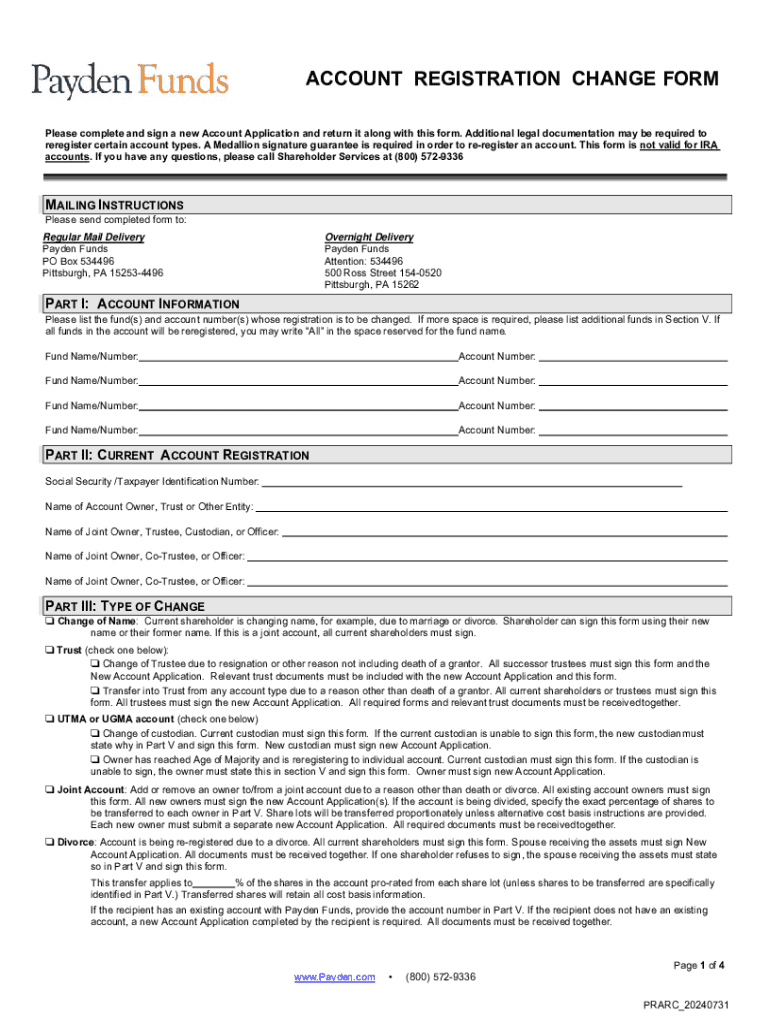
Get the free Account Registration Change Form
We are not affiliated with any brand or entity on this form

Fill out
Complete the form online in a simple drag-and-drop editor.

eSign
Add your legally binding signature or send the form for signing.

Share
Share the form via a link, letting anyone fill it out from any device.

Export
Download, print, email, or move the form to your cloud storage.
Why pdfFiller is the best tool for your documents and forms


End-to-end document management
From editing and signing to collaboration and tracking, pdfFiller has everything you need to get your documents done quickly and efficiently.
Accessible from anywhere
pdfFiller is fully cloud-based. This means you can edit, sign, and share documents from anywhere using your computer, smartphone, or tablet.
Secure and compliant
pdfFiller lets you securely manage documents following global laws like ESIGN, CCPA, and GDPR. It's also HIPAA and SOC 2 compliant.
What is Account Change Form
The Account Registration Change Form is a document used by individuals to update their account registration details.
pdfFiller scores top ratings on review platforms




Who needs Account Change Form?
Explore how professionals across industries use pdfFiller.

Account Change Form is needed by:
-
Individuals updating their account information
-
Customers of a service provider requiring account modifications
-
Users with changes to personal identification details
-
Members of an organization needing to correct contact data
-
Clients ensuring their account information is current
Comprehensive Guide to Account Change Form
What is the Account Registration Change Form?
The account registration change form is a key document designed to allow users to update their account information efficiently. This form is essential when users need to modify personal details, such as addresses or contact information. Users may require this form during periods of significant life changes, like a change of residence or legal name, ensuring their account remains accurate and functional.
Purpose and Benefits of the Account Registration Change Form
Accurately completing the account registration change form is crucial for maintaining the integrity of user accounts. Some benefits of using this form include:
-
Preventing potential account issues caused by outdated information.
-
Ensuring that users stay informed about their account status and updates.
-
Simplifying the process of maintaining accurate records.
By utilizing this form, users can enhance their account security and overall user experience.
Who Needs the Account Registration Change Form?
This form is necessary for various audiences, including individuals who have moved, businesses that have rebranded, and organizations updating member information. Eligibility criteria may differ based on user type:
-
Individuals need the form for personal information updates.
-
Businesses utilize the form for organizational changes.
-
Nonprofits may require it for updating contact details.
How to Fill Out the Account Registration Change Form Online (Step-by-Step)
Filling out the account registration change form online is straightforward. Follow these steps:
-
Access the online form through the designated portal.
-
Provide all required fields with accurate information.
-
Review the form for common mistakes, such as typos or missing details.
-
Submit the form once all information is verified.
By following these steps, users can complete the process efficiently and correctly.
Key Features of the Account Registration Change Form
The account registration change form offers several standout features that enhance user experience, including:
-
Clarity in instructions for filling out the form.
-
Simplicity in design that facilitates quick completion.
-
Online access, allowing users to fill out the form from anywhere.
These features are essential for ensuring all submissions are accurate and comprehensive.
How to Sign or Notarize the Account Registration Change Form
Signing the account registration change form requires understanding the different options available. Users have the choice of a digital signature or a wet signature based on their preference. Notarization may also be necessary for certain submissions, which can be easily accomplished online with tools like pdfFiller.
Where and How to Submit the Account Registration Change Form
Users can submit the account registration change form through various methods, including:
-
Online submission, which is the preferred method for speed.
-
Mailing the form to the designated address for physical submissions.
It is important to be aware of any deadlines for submission to avoid processing delays.
Security and Compliance for the Account Registration Change Form
When handling the account registration change form, pdfFiller employs robust security measures, including 256-bit encryption. The platform ensures compliance with relevant privacy regulations, including HIPAA and GDPR, safeguarding sensitive user data throughout the process.
Sample or Example of a Completed Account Registration Change Form
To assist users, an example of a completed account registration change form can clarify how to fill it out effectively. This includes specific sections such as:
-
Personal information fields.
-
Contact details and updated address sections.
Understanding these sections can significantly enhance the accuracy of submissions.
Experience the Ease of Using pdfFiller for Your Account Registration Change Form
Utilizing pdfFiller for the account registration change form streamlines the process for users. The platform offers editing and eSigning tools that simplify managing documents, allowing for a quick and efficient user experience compared to traditional methods.
How to fill out the Account Change Form
-
1.Access pdfFiller and search for the 'Account Registration Change Form' in the template gallery. Click on the form to open it in the editor.
-
2.Familiarize yourself with the structure of the form. It will have fields for personal information, contact details, and specific changes you wish to make.
-
3.Before you begin filling in the form, gather all necessary documents such as your current identification and any prior registration details relevant to the updates.
-
4.Start filling in the required fields, ensuring all information is accurate. Pay close attention to sections that require specific details or explanations regarding your changes.
-
5.If you need help, utilize pdfFiller's tools, such as text boxes, highlighting options, and comment fields to clarify any changes or important notes.
-
6.Once you have completed all the relevant sections, review the form thoroughly. Check for any missing fields or inaccuracies to ensure your submission is correct.
-
7.After cross-checking your information, you can choose to save the form, download it for your records, or submit it directly through pdfFiller's submission options.

Who is eligible to use the Account Registration Change Form?
Any individual needing to update their account information, such as contact details or personal identification, can use this form. Ensure your account is active to proceed.
What documents do I need to complete this form?
Typically, you may need valid identification and any previous account-related documents that support your update request. Ensure you have this information ready before you start.
How do I submit the Account Registration Change Form?
After completing the form on pdfFiller, you can submit it electronically, save it for later submission, or download it to print and mail it as required by your organization.
Is there a deadline for submitting the form?
While deadlines may vary by organization, it is advisable to submit your form promptly to ensure your account updates are processed without delay.
What are some common mistakes to avoid when filling out the form?
Common mistakes include providing incorrect personal information, omitting required fields, or failing to review the completed form for accuracy before submission.
How long does it take to process the changes after submitting the form?
Processing times can vary depending on the organization, but typically, updates may take a few business days. Check with your provider for specific timelines.
Can I make multiple changes using this form?
Yes, you can update various details in a single submission. However, ensure that all changes are clearly documented to avoid confusion during processing.
Related Forms




Get the latest insights from our blog


If you believe that this page should be taken down, please follow our DMCA take down process
here
.
This form may include fields for payment information. Data entered in these fields is not covered by PCI DSS compliance.