
Last updated on
Oct 7, 2026
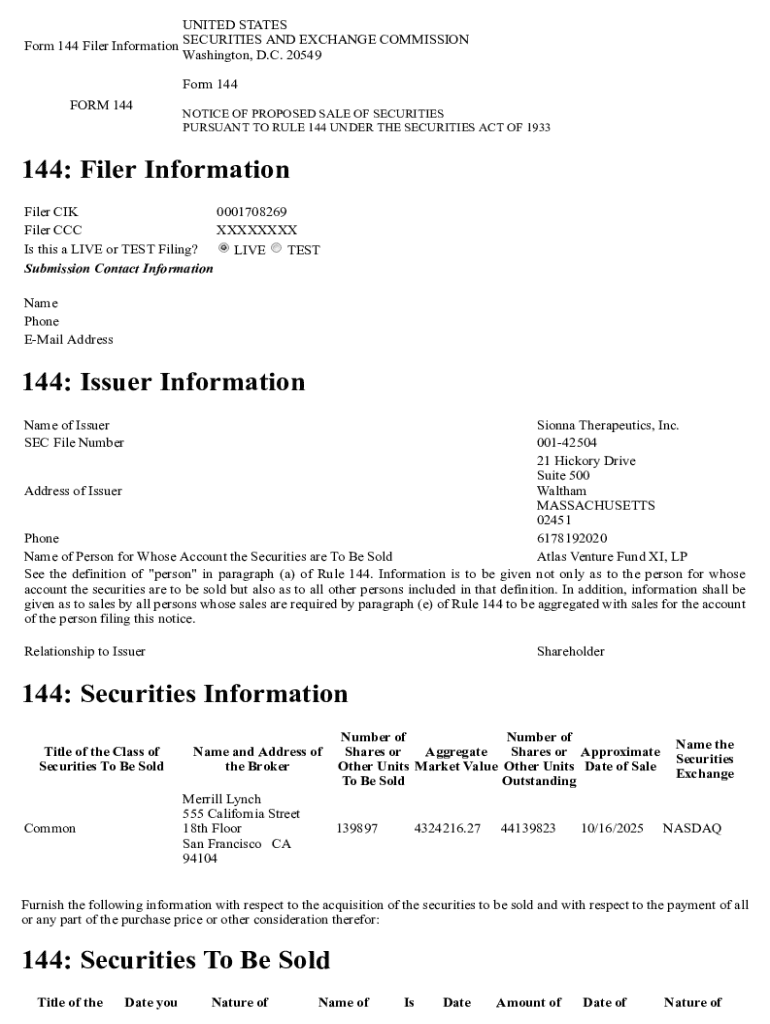
Get the free Form 144 Notice of Proposed Sale of Securities
We are not affiliated with any brand or entity on this form

Fill out
Complete the form online in a simple drag-and-drop editor.

eSign
Add your legally binding signature or send the form for signing.

Share
Share the form via a link, letting anyone fill it out from any device.

Export
Download, print, email, or move the form to your cloud storage.
Why pdfFiller is the best tool for your documents and forms


End-to-end document management
From editing and signing to collaboration and tracking, pdfFiller has everything you need to get your documents done quickly and efficiently.
Accessible from anywhere
pdfFiller is fully cloud-based. This means you can edit, sign, and share documents from anywhere using your computer, smartphone, or tablet.
Secure and compliant
pdfFiller lets you securely manage documents following global laws like ESIGN, CCPA, and GDPR. It's also HIPAA and SOC 2 compliant.
What is Form 144
The Form 144 Notice of is a document used by individuals and organizations to formally notify relevant parties of specific legal matters or intentions.
pdfFiller scores top ratings on review platforms




Who needs Form 144?
Explore how professionals across industries use pdfFiller.

Form 144 is needed by:
-
Property owners initiating legal actions
-
Real estate agents managing property transactions
-
Lawyers representing clients in property disputes
-
Investors involved in real estate developments
-
Local government officials overseeing property issues
Comprehensive Guide to Form 144
What is the Form 144 Notice of?
The Form 144 Notice of is a document filed to notify the Securities and Exchange Commission (SEC) of proposed sales of securities that are restricted from public trading. This form is essential for maintaining compliance with securities regulations, ensuring that investors are informed about sales by insiders or affiliated persons.
Typically, the Form 144 Notice of is utilized in contexts involving private placements or situations where company insiders sell their shares. Users may encounter terminology such as “restricted securities” and “affiliate” which are integral to understanding this form’s implications.
Purpose and Benefits of the Form 144 Notice of
The primary purpose of the Form 144 Notice of is to provide transparency and compliance in the sale of restricted securities. Filers must understand that this form assists in protecting the interests of investors by disclosing sales that might otherwise go unreported.
Completing the form accurately offers significant advantages, including legal protection and reduced risk of penalties from regulatory authorities. Proper filing can enhance a company’s reputation by demonstrating adherence to regulatory requirements, while also ensuring that investors are adequately informed.
Who Needs to Complete the Form 144 Notice of?
Individuals who typically need to complete the Form 144 Notice of include company executives, directors, and affiliates who plan to sell restricted stock. It is essential for these professionals to understand when this requirement applies, particularly during events like public offerings or when their shares become unrestricted.
Failing to comprehend their obligation may lead to regulatory actions or fines. Therefore, professionals in the finance sector, as well as corporate executives, must be aware of their responsibilities concerning this form.
When to File the Form 144 Notice of
Filing the Form 144 Notice of must be done in accordance with specific deadlines set by the SEC. Generally, the form should be submitted simultaneously with the transaction notice to ensure compliance.
Events triggering the need to file include the sale of restricted securities and changes in ownership status. Late filing can result in significant fines and complications, underscoring the importance of adhering to the established timelines.
How to Fill Out the Form 144 Notice of Online
To fill out the Form 144 Notice of online, users should follow a systematic process. Initially, gather all required information, such as details about the securities being sold and the seller’s information. Next, access the form through a suitable online platform.
It is crucial to ensure the form is completed accurately. Helpful tips include verifying all entries for correctness and checking for any missing information before submission. Supporting documents, such as proof of ownership or related agreements, may also be necessary during the process.
Common Errors and How to Avoid Them
Common errors when filling out the Form 144 Notice of often include incorrect dates, mismatched names, or failure to provide required information. Such mistakes can lead to delays or rejections.
To avoid common pitfalls, users should adopt best practices such as double-checking all details, using clear and correct terminology, and consulting additional resources if unsure. Troubleshooting advice may involve reviewing the completed form against official guidelines to ensure compliance.
How to Submit the Form 144 Notice of
Submitting the Form 144 Notice of can be done through various methods, including electronic submission and traditional mail. Each method has specific requirements that need to be observed, such as file formats for electronic submissions.
After submission, it is imperative to confirm that the filing was successful. Users can maintain a record of the submission confirmation received to protect against compliance issues in the future.
Security and Compliance for the Form 144 Notice of
Security is a significant concern when handling sensitive documents like the Form 144 Notice of. pdfFiller ensures document security using 256-bit encryption and compliance with industry regulations including HIPAA and GDPR.
Users can feel assured that their information remains private throughout the filing process. Understanding these measures is vital for anyone concerned about compliance and data security regarding sensitive information.
Use pdfFiller for Effortless Form Completion
Utilizing pdfFiller simplifies the process of completing the Form 144 Notice of, making it more accessible for users. The platform offers user-friendly features, including eSign capabilities and editing tools that enhance the form-filling experience.
Moreover, pdfFiller's commitment to security and compliance measures reinforces user confidence in managing their documents effortlessly. This makes it an ideal choice for those looking to complete forms accurately and efficiently.
How to fill out the Form 144
-
1.To access and open the Form 144 Notice of on pdfFiller, visit the pdfFiller website and log into your account or create a new one.
-
2.Use the search bar to locate the Form 144 Notice of by typing in the form's name and selecting it from the results.
-
3.Once opened, familiarize yourself with the layout of the document and the fields that need to be filled out.
-
4.Before starting, gather all necessary information such as property details and relevant legal information to fill out the form accurately.
-
5.Begin completing the fields by clicking on each section and inputting the required information, making sure to follow any instructions provided on the form.
-
6.For ease of use, utilize pdfFiller’s tools to add text, checkboxes, or signatures as needed.
-
7.As you work, regularly review your entries to avoid mistakes, ensuring all information is accurate and complete.
-
8.Once you have filled out the entire form, carefully review it one last time to confirm that all fields are completed correctly.
-
9.To save, download, or submit the form through pdfFiller, look for the options at the top of the page and select the desired action—either saving it to your device or sending it directly to the required parties.

What are the eligibility requirements to use Form 144?
There are no specific eligibility requirements for using Form 144 Notice of. However, it is recommended for those with legal or property-related intentions that require official notification.
What is the deadline for submitting the Form 144?
The submission deadline for Form 144 could vary based on the legal context or jurisdiction. It is best to consult a legal expert for specific timelines related to your situation.
How can I submit the Form 144 after filling it out?
After filling out Form 144 on pdfFiller, you can submit it via email, print to send it through postal mail, or use any electronic submission options provided by the receiving party.
What supporting documents do I need to attach with Form 144?
Typically, you may need to provide supporting documents such as property ownership proof or relevant legal papers. Always check specific requirements based on your situation.
What common mistakes should I avoid while completing Form 144?
Common mistakes to avoid include failing to fill all required sections, providing incorrect information, and not reviewing the form before submission. Double-check your entries for accuracy.
What is the processing time for Form 144 submissions?
Processing times for Form 144 submissions can vary based on the nature of the notification and the response needed. Generally, it can take several days to weeks for processing.
Are there any fees associated with filing Form 144?
Fees associated with filing Form 144 may depend on local regulations or the type of notification involved. It’s advisable to check with local authorities for any applicable fees.
Related Forms




Get the latest insights from our blog


If you believe that this page should be taken down, please follow our DMCA take down process
here
.
This form may include fields for payment information. Data entered in these fields is not covered by PCI DSS compliance.