
Last updated on
Oct 19, 2026
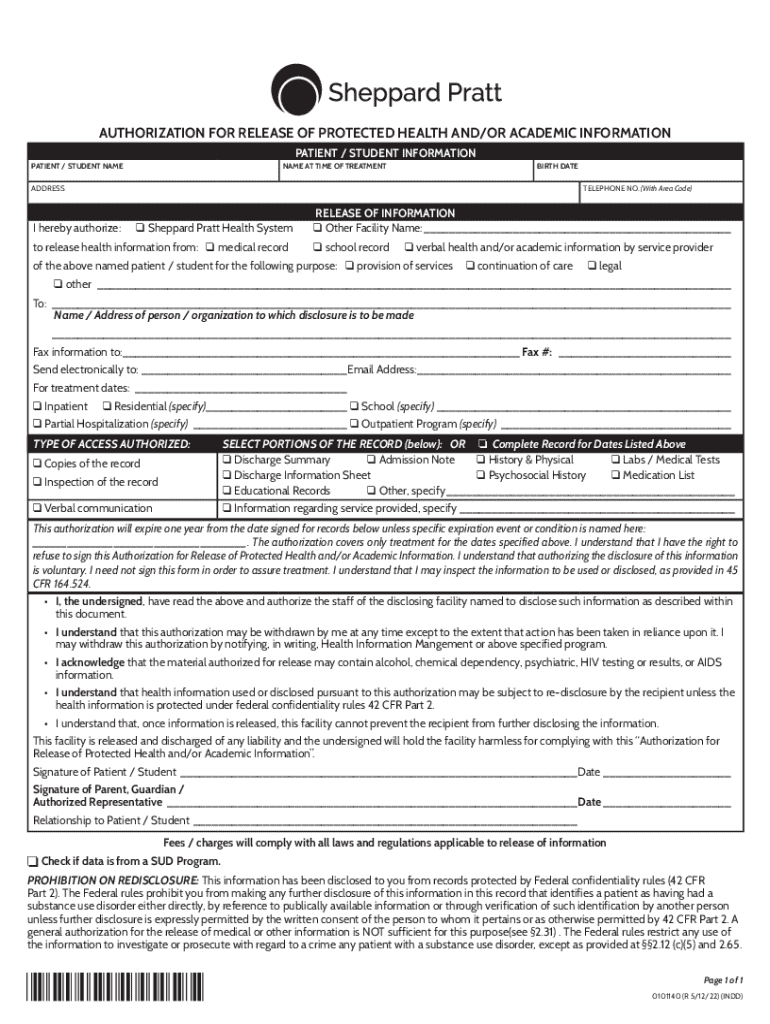
Get the free Authorization for Release of Protected Health and Academic Information
We are not affiliated with any brand or entity on this form

Fill out
Complete the form online in a simple drag-and-drop editor.

eSign
Add your legally binding signature or send the form for signing.

Share
Share the form via a link, letting anyone fill it out from any device.

Export
Download, print, email, or move the form to your cloud storage.
Why pdfFiller is the best tool for your documents and forms


End-to-end document management
From editing and signing to collaboration and tracking, pdfFiller has everything you need to get your documents done quickly and efficiently.
Accessible from anywhere
pdfFiller is fully cloud-based. This means you can edit, sign, and share documents from anywhere using your computer, smartphone, or tablet.
Secure and compliant
pdfFiller lets you securely manage documents following global laws like ESIGN, CCPA, and GDPR. It's also HIPAA and SOC 2 compliant.
What is Health Info Release
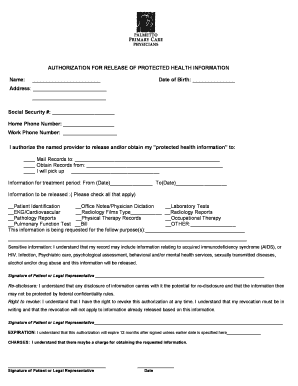
The Authorization for Release of Information form is a document used by individuals to grant permission for the disclosure of their personal information to authorized parties.
pdfFiller scores top ratings on review platforms




Who needs Health Info Release?
Explore how professionals across industries use pdfFiller.

Health Info Release is needed by:
-
Patients needing to share medical records with providers
-
Clients authorizing legal representatives to access documents
-
Individuals applying for loans requiring personal information verification
-
Students requesting transcript releases
-
Employees seeking to share work-related documents with third parties
-
Beneficiaries allowing insurance companies access to claim-related data
Comprehensive Guide to Health Info Release
What is the Authorization for Release Of?
The Authorization for Release Of is a crucial form designed to facilitate the lawful transfer of personal information between parties. Individuals may need to request a release of information for various reasons, including seeking medical records, sharing academic information, or accessing financial records. This form serves to protect personal data while ensuring that necessary information is shared with relevant parties, providing a structured means of communication.
Purpose and Benefits of the Authorization for Release Of
This form holds significant importance as it streamlines communication between involved parties while safeguarding privacy. By utilizing the Authorization for Release Of, users can ensure that sensitive details are only shared with authorized individuals. Benefits include the ability to expedite important transactions, enhance cooperation among different entities, and maintain confidentiality in data handling processes.
-
Facilitates efficient communication between entities.
-
Enhances privacy and data protection.
-
Streamlines administrative processes.
-
Enables users to specify exact information to be shared.
Key Features of the Authorization for Release Of
The Authorization for Release Of showcases several key features that enhance its usability. Designed for flexibility, the form allows customization to meet specific needs, ensuring it is applicable in various contexts. Its user-friendly layout simplifies the process of filling out and submitting the required information.
-
Customizable fields to suit individual needs.
-
Easy to use interface for efficient completion.
-
Digital format allows for quick access and submission.
Who Needs the Authorization for Release Of?
Many individuals and organizations may find themselves in need of this form. Healthcare providers, legal representatives, and educational institutions are common examples of relevant parties who regularly utilize the Authorization for Release Of to obtain necessary information. Situations like transitioning to a new healthcare provider or seeking information for legal claims frequently require a proper release form.
How to Fill Out the Authorization for Release Of Online (Step-by-Step)
Filling out the Authorization for Release Of online through pdfFiller is simple. Follow these steps to navigate the digital platform:
-
Access the pdfFiller website and log in or create an account.
-
Select the Authorization for Release Of form from the library.
-
Fill in the required fields, ensuring accurate information is entered.
-
Review the information for completeness and accuracy.
-
Save your changes and prepare the document for signing or submission.
Fields in the Authorization for Release Of: Explained
Each field in the Authorization for Release Of is designed to gather specific information. Users must pay attention to common requirements and ensure all necessary data is included to avoid processing delays. Some fields may be strictly necessary, while others may allow optional information to further clarify the request.
-
Contact information of the individual requesting the release.
-
Description of the information to be released.
-
Recipient details, including their relationship to the requester.
How to Sign the Authorization for Release Of
Signing the Authorization for Release Of can be done through various options, including digital signatures and traditional wet signatures. Using pdfFiller, users have access to secure eSigning features, enabling them to sign documents efficiently and safely without needing to print them.
Submission Methods for the Authorization for Release Of
Once the Authorization for Release Of has been filled out and signed, there are several available submission methods. Users can choose to submit the form electronically, by mail, or through secure fax. To ensure timely processing, it is advisable to confirm the preferred delivery method with the receiving party.
-
Electronic submission via email or a secure online platform.
-
Standard mail – ensure correct addressing for delivery.
-
Secure fax – confirm recipient's fax number for accuracy.
Security Measures for the Authorization for Release Of
Handling sensitive information requires robust security protocols. The Authorization for Release Of implements measures to protect data in compliance with regulations such as HIPAA and GDPR. Users can rest assured that their information is safeguarded through advanced security practices.
Utilizing pdfFiller for Your Authorization for Release Of Needs
pdfFiller offers a seamless experience for users needing assistance with the Authorization for Release Of. With features designed to simplify form management, pdfFiller enhances the process of completing and submitting the form efficiently while ensuring security throughout.
How to fill out the Health Info Release
-
1.Begin by navigating to pdfFiller and logging into your account. If you don’t have an account yet, create one to access the tools available.
-
2.Once logged in, use the search function to locate 'Authorization for Release of Information' or upload your form directly if you have it saved.
-
3.Open the document and carefully read through each section to understand the information required.
-
4.Start filling out the form by clicking on each field. Enter the necessary data such as your name, address, and details about the information you wish to release.
-
5.Make sure to gather any required documents or information beforehand, such as identification or reference numbers, to facilitate accurate completion.
-
6.Review all entered information for accuracy and completeness before moving on to the next steps.
-
7.Once completed, utilize pdfFiller's features to save your progress. Ensure that all signatures and authorization boxes are appropriately filled.
-
8.Finalize your form by checking for any missed fields or errors, and use pdfFiller to download it as a PDF or submit it electronically through the platform.

Who is eligible to use the Authorization for Release of Information form?
Any individual seeking to allow the release of their personal information to a third party can use this form. It is particularly beneficial in medical, legal, and educational contexts.
Are there any deadlines for submitting this form?
Deadlines may vary depending on the requesting entity. It's important to check with the organization or agency to which you're submitting the form for specific timelines.
How do I submit the Authorization for Release of Information form?
You can submit the completed form through various methods depending on the recipient’s requirements. Options typically include electronic submission via email, mailing a hard copy, or providing it directly in-person.
What supporting documents are needed with the form?
Often, a government-issued ID or other identification may be required to verify your identity. Always check specific requirements outlined by the entity requesting the form.
What are some common mistakes to avoid when filling out this form?
Ensure that all fields are completed accurately and legibly. Double-check names, dates, and signatures to prevent processing delays.
How long does it take to process the Authorization for Release of Information?
Processing times can vary widely. Typically, it can take from a few days to several weeks, depending on the receiving organization’s operations and workload.
Can I revoke my permission after submitting the form?
Yes, most forms allow you to revoke your authorization. However, you should check with the entity to understand their specific process for revocation.
Related Forms


Get the latest insights from our blog


If you believe that this page should be taken down, please follow our DMCA take down process
here
.
This form may include fields for payment information. Data entered in these fields is not covered by PCI DSS compliance.