
Last updated on
Oct 31, 2026

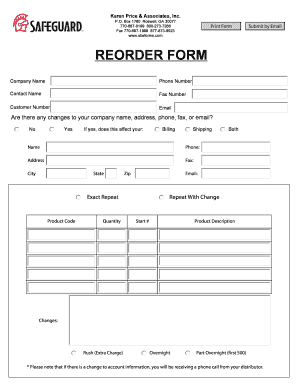
Get the free PROFILE-II and EZ-SCREEN Products Reorder Form
We are not affiliated with any brand or entity on this form

Fill out
Complete the form online in a simple drag-and-drop editor.

eSign
Add your legally binding signature or send the form for signing.

Share
Share the form via a link, letting anyone fill it out from any device.

Export
Download, print, email, or move the form to your cloud storage.
Why pdfFiller is the best tool for your documents and forms


End-to-end document management
From editing and signing to collaboration and tracking, pdfFiller has everything you need to get your documents done quickly and efficiently.
Accessible from anywhere
pdfFiller is fully cloud-based. This means you can edit, sign, and share documents from anywhere using your computer, smartphone, or tablet.
Secure and compliant
pdfFiller lets you securely manage documents following global laws like ESIGN, CCPA, and GDPR. It's also HIPAA and SOC 2 compliant.
What is PROFILE-II Reorder Form
The profile-ii and ez-screen products are administrative forms used by individuals or organizations to manage their product profiles and screen evaluations efficiently.
pdfFiller scores top ratings on review platforms




Who needs PROFILE-II Reorder Form?
Explore how professionals across industries use pdfFiller.

PROFILE-II Reorder Form is needed by:
-
Business owners seeking to manage product information.
-
Market researchers analyzing product features and performance.
-
Regulatory agencies requiring product compliance data.
-
Consumers comparing product specifications.
-
Quality assurance teams conducting screening assessments.
Comprehensive Guide to PROFILE-II Reorder Form
What Are the Profile-II and EZ-Screen Products?
The Profile-II and EZ-Screen products are essential forms designed to facilitate regulatory compliance and reporting requirements across various sectors. The Profile-II form is generally used for more comprehensive reporting, while the EZ-Screen is a streamlined option for quicker submissions. Both products play a crucial role in ensuring organizations meet their legal obligations effectively.
Understanding these forms is vital for users who must navigate the regulatory landscape, as incorrect or incomplete submissions can lead to significant obstacles. Familiarity with the profile-ii and ez-screen products helps ensure compliance and improves overall operational efficiency.
Purpose and Benefits of the Profile-II and EZ-Screen Products
The primary objectives of the Profile-II and EZ-Screen products center around meeting specific reporting requirements mandated by regulatory bodies. Timely completion of these forms allows users to avoid penalties and ensure their operations remain compliant. Proactive filing contributes to smoother business operations and builds trust with stakeholders.
Failing to file these forms correctly can lead to serious implications, including fines and legal repercussions. Users should appreciate the benefits of profile-II and ez-screen products to maximize their organizational effectiveness and avoid unnecessary risks.
Key Features of the Profile-II and EZ-Screen Products
Both the Profile-II and EZ-Screen products offer distinctive features that enhance user experience and streamline the completion process. Key functionalities include:
-
Data collection for reporting requirements
-
Information submission capabilities to regulatory bodies
-
Accessibility to specific sections or fields for user convenience
By leveraging these features, users can ensure accurate and efficient form completion.
Who Needs the Profile-II and EZ-Screen Products?
The profile-II and ez-screen products are essential for various professionals and businesses that fall under specific regulatory requirements. Professionals such as healthcare providers, construction companies, and manufacturers often find themselves mandated to complete these forms. Situations requiring completion include mergers, business expansions, and instances of regulatory audits.
Identifying the demographics likely to utilize these forms aids in understanding the broader implications of compliance and reporting within specific industries.
Eligibility Criteria for the Profile-II and EZ-Screen Products
Users must meet certain eligibility criteria to utilize the Profile-II and EZ-Screen products effectively. These criteria may include specific qualifications or certifications relevant to the industry and an understanding of applicable regulations.
Some users may be disqualified or exempt from needing these forms based on certain conditions. Additionally, it is crucial to consider any state-specific requirements that may affect eligibility. Ensure to consult local regulations before proceeding with form completion.
How to Fill Out the Profile-II and EZ-Screen Products Online
Filling out the Profile-II and EZ-Screen products online can be straightforward if you follow these steps:
-
Access the pdfFiller platform and select the appropriate form.
-
Input required information in designated fields, ensuring accuracy.
-
Review your entries to avoid common mistakes.
-
Save and submit the completed form.
Avoiding pitfalls such as omitting essential information is critical to successful submissions. Utilizing pdfFiller enhances the process, making it user-friendly and efficient.
Common Errors and How to Avoid Them When Using Profile-II and EZ-Screen Products
Users frequently encounter specific errors while filling out the Profile-II and EZ-Screen forms. Common mistakes include:
-
Misplacing required signatures
-
Omitting important data fields
-
Incorrect formatting of information
To ensure accurate submissions, utilize a validation checklist and double-check all entries before finalizing. Implementing these strategies will significantly reduce the likelihood of errors.
How to Submit the Profile-II and EZ-Screen Products
Submission methods for the Profile-II and EZ-Screen products vary depending on specific state and federal requirements. Users should be aware of available options such as electronic submissions or mailing hard copies.
Tracking submissions is crucial for peace of mind, and users should inquire about tracking capabilities to confirm receipt of their forms. This practice fosters confidence in the compliance process.
Security and Compliance Considerations for Profile-II and EZ-Screen Products
When handling sensitive information related to the Profile-II and EZ-Screen products, security is paramount. pdfFiller emphasizes its commitment to document security through practices like 256-bit encryption and compliance with SOC 2 Type II, HIPAA, and GDPR regulations.
Understanding the legal implications of filing these forms is critical to ensure compliance. Proper data protection practices mitigate risks associated with sensitive information.
Experience the Ease of Filling Out Your Profile-II and EZ-Screen Products with pdfFiller
Utilizing pdfFiller for your Profile-II and EZ-Screen form completion streamlines the entire process. Key features designed for efficient form management include a user-friendly interface and robust editing tools.
Users can rest assured knowing that support and resources are readily available, enhancing their overall experience. Making the best use of pdfFiller can lead to smoother operations and improved compliance outcomes.
How to fill out the PROFILE-II Reorder Form
-
1.Begin by accessing the pdfFiller website and logging into your account. If you don't have an account, create one to get started. Once logged in, use the search bar to find the 'profile-ii and ez-screen products' form.
-
2.Click on the form title to open it in the pdfFiller editor. You will see various fields that need to be filled out, organized in a user-friendly layout.
-
3.Gather all necessary information and documents that pertain to your product before you start. This might include previous product evaluations, specifications, and relevant compliance documentation.
-
4.Carefully fill out each field in the form, ensuring that all requested information is accurate. Use the toolbar to navigate through the document easily. pdfFiller allows you to type directly into the fields or upload files as needed.
-
5.As you complete the form, regularly save your progress using the 'Save' feature to avoid losing any information. Take advantage of the 'Review' feature to check for any missing data or errors.
-
6.Once you’ve filled in all sections of the form and reviewed it for completeness, look for the option to finalize the document. pdfFiller typically offers a summary view to ensure you approve all entered information.
-
7.When satisfied with your entries, choose the 'Save,' 'Download,' or 'Submit' option to finalize your submission. This could include saving it to your device or sharing it directly with relevant stakeholders through email.

Who is eligible to use the profile-ii and ez-screen products form?
Any individual or organization that needs to manage or evaluate product profiles is eligible to use the profile-ii and ez-screen products form. This includes businesses, researchers, and regulatory bodies.
What is the deadline for submitting the form?
While specific deadlines for the profile-ii and ez-screen products form are not provided in the metadata, it’s important to check internal company policies or regulatory requirements that might dictate submission timelines.
How can I submit the completed form?
After completing the profile-ii and ez-screen products form on pdfFiller, you can submit it electronically through the platform or download and send it via email or physical mail, depending on your needs.
What supporting documents are required with this form?
While the metadata does not specify required documents, typical supporting information may include previous evaluations, compliance documents, or related product specifications. Always check for specific requirements based on your purpose.
What are common mistakes to avoid when filling out the form?
Common mistakes include omitting required fields, providing inaccurate product details, or failing to review the completed form for errors. Always double-check for completeness before submitting.
How long does it take to process the form?
Processing times for the profile-ii and ez-screen products form can vary significantly based on the organization or agency involved. It’s advisable to inquire directly with the relevant office for specific processing timelines.
What should I do if I experience issues using pdfFiller?
If you encounter difficulties while using pdfFiller, check the platform’s help section or customer support for assistance. They offer resources and support to users facing technical issues.
Related Forms





Get the latest insights from our blog


If you believe that this page should be taken down, please follow our DMCA take down process
here
.
This form may include fields for payment information. Data entered in these fields is not covered by PCI DSS compliance.