
Last updated on
Nov 9, 2026

UK Railways Pension Scheme PM42 2015 free printable template
We are not affiliated with any brand or entity on this form

Fill out
Complete the form online in a simple drag-and-drop editor.

eSign
Add your legally binding signature or send the form for signing.

Share
Share the form via a link, letting anyone fill it out from any device.

Export
Download, print, email, or move the form to your cloud storage.
Why pdfFiller is the best tool for your documents and forms


End-to-end document management
From editing and signing to collaboration and tracking, pdfFiller has everything you need to get your documents done quickly and efficiently.
Accessible from anywhere
pdfFiller is fully cloud-based. This means you can edit, sign, and share documents from anywhere using your computer, smartphone, or tablet.
Secure and compliant
pdfFiller lets you securely manage documents following global laws like ESIGN, CCPA, and GDPR. It's also HIPAA and SOC 2 compliant.
What is UK Railways Pension Scheme PM42
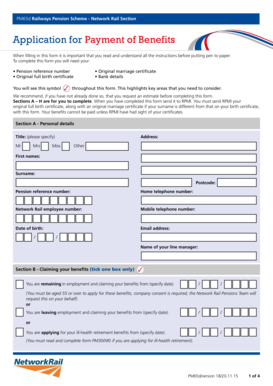
The PM42 Railways Pension Scheme AVC Extra Application is a personal finance document used by members to amend their Additional Voluntary Contribution (AVC) Extra contributions.
pdfFiller scores top ratings on review platforms




Who needs UK Railways Pension Scheme PM42?
Explore how professionals across industries use pdfFiller.

UK Railways Pension Scheme PM42 is needed by:
-
Railways Pension Scheme members seeking to adjust their contributions
-
HR personnel managing pension contributions
-
Payroll offices overseeing employee pension plans
-
Financial advisors assisting clients with pension options
-
Individuals interested in making one-off or regular pension contributions
-
Employees considering changing their investment choices
Comprehensive Guide to UK Railways Pension Scheme PM42
What is the PM42 Railways Pension Scheme AVC Extra Application?
The PM42 form is designed for members of the Railways Pension Scheme who wish to amend their Additional Voluntary Contributions (AVC). This document is crucial for managing pension contributions, ensuring that members have the ability to modify their payments or make one-off contributions effectively.
By utilizing the PM42 form, individuals can enhance their pension management strategies, aligning their contributions with personal financial goals. It serves as a key tool for optimizing pension investments through AVCs, facilitating better decision-making regarding retirement funds.
Purpose and Benefits of the PM42 Railways Pension Scheme AVC Extra Application
The PM42 form allows users to make adjustments to their AVC contributions, which can result in increased retirement savings. Members can leverage this form to amend regular contributions or to make one-off payments that can significantly boost their pension fund.
By using this application, individuals have the opportunity to enhance their pension investment choices and optimize their overall contribution strategy, thus securing a more favorable financial future upon retirement.
Who Needs the PM42 Railways Pension Scheme AVC Extra Application?
The PM42 form is specifically tailored for members of the Railways Pension Scheme who are looking to make changes to their AVCs. This includes both current employees and those near retirement.
HR and payroll offices also play an essential role in processing these applications, ensuring accurate and timely adjustments to employee pension contributions. Their involvement is vital for maintaining compliance with scheme regulations and ensuring member satisfaction.
Step-by-Step Guide: How to Fill Out the PM42 Railways Pension Scheme AVC Extra Application Online
Follow these steps to complete the PM42 form online:
-
Begin by downloading the PM42 form from the official site.
-
Fill in your Full Name and National Insurance number as required.
-
Complete your Home Address and Postcode accurately.
-
Specify your desired AVC contribution amounts.
-
Review all entries to ensure clarity and correctness, using BLOCK CAPITAL letters where instructed.
-
Sign the form and submit it to your HR or payroll office.
Signature Requirements for the PM42 Railways Pension Scheme AVC Extra Application
Applicants must provide their signature on the PM42 form, confirming all necessary details are correct. Additionally, the HR or payroll office is required to sign for verification purposes.
Both digital and wet signature options are accepted, but it’s essential to follow the specific requirements set by your organization regarding signature methods to ensure successful processing of your application.
Submission Methods for the PM42 Railways Pension Scheme AVC Extra Application
There are several methods available for submitting the completed PM42 form:
-
In-person submission at your HR or payroll office.
-
Mail the application to the designated pensions department.
-
Electronically submit via the specified digital platform, if available.
Make sure to check with your HR department for precise guidelines on where to send the form based on the submission method you choose.
What Happens After You Submit the PM42 Railways Pension Scheme AVC Extra Application?
Upon submission of the PM42 form, applicants can expect a processing period during which their application will be reviewed. Members will receive a notification of acceptance or any required additional information.
If the application is rejected, it is advisable to follow up promptly with the HR office to address any outstanding issues or to resubmit the required information necessary for approval.
Security and Compliance for the PM42 Railways Pension Scheme AVC Extra Application
Security is a top priority when submitting the PM42 form. Comprehensive measures are in place to protect private information throughout the submission process.
Moreover, the PM42 form complies with GDPR and other relevant data protection regulations, ensuring that all personal data is handled securely and responsibly.
Using pdfFiller for the PM42 Railways Pension Scheme AVC Extra Application
pdfFiller streamlines the process of completing the PM42 form, offering users an intuitive platform to edit, sign, and submit documents online. With its cloud-based capabilities, users enjoy enhanced document management and security features.
Feel confident in managing your pension contribution forms efficiently while benefiting from a user-friendly experience and robust document protection provided by pdfFiller.
Additional Resources and Support for the PM42 Railways Pension Scheme AVC Extra Application
For those seeking further assistance, a variety of supplementary resources and customer support options are available. Members are encouraged to explore community forums or FAQ sections related to the Railways Pension Scheme.
These resources can provide valuable insights and answers to common inquiries, ensuring that individuals feel well-supported during their pension management journey.
How to fill out the UK Railways Pension Scheme PM42
-
1.Begin by accessing the PM42 form on pdfFiller. You can search for the form using the form name in the pdfFiller search bar.
-
2.Once you locate the PM42 form, click on it to open the document in the pdfFiller interface.
-
3.Before you start filling out the form, gather the necessary information, including your full name, National Insurance number, and home address.
-
4.Review the fillable fields carefully, starting with your full name. Click on the corresponding field and type in your information.
-
5.Next, enter your National Insurance number in the designated field. Be sure to double-check for any typos.
-
6.In the home address section, provide your complete address including the postcode. Use BLOCK CAPITAL letters, as instructed.
-
7.Now, proceed to indicate your contribution amounts. Make sure to fill in the appropriate fields accurately.
-
8.After completing the required fields, review the form for completeness and accuracy. Ensure that there are no mistakes.
-
9.You will then need to sign the form electronically in the signature field provided.
-
10.Once all information is correctly entered and the form is signed, look for the option to save your form. Click on it to save a copy to your device.
-
11.If you need to submit the form, pdfFiller offers options to either download the completed form or send it directly via email. Choose the method that suits your needs best.
-
12.Finally, if you are required to pass this form to your HR or payroll office, follow the instructions to do so promptly.

Who is eligible to use the PM42 form?
Members of the Railways Pension Scheme are eligible to use the PM42 form for adjusting their Additional Voluntary Contributions (AVC) Extra.
Are there any deadlines for submitting the PM42 form?
There are no specific deadlines mentioned in the metadata. However, it is advisable to submit the form as soon as you've made your decisions regarding contributions.
How do I submit the completed PM42 form?
You can submit the completed PM42 form either by downloading it and sending it via email or handing it directly to your HR or payroll office for verification.
What supporting documents do I need to submit with the PM42 form?
Typically, no additional documents are required beyond personal details provided in the form. However, check with your HR office for any specific requirements.
What are common mistakes to avoid when filling out the PM42 form?
Be careful to avoid typos in your personal information, especially your National Insurance number, and ensure all required fields are completed to prevent delays in processing.
How long does it take to process the PM42 form?
Processing times for the PM42 form can vary. Generally, it should be processed within a few weeks, but contacting your HR or payroll office may provide specific timelines.
Can I make changes to the PM42 form after submission?
Once submitted, you typically need to submit a new form if you wish to make changes. Contact your HR office for specific procedures regarding amendments.
UK Railways Pension Scheme PM42 Form Versions
Related Forms




Get the latest insights from our blog



If you believe that this page should be taken down, please follow our DMCA take down process
here
.
This form may include fields for payment information. Data entered in these fields is not covered by PCI DSS compliance.