
Last updated on
Oct 19, 2026

Get the free Notice of Hard Copy Submission
We are not affiliated with any brand or entity on this form

Fill out
Complete the form online in a simple drag-and-drop editor.

eSign
Add your legally binding signature or send the form for signing.

Share
Share the form via a link, letting anyone fill it out from any device.

Export
Download, print, email, or move the form to your cloud storage.
Why pdfFiller is the best tool for your documents and forms


End-to-end document management
From editing and signing to collaboration and tracking, pdfFiller has everything you need to get your documents done quickly and efficiently.
Accessible from anywhere
pdfFiller is fully cloud-based. This means you can edit, sign, and share documents from anywhere using your computer, smartphone, or tablet.
Secure and compliant
pdfFiller lets you securely manage documents following global laws like ESIGN, CCPA, and GDPR. It's also HIPAA and SOC 2 compliant.
What is Hard Copy Notice
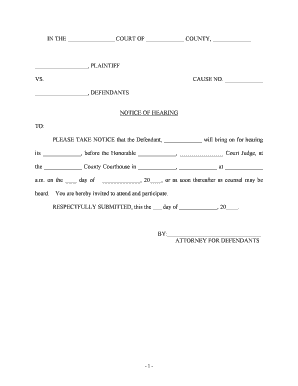
The Notice of Hard Copy is a document used by individuals or organizations to formally notify recipients about hard copy document submissions.
pdfFiller scores top ratings on review platforms




Who needs Hard Copy Notice?
Explore how professionals across industries use pdfFiller.

Hard Copy Notice is needed by:
-
Individuals sending important documents via mail
-
Businesses submitting paperwork to clients
-
Law firms notifying clients about document deliveries
-
Organizations distributing printed materials
-
Administrative offices handling official communications
Comprehensive Guide to Hard Copy Notice
What is the Notice of Hard Copy?
A notice of hard copy is a formal document used to inform relevant parties about the existence and filing of specific records. Its primary purpose is ensuring proper documentation and compliance within various legal and professional contexts. Accurately filing this document is crucial, as it can impact legal standing and the ability to refer back to claims, ensuring that all parties are informed and any obligations are fulfilled.
Purpose and Benefits of the Notice of Hard Copy
The purpose of a notice of hard copy is multifaceted, serving as a tool to document essential communications and submissions effectively. The legal implications associated with filing this notice are significant, as they ensure transparency and accountability in legal matters.
-
Enhances record-keeping for individuals and organizations.
-
Facilitates compliance with legal obligations.
-
Provides a reliable reference for future inquiries.
Who Needs the Notice of Hard Copy?
Individuals and organizations required to file a notice of hard copy include those involved in legal proceedings or regulatory compliance situations. Circumstances that necessitate this filing could involve legal notices, compliance documents, or formal communications that require acknowledgement.
How to Fill Out the Notice of Hard Copy Online (Step-by-Step)
Filling out the notice of hard copy online is streamlined through platforms like pdfFiller. To complete the form, follow these steps:
-
Access the notice on pdfFiller’s platform.
-
Fill in the required fields accurately, ensuring all details are correct.
-
Review each section for completeness and accuracy.
-
Submit the form electronically once all information is verified.
Common Mistakes and How to Avoid Them
Understanding common errors can significantly reduce mistakes when filing a notice of hard copy. Some prevalent mistakes include incomplete sections, incorrect information entries, and failing to check for updates in legal requirements.
-
Double-check all entries for accuracy.
-
Ensure all forms are fully completed before submission.
-
Stay updated on any regulatory changes that might affect the filing process.
Filing and Submission Methods for the Notice of Hard Copy
The submission of the completed notice of hard copy can be done through various methods depending on jurisdictional requirements. Options may include online submissions, mailing physical copies, or in-person submissions at designated locations.
-
Online submission via approved platforms.
-
Mailing to the appropriate governing body.
-
Personal delivery to specified offices.
What Happens After You Submit the Notice of Hard Copy?
Once you submit the notice of hard copy, there are several potential outcomes. Users can expect confirmation of their submission along with options for tracking its status. Various responses may arise, including approval notifications or requests for additional information.
Security and Compliance Considerations for the Notice of Hard Copy
Security measures in place at pdfFiller enhance the safety of handling sensitive documents. It is essential to remain compliant with legal regulations when filing this notice, which protects both the filer and the recipients from potential legal repercussions.
Using pdfFiller to Simplify the Notice of Hard Copy Process
pdfFiller significantly enhances the experience of filling out and submitting the notice of hard copy. Some features that facilitate this process include easy form filling, editing capabilities, and the option to eSign documents directly within the platform.
Sample of a Completed Notice of Hard Copy
Providing a visual reference through a completed notice of hard copy can greatly assist users. A sample form includes annotations that explain the various sections, helping users understand how to fill out their own documents accurately.
How to fill out the Hard Copy Notice
-
1.Start by accessing pdfFiller's website and logging into your account or creating a new one if necessary.
-
2.Once logged in, use the search bar to find 'Notice of Hard Copy' and select the form from the results.
-
3.Open the form to see all available fields. Familiarize yourself with the requirements and any specific instructions.
-
4.Before filling out the form, gather all necessary information, such as recipient details and document types being submitted.
-
5.Begin filling in the fields by clicking on each section. Utilize pdfFiller's tools to add text, checkboxes, or signatures where required.
-
6.Carefully review the entered information for accuracy. Pay special attention to recipient names, addresses, and document descriptions.
-
7.Once completed, use the review feature to ensure everything looks correct. Make any final adjustments before proceeding.
-
8.To save your work, click the save button on the top right. You can choose to download the form as a PDF or save it to your pdfFiller account.
-
9.If you're ready to submit, select the submission option within pdfFiller, then follow the prompts to send the completed form wherever needed.

Who is eligible to use the Notice of Hard Copy?
Anyone needing to notify another party about the submission of hard copy documents is eligible to use the Notice of Hard Copy. This includes individuals and businesses alike.
Are there deadlines associated with this form?
While there may not be strict deadlines for submitting the Notice of Hard Copy, prompt notification is recommended to ensure timely communication regarding documents.
How can I submit the Notice of Hard Copy?
The Notice of Hard Copy can be submitted via mail or electronically depending on the recipient's preferences. Use pdfFiller to streamline the submission process.
What supporting documents are required?
Typically, you do not need supporting documents to submit the Notice of Hard Copy itself. However, it's recommended to include any documents you are notifying the recipient about.
What are common mistakes to avoid?
Common mistakes include misspelling recipient names or addresses, failing to include the document details, or neglecting to review the form for completeness before submission.
How long does it take to process this form?
Processing time for the Notice of Hard Copy varies based on the mailing or electronic submission method. Generally, allow several business days for confirmation of receipt.
Can I edit the form after saving it?
Yes, you can edit the Notice of Hard Copy at any time after saving in your pdfFiller account. Simply reopen the form to make adjustments as needed.




Get the latest insights from our blog


If you believe that this page should be taken down, please follow our DMCA take down process
here
.
This form may include fields for payment information. Data entered in these fields is not covered by PCI DSS compliance.