
Last updated on
Nov 9, 2026
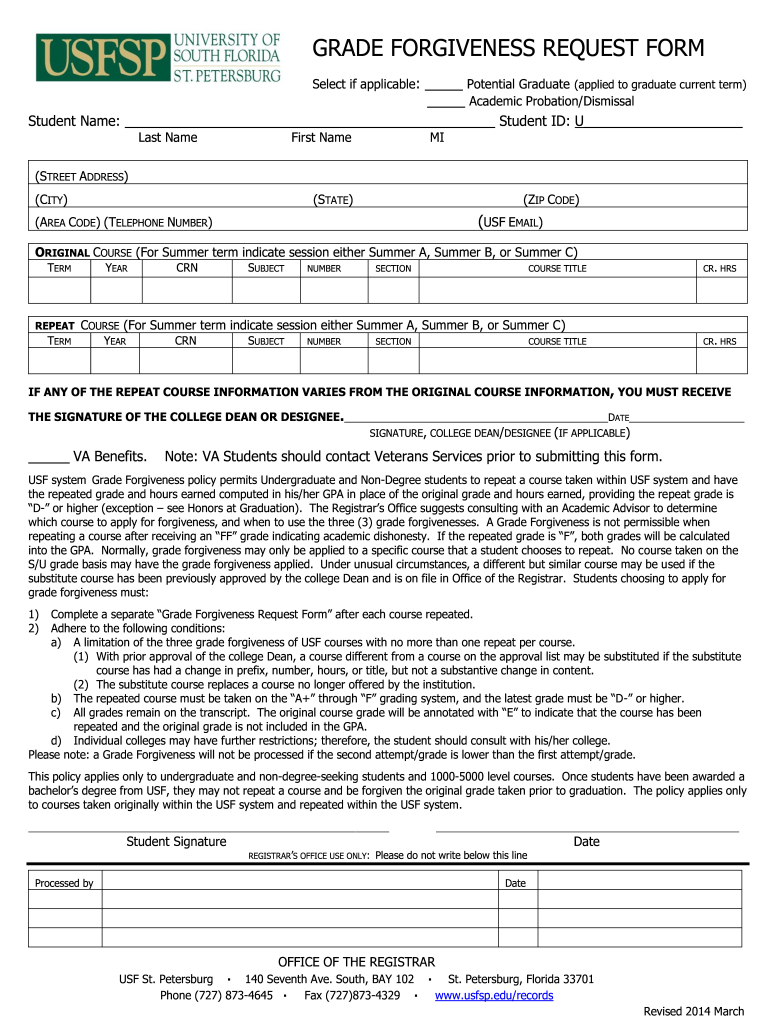
University of South Florida Grade Forgiveness Request Form 2014 free printable template
pdfFiller is not affiliated with any government organization

Fill out
Complete the form online in a simple drag-and-drop editor.

eSign
Add your legally binding signature or send the form for signing.

Share
Share the form via a link, letting anyone fill it out from any device.

Export
Download, print, email, or move the form to your cloud storage.
Why pdfFiller is the best tool for your documents and forms


End-to-end document management
From editing and signing to collaboration and tracking, pdfFiller has everything you need to get your documents done quickly and efficiently.
Accessible from anywhere
pdfFiller is fully cloud-based. This means you can edit, sign, and share documents from anywhere using your computer, smartphone, or tablet.
Secure and compliant
pdfFiller lets you securely manage documents following global laws like ESIGN, CCPA, and GDPR. It's also HIPAA and SOC 2 compliant.
What is University of South Florida Grade Forgiveness Request Form
The USF Grade Forgiveness Request Form is an important educational document used by students at the University of South Florida to request grade forgiveness for repeated courses.
pdfFiller scores top ratings on review platforms




Who needs University of South Florida Grade Forgiveness Request Form?
Explore how professionals across industries use pdfFiller.

University of South Florida Grade Forgiveness Request Form is needed by:
-
Undergraduate students at USF seeking grade forgiveness.
-
Non-degree-seeking students at USF needing to repeat courses.
-
College deans or designees responsible for approving requests.
-
Academic advisors guiding students through the process.
-
Registrar's Office staff processing the request.
Comprehensive Guide to University of South Florida Grade Forgiveness Request Form
What is the USF Grade Forgiveness Request Form?
The USF Grade Forgiveness Request Form is a critical document designed for undergraduate and non-degree-seeking students at the University of South Florida (USF). This form serves the essential purpose of allowing students to request grade forgiveness, thereby improving their academic records. By submitting this form, students can replace lower grades with higher ones, which is especially relevant for those striving to enhance their GPA.
This form plays a key role in academic records management, ensuring that students have the opportunity to recover from academic challenges they may have faced. The USF Grade Forgiveness Request Form is particularly vital for navigating the academic policies set forth by the university.
Purpose and Benefits of the USF Grade Forgiveness Request Form
The primary benefit of using the USF Grade Forgiveness Request Form is its ability to enhance a student's overall GPA. By allowing lower grades to be replaced with the results of repeated courses, this form provides an essential avenue for academic improvement. This option encourages students who may be struggling with their studies to take proactive steps toward success.
Moreover, the academic grade forgiveness policy embodied in this form promotes a more forgiving educational environment, fostering motivation among students facing difficulties. Utilizing this form can lead to significant benefits in their academic journey.
Key Features of the USF Grade Forgiveness Request Form
-
Fillable fields for detailed course information, ensuring accurate submissions.
-
Requires both student and college dean/designee signatures to validate the request.
-
Clear instructions are provided for multiple submissions if needed.
The unique aspects of the USF Grade Forgiveness Request Form make it versatile for various situations while maintaining a structured approach to form completion. The format encourages students to provide precise details about their academic history, enhancing clarity in the review process.
Who Needs the USF Grade Forgiveness Request Form?
This form is primarily intended for undergraduate and non-degree-seeking students at USF. It is essential for those who wish to improve their academic standing by taking advantage of the grade forgiveness policy. Certain conditions, such as specific academic policies and situations, determine when a student should utilize this form to ensure proper consideration of their request.
Eligibility requirements will help guide students in understanding whether this form is necessary for their circumstances, emphasizing its importance for academic progression.
How to Fill Out the USF Grade Forgiveness Request Form Online (Step-by-Step)
-
Access the form through the designated platform.
-
Fill in all required fillable fields including course details.
-
Review the provided information for accuracy.
-
Obtain the necessary signatures from the student and college dean/designee.
-
Submit the completed form as instructed.
Students should ensure they follow these steps diligently to avoid common pitfalls during completion. Attention to detail is critical, as inaccuracies can delay the processing of their requests.
Submission Methods and Important Deadlines for the USF Grade Forgiveness Request Form
Students have multiple options for submitting the USF Grade Forgiveness Request Form, including in-person submissions and online methods. It is crucial to adhere to important deadlines set forth by the university to ensure requests are processed in a timely manner.
Late submissions may result in negative consequences, potentially impacting a student's academic standing. Understanding these factors is essential for all users of the form.
What Happens After You Submit the USF Grade Forgiveness Request Form?
After submitting the form, it is processed by the Registrar’s Office at USF. Students can track the status of their submission through the provided channels. Awareness of possible outcomes is essential, as it prepares students for next steps, whether their request is accepted or rejected.
Common rejection reasons are also noted, allowing students to understand what might hinder the processing of their forms and to take corrective actions if necessary.
Security and Privacy Considerations for the USF Grade Forgiveness Request Form
Security and privacy are paramount when handling the USF Grade Forgiveness Request Form. pdfFiller employs robust security protocols to protect sensitive information included in the form. Compliance with federal and state regulations is ensured, reinforcing the commitment to data confidentiality throughout the academic records process.
Students can have peace of mind knowing their documents are managed securely, safeguarding their personal academic information.
Tips for Using pdfFiller to Complete the USF Grade Forgiveness Request Form
-
Edit text and images directly within the pdfFiller platform for accuracy.
-
Easily eSign the form for a seamless completion process.
-
Benefit from online accessibility, allowing for submissions from any device.
Utilizing pdfFiller enhances the user experience when completing the USF Grade Forgiveness Request Form. The platform's capabilities support efficient management of submissions, allowing students to track and store their documents securely.
Get Started with pdfFiller for Your USF Grade Forgiveness Request Form
Students are encouraged to leverage the features of pdfFiller to ensure a smooth experience while filling out the USF Grade Forgiveness Request Form. With its user-friendly tools and robust support access, students can complete their forms confidently, knowing their documents are handled in compliance with stringent security standards.
How to fill out the University of South Florida Grade Forgiveness Request Form
-
1.To access the USF Grade Forgiveness Request Form, visit pdfFiller's website and use the search function to find the form by its name.
-
2.Once located, click on the form to open it in the pdfFiller editor, where you will see all available fillable fields clearly displayed.
-
3.Before you start filling out the form, gather the necessary information such as your Student Name, Student ID, CRN, course details, and the term when the courses were taken.
-
4.Begin filling in the required fields. Enter your personal details accurately and ensure that you provide correct information about the original and the repeated courses.
-
5.Pay attention to any checkboxes that may apply to your situation and select any applicable options as needed.
-
6.Review all filled details for accuracy, making sure to double-check the course information and your personal details.
-
7.Sign the form using the signature tool provided in pdfFiller, ensuring that the signature matches the name provided on the form.
-
8.Once completed, save your work regularly to avoid losing any entered information.
-
9.After revising the form for any last-minute changes, download or save it directly from pdfFiller or submit it through the platform as per your registration office's submission procedure.

Who is eligible to use the USF Grade Forgiveness Request Form?
The form is available for undergraduate and non-degree-seeking students at the University of South Florida who wish to request grade forgiveness after repeating a course.
What information do I need before filling out the form?
Collect your Student Name, Student ID, original and repeated course details such as CRN, term, year, subject, number, section, course title, and credit hours to fill out the form accurately.
Is there a deadline for submitting the Grade Forgiveness Request Form?
While specifics aren’t provided, it’s advisable to submit the form as early as possible, ideally before the semester begins, to ensure timely processing by the Registrar’s Office.
How do I submit the USF Grade Forgiveness Request Form?
After completing the form on pdfFiller, you can either download it for physical submission or submit electronically if the Registrar's Office allows it. Verify preferred submission channels via USF's policies.
What common mistakes should I avoid when filling out the form?
Ensure all information is accurate, especially course details. Avoid omitting required signatures from both the student and the college dean or designee, as this may delay processing.
How long does the processing take after submission?
Processing times can vary but generally take a few weeks. Check with the Registrar’s Office for specific timelines during peak periods such as registration or grading.
Are there any fees associated with the Grade Forgiveness Request Form?
The metadata does not specify fees, but typically, forms related to grade forgiveness do not incur additional charges. Confirm with USF’s Registrar for any potential fees.
University of South Florida Grade Forgiveness Request Form Form Versions
Related Forms






Get the latest insights from our blog


If you believe that this page should be taken down, please follow our DMCA take down process
here
.
This form may include fields for payment information. Data entered in these fields is not covered by PCI DSS compliance.