
Last updated on
Oct 7, 2026

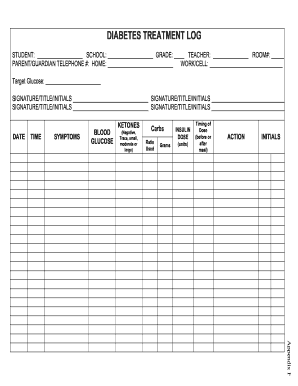
Get the free Dayton Children's School Blood Sugar Log
We are not affiliated with any brand or entity on this form

Fill out
Complete the form online in a simple drag-and-drop editor.

eSign
Add your legally binding signature or send the form for signing.

Share
Share the form via a link, letting anyone fill it out from any device.

Export
Download, print, email, or move the form to your cloud storage.
Why pdfFiller is the best tool for your documents and forms


End-to-end document management
From editing and signing to collaboration and tracking, pdfFiller has everything you need to get your documents done quickly and efficiently.
Accessible from anywhere
pdfFiller is fully cloud-based. This means you can edit, sign, and share documents from anywhere using your computer, smartphone, or tablet.
Secure and compliant
pdfFiller lets you securely manage documents following global laws like ESIGN, CCPA, and GDPR. It's also HIPAA and SOC 2 compliant.
What is Blood Sugar Log
The Dayton Children's School Blood form is a document used by parents and guardians to authorize the administration of blood services for their children at Dayton Children's Hospital.
pdfFiller scores top ratings on review platforms




Who needs Blood Sugar Log?
Explore how professionals across industries use pdfFiller.

Blood Sugar Log is needed by:
-
Parents or guardians of students at Dayton Children's School
-
Healthcare providers involved in pediatric care
-
Administrative staff at Dayton Children's Hospital
-
School officials responsible for student health records
-
Legal guardians managing medical permissions
Comprehensive Guide to Blood Sugar Log
What is the Dayton Children's School Blood Form?
The Dayton Children’s School Blood Form serves as an essential document designed for collecting vital health information for school-aged children. It is issued by educational institutions to ensure that schools have the necessary health records for students. This form is crucial during specific situations, such as health screenings and when vaccinations are required. Understanding the purpose of the form helps parents engage with their child's health requirements in an organized manner.
Purpose and Benefits of the Dayton Children's School Blood Form
Completing the Dayton Children's School Blood Form plays a critical role in supporting child health and educational success. It enables schools to access necessary health information, which is imperative for ensuring students are fit to participate in school activities. Timely submission offers multiple benefits, such as avoiding delays in enrollment and ensuring compliance with health regulations. Parents who understand the importance of the form are better prepared to meet their child's health needs.
Who Needs the Dayton Children's School Blood Form?
The Dayton Children's School Blood Form is primarily required for parents or guardians of school-aged children. Specifically, it must be filled out under circumstances like entering a new school, enrolling in specific programs, or when health screenings and vaccinations are necessary. Identifying these eligibility criteria helps parents ensure their children meet school health requirements promptly and efficiently.
How to Fill Out the Dayton Children's School Blood Form Online
Filling out the Dayton Children's School Blood Form online can be done easily using pdfFiller. Here’s a quick outline of the process:
-
Access pdfFiller and locate the Dayton Children’s School Blood Form.
-
Complete all essential fields, ensuring that personal and health information is accurate.
-
Review the form for any required signatures or additional documentation before finalizing.
This online process simplifies form completion and reduces the chances of errors.
Common Errors and How to Avoid Them When Filling the Dayton Children's School Blood Form
While completing the Dayton Children's School Blood Form, users often encounter several common errors. Some frequent mistakes include:
-
Omitting required signatures or incomplete information.
-
Entering incorrect dates or health information.
-
Failure to provide necessary supplementary documents.
To avoid these pitfalls, double-check all data before submission and ensure that every required field is filled accurately.
How to Sign and Submit the Dayton Children's School Blood Form
Signing the Dayton Children's School Blood Form can be accomplished in different ways to accommodate user preferences. Options include:
-
Electronic signatures through pdfFiller, which offers a secure and quick method.
-
Wet (handwritten) signatures, if required for specific submissions.
Once signed, the form can be submitted through online platforms or mailed to the appropriate school office.
What Happens After You Submit the Dayton Children's School Blood Form?
After submitting the Dayton Children's School Blood Form, parents can expect the following: the processing timeline typically varies based on school administrative procedures. Parents should follow up within a few days to a week to ensure the submission was received. In addition, some schools offer methods to track the status of the submission for peace of mind.
Security and Compliance of the Dayton Children's School Blood Form
The security of the Dayton Children's School Blood Form is paramount. pdfFiller implements robust security measures, including 256-bit encryption and compliance with regulations such as HIPAA, ensuring that users' sensitive information is well-protected. Understanding these data protection measures allows parents to confidently submit necessary health-related forms without the fear of unauthorized access.
Why Choose pdfFiller for the Dayton Children's School Blood Form?
Users benefit greatly from utilizing pdfFiller to complete the Dayton Children's School Blood Form. The platform features a user-friendly interface that simplifies the form-filling process. Key functionalities such as document editing, eSigning, and excellent customer support enhance the overall experience for users seeking a reliable method to manage their paperwork.
Get Started with pdfFiller to Complete the Dayton Children's School Blood Form
Using pdfFiller to fill out the Dayton Children's School Blood Form streamlines an otherwise tedious process. It offers a solution to create an account and start working on the form immediately. Embracing pdfFiller not only simplifies form completion but also fosters better engagement in managing your child's health documentation.
How to fill out the Blood Sugar Log
-
1.Begin by accessing the pdfFiller website and logging into your account. If you do not have an account, you can easily create one or use a guest option to start.
-
2.Once logged in, use the search bar to find the 'Dayton Children's School Blood' form. You can also browse through the categories if you’re unsure of the exact name.
-
3.After locating the form, click to open it. pdfFiller provides an intuitive interface where fields that need to be completed are clearly highlighted.
-
4.Gather all necessary information before you begin filling out the form. This may include your child's details, your contact information, and any specific medical instructions you wish to provide.
-
5.Carefully fill in all required fields. pdfFiller allows you to navigate the form easily using your mouse or keyboard. Ensure you complete all mandatory fields to avoid submission issues.
-
6.Once you’ve completed the form, review all entries for accuracy. Check for any spelling mistakes or missed sections, as errors could affect processing.
-
7.After finalizing your entries, you can save the form to your pdfFiller account for future reference or opt to download it directly to your computer.
-
8.If you choose to submit the form online, follow the on-screen instructions for submission through pdfFiller’s secure portal. Alternatively, print the form to submit it via mail or hand-delivery.

Who is eligible to complete the Dayton Children's School Blood form?
The form is intended for parents or guardians of students enrolled at Dayton Children's School who need to authorize blood services for their child.
Are there any deadlines for submitting this form?
While specific deadlines may vary, it is recommended to submit the Dayton Children's School Blood form well ahead of any scheduled medical procedures to ensure timely processing.
How do I submit the completed form?
You can submit the form through pdfFiller's submission portal after filling it out online, or print it to submit it via mail or hand-delivery to Dayton Children's Hospital.
What supporting documents are required with the Dayton Children's School Blood form?
Typically, no additional documents are needed when submitting the form, but having your child’s medical history or insurance details on hand is advisable.
What common mistakes should I avoid when filling out the form?
Ensure that all required fields are completed and double-check for accuracy. Missing signatures or incorrect information can lead to processing delays.
What is the processing time for the Dayton Children's School Blood form?
Processing times can vary but students generally receive confirmation within a few days of submission, barring any missing information.
What should I do if I have concerns about this form?
If you have specific concerns, it’s best to contact Dayton Children's Hospital directly for assistance or consult with the school administration.
Related Forms




Get the latest insights from our blog


If you believe that this page should be taken down, please follow our DMCA take down process
here
.
This form may include fields for payment information. Data entered in these fields is not covered by PCI DSS compliance.