
Last updated on
Oct 31, 2026

Get the free Confidential Financial Statement
We are not affiliated with any brand or entity on this form

Fill out
Complete the form online in a simple drag-and-drop editor.

eSign
Add your legally binding signature or send the form for signing.

Share
Share the form via a link, letting anyone fill it out from any device.

Export
Download, print, email, or move the form to your cloud storage.
Why pdfFiller is the best tool for your documents and forms


End-to-end document management
From editing and signing to collaboration and tracking, pdfFiller has everything you need to get your documents done quickly and efficiently.
Accessible from anywhere
pdfFiller is fully cloud-based. This means you can edit, sign, and share documents from anywhere using your computer, smartphone, or tablet.
Secure and compliant
pdfFiller lets you securely manage documents following global laws like ESIGN, CCPA, and GDPR. It's also HIPAA and SOC 2 compliant.
What is Financial Statement
The Confidential Financial Statement is a personal financial document used by individuals to disclose their financial condition, primarily for credit assessment purposes.
pdfFiller scores top ratings on review platforms




Who needs Financial Statement?
Explore how professionals across industries use pdfFiller.

Financial Statement is needed by:
-
Individuals applying for loans or credit
-
Business owners seeking funding
-
Homebuyers applying for mortgage loans
-
Professionals needing to disclose finances for partnerships
-
Grant or scholarship applicants requiring financial disclosure
Comprehensive Guide to Financial Statement
What is the Confidential Financial Statement?
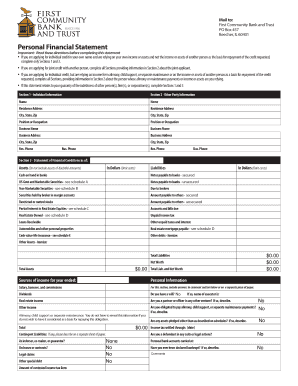
The Confidential Financial Statement is a specialized form utilized primarily by individuals to outline their financial status, including critical components like assets, liabilities, and net worth. This document holds significant relevance for financial institutions, specifically for Plains Capital Bank, as it aids in evaluating the financial standing of applicants. Understanding the various sections of the form enables users to present a complete picture of their financial condition in a structured manner.
Included within this form are essential elements, such as a comprehensive breakdown of assets, liabilities, and a summary of net worth. By maintaining clarity and completeness, individuals better inform lenders about their fiscal health.
Purpose and Benefits of the Confidential Financial Statement
The primary purpose of completing the Confidential Financial Statement is to facilitate an accurate assessment of one’s creditworthiness by lenders. Potential borrowers find this form invaluable when seeking loans or credit, as it provides lenders with necessary insights into the applicant's financial background.
By submitting this financial disclosure form as part of a credit application process, users enhance their chances of securing financing options that align with their financial goals.
Who Needs to Complete the Confidential Financial Statement?
Various individuals find the Confidential Financial Statement essential, particularly those applying for credit or loans from financial institutions. Business owners also frequently need to submit their personal financial information to present a comprehensive financial picture to lenders.
This form is especially relevant in Texas and serves as a critical component for securing necessary banking services and credit lines for both personal and business needs.
Key Features of the Confidential Financial Statement
This user-friendly form boasts specific design features that contribute to a seamless completion process. It includes fillable fields and checkboxes that simplify data entry, making the form accessible and easy to navigate.
-
Structured layout with designated sections for personal and financial information
-
Detailed schedules for additional financial information, enhancing completeness
These elements ensure that all necessary data is captured efficiently, making it an effective asset liability form for both personal and professional financial planning.
How to Fill Out the Confidential Financial Statement Online (Step-by-Step)
Completing the Confidential Financial Statement online involves several straightforward steps to ensure accuracy. Users should begin by entering basic personal information, such as their full name, social security number, and date of birth.
-
Fill in personal details accurately in the designated fields.
-
Provide a comprehensive listing of assets and their values.
-
Detail all liabilities, ensuring totals are clearly defined.
-
Review each section for completeness; use "NO" or "NONE" where applicable.
This process minimizes errors and helps maintain the integrity of the submitted information.
Common Errors When Completing the Confidential Financial Statement
Applicants frequently encounter specific pitfalls when filling out the Confidential Financial Statement. It is vital to avoid common mistakes to ensure the document’s completeness and accuracy.
-
Leaving sections unanswered instead of providing a response
-
Incorrectly calculating total assets and liabilities
To enhance accuracy, applicants should carefully review the instructions provided on the form and consider seeking guidance if uncertain about any section.
How to Sign the Confidential Financial Statement
Signing the Confidential Financial Statement involves understanding the requirements for signatures. Applicants must be aware of the distinction between digital signatures and wet signatures, as both may be accepted depending on the submission method.
Additionally, a witness signature is often necessary, ensuring the form’s legitimacy and compliance with institutional policies.
Where to Submit the Confidential Financial Statement
Submission of the completed Confidential Financial Statement can occur through various channels. Options typically include online submissions or in-person delivery at designated financial institutions.
Individuals should also confirm the appropriate offices or departments where the form should be sent to for processing, ensuring that it reaches the right personnel for review.
Security and Compliance for Handling the Confidential Financial Statement
Maintaining the privacy and security of information within the Confidential Financial Statement is paramount. Insights into practices implemented by pdfFiller, such as 256-bit encryption, underline the commitment to safeguarding sensitive data.
Additionally, adherence to regulations like HIPAA and GDPR ensures that all collected financial information is handled with the utmost care and compliance.
Utilizing pdfFiller for Your Confidential Financial Statement
Using pdfFiller to complete your Confidential Financial Statement offers significant advantages. The platform allows users to easily edit, fill, and eSign documents, enhancing the overall efficiency of the process.
Furthermore, pdfFiller ensures secure management of all submitted documents, making it the ideal tool for those needing to handle sensitive financial forms securely and conveniently.
How to fill out the Financial Statement
-
1.Access pdfFiller and locate the Confidential Financial Statement form by using the search bar or browse through the Business Forms section.
-
2.Once found, click on the form to open it in the pdfFiller editor.
-
3.Ensure you have all necessary information ready, such as your name, social security number, employment details, assets, and liabilities.
-
4.Begin by filling in your personal information in the designated fields, making sure to double-check for accuracy.
-
5.When you reach the assets and liabilities sections, provide detailed information on each item, referencing any financial documentation you have.
-
6.Utilize the fillable features such as checkboxes for any applicable items and drop-downs for specific categories.
-
7.Review the form thoroughly as you fill it out, making sure no questions are left unanswered. Adhere to the instructions indicating how to report 'No' or 'None' where applicable.
-
8.Once completed, finalize the form by adding your signature in the appropriate area. Ensure a witness also signs as required.
-
9.After reviewing the completed form, you can save your progress or download it directly from pdfFiller.
-
10.If necessary, submit the form electronically or print it out for mailing following the specific submission instructions provided by your bank or organization.

Who needs to complete the Confidential Financial Statement?
Individuals applying for loans, business owners seeking funding, or professionals needing to disclose financial status for partnerships typically need to complete this form.
What information is required to fill out the form?
You need personal details such as your name, social security number, employment history, and the complete details of your assets and liabilities.
Is the Confidential Financial Statement required to be notarized?
No, this form does not require notarization. However, it must be signed by both the applicant and a witness.
Are there common mistakes to avoid when filling out this form?
Common errors include leaving fields blank, misreporting assets or liabilities, and omitting required signatures. Always review your form before submitting.
How can I submit the Confidential Financial Statement?
The form can be submitted electronically through your bank’s platform or printed out and mailed, depending on the instructions provided.
What is the processing time for the Confidential Financial Statement?
Processing times vary by institution but generally take a few days to a couple of weeks. Check with the receiving entity for more specific timelines.
What should I do if I make a mistake on the form?
If you notice an error after submission, contact the recipient immediately for guidance on how to correct the mistake or provide a revised form.
Related Forms




Related Catalogs
Get the latest insights from our blog


If you believe that this page should be taken down, please follow our DMCA take down process
here
.
This form may include fields for payment information. Data entered in these fields is not covered by PCI DSS compliance.