
Last updated on
Oct 19, 2026

MN Mechanical Permit Application - City of Brooklyn Park 2015 free printable template
pdfFiller is not affiliated with any government organization

Fill out
Complete the form online in a simple drag-and-drop editor.

eSign
Add your legally binding signature or send the form for signing.

Share
Share the form via a link, letting anyone fill it out from any device.

Export
Download, print, email, or move the form to your cloud storage.
Why pdfFiller is the best tool for your documents and forms


End-to-end document management
From editing and signing to collaboration and tracking, pdfFiller has everything you need to get your documents done quickly and efficiently.
Accessible from anywhere
pdfFiller is fully cloud-based. This means you can edit, sign, and share documents from anywhere using your computer, smartphone, or tablet.
Secure and compliant
pdfFiller lets you securely manage documents following global laws like ESIGN, CCPA, and GDPR. It's also HIPAA and SOC 2 compliant.
What is MN Mechanical Permit Application - City of Brooklyn Park
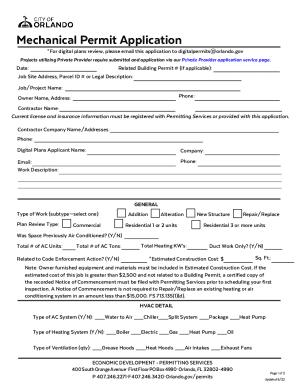
The Mechanical Permit Application is a government form used by applicants to request a mechanical permit for work in Brooklyn Park, Minnesota.
pdfFiller scores top ratings on review platforms




Who needs MN Mechanical Permit Application - City of Brooklyn Park?
Explore how professionals across industries use pdfFiller.

MN Mechanical Permit Application - City of Brooklyn Park is needed by:
-
Homeowners planning HVAC installations or repairs
-
Contractors working on mechanical systems
-
Property developers requiring permits for building projects
-
Commercial businesses needing mechanical work permits
-
Municipal staff processing permit applications
-
Building inspectors reviewing compliance
-
Architects involved in design and planning
Comprehensive Guide to MN Mechanical Permit Application - City of Brooklyn Park
What is the Mechanical Permit Application?
The Mechanical Permit Application is essential for individuals and businesses in Brooklyn Park, Minnesota, who need to perform mechanical work. This form outlines the requirements for obtaining a permit and ensures that installations comply with local ordinances and the Minnesota State Building Code.
The application is primarily used by homeowners and contractors to seek approval for mechanical systems, ensuring that safety standards are met throughout the installation process. Completing this form is crucial for avoiding violations related to unpermitted work.
Purpose and Benefits of the Mechanical Permit Application
Applying for a mechanical permit is vital for several reasons. Firstly, it guarantees that installations like HVAC systems are safe and compliant with regulatory standards. By securing this permit, applicants can avoid penalties associated with unpermitted mechanical work.
Moreover, obtaining a permit streamlines the building inspection process, facilitating quicker approvals and reducing delays during project execution. This ensures that all work meets the required safety and legal standards.
Who Needs the Mechanical Permit Application?
The Mechanical Permit Application targets several key audiences. Homeowners and property managers planning to undertake mechanical work must file this application to ensure compliance. Additionally, contractors and construction professionals operating in Brooklyn Park are required to submit this form as part of their project planning.
Typical scenarios that necessitate filing include installations involving significant mechanical systems, such as heating or ventilation systems. Understanding whether you need this permit is crucial for both residential and commercial projects.
How to Fill Out the Mechanical Permit Application Online (Step-by-Step)
Filling out the Mechanical Permit Application accurately is essential for a successful submission. Here is a step-by-step guide to help you through the process:
-
Start with the "Site Address" field, entering the complete address where the work will be performed.
-
Provide the "Applicant Name" and any necessary contact details.
-
Select the appropriate "Permit Type" from the checkboxes provided, ensuring your selection aligns with your project.
-
Complete the section regarding the valuation of work, which is crucial for fee computation.
-
Finally, ensure that you sign and date the application, acknowledging the statement provided.
Double-checking all filled fields will help prevent errors and omissions that could delay your application.
Required Documents and Supporting Materials
Accompanying your Mechanical Permit Application with the proper documentation is necessary for a smooth approval process. Required documents typically include:
-
Plans or specifications illustrating the proposed mechanical work.
-
Proof of ownership or consent if the applicant is not the property owner.
Depending on the specific nature of your project, additional documentation may be necessary. Applicants should also prepare all materials carefully to ensure compliance with local guidelines.
Fees, Deadlines, and Processing Time
Understanding the financial implications of your application is vital. Fees associated with the Mechanical Permit Application are determined based on the valuation of the work as specified by municipal guidelines. It’s important to budget accordingly.
Potential applicants should also be aware of submission deadlines for timely processing. Typically, processing times can vary but expect an average duration from the moment of submission for a decision on your application.
Where and How to Submit the Mechanical Permit Application
Submitting your Mechanical Permit Application can be done through several methods. Applicants have the option to submit their applications online via designated portals or deliver them in person at Brooklyn Park municipal offices.
For those unsure about the submission process, reaching out for assistance is recommended. Contact information for support can be found on official municipal websites.
What Happens After You Submit the Mechanical Permit Application?
After submitting your application, you will enter the review process. The city will assess your application for compliance with all relevant codes and regulations.
During this review phase, applicants should expect communication regarding any additional information required. It is advisable to track the status of your application to stay informed about its progress.
Common Errors and How to Avoid Them
Avoiding common mistakes during the application process can significantly enhance the likelihood of approval. Some frequent errors include:
-
Leaving fields blank or providing incorrect signatures.
-
Failing to read the application guidelines before filling out the form.
Taking the time to double-check your application can save you from unnecessary delays and help ensure that all necessary information is submitted correctly.
Experience Hassle-Free Form Filling with pdfFiller
Utilizing pdfFiller for your Mechanical Permit Application can streamline the process considerably. This platform offers features such as editable fields, e-signature capabilities, and robust document handling that prioritize user security.
With its user-friendly interface, pdfFiller makes the permit application process more efficient and straightforward, allowing applicants to focus on their projects with peace of mind when it comes to document handling.
How to fill out the MN Mechanical Permit Application - City of Brooklyn Park
-
1.Visit pdfFiller and use the search bar to find the Mechanical Permit Application form.
-
2.Once accessed, click the form to open it in the editor.
-
3.Before beginning, gather necessary information including your name, address, permit type, work type, fuel type, system type, and the valuation of work.
-
4.Start filling in the fields by clicking on each area in the form. Use fillable fields to enter your details accurately.
-
5.For the 'Site Address/Tenant Name', clearly indicate the exact location where the work will occur.
-
6.Input your name under 'Contractor/Applicant Name', and include the necessary 'License #'
-
7.Check appropriate boxes for 'Permit Type', 'Work Type', 'Fuel Type', and 'System Type' that applies to your application.
-
8.Carefully review the provided details ensuring all information is correctly filled before the final submission.
-
9.Once complete, look for the review toggle to ensure all fields are accurate and nothing is overlooked.
-
10.To save your progress, click on the save option; to download, select the download button or to submit directly, follow the on-screen instructions for submission through pdfFiller.

Who is eligible to apply for the Mechanical Permit Application?
Eligibility typically includes homeowners, contractors, and businesses planning mechanical work. Ensure you have the appropriate licenses and comply with local regulations.
What documents do I need to complete the Mechanical Permit Application?
You'll need your identification, proof of ownership or permission to drill, contractor licenses, and any project specifications. Be prepared with the valuation of the work being done.
How do I submit the Mechanical Permit Application?
You can submit the completed application through pdfFiller by following the on-screen submission instructions. Alternatively, you may print and submit it in person or via mail to your local municipal office.
Is there a fee associated with the Mechanical Permit Application?
Fees may vary based on the valuation of work. The form includes a computation section to help you calculate the required fee based on the information you provide.
What is the processing time for the Mechanical Permit Application?
Processing times can vary, but typically it may take a few days to a couple of weeks depending on volume, complexity of the request, and local jurisdiction protocols.
Are there common mistakes to avoid when filling out this application?
Common mistakes include omitting required information, incorrect spelling of names, and failing to check the necessary options. Ensure that all fields are filled out accurately.
What if I need assistance while filling out the form on pdfFiller?
If you need help, pdfFiller provides customer support and guidance available on their website, including tutorials and FAQs tailored to assist with form filling.
MN Mechanical Permit Application - City of Brooklyn Park Form Versions
Related Forms



Get the latest insights from our blog



If you believe that this page should be taken down, please follow our DMCA take down process
here
.
This form may include fields for payment information. Data entered in these fields is not covered by PCI DSS compliance.