
Last updated on
Oct 31, 2026
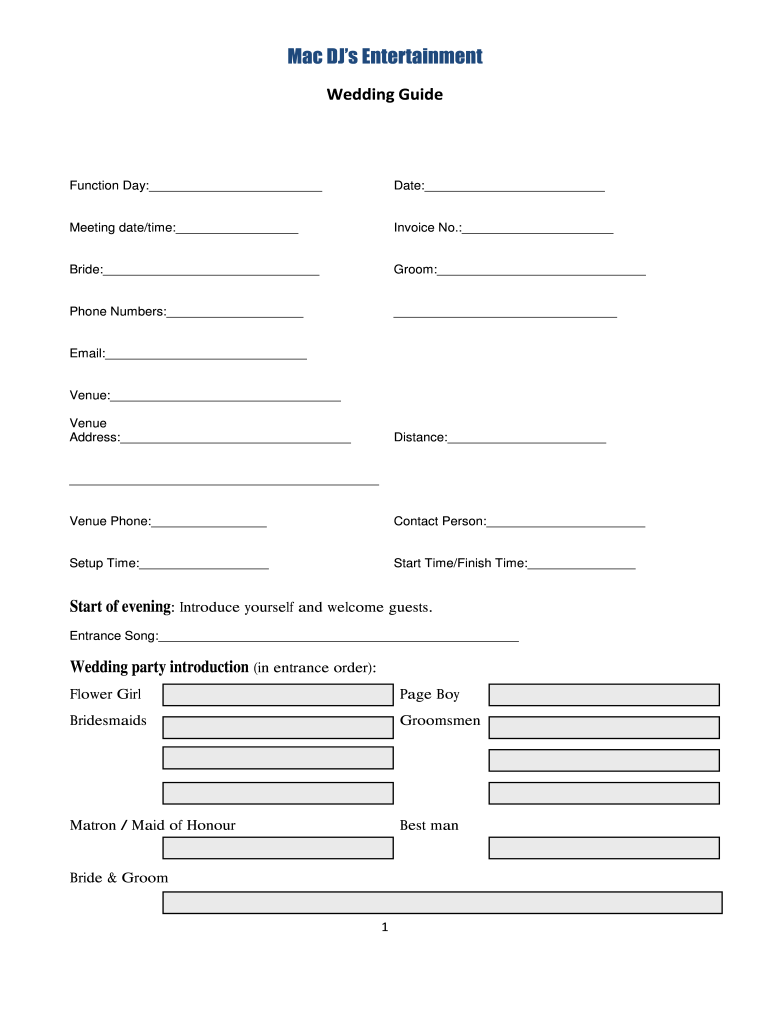
Mac DJs Entertainment Wedding Guide free printable template
We are not affiliated with any brand or entity on this form

Fill out
Complete the form online in a simple drag-and-drop editor.

eSign
Add your legally binding signature or send the form for signing.

Share
Share the form via a link, letting anyone fill it out from any device.

Export
Download, print, email, or move the form to your cloud storage.
Why pdfFiller is the best tool for your documents and forms


End-to-end document management
From editing and signing to collaboration and tracking, pdfFiller has everything you need to get your documents done quickly and efficiently.
Accessible from anywhere
pdfFiller is fully cloud-based. This means you can edit, sign, and share documents from anywhere using your computer, smartphone, or tablet.
Secure and compliant
pdfFiller lets you securely manage documents following global laws like ESIGN, CCPA, and GDPR. It's also HIPAA and SOC 2 compliant.
What is Mac DJs Entertainment Wedding Guide
The Mac DJ’s Wedding Guide is a service agreement used by wedding planners and DJs to organize and manage wedding entertainment details.
pdfFiller scores top ratings on review platforms




no big problems, was able to figure it out.
awesome software to edit and modify the PDF files
Who needs Mac DJs Entertainment Wedding Guide?
Explore how professionals across industries use pdfFiller.

Mac DJs Entertainment Wedding Guide is needed by:
-
Brides looking to plan their wedding entertainment
-
Grooms coordinating with DJs for their wedding
-
Wedding planners arranging event logistics
-
DJs providing services for weddings
-
Event coordinators managing wedding schedules
Comprehensive Guide to Mac DJs Entertainment Wedding Guide
What is the Mac DJ’s Wedding Guide?
The Mac DJ’s Wedding Guide serves as a comprehensive tool in the realm of wedding entertainment coordination. This guide is designed to assist couples in organizing their wedding day details effectively, ensuring that crucial information is readily available.
This form includes essential components such as fields for the bride and groom's information, venue specifics, and preferred song selections. Furthermore, the document requires a signed agreement from both parties, which facilitates smooth operations on the wedding day.
Benefits of Using the Mac DJ’s Wedding Guide
Utilizing the Mac DJ’s Wedding Guide simplifies the wedding planning process for couples. By consolidating essential information into a single, easy-to-use document, it enhances organization and clarity.
-
Facilitates clear communication and sets expectations between the bride, groom, and DJ.
-
Minimizes stress on the wedding day by detailing entertainment preferences and logistical details.
Key Features of the Mac DJ’s Wedding Guide
The Mac DJ’s Wedding Guide is equipped with several functionalities that enhance its effectiveness. The form features fillable fields for easy data entry, which allows couples to specify song choices and event particulars effortlessly.
-
Includes checkboxes for preferences, allowing for straightforward information collection.
-
Signature sections ensure commitment from both the bride and groom.
Who Should Use the Mac DJ’s Wedding Guide?
This guide is intended for various users involved in the wedding planning process. Primarily, brides and grooms, along with wedding planners and DJs, will find this tool invaluable.
Each party plays a specific role in the wedding entertainment process, and this guide becomes especially beneficial in complex scenarios, such as destination weddings or larger events requiring detailed coordination.
How to Fill Out the Mac DJ’s Wedding Guide Online (Step-by-Step)
Completing the Mac DJ’s Wedding Guide is straightforward, especially when done electronically. Follow these step-by-step instructions to fill out the form via pdfFiller:
-
Access the form through pdfFiller.
-
Carefully explain each section and its requirements.
-
Gather necessary information before starting the filling process.
-
Double-check all details for accuracy before submission.
Common Errors and How to Avoid Them
While filling out the Mac DJ’s Wedding Guide, users may encounter common pitfalls. Being aware of these can help ensure a smooth process.
-
Missing signatures or incomplete sections are frequent mistakes to avoid.
-
Validate all information before finalizing the form.
-
Review the completed document for accuracy to prevent potential issues.
Signing and Submitting the Mac DJ’s Wedding Guide
Once the form is completed, understanding how to sign and submit it is crucial. Users should be aware of the differences between digital signatures and wet signatures, as both have their own validity.
After signing, various options are available for submission, ensuring that both parties have a retained copy of the final signed document for their records.
How to Store and Share the Mac DJ’s Wedding Guide
Effective document management post-filling is essential. Best practices include securely storing the completed form online with pdfFiller, as this platform provides robust security features for sensitive documents.
-
Consider options for sharing the form with relevant wedding vendors, family, or friends.
-
Always prioritize privacy and data protection when handling wedding documents.
Maximize Your Wedding Planning with pdfFiller
pdfFiller offers capabilities that enhance the wedding planning experience with features tailored for managing the Mac DJ’s Wedding Guide. Users can benefit from the platform's editing tools and eSigning capabilities.
The security measures implemented by pdfFiller reassure users when handling sensitive information. Begin utilizing this guide today to experience a seamless wedding planning journey.
How to fill out the Mac DJs Entertainment Wedding Guide
-
1.Access the form on pdfFiller by searching for 'Mac DJ’s Wedding Guide' or clicking the link provided by your wedding organizer.
-
2.Once open, familiarize yourself with the form layout which includes sections for the bride and groom's information, venue details, and song selections.
-
3.Before filling out the form, gather necessary information such as the names of the bride and groom, venue address, preferred song lists, and any special requests for the wedding day.
-
4.Fill in the fields provided for the bride and groom, making sure to include full names and accurate contact information. Use the editable text boxes to enter the necessary details.
-
5.Check any applicable checkboxes for services or preferences that apply to your wedding entertainment needs.
-
6.Once all fields are completed, review the form carefully. Ensure all information is accurate and complete to avoid any issues later.
-
7.Finalize the form by signing electronically in the designated areas for both the bride and groom. This step is crucial for the agreement.
-
8.After finalizing, save the document on pdfFiller. You can also download a copy for your records or submit it directly to your DJ or wedding planner from the platform.

Who needs to sign the Mac DJ’s Wedding Guide?
Both the bride and groom are required to sign the Mac DJ’s Wedding Guide. This ensures mutual agreement on the wedding entertainment details and coordination strategies.
What information do I need to complete this form?
Before filling out the form, gather details such as the names of the bride and groom, venue information, song choices, and any specific requests regarding the entertainment for the wedding.
How do I submit the completed form?
You can submit the Mac DJ’s Wedding Guide directly through pdfFiller by utilizing the submit feature, or you can download the completed form and email it to your DJ or wedding planner.
Are there any deadlines for submitting the form?
While there are no specific deadlines mentioned for submitting the Mac DJ’s Wedding Guide, it is recommended to complete and submit it as early as possible to ensure all entertainment details are secured.
Can I make changes to the form after filling it out?
Yes, you can edit the Mac DJ’s Wedding Guide as needed before finalizing it on pdfFiller. Make sure that all details are correct before signing.
What should I do if I encounter issues while filling out the form?
If you experience difficulties, consult the help resources on pdfFiller or reach out to their customer support for assistance.
Is notarization required for this form?
No, notarization is not required for the Mac DJ’s Wedding Guide, making it easier to complete and submit for your wedding needs.
Related Forms



Related Catalogs
Get the latest insights from our blog


If you believe that this page should be taken down, please follow our DMCA take down process
here
.
This form may include fields for payment information. Data entered in these fields is not covered by PCI DSS compliance.