
Last updated on
Nov 12, 2026
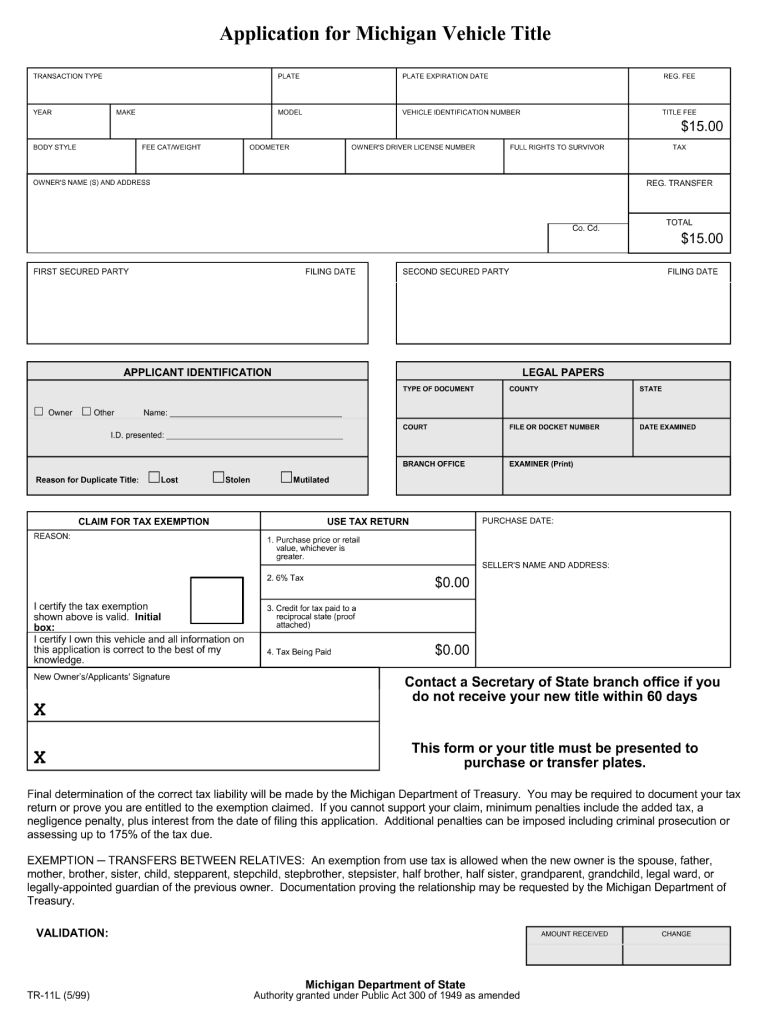
MI TR-11L 1999 free printable template
pdfFiller is not affiliated with any government organization

Fill out
Complete the form online in a simple drag-and-drop editor.

eSign
Add your legally binding signature or send the form for signing.

Share
Share the form via a link, letting anyone fill it out from any device.

Export
Download, print, email, or move the form to your cloud storage.
Why pdfFiller is the best tool for your documents and forms


End-to-end document management
From editing and signing to collaboration and tracking, pdfFiller has everything you need to get your documents done quickly and efficiently.
Accessible from anywhere
pdfFiller is fully cloud-based. This means you can edit, sign, and share documents from anywhere using your computer, smartphone, or tablet.
Secure and compliant
pdfFiller lets you securely manage documents following global laws like ESIGN, CCPA, and GDPR. It's also HIPAA and SOC 2 compliant.
What is MI TR-11L
The MI TR-11L is a state-specific tax form used by taxpayers in Michigan to report and pay specific taxes related to real property transfers.
pdfFiller scores top ratings on review platforms




Great Software
Good experience but we just need the time to learn more.
Ease of use once we know what we are doing!
Need to contact Customer Support for help as I believe there are way where we need to know more.
PDFFILLER HAS CHANGED MY PRACTICE - FOR THE BETTER
I use this software everyday and have found it a necessity in my practice.
Prior to having pdffiller, we still had to type into forms using a TYPEWRITER. No joke. With my legal practice there are numerous forms that we have to fill out. Not only does pdffiller have the usual ability to enter Text into a form, but the feature we rely on the most is the ability to DELETE and RE-TYPE into the document. This has improved the time it takes to draft and amend documents that were not originally created by our office.
Sometimes it is difficult to save under a different name and I often accidentally save over a prior document.
Who needs MI TR-11L?
Explore how professionals across industries use pdfFiller.

MI TR-11L is needed by:
-
Homebuyers and sellers in Michigan
-
Real estate agents facilitating transactions
-
Title companies handling deed transfers
-
Attorneys involved in property transactions
-
Tax advisors for real estate clients
Comprehensive Guide to MI TR-11L
What is the MI TR-11L?
The MI TR-11L is a specific document designed for organizational and compliance use, particularly in the context of reporting requirements. This form plays a vital role in the efficient filing of necessary information, making it essential for both individuals and businesses. Typically, those needing to report certain financial data or statuses will require the MI TR-11L, ensuring that their submissions meet regulatory standards.
Purpose and Benefits of the MI TR-11L
The primary purpose of filing the MI TR-11L is to provide clear and organized documentation in compliance with relevant regulations. Utilizing this form offers numerous benefits, including increased efficiency in tracking necessary submissions and maintaining an orderly filing system. Organizations or individuals that implement the MI TR-11L may experience streamlined operations and minimized errors in reporting.
Who Needs the MI TR-11L?
The MI TR-11L is essential for various users, including business owners, accountants, and individuals needing to report specific details. Scenarios that require the use of this form often involve financial disclosures or tax-related information. For example, small business owners may need the MI TR-11L to document their earnings accurately for state filings.
Key Features of the MI TR-11L
The MI TR-11L includes several key sections designed to capture comprehensive information. Unique features of the form include detailed prompts for each section, ensuring users provide all necessary data. Special instructions are also included to guide users on specific fields, enhancing the accuracy of their submissions.
-
Detailed prompts for information entry
-
Clear guidelines for filling out each section
-
Instructions for specific fields
How to Fill Out the MI TR-11L Online (Step-by-Step)
Filling out the MI TR-11L online can be accomplished easily through pdfFiller. Follow these steps to ensure a smooth process:
-
Visit pdfFiller's website and access the MI TR-11L form.
-
Input your information in the designated fields.
-
Review your entries for accuracy.
-
Utilize pdfFiller’s features for e-signing if required.
-
Submit your completed form according to the provided instructions.
Common Errors and How to Avoid Them
Users often make common errors when filling out the MI TR-11L, which can lead to processing delays. Key mistakes include omitting required fields or providing incorrect data. To avoid these issues, it is crucial to carefully review each section of the form, ensuring all necessary information is complete and accurate prior to submission.
-
Double-check all entries for accuracy
-
Ensure all required fields are filled out
-
Read all instructions carefully
Where to Submit the MI TR-11L
Submitting the MI TR-11L requires following specific methods outlined in the form's instructions. Users should be aware of associated deadlines to ensure timely submissions. Additionally, tracking methods are available to monitor the progress of your submission, facilitating communication with relevant authorities if necessary.
Security and Compliance for the MI TR-11L
Maintaining the security of the MI TR-11L is paramount, especially when dealing with sensitive information. pdfFiller ensures compliance with legal standards, implementing robust security measures to protect users' data. When filling out and submitting this form, users can trust privacy practices designed to safeguard their information.
Sample of a Completed MI TR-11L
Having a reference for a completed MI TR-11L can be immensely helpful for users. A sample form illustrates how each section should be filled out, guiding users to identify and replicate necessary details in their submissions. Comparing entries against this sample can increase accuracy and confidence in the completed form.
Streamline Your MI TR-11L Form Experience with pdfFiller
pdfFiller offers valuable tools to simplify the process of completing the MI TR-11L. Key features include easy editing capabilities, seamless e-signing, and options for document sharing. By choosing pdfFiller, users can enhance their experience and enjoy a more efficient path towards completing the MI TR-11L.
How to fill out the MI TR-11L
-
1.To begin, access the pdfFiller website and log into your account.
-
2.Use the search bar to find the MI TR-11L form by typing its name, or navigate to your documents if you have it saved.
-
3.Once the form is open, review the instructions provided at the top of the document to understand the required information.
-
4.Collect all necessary details, including property descriptions, buyer, and seller information, and any relevant financial data before proceeding.
-
5.Click on each text field to fill in the required information. pdfFiller allows you to enter text easily and format it as needed.
-
6.Use the toolbar features to add or remove fields, and utilize the 'help' options for guidance as needed.
-
7.After completing all fields, thoroughly review the form to check for any errors or missing information.
-
8.Once satisfied with your entries, look for the 'Save' button to keep a copy of your form.
-
9.You can download the completed MI TR-11L for your records or submit it directly through the pdfFiller platform as required.
-
10.Make sure to follow up on any submission confirmation or additional steps needed by your local tax authority.

Who is eligible to file the MI TR-11L?
Any property owner or buyer involved in a real estate transaction in Michigan is eligible to file the MI TR-11L. This includes both individuals and businesses involved in the transfer.
What is the deadline for submitting the MI TR-11L?
The MI TR-11L should generally be filed at the time of the property transfer. It is often due alongside the real estate closing paperwork to ensure compliance with state tax laws.
How can I submit the MI TR-11L once completed?
You can submit the MI TR-11L online via the Michigan Department of Treasury's website or physically at the local county register of deeds office. You may need to verify their submission procedures.
What supporting documents are required when filing the MI TR-11L?
When filing the MI TR-11L, you typically need to include supporting documents like the purchase agreement, deed, and any additional paperwork proving eligibility for tax exemptions if applicable.
What are common mistakes to avoid when filling out the MI TR-11L?
Common mistakes include incorrect property details, missing signatures, and failing to include necessary supporting documents. Double-check all information for accuracy before submission.
How long does it take to process the MI TR-11L?
Processing times for the MI TR-11L may vary based on the volume of submissions. Generally, expect processing to take a few business days after submission.
Do I need to notarize the MI TR-11L?
No, the MI TR-11L does not require notarization. However, it is important to confirm with local regulations as requirements may vary by county.
MI TR-11L Form Versions
Related Content
Related Forms





Related Catalogs
Get the latest insights from our blog


If you believe that this page should be taken down, please follow our DMCA take down process
here
.
This form may include fields for payment information. Data entered in these fields is not covered by PCI DSS compliance.