

Get the free Brookside Laboratories Soil Test Form
We are not affiliated with any brand or entity on this form

Fill out
Complete the form online in a simple drag-and-drop editor.

eSign
Add your legally binding signature or send the form for signing.

Share
Share the form via a link, letting anyone fill it out from any device.

Export
Download, print, email, or move the form to your cloud storage.
Why pdfFiller is the best tool for your documents and forms


End-to-end document management
From editing and signing to collaboration and tracking, pdfFiller has everything you need to get your documents done quickly and efficiently.
Accessible from anywhere
pdfFiller is fully cloud-based. This means you can edit, sign, and share documents from anywhere using your computer, smartphone, or tablet.
Secure and compliant
pdfFiller lets you securely manage documents following global laws like ESIGN, CCPA, and GDPR. It's also HIPAA and SOC 2 compliant.
What is Soil Test Form
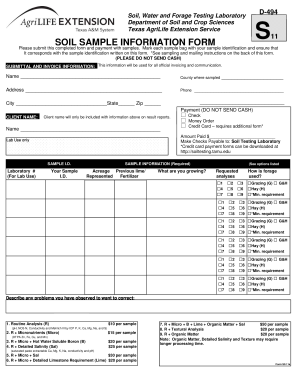
The Brookside Laboratories Soil Test Form is a business document used by clients to submit samples for soil, manure, fertilizer, lime, and herbicide/pesticide analysis.
pdfFiller scores top ratings on review platforms




Who needs Soil Test Form?
Explore how professionals across industries use pdfFiller.

Soil Test Form is needed by:
-
Farmers requiring soil nutrient analysis
-
Agronomists seeking precise soil information
-
Landowners managing agricultural properties
-
Researchers conducting soil studies
-
Gardeners interested in soil health assessment
-
Consultants advising on soil management practices
How to fill out the Soil Test Form
-
1.Begin by accessing the Brookside Laboratories Soil Test Form on pdfFiller by searching for its name or navigating through provided links.
-
2.Once the form is open, review all sections carefully to understand what information you need to fill in.
-
3.Gather required details such as your client information, sample location, and specific tests you wish to request before proceeding.
-
4.Start filling in the fields one at a time, entering your Client Name, Sample Location ID, and any other pertinent information in the blank fields provided.
-
5.Use checkboxes for selecting desired sample packages, ensuring you mark all applicable options based on your soil testing needs.
-
6.As you complete each section, utilize the tooltips available on pdfFiller for clarification on what details are needed.
-
7.After you have filled in all required fields and made selections, take a moment to review the entire form for accuracy
-
8.Check every entry to avoid common mistakes such as missing samples or incorrect selections.
-
9.Once you are satisfied with the information provided, you can save the document by clicking on the save button within the pdfFiller interface.
-
10.If you would like to download a copy for your records, choose the download option available to save the file to your device.
-
11.Finally, to submit the form to Brookside Laboratories, follow the instructions on the form for email or postal delivery.

Who can use the Brookside Laboratories Soil Test Form?
Any individual or entity with soil, manure, fertilizer, lime, or herbicide/pesticide samples can use this form, including farmers, agronomists, landowners, and researchers.
What information is required to fill out the form?
You will need to provide your client information, sample location ID, and select the specific test packages relevant to your analysis needs.
How do I submit the completed form?
The completed Brookside Laboratories Soil Test Form can be submitted via email or postal service as per the guidelines provided on the form itself.
Are there any deadlines for submitting samples?
While specific deadlines aren't provided, it's advisable to submit your samples as soon as possible to ensure timely analysis and results.
What common mistakes should I avoid when filling out the form?
Ensure that all fields are complete and accurate, especially the sample details and selected tests. Double-check for missing entries or incorrect information.
How long will it take to get my results after submission?
Processing times can vary, but you should expect results within a few weeks. Check the Brookside Laboratories website for any updates on processing times.
Can I receive assistance if I have trouble filling out the form?
Yes, you can contact Brookside Laboratories customer service for support or refer to their FAQ section for additional help with form completion.






Get the latest insights from our blog


If you believe that this page should be taken down, please follow our DMCA take down process
here
.
This form may include fields for payment information. Data entered in these fields is not covered by PCI DSS compliance.