
Last updated on
Oct 31, 2026
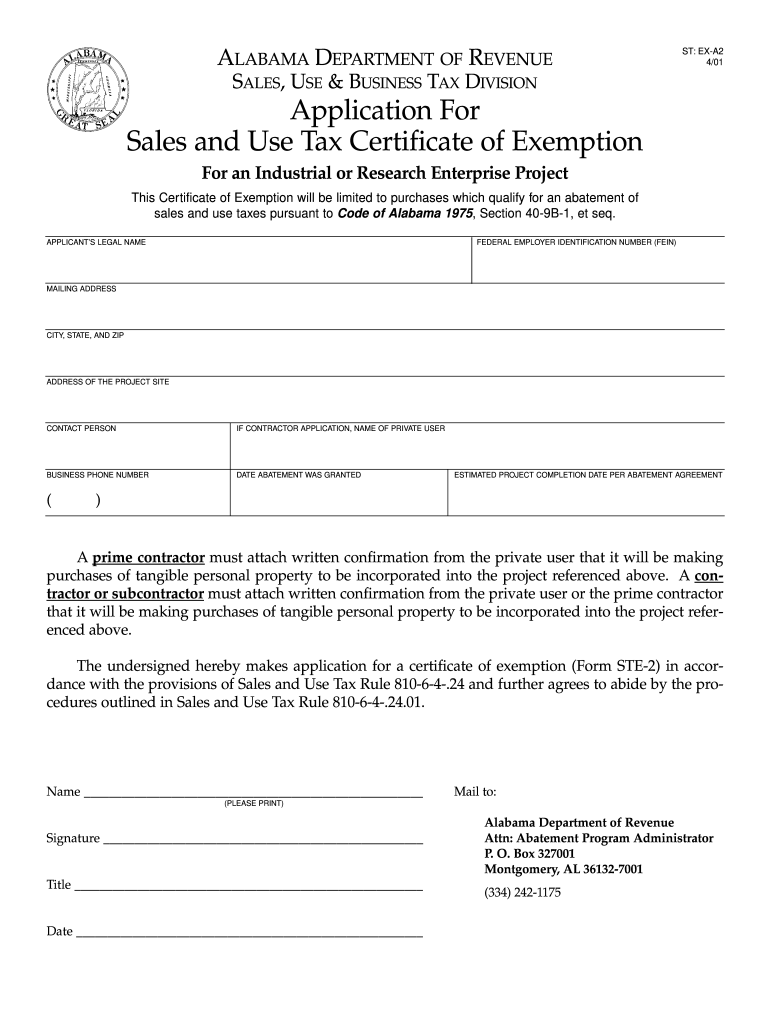
AL ST: EX-A2 2001 free printable template
pdfFiller is not affiliated with any government organization

Fill out
Complete the form online in a simple drag-and-drop editor.

eSign
Add your legally binding signature or send the form for signing.

Share
Share the form via a link, letting anyone fill it out from any device.

Export
Download, print, email, or move the form to your cloud storage.
Why pdfFiller is the best tool for your documents and forms


End-to-end document management
From editing and signing to collaboration and tracking, pdfFiller has everything you need to get your documents done quickly and efficiently.
Accessible from anywhere
pdfFiller is fully cloud-based. This means you can edit, sign, and share documents from anywhere using your computer, smartphone, or tablet.
Secure and compliant
pdfFiller lets you securely manage documents following global laws like ESIGN, CCPA, and GDPR. It's also HIPAA and SOC 2 compliant.
What is AL ST: EX-A2
The Alabama Sales Tax Exemption Certificate is a tax exemption document used by industrial and research enterprises in Alabama to apply for sales and use tax abatements.
pdfFiller scores top ratings on review platforms




Who needs AL ST: EX-A2?
Explore how professionals across industries use pdfFiller.

AL ST: EX-A2 is needed by:
-
Businesses involved in industrial activities in Alabama
-
Research enterprises located in Alabama
-
Applicants seeking tax exemptions on purchases
-
Tax professionals assisting clients with exemptions
-
Non-profit organizations conducting qualifying research
Comprehensive Guide to AL ST: EX-A2
What is the Alabama Sales Tax Exemption Certificate?
The Alabama Sales Tax Exemption Certificate serves as a vital tool for industrial and research enterprises in Alabama, allowing them to apply for sales and use tax abatement. This certificate is intended for organizations that qualify under specific criteria, enabling them to make significant savings on their taxable purchases. To apply, businesses must provide essential details such as their legal name, Federal Employer Identification Number (FEIN), and other necessary information. The certificate plays a crucial role in securing tax abatement, making it a key asset for companies looking to optimize their financial resources.
Purpose and Benefits of the Alabama Sales Tax Exemption Certificate
Businesses that utilize the Alabama Sales Tax Exemption Certificate can unlock various benefits, including substantial cost savings through tax abatement. Leveraging this certificate effectively supports organizations in their research and development initiatives, driving innovation and efficiency. Industries involved in manufacturing, technology, and various R&D projects often reap the most significant advantages from this exemption. By applying for the Alabama tax abatement application, companies can enhance their operations and significantly reduce overhead costs.
Eligibility Criteria for the Alabama Sales Tax Exemption Certificate
To qualify for the Alabama Sales Tax Exemption Certificate, applicants must meet specific criteria that ensure compliance with state regulations. Required details may include a valid FEIN, proof of business operations within the state, and documentation supporting the nature of the project or industry. Certain sectors, particularly those involved in manufacturing or research activities, are more likely to secure eligibility. Maintaining proper legal standing and presenting accurate documentation is essential for a successful application process.
How to Fill Out the Alabama Sales Tax Exemption Certificate Online
Filling out the Alabama Sales Tax Exemption Certificate online is streamlined for efficiency. Follow these step-by-step instructions to ensure successful completion:
-
Access the online certificate form.
-
Enter your legal name and FEIN in the designated fields.
-
Fill in your mailing address along with the project site address.
-
Review all entered information for inaccuracies.
-
Submit the completed form electronically.
Make sure to validate all fields, as missing or incorrect information could delay processing. Utilizing tools like the form STE-2 template can ensure you provide accurate content.
Common Errors and How to Avoid Them
When completing the Alabama Sales Tax Exemption Certificate, applicants often make several common errors that can lead to rejection. Among the frequent mistakes are:
-
Omitting required fields such as the legal name and FEIN.
-
Submitting incomplete project descriptions.
-
Failing to sign the form correctly.
To prevent these issues, applicants should double-check their entries and ensure conformity with all rules outlined in the instructions. Adhering to best practices during the submission can significantly enhance your chances of approval.
How to Sign the Alabama Sales Tax Exemption Certificate
Understanding the signing requirements for the Alabama Sales Tax Exemption Certificate is essential to validate your application. Applicants have the option to use digital signatures or wet signatures, depending on their preferences.
To eSign the document through pdfFiller, follow these steps:
-
Locate the signature field in the document.
-
Select the option to eSign using pdfFiller's tools.
-
Follow the on-screen instructions to complete the signing process.
Applicants should verify whether notarization is necessary for their specific situation to avoid complications during submission.
Submission Methods and Delivery
Once the Alabama Sales Tax Exemption Certificate is complete, understanding the submission methods is crucial. Applicants can send their certificates through various channels, including:
-
Online submission via the Alabama Department of Revenue's designated portal.
-
Mailing the completed form to the appropriate address.
It is important to stay informed about submission deadlines and processing times to avoid delays. For official correspondence, ensure to keep the contact details for the Alabama Department of Revenue handy.
Security and Compliance for Sensitive Documents
As sensitive documents, tax forms require robust security measures to protect user information. pdfFiller employs 256-bit encryption and adheres to regulations such as HIPAA and GDPR, ensuring that your data remains safe throughout the entire process.
By choosing a solution like pdfFiller for managing your Alabama Sales Tax Exemption Certificate, you can confidently handle document security while maintaining compliance with relevant regulations.
Utilizing pdfFiller for a Smooth Application Process
Using pdfFiller can significantly enhance your experience when completing the Alabama Sales Tax Exemption Certificate. Key features include:
-
Editing capabilities for easy adjustments to your document.
-
eSigning for quick and secure signing processes.
-
Cloud storage for convenient access to your forms anytime.
By registering for an account, you can harness these features to simplify the filling and submission process for not just this certificate but other relevant forms as well.
How to fill out the AL ST: EX-A2
-
1.Access pdfFiller and search for the Alabama Sales Tax Exemption Certificate form.
-
2.Click on the form to open it in the pdfFiller editor.
-
3.Review the form fields and familiarize yourself with the required information needed for completion.
-
4.Prepare necessary details such as the applicant's legal name, FEIN, mailing address, project site address, and contact information before filling out the form.
-
5.Use the text tool in pdfFiller to input your data clearly into the corresponding fields.
-
6.Ensure that all required fields are filled accurately as specified in the form's instructions.
-
7.After completing all fields, review your entries for accuracy and completeness.
-
8.Make sure to sign the form electronically using pdfFiller's signature tool to validate your application.
-
9.Once everything is finalized, save your document by clicking on the 'Save' option in the menu.
-
10.Download the completed form or choose to submit it directly through pdfFiller, if submission options are provided.

Who is eligible to use the Alabama Sales Tax Exemption Certificate?
The Alabama Sales Tax Exemption Certificate is intended for industrial or research enterprises that meet specific eligibility criteria, including those aiming to purchase qualifying goods or services for exempt purposes.
What is the deadline for submitting this form?
There are no specific deadlines for submitting the Alabama Sales Tax Exemption Certificate; however, it is advisable to submit the form ahead of planned purchases to ensure timely processing.
How do I submit the completed Alabama Sales Tax Exemption Certificate?
After completing the form on pdfFiller, you can submit it directly through the platform or print it and mail it to the Alabama Department of Revenue as per the specific instructions provided.
What supporting documents are required when submitting the form?
Typically, you will need to provide documentation that verifies your eligibility, such as business licenses or tax identification numbers, alongside the Alabama Sales Tax Exemption Certificate.
What common mistakes should I avoid when filling out the form?
Be sure to fill in all required fields accurately. Common mistakes include missing the signature, providing incorrect FEIN information, or using outdated forms.
How long does it take to process the exemption certificate?
Processing times for the Alabama Sales Tax Exemption Certificate may vary. Typically, it can take a few weeks, so plan accordingly to avoid delays in your tax exemption.
Is notarization necessary for the Alabama Sales Tax Exemption Certificate?
No, notarization is not required for the Alabama Sales Tax Exemption Certificate. You only need a signature as part of the form's requirements.
AL ST: EX-A2 Form Versions
Related Content
Related Forms





Get the latest insights from our blog


If you believe that this page should be taken down, please follow our DMCA take down process
here
.
This form may include fields for payment information. Data entered in these fields is not covered by PCI DSS compliance.