
Last updated on
Nov 9, 2026
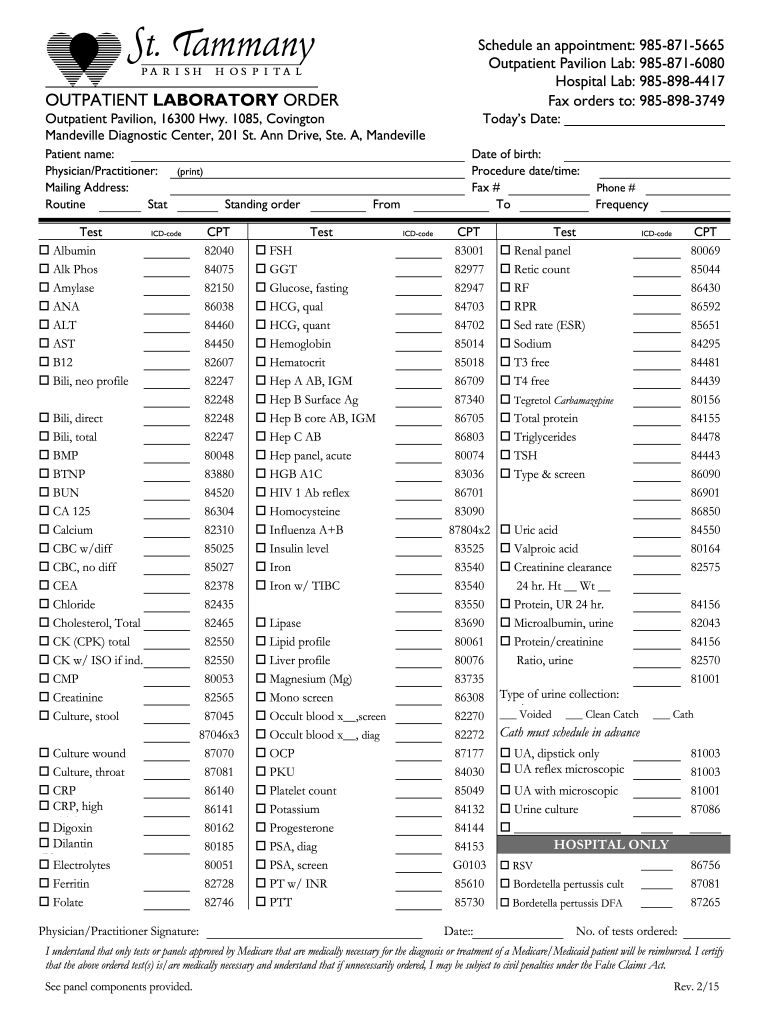
ST. Tammany Parish Hospital Outpatient Laboratory Order 2015 free printable template
pdfFiller is not affiliated with any government organization

Fill out
Complete the form online in a simple drag-and-drop editor.

eSign
Add your legally binding signature or send the form for signing.

Share
Share the form via a link, letting anyone fill it out from any device.

Export
Download, print, email, or move the form to your cloud storage.
Why pdfFiller is the best tool for your documents and forms


End-to-end document management
From editing and signing to collaboration and tracking, pdfFiller has everything you need to get your documents done quickly and efficiently.
Accessible from anywhere
pdfFiller is fully cloud-based. This means you can edit, sign, and share documents from anywhere using your computer, smartphone, or tablet.
Secure and compliant
pdfFiller lets you securely manage documents following global laws like ESIGN, CCPA, and GDPR. It's also HIPAA and SOC 2 compliant.
What is ST. Tammany Parish Hospital Outpatient Laboratory Order
The Outpatient Laboratory Order Form is a medical document used by healthcare providers to request laboratory tests for patients and ensure proper documentation.
pdfFiller scores top ratings on review platforms




Had some trouble with billing and the customer service was right on it and took care of the problem. Software is good and being able to access various pre-made docs is very nice.
It has been a very useful tool for my company.
Who needs ST. Tammany Parish Hospital Outpatient Laboratory Order?
Explore how professionals across industries use pdfFiller.

ST. Tammany Parish Hospital Outpatient Laboratory Order is needed by:
-
Physicians and practitioners requesting lab tests
-
Healthcare facilities managing patient records
-
Medical coders and billers for test documentation
-
Patients needing lab tests through a physician
-
Insurance companies verifying medical necessity
Comprehensive Guide to ST. Tammany Parish Hospital Outpatient Laboratory Order
What is the Outpatient Laboratory Order Form?
The Outpatient Laboratory Order Form is a crucial tool in the healthcare process, designed to request laboratory tests for patients. This form consists of various components, including fields for patient information and a list of tests with associated ICD and CPT codes. It plays a significant role for both physicians and patients, ensuring that lab tests are accurately requested and documented within medical records. Physicians utilize this form to streamline the workflow, allowing for efficient ordering of necessary laboratory tests.
Purpose and Benefits of the Outpatient Laboratory Order Form
This specific form is essential for healthcare providers as it streamlines the process of ordering laboratory tests. When utilizing the outpatient laboratory order form, healthcare professionals can ensure compliance with medical necessity standards, thereby reducing the likelihood of errors in test orders. Key benefits of using this form include:
-
Expedited lab testing process.
-
Accuracy and adherence to medical guidelines.
-
Minimized paperwork errors, enhancing patient safety.
Key Features of the Outpatient Laboratory Order Form
The outpatient laboratory order form includes several noteworthy features that enhance its functionality. Key aspects include:
-
Fillable fields for patient details such as name and date of birth.
-
Inclusion of ICD and CPT codes that ensure diagnostic accuracy.
-
Signature requirements for physician certification to validate medical necessity.
These features help streamline the ordering process, making it easier for both healthcare professionals and patients to navigate laboratory tests.
Who Needs the Outpatient Laboratory Order Form?
Various stakeholders in healthcare rely on the outpatient laboratory order form. Primarily, it is utilized by:
-
Physicians and practitioners who require laboratory testing for patient evaluations.
-
Patients needing laboratory tests based on medical advice from their healthcare providers.
This form is vital for ensuring that proper protocols are followed in requesting laboratory tests, underlining its importance in patient care.
How to Fill Out the Outpatient Laboratory Order Form Online (Step-by-Step)
Filling out the outpatient laboratory order form online can be straightforward. Follow these step-by-step instructions to complete the form accurately:
-
Access the form on the pdfFiller platform.
-
Enter the patient’s details such as their name and date of birth.
-
Provide the physician's details and include any necessary contact information.
-
Fill in the required ICD and CPT codes corresponding to the tests ordered.
-
Ensure the physician reviews the form and provides their signature.
Be attentive to common fields and areas where errors might occur to avoid unnecessary complications.
Submission and Delivery of the Outpatient Laboratory Order Form
Understanding various submission methods is important for timely processing of laboratory tests. The outpatient laboratory order form can be submitted in several ways:
-
Online submission via authorized healthcare platforms.
-
Faxing the completed form directly to the laboratory.
After submitting the form, confirm successful delivery by following up with the laboratory to ensure that the order has been received and is being processed.
Security and Compliance for the Outpatient Laboratory Order Form
When handling sensitive patient information, security and compliance are paramount. pdfFiller ensures the safety of your data through robust security features, including:
-
256-bit encryption for data protection.
-
Adherence to HIPAA regulations.
-
General compliance with GDPR to protect user privacy.
Utilizing secure methods to manage the outpatient laboratory order form safeguards patient confidentiality and maintains compliance with legal standards.
Common Errors and How to Avoid Them with the Outpatient Laboratory Order Form
Completing the outpatient laboratory order form can lead to certain pitfalls if not done with care. Common mistakes include:
-
Missing physician signatures that can delay the process.
-
Incorrect ICD and CPT codes that may lead to inaccurate test results.
To prevent these issues, always review the completed form for accuracy before submission and ensure all required fields are filled out completely.
Example of a Completed Outpatient Laboratory Order Form
Having a visual reference can be extremely helpful. A completed outpatient laboratory order form typically includes:
-
Patient information such as name, date of birth, and contact details.
-
Physician's information, including the signature confirming the tests are essential.
-
A checklist of laboratory tests to be ordered with their respective codes.
This example can serve as a guide for ensuring that all necessary components are included when filling out the form.
Utilize pdfFiller to Complete Your Outpatient Laboratory Order Form
pdfFiller offers an efficient and secure way to fill out your outpatient laboratory order form. With features that simplify the completion of healthcare forms, users can:
-
Easily edit and fill forms online from any browser.
-
Benefit from secure processing and storage of sensitive documents.
Start utilizing pdfFiller today to streamline your form-filling experience and ensure compliance with healthcare documentation.
How to fill out the ST. Tammany Parish Hospital Outpatient Laboratory Order
-
1.To access the Outpatient Laboratory Order Form on pdfFiller, visit the pdfFiller website and search for the form by name.
-
2.Once located, open the form by clicking on the appropriate link which will redirect you to the pdfFiller editing interface.
-
3.Before completing the form, gather necessary patient information such as the patient's name, date of birth, and relevant medical history.
-
4.Navigate through the fillable fields in the pdfFiller interface. Input all required patient details, including the physician's name and signature.
-
5.Use the checkboxes to select the specific laboratory tests being requested, ensuring to include corresponding ICD and CPT codes as applicable.
-
6.Review all entries carefully to ensure accuracy and completeness. Make any necessary corrections before finalizing the form.
-
7.Once you are satisfied with the completed form, save your changes. Use the download feature to save it as a PDF, or use the submit functionality if required.

Who is eligible to use the Outpatient Laboratory Order Form?
The Outpatient Laboratory Order Form is designed for physicians and practitioners who need to order laboratory tests for their patients. It is essential that the healthcare provider is authorized to request such tests.
Are there any deadlines associated with submitting the form?
While there are no specific deadlines for completing the Outpatient Laboratory Order Form, it is recommended to submit it as early as possible to avoid delays in laboratory testing and patient care.
How should I submit the completed Outpatient Laboratory Order Form?
The completed Outpatient Laboratory Order Form can typically be submitted directly to the laboratory conducting the tests. You can also submit it electronically via the pdfFiller platform if your provider offers that option.
What supporting documents are required with this form?
Typically, no additional supporting documents are required with the Outpatient Laboratory Order Form. However, it may be helpful to include patient medical history if relevant to the tests ordered.
What common mistakes should be avoided when filling out this form?
Common mistakes include missing patient or physician details, incorrect selection of laboratory tests, and failure to sign the form. Always double-check that all required fields are filled out accurately.
What is the processing time for laboratory tests ordered with this form?
Processing times for laboratory tests can vary depending on the type of tests ordered and the laboratory’s workload. It's best to check with the specific laboratory for their estimated turnaround times.
Is notarization required for this form?
No, notarization is not required for the Outpatient Laboratory Order Form. However, a physician's signature is mandatory to certify the medical necessity of the tests being ordered.
ST. Tammany Parish Hospital Outpatient Laboratory Order Form Versions
Related Forms



Related Catalogs
Get the latest insights from our blog


If you believe that this page should be taken down, please follow our DMCA take down process
here
.
This form may include fields for payment information. Data entered in these fields is not covered by PCI DSS compliance.