AI PDF Filler For Free

Drop document here to upload
Select from device
Up to 100 MB for PDF and up to 25 MB for DOC, DOCX, RTF, PPT, PPTX, JPEG, PNG, JFIF, XLS, XLSX or TXT
Note: Integration described on this webpage may temporarily not be available.

Last updated on Oct 12, 2026

AI PDF Filler

Enhance your document workflows with AI PDF Filler for quick editing, signing, and form filling.

What is AI PDF Filler?

The AI PDF Filler is a powerful tool that combines editing, signing, and form filling capabilities into one platform. It leverages AI assistance to create faster workflows, making it particularly suitable for small and medium businesses. With the AI PDF Filler, you can edit documents, sign them digitally, and fill out forms with ease. This tool avoids the common pitfalls associated with traditional document management tools, offering a more efficient solution for your business needs.

How Does AI PDF Filler Improve Workflows?

AI PDF Filler significantly reduces the time spent on document tasks by simplifying the editing process. It integrates seamlessly with existing tools, allowing businesses to maintain their current workflows while enhancing efficiency. By utilizing AI assistance, the tool streamlines tasks such as document editing and signing, enabling small and medium businesses to focus on their core activities rather than getting bogged down in paperwork.

Step-by-Step Guide to Using AI PDF Filler

  • Access the AI PDF Filler platform on your device.
  • Upload the document you wish to edit or fill out.
  • Use the editing tools to modify text or images as needed.
  • To sign the document electronically, select the signature option.
  • Follow the prompts to create or upload your digital signature.
  • Fill in any required fields using the AI-assisted form filling feature.
  • Review the document for accuracy before saving or sharing.
  • Export the completed document in your preferred format.

Supported Document Formats for AI PDF Filler

  • Supports PDF, DOCX, and TXT file formats for input.
  • Exports documents in PDF, DOCX, and other common formats.
  • Compatible with various devices including desktops, tablets, and smartphones.

AI-Powered Editing Features

The AI PDF Filler offers a range of text editing and formatting options that are enhanced by AI assistance. Users can easily modify text, adjust formatting, and make other changes through a user-friendly interface. This simplicity allows small and medium businesses to manage their documents without the need for complex editing tools, ensuring that anyone can use it effectively.

AI-Assisted Signature Options

With AI PDF Filler, you have access to various signature methods, including legally binding e-signatures. The platform ensures ease of use across devices, allowing you to sign documents from anywhere. This functionality is crucial for small and medium businesses that require quick and secure signing options without the hassle of traditional methods.

AI-Powered Form Filling

The AI PDF Filler excels in assisting users with filling out forms. AI assistance helps to accurately complete fields, significantly increasing the speed and accuracy of form completion. This feature is ideal for various document types, making it a valuable tool for small and medium businesses that handle numerous forms regularly.

Reviewing AI Output for Accuracy

While AI PDF Filler provides powerful tools, it is essential to review AI-generated content for accuracy. Users should verify the information and correct any discrepancies. Best practices for reviewing documents include checking for errors and ensuring all required fields are filled out correctly, as AI is not infallible.

Industry-Specific Scenarios for AI PDF Filler

In the healthcare industry, AI PDF Filler can be used to manage patient forms and consent documents efficiently. Legal professionals benefit from its ability to handle contracts and agreements, ensuring compliance and accuracy. In finance, the tool aids in processing invoices and financial statements, streamlining workflows for small businesses. These specific applications demonstrate how versatile and beneficial AI PDF Filler can be across various sectors.

Security Measures During AI Processing

AI PDF Filler employs TLS encryption to safeguard your documents during processing. The platform adheres to strict document retention policies and complies with relevant regulations to ensure data security. These measures are crucial for small and medium businesses that handle sensitive information and need to maintain compliance with industry standards.

Comparison with Other AI Document Tools

pdfFiller stands out against competitors due to its user-friendly interface and comprehensive features. Unlike other tools, pdfFiller offers a wide range of ready-to-use templates, making it easier for small businesses to get started. Additionally, its AI capabilities provide a significant advantage in document editing and signing compared to alternatives.

Next Steps with AI PDF Filler

To start using AI PDF Filler, visit the pdfFiller website and sign up for an account. You can choose from various plans that suit your business needs, and trial options are available for new users. This straightforward sign-up process allows you to begin enhancing your document workflows without any confusion.

Try most popular PDF tools

Discover a full set of tools to handle any document task.

Edit PDFs

Make quick PDF edits online.

Sign

Add legally binding signatures.

Merge

Combine multiple PDFs.

Request signatures

Send a document for signing.

Convert

Transform PDFs into other formats.

Rearrange

Change the order of pages.

Share

Send PDFs for review or editing.

Compress

Reduce PDF file sizes.

How to simplify complex processes with AI

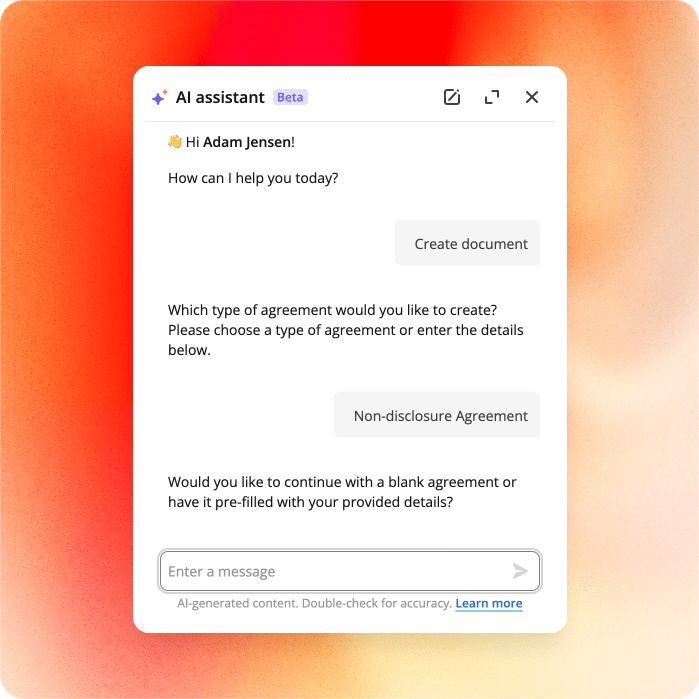
1. Access the AI-powered editor

Let PDF AI do the heavy lifting

  • Create documents with AI Generate anything — from proposals and reports to contracts and NDAs — with just a few quick prompts. Save time and avoid the hassle of starting from scratch.
  • Quickly prepare docs for signing Let AI detect signature fields and assign them to the right recipients. Whether it’s contracts or forms, everything will be ready for signing in seconds.
  • OCR scanned documents Use PDF AI for quick text recognition and turn scans into editable documents. Revise paperwork, extract key details, and edit scans without headaches.
  • Restore scanned documents Transform your roughest scans into clear, high-quality documents. Retrieve content from faded or low-quality scans to ensure that important information stays accessible.
  • Summarize content to save time Why slog through lengthy reports and agreements when you can get a quick summary that highlights the important stuff? Focus on the essentials!
  • Translate PDFs on the fly From international sales pitches to contracts and e-books, translate content in any language without leaving your PDF reader.
  • Ask PDF AI anything Need to locate a clause in a contract or specific findings in a lengthy research paper? Chat with PDF AI and get instant, relevant answers about documents.
  • Search smarter and faster No more wasting time digging for the right doc. Use advanced contextual search to pinpoint the exact document, form, or template in your account, pdfFiller’s library, or on the web.

Who needs this?

Explore how professionals across industries handle PDFs using AI.

Healthcare

Streamline the creation of patient intake forms, consent documents, and medical history questionnaires with AI. Use AI-powered OCR to digitize and restore scanned medical records, making them editable and easy to store.

  • Patient intake forms
  • Medical history questionnaires
  • Consent and release forms
  • Insurance claims
Healthcare
  • G2 — Users Most Likely To Recommend
  • G2 — Grid Leader in Small-Business
  • G2 — High Performer
  • G2 — Regional Leader
  • G2 — Easiest To Do Business With
  • G2 — Best Meets Requirements
  • G2 — Best Support

pdfFiller scores top ratings on review platforms

pdfFiller is rated 4.6 out of 5 stars across 1,000+ G2 reviews.

Really great form filler. Very practical and easy to use.
Donna R Z
makes life much easier when I can type information into forms
Cathy B
I like this program. It has been very useful taking care of things. Making it fast an easy.
Christy
Most comprehensive source of fillable forms I've ever seen!
Danielle M
fairly simple to use. Made my tax form much more legible than handwritten
Tracy B
Great service to fill PDF forms and sign documents. It goes everywhere you go. Versatile and very easy to use. Worth the investment.
Nick
It has been very helpful in the process of me submitting medical claims that required a typed form vs handwritten.
Anonymous Customer
User friendly User friendly. Love it!!!
Carmen M
Easy to use Easy to use; easy to find documents, fool-proof system.
Dennis

Enhance your PDF experience with AI superpowers

Try easy-to-use tools for all your document management needs.

pdfFiller workspace for creating, filling and managing PDF forms

More than an AI PDF editor

Complete document management

FAQs

If you can't find what you're looking for, please contact us anytime!

An AI PDF Filler is an advanced tool that automates the process of filling out PDF forms using artificial intelligence. This technology significantly reduces the time and effort required for document management tasks. By leveraging AI, pdfFiller enables users to quickly extract information from existing documents and auto-fill forms, which is particularly beneficial for remote professionals and legal teams who handle numerous documents daily. A practical tip is to utilize the AI features to streamline repetitive tasks, allowing you to focus on more critical aspects of your work.

AI PDF Filler prioritizes document security by implementing robust encryption protocols and secure cloud storage. This means that your sensitive information remains protected from unauthorized access while being easily accessible to authorized users. For remote professionals and SMEs, this level of security is crucial when managing confidential documents. To enhance your security further, always ensure that you use strong passwords and enable two-factor authentication for your pdfFiller account.

Yes, AI PDF Filler offers cross-platform compatibility and can seamlessly integrate with various software tools such as Google Drive, Dropbox, and Microsoft Office. This integration allows users to enhance their document workflows by easily accessing and managing files across different platforms. For legal teams and SMEs, this means less time spent switching between applications and more efficient document handling. To maximize your productivity, explore the integration settings in pdfFiller to connect with the tools you already use.

Using AI PDF Filler for document automation streamlines the process of creating, editing, and managing PDFs, saving time and reducing errors. The AI capabilities allow for intelligent data extraction and form filling, which is especially useful for legal teams that frequently handle standard forms. A key benefit is the ability to automate repetitive tasks, freeing up valuable time for more strategic activities. To get started, identify the most common forms you use and set up templates in pdfFiller to automate their completion.

AI PDF Filler enhances collaboration among remote teams by providing real-time editing and commenting features on shared documents. This allows team members to work together efficiently, regardless of their location. For SMEs, this means that document revisions and approvals can happen faster, reducing bottlenecks in workflows. To optimize collaboration, encourage your team to utilize the commenting feature to provide feedback directly on the document, ensuring clear communication and reducing the need for back-and-forth emails.

AI PDF Filler offers features tailored specifically for legal professionals, such as eSignature capabilities, secure document sharing, and compliance with legal standards. These features help legal teams manage contracts and agreements efficiently while ensuring that all documents are legally binding. A practical tip for legal professionals is to utilize the template feature to create frequently used legal documents, which can be filled out quickly and securely using AI PDF Filler.

AI PDF Filler supports mobile document management by providing a user-friendly app that allows users to edit, sign, and share PDFs on-the-go. This is particularly beneficial for remote professionals who need to manage documents while traveling or working outside the office. The app retains all the core functionalities of the desktop version, ensuring a seamless experience. To make the most of mobile document management, download the pdfFiller app and enable notifications for document updates to stay informed.

What businesses achieve with pdfFiller

Discover how you can benefit too.

Other software options offering customized branding have really extreme pricing. Compared to the monthly costs of PandaDoc, we are now saving unbelievable amounts of money.

B2B Services Message Direct

One tool. Every document task.

One workflow shouldn’t take five tools

Start free trial