Annotate PDF Plugin
Start annotating PDF documents quickly with the Annotate PDF Plugin, accessible directly from your browser for seamless collaboration.
What is the Annotate PDF Plugin?
The Annotate PDF Plugin is a powerful tool designed to help small and medium-sized businesses enhance their PDF documents directly within their web browsers. This plugin allows users to annotate PDF files easily, making it an essential PDF annotation tool for efficient document collaboration. Key features include a user-friendly interface, compatibility with various browsers, and the ability to integrate with other tools like Google Docs. Users benefit from quick access to PDF editing capabilities, enabling them to add comments, highlights, and drawings without the need for complicated software installations. With the Annotate PDF Plugin, you can improve your document workflow and make collaboration more effective.
How to Install the Annotate PDF Plugin
- Open your web browser and navigate to the official website of the Annotate PDF Plugin.
- Click on the download link for the Chrome extension to start the installation process.
- Once downloaded, locate the file in your downloads folder and click to install.
- Follow the on-screen instructions to complete the installation.
- After installation, sign in to your account or create a new one if necessary.
- Access the toolbar in your browser to find the Annotate PDF Plugin icon.
- Click on the icon to open the plugin and start annotating your PDF documents.
- Ensure you have the latest version of your browser for optimal performance.
How the Plugin Works in Your Browser
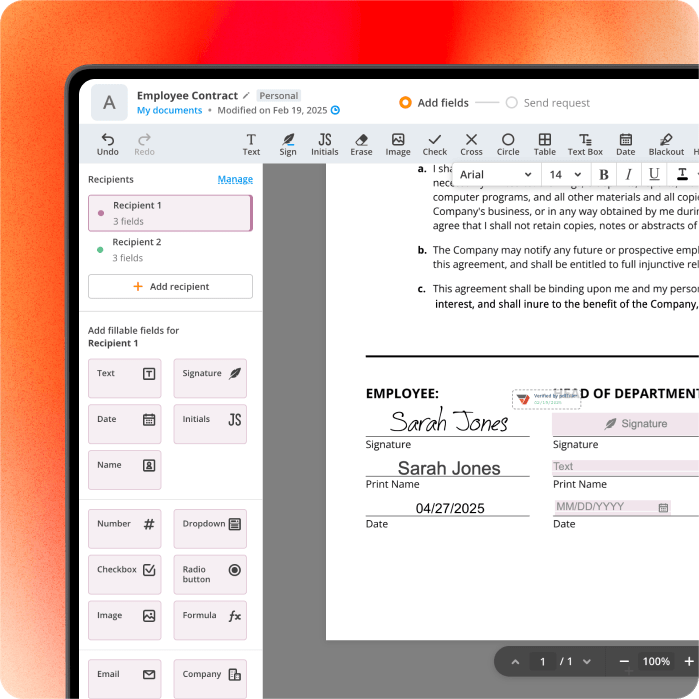
The Annotate PDF Plugin operates directly within your browser, allowing you to access PDFs effortlessly. To begin, simply open a PDF file in your browser and activate the plugin. You can then utilize various annotation tools such as text boxes, highlights, and shapes to mark up your document. After making your annotations, saving changes is straightforward, ensuring that your document workflow remains uninterrupted. This integration allows for quick edits and annotations without needing to switch between applications, enhancing your productivity.
Editing and Signing PDFs with the Plugin
The Annotate PDF Plugin not only allows for easy annotations but also offers robust editing tools. Users can modify text, add images, and even fill out forms directly within the PDF. Additionally, the plugin supports digital signatures, making it possible to sign documents electronically. This feature is particularly useful for legal professionals who require legally binding signatures on contracts and agreements. The signing process is straightforward, ensuring that users can complete their tasks efficiently without confusion about the legality of their signatures.
Converting PDFs Using the Plugin
The Annotate PDF Plugin also provides conversion functionalities, allowing users to convert PDFs into various formats. Supported formats include Word documents and image files, making it easy to repurpose content. To convert a PDF, simply open the document in the plugin and select the desired output format. The quality of the converted files is generally high, ensuring that your documents retain their original formatting and integrity.
Using the Plugin with Google Docs
Integrating the Annotate PDF Plugin with Google Docs enhances its functionality significantly. To use the plugin with Google Docs, first install it as described earlier. Once installed, you can open PDF files directly from Google Docs and annotate them using the plugin's tools. This integration provides a seamless experience for users who frequently collaborate on documents, as it combines the strengths of both platforms. Benefits include easy sharing and real-time collaboration, making it an ideal solution for small businesses and educators.
Scenarios for Using the Plugin
The Annotate PDF Plugin is versatile and can be utilized in various real-world scenarios. For small businesses, it simplifies the process of reviewing contracts and proposals, allowing team members to provide feedback directly on the document. Legal professionals can use it to annotate case files and add digital signatures, ensuring that all necessary changes are documented. Educators can benefit from the plugin by annotating student submissions, providing clear feedback on assignments. These practical applications demonstrate how the plugin serves as an effective collaborative tool across different industries.
Limitations of the Annotate PDF Plugin
While the Annotate PDF Plugin offers many features, there are some limitations to consider. It requires a compatible web browser, which may restrict access for users on outdated versions. Additionally, certain advanced features may not be available, limiting the plugin's functionality in specific scenarios. Users should also be aware of potential compatibility issues with certain PDF formats, which could affect their ability to annotate or edit documents effectively.
Security and Data Handling
The Annotate PDF Plugin prioritizes user security and data handling. It employs data encryption to protect sensitive information during the annotation process. Compliance with industry standards ensures that user privacy is maintained, which is crucial for businesses handling confidential documents. Users can trust that their data is managed securely, especially when utilizing features like digital signatures, which require stringent security measures.
How Does the Annotate PDF Plugin Compare with Other PDF Annotation Tools?
When comparing the Annotate PDF Plugin with other PDF annotation tools, several key differentiators emerge. Adobe Acrobat offers comprehensive features but comes with a higher price tag, making it complex for simple tasks. Smallpdf provides basic annotation tools but lacks advanced features like digital signatures, which may not meet all business needs. DocHub is good for collaboration but has limited integration options compared to the Annotate PDF Plugin, potentially hindering seamless workflows.