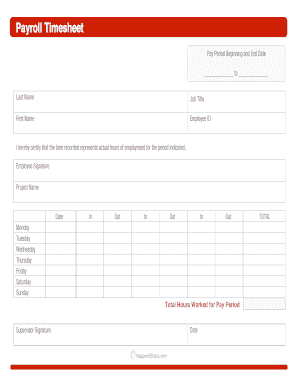
What is simple timesheet template?

A simple timesheet template is a pre-designed document that helps individuals or organizations track and record the hours worked by employees. It provides a convenient way to calculate the payroll and monitor the overall productivity of a workforce. With a simple timesheet template, users can easily enter their work hours and submit them for approval or further processing.

What are the types of simple timesheet template?

There are various types of simple timesheet templates available, each catering to different needs and preferences. Some common types include: 1. Weekly timesheet template: This type of template allows users to track their weekly work hours, making it ideal for businesses with consistent work schedules. 2. Bi-weekly timesheet template: Suitable for organizations that pay their employees every two weeks, this template helps track work hours over a two-week period. 3. Monthly timesheet template: Designed for monthly payroll calculations, this template enables users to accurately record their work hours throughout a month. 4. Project-based timesheet template: This type of template is useful for tracking work hours spent on specific projects or tasks, allowing for efficient project management.

Weekly timesheet template
Bi-weekly timesheet template
Monthly timesheet template
Project-based timesheet template

How to complete simple timesheet template

Completing a simple timesheet template is straightforward and easy. Follow these steps to fill out the template accurately: 1. Enter your name and employee ID: Start by providing your full name and employee identification number to ensure accurate record-keeping. 2. Date and time: Fill in the appropriate date and enter the start and end times for each workday. 3. Breaks and overtime: If applicable, include any breaks or overtime hours separately. This will help calculate the total work hours accurately. 4. Task description: Provide a brief description of the tasks or projects worked on during each time period. 5. Review and submit: Once you have completed filling out the timesheet, review the entries for any errors or missing information. Make sure to submit the timesheet to the appropriate department or supervisor for approval or further processing.

01
Enter your name and employee ID
02
Fill in the appropriate date and enter the start and end times for each workday
03
Include any breaks or overtime hours separately
04
Provide a brief description of the tasks or projects worked on during each time period
05
Review and submit

pdfFiller empowers users to create, edit, and share documents online. Offering unlimited fillable templates and powerful editing tools, pdfFiller is the only PDF editor users need to get their documents done.

Thousands of positive reviews can’t be wrong

Read more or give pdfFiller a try to experience the benefits for yourself
4.0
I found this site to be helpful, but .
I found this site to be helpful, but . . . I found this site to be helpful. A great time saver on changing documents. I would have saved more time, if I knew ahead of time, that the scanned in pdf, that I edited, would not be able to convert to a word document.
Dawn Meinelt
5.0
My subscription had expired My subscription had expired.
My subscription had expired My subscription had expired. I was trying to reactivate my account with a discount offer that was offered to me before my account had expired. Unfortunately I couldn’t seem to figure this out. I was connected to Katrina using the live chat. She explained to me because my account had expired the offer was no longer available. She did however offer me 25% I accepted what was proposed to me. Yet again I was still having problems figuring out how to get this discount link Katrina had sent me. She eventually emailed the link to me because the computer and myself don’t see eye to eye and I can’t figure out how the thing works sometimes. Katrina was very patient and understanding. She helped me figure out my dilemma. Thank youMathieu
M. Vansyd
5.0
Great product!
Great product! Great product!Does what it should do in a simple and intuitive way.Hope it also keeps me private
yuri bernstein

Questions & answers

0:00 0:25 How to Create Timesheets in Microsoft Word 2010 - YouTube YouTube Start of suggested clip End of suggested clip Select. New look over to the right of office comm. Click type timesheets press ENTER review theMoreSelect. New look over to the right of office comm. Click type timesheets press ENTER review the results select the timesheet that you desire select download.
How To Create a Timesheet in Excel? Step 1: Format your spreadsheet. Open a new Excel file. Step 2: Add timesheet title. Highlight the cell range A1–L1. Step 3: Add required labels. Now it's time to add all the labels to your Excel timesheet. Step 4: Add time-related labels. Step 5: Finishing touches.
An Excel timesheet template is a spreadsheet that businesses use to track employee hours and manage their payrolls. These templates allow employees to enter total hours and calculate pay easily, and are also organized and editable to suit your needs.
How To Create a Timesheet in Excel? Step 1: Format your spreadsheet. Open a new Excel file. Step 2: Add timesheet title. Highlight the cell range A1–L1. Step 3: Add required labels. Now it's time to add all the labels to your Excel timesheet. Step 4: Add time-related labels. Step 5: Finishing touches.
If you're already on the latest update, then here's how you can try out the new linked data feature in just three easy steps: 1) Create a new table in Excel. 2) Assign a linked online data type in Excel. 3) Add a new column to get real-time online data.
0:03 1:34 How to Make Hourly Work Time Sheet - YouTube YouTube Start of suggested clip End of suggested clip Simply enter the time in and time out for a person along with their lunch hours and the total numberMoreSimply enter the time in and time out for a person along with their lunch hours and the total number of hours will be calculated.