Change PDF to Fillable Form for NDA For Free

Drop document here to upload
Select from device
Up to 100 MB for PDF and up to 25 MB for DOC, DOCX, RTF, PPT, PPTX, JPEG, PNG, JFIF, XLS, XLSX or TXT

Last updated on Sep 11, 2026

Change PDF to Fillable Form for NDA

Change your PDF to a fillable form for NDAs quickly and easily using pdfFiller.

What is a Fillable Form?

A fillable form is a document that contains interactive fields allowing users to enter information directly into the document. These forms are beneficial for businesses as they simplify the process of document completion, making it faster and more efficient. Common use cases include contracts, applications, and surveys where user input is required. By using fillable forms, businesses can streamline their workflows and reduce the need for manual document handling.

Why Change PDF to Fillable Form?

Changing a PDF to a fillable form eliminates the traditional print-sign-scan cycle, which can be time-consuming and inefficient. By converting to a fillable format, you increase efficiency in document handling, allowing for quicker turnaround times. This transformation also enhances user experience, as recipients can fill out forms directly on their devices without needing to print anything. Overall, fillable forms provide a modern solution to outdated methods of document management.

How to Change PDF to Fillable Form

  • Access pdfFiller's editor by logging into your account.
  • Select the PDF you want to convert and open it in the editor.
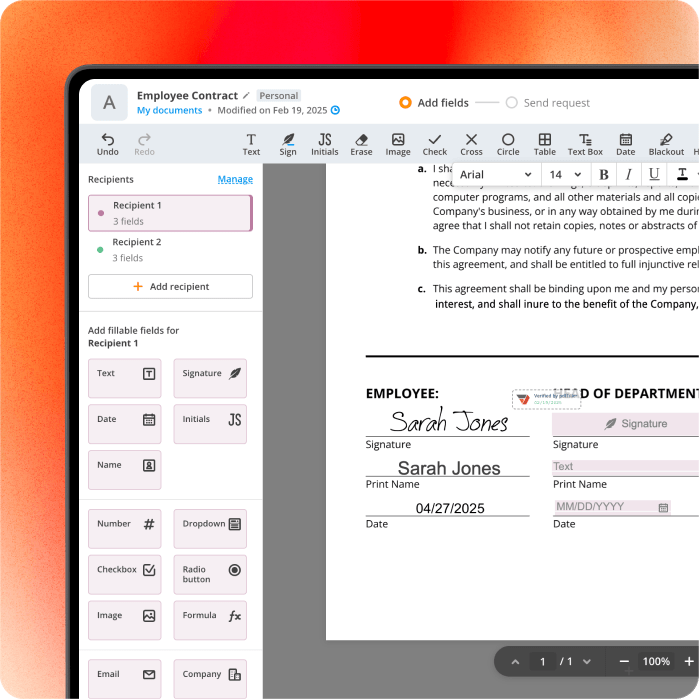
  • Use the Add Fields mode to insert interactive fields where needed.
  • Customize the fields to suit your requirements, such as text boxes, checkboxes, or dropdowns.
  • Once completed, save the fillable form to your account.
  • Share the fillable form via email or download it for distribution.
  • Ensure that all fields are functioning correctly before sending it out.

Using PDF Typer for Non-Interactive PDFs

The PDF Typer feature allows you to type on non-interactive PDFs easily. To activate this feature, simply select the PDF you want to edit and enable PDF Typer. You can then type anywhere on the document, making it convenient to add notes or fill in information. After making your changes, save the document to ensure your edits are preserved.

Converting a Static PDF to a Fillable Form

  • Open the static PDF in pdfFiller's Add Fields mode.
  • Identify areas where user input is required and place fields accordingly.
  • Adjust the size and type of each field to match the expected input.
  • Save the fillable form once all fields are added and configured.
  • Test the form to ensure all fields are functional before distribution.
  • Share the fillable form with recipients via email or download it for later use.

Batch-Filling Forms from a Spreadsheet

To fill multiple forms at once, upload a spreadsheet containing the necessary data. Map the fields in your fillable form to the corresponding columns in the spreadsheet. Once the mapping is complete, generate filled documents in bulk, saving time and reducing manual entry errors. This method is particularly useful for businesses handling large volumes of similar forms.

Filling DOCX and Word-Based Forms

You can open DOCX files directly in pdfFiller without needing to convert them first. This allows you to fill in fields directly within the document. After completing the form, you can save and share the finished document easily. This feature is beneficial for professionals who frequently work with Word forms and need a straightforward filling process.

Security and Data Handling

pdfFiller prioritizes the security of your data. All documents are encrypted in transit, ensuring that sensitive information remains protected. The platform also adheres to strict file retention policies, giving you control over how long your documents are stored. Compliance with regulations further ensures that your data handling practices meet industry standards, providing peace of mind when using fillable forms.

Comparison with Other PDF Tools

pdfFiller offers key features that set it apart from competitors like Adobe Acrobat and Nitro PDF. Unlike Adobe Acrobat, pdfFiller provides a more user-friendly interface tailored for small and medium businesses. Additionally, pdfFiller's pricing is more accessible, making it a preferred choice for those looking to manage documents without the high costs associated with other tools.

Next Steps After Changing Your PDF

After creating your fillable form, the next steps include signing the document if necessary. You can easily send or download the completed form for distribution. Additionally, manage your documents within pdfFiller to keep everything organized and accessible. This workflow ensures that you can handle all your document needs efficiently.

Try most popular PDF tools

Discover a full set of tools to handle any document task.

Edit PDFs

Make quick PDF edits online.

Sign

Add legally binding signatures.

Merge

Combine multiple PDFs.

Request signatures

Send a document for signing.

Convert

Transform PDFs into other formats.

Rearrange

Change the order of pages.

Share

Send PDFs for review or editing.

Compress

Reduce PDF file sizes.

How to fill or build a PDF form

1. Upload or create your form

Everything you need to work with forms

  • Make any PDF fillable in seconds Upload any static PDF, from scanned forms to tax templates, and turn it into an interactive form. Add text fields, checkboxes, dropdowns, date pickers, and signature fields anywhere on the form. No redesign. No extra tools needed.
  • Build forms from scratch or let AI do it Start from a blank page, pick a template from pdfFiller's library, or describe what you need and let AI generate a ready-to-use form in seconds. Add fields, set validation rules, mark required inputs — then publish, embed, or share in one click.
  • Fill any form online pdfFiller auto-detects fillable fields as soon as you open a document. Just click and start — type text, check boxes, pick dates, or add your signature. No downloads or extra tools. Works with scanned PDFs and non-interactive forms too.
  • Collect responses, not just files Share your form via a direct link, embed it on your site, or send it to specific recipients. Every submission lands in your pdfFiller account as a separate, trackable response. See who completed the form, get notified when new responses come in, and export all entries to a spreadsheet in one click.
  • Reuse your forms without starting over Save any form as a template and reuse it whenever you need. When the same intake form, contract, or questionnaire needs to go out again, just open the template, update what’s changed, add a signature, and send. Each submission is saved separately, so your original stays intact.

Who needs this?

Explore how professionals across industries use pdfFiller to edit PDFs.

Healthcare

Paper intake forms slow everything down — staff re-enter data, patients wait, and information gets lost. Replace paper with digital forms patients can complete from any device before their appointment. Every submission goes straight into your workflow, organized and easy to search. HIPAA-compliant storage keeps sensitive data secure.

  • Patient registration and intake forms
  • Medical history questionnaires
  • Consent and authorization forms
  • Prescription refill and referral requests
Healthcare
  • G2 — Users Most Likely To Recommend
  • G2 — Grid Leader in Small-Business
  • G2 — High Performer
  • G2 — Regional Leader
  • G2 — Easiest To Do Business With
  • G2 — Best Meets Requirements
  • G2 — Best Support

pdfFiller scores top ratings on review platforms

pdfFiller is rated 4.6 out of 5 stars across 1,000+ G2 reviews.

Very easy to use. All my forms in one place.
tODDbDOC
Great for filling in PDF forms thus far.
Charles H. C
Very useful website. Has helped in the processing of many of our business documents.
Annie S
Great Application...for filling out PDF Applications!
Jeff H
Very good program for creating and… Very good program for creating and editing.
VERBA SANDERS
Great service, very easy to modify a PDF.
lynda c

Create, fill, and manage PDF forms — all in one place

Try easy-to-use tools to handle all your documents.

pdfFiller workspace for creating, filling and managing PDF forms

PDF editing is just the beginning

More than a PDF editor

How to Use pdfFiller’s Advanced Form Builder

Want to turn static PDFs into smart, fillable online forms in minutes? This pdfFiller tutorial shows you how to use the advanced form builder to create dynamic documents for resumes, HR forms, client contracts, job applications, and more—no coding needed. Learn how to build interactive forms using drag-and-drop tools with ease.

FAQs

If you can't find what you're looking for, please contact us anytime!

To change a PDF to a fillable form for an NDA, upload your PDF document to pdfFiller and select the 'Fillable Form' option. This process allows you to add text fields, checkboxes, and signature lines directly onto the document. Once you’ve customized the form, you can save and share it securely. For best results, ensure your NDA is clear and structured, which helps in placing fields accurately.

pdfFiller employs robust security protocols, including AES-256 encryption, to protect your documents when changing a PDF to a fillable form for NDA. This ensures that sensitive information remains confidential during editing and sharing. Additionally, you can set access permissions and track document activity, providing an extra layer of security for your legal agreements.

Yes, you can edit your NDA after converting it to a fillable PDF form using pdfFiller. Simply open the saved fillable form in the platform, make the necessary changes, and save the updated version. This flexibility allows you to adjust terms or details as needed, ensuring your NDA remains relevant and accurate. Remember to review all changes for compliance with legal standards.

When changing a PDF to a fillable form for NDA, you can add various field types, including text fields for names and addresses, checkboxes for agreement options, and signature fields for electronic signing. This customization ensures that all necessary information is collected efficiently. Use the drag-and-drop interface in pdfFiller to position fields precisely where they are needed for clarity.

Yes, pdfFiller allows for seamless collaboration on a fillable NDA. You can invite team members or stakeholders to review and fill out the form simultaneously. This feature enhances document automation and streamlines the approval process, making it easier to finalize agreements. Utilize the commenting and version history tools to keep track of changes and feedback.

When changing a PDF to a fillable form for NDA, consider compliance with local laws and regulations regarding electronic signatures and document storage. Ensure that your fillable form includes all necessary legal language and that it adheres to the standards set by the Electronic Signatures in Global and National Commerce (ESIGN) Act. pdfFiller’s templates can guide you in maintaining compliance.

Yes, pdfFiller is designed for cross-platform compatibility, allowing you to access your fillable NDA from any device with internet connectivity. Whether you’re using a desktop, tablet, or smartphone, you can edit, share, and sign documents securely. This flexibility is essential for remote professionals and legal teams who need to manage documents on the go.

What businesses achieve with pdfFiller

Discover how you can benefit too.

I tell my employees that if you need to have stuff filled out, hey, check out pdfFiller, that's what I use. Yes, I would and I do recommend it.

Hope Discovery ABA Services

One tool. Every document task.

One workflow shouldn’t take five tools

Start free trial