Convert NDA to Word
Convert your NDA to Word format in seconds using pdfFiller's easy-to-use conversion tool.
What is the NDA to Word Conversion Tool?
The NDA to Word conversion tool allows you to convert NDAs into an editable Word format. This tool is designed for small and medium-sized businesses that need a straightforward solution for document conversion. With pdfFiller, you can convert NDA documents without any software installation required. Trusted by over 68 million users, this tool simplifies the process of document conversion, making it accessible for everyone.
Why Convert NDA to Word?
Converting your NDA to Word format offers several advantages. First, it allows for easy editing and formatting, enabling you to make necessary changes quickly. Additionally, sharing capabilities are enhanced, as Word documents are widely accepted and easy to distribute. Improved collaboration is another benefit, as multiple team members can work on the document simultaneously, ensuring that everyone is on the same page.
How to Access the NDA Conversion Tool
You can access the NDA conversion tool through three different paths. First, use the Done dropdown menu in the editor to find the conversion option. Second, navigate to the All Tools card on the dashboard, where you can find the conversion tool easily. Lastly, you can access it via the document row More menu, which provides a direct link to the conversion feature.
Steps to Convert NDA to Word
- Upload your NDA document to pdfFiller by selecting the upload option.
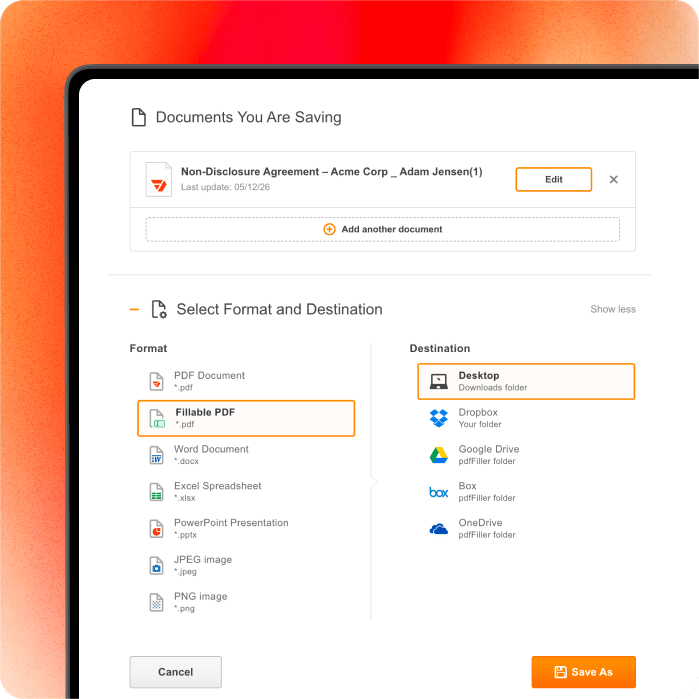
- Select the output format as Word (.docx) from the available options.
- Click on the convert button to initiate the conversion process.
- Wait for the server-side processing to complete; this usually takes just a few moments.
- Download the converted document directly to your device once the process is finished.
- Open the downloaded Word document to review and edit as needed.
- Share the edited NDA with stakeholders or team members for further collaboration.
- Consider signing the document electronically if required, using pdfFiller's e-signature feature.
Supported Output Formats
pdfFiller supports several output formats for document conversion. You can convert to Word (.docx), Excel (.xlsx), and PowerPoint (.pptx) formats. This variety allows you to choose the format that best suits your needs for editing and sharing.
Accepted Input File Types
pdfFiller accepts various input file types for conversion to PDF. You can upload PDF files, Word documents, and image files for conversion. This flexibility ensures that you can convert your NDAs and other documents without worrying about file compatibility.
What to Expect from the Converted NDA
When converting your NDA to Word format, you can expect a high degree of layout fidelity, meaning the document will retain its original appearance as much as possible. The text will be editable, allowing you to make necessary changes. However, be aware of OCR limitations; scanned PDFs may not convert perfectly without applying OCR technology.
Comparison with Other Tools
How does pdfFiller compare with other tools? Adobe Acrobat offers comprehensive features for PDF management but can be costly for small businesses. Smallpdf provides basic conversion tools but lacks the extensive template library of pdfFiller. Nitro is known for its powerful editing tools but requires installation and can be complex for new users.
Limitations of the Conversion Tool
While the NDA conversion tool is highly effective, there are some limitations to consider. Page count limits may apply based on your plan tier, and OCR availability can affect the quality of scanned documents. Additionally, complex layout fidelity may not be guaranteed for documents with intricate formatting.
Next Steps After Conversion
After converting your NDA to Word format, you can take several next steps. First, edit the converted NDA to ensure it meets your requirements. Then, share the document with stakeholders for their input. Finally, consider signing the document electronically using pdfFiller’s e-signature feature to finalize the agreement.