eSign NDA
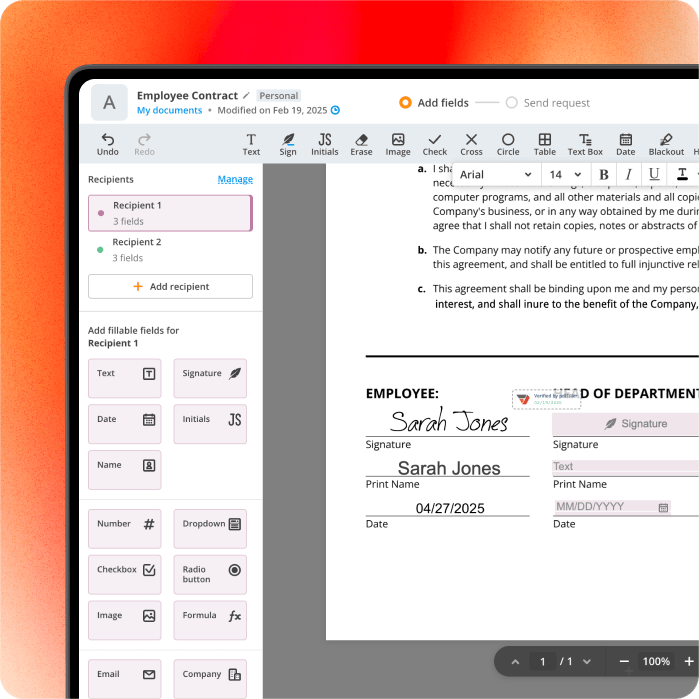
eSign your NDA quickly and securely using pdfFiller’s electronic signature tool. No technical setup is required, and you can sign from any device.
What is the eSign NDA Tool?
The eSign NDA tool in pdfFiller allows you to electronically sign a Non-Disclosure Agreement (NDA) with ease. This tool distinguishes between self-signing and sending documents for signature, making it user-friendly and accessible without requiring any IT setup. You can manage your legal documents efficiently, ensuring that you can complete your signing tasks quickly and securely.
Why Use pdfFiller for eSigning NDAs?
Using pdfFiller for your eSign NDA needs offers numerous benefits. It is trusted by over 68 million users and provides access to more than 1 million templates, ensuring you have everything you need at your fingertips. With legally binding signatures and no hidden fees, pdfFiller stands out as a reliable choice for small and medium-sized businesses looking for secure signing solutions.
Three Ways to eSign Your NDA
pdfFiller provides three methods to eSign your NDA: Draw, Type, and Upload. Each method produces a legally binding signature, allowing you to choose the one that best fits your style. Whether you prefer to draw your signature freehand, type it in a selected font, or upload an image of your handwritten signature, pdfFiller makes the process straightforward and efficient.
How to Draw Your Signature
- Open the pdfFiller editor and select the Signature tool.
- Choose the Draw option to create your signature using your mouse, touchpad, or stylus.
- Adjust the color and line thickness to your preference.
- Resize and reposition your signature as needed within the document.
- Save your drawn signature for future use if desired.
How to Type Your Signature
- Select the Type option in the Signature tool.
- Type your name in the designated field.
- Choose a font style and color that you like.
- Place your typed signature in the appropriate location on your NDA.
- Save your typed signature for reuse in future documents.
How to Upload Your Signature
- Access the Signature tool and select the Upload option.
- Choose an image file of your handwritten signature from your device.
- Ensure the image is clear and of high quality for best results.
- Resize and position your uploaded signature within the document.
- Save the uploaded signature for future use if you wish.
Adding Initials to Your NDA
You can easily add your initials to your NDA using the same three methods available for signatures: Draw, Type, and Upload. Each method is legally valid, allowing you to customize your initials to fit your document needs without confusion.
Saving and Reusing Your Signature
pdfFiller allows you to save your signatures for future use, making it easy to reuse them across different documents. You can set a default signature that will automatically appear when you need to sign, streamlining your document signing process.
Legal Validity of Your eSigned NDA
When you eSign your NDA using pdfFiller, your signature is compliant with ESIGN, UETA, eIDAS, and GDPR regulations. This ensures that your electronically signed documents are legally binding and recognized in various jurisdictions, providing you with peace of mind.
Next Steps After eSigning Your NDA
After you eSign your NDA, you can easily share it with others or store it securely within pdfFiller. The platform also allows you to fill out additional forms or documents, enhancing your overall document management workflow.
How Does pdfFiller Compare?
DocuSign offers extensive features for enterprise users, but can be complex for small businesses. Adobe Acrobat Sign is known for robust PDF capabilities, but may require more technical setup. Dropbox Sign provides basic signing features, but lacks the comprehensive template library of pdfFiller.