What are Designer Business Card Templates?

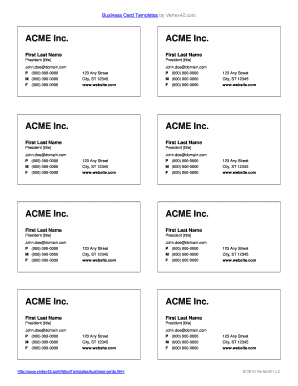
Designer Business Card Templates are pre-designed layouts that individuals or businesses can use to create professional-looking business cards. These templates often include elements such as logos, contact information, and design elements that can be easily personalized to suit the user's needs.

What are the types of Designer Business Card Templates?

There are various types of Designer Business Card Templates available to cater to different styles and preferences. Some common types include:

Minimalist Business Card Templates
Creative Business Card Templates
Classic Business Card Templates
Modern Business Card Templates

How to complete Designer Business Card Templates

Completing Designer Business Card Templates is a simple process that can be done in a few easy steps. Here's how:

01
Choose a Designer Business Card Template that fits your style and needs.
02
Personalize the template by adding your logo, contact information, and any other details you want to include.
03
Customize the design elements such as colors, fonts, and layouts to make the business card unique.
04
Review the completed business card template to ensure all information is accurate and visually appealing.

pdfFiller empowers users to create, edit, and share documents online. Offering unlimited fillable templates and powerful editing tools, pdfFiller is the only PDF editor users need to get their documents done.

Video Tutorial How to Fill Out Designer Business Card Templates

Thousands of positive reviews can’t be wrong

Read more or give pdfFiller a try to experience the benefits for yourself
5.0
Accounting Assistant This software made it easy for me to complete a single 1099...
Accounting Assistant This software made it easy for me to complete a single 1099-MISC that i needed and that i wasn't able to use my current software for. I was able to quickly create the document and send it out to the necessary party on a time crunch. This would not be good to use for a large amount of 1099's but, it did meet my needs.
Kadi D.
5.0
Really helps me with any random form that comes my way.
Really helps me with any random form that comes my way. I hated printing out, filling out by hand and scanning. This keeps it simple and discreet! Easy to get people to fill out forms, too.
Amanda G.
5.0
I enjoyed using the PDFfiller because it saves time and makes my documents more...
I enjoyed using the PDFfiller because it saves time and makes my documents more legible. Finally, it allows me to save documents for future use.
Karen S.

Questions & answers

How to make business cards Open Canva. Open up Canva and search for “Business Cards” to get started. Browse ready-made templates. Not sure where to start? Personalize your design. Create a business card that truly represents you. Get creative with more design ingredients. Order your prints.
You don't need to pay someone to make them—you can make your own business cards using Google Docs. Google Docs is free, simple to use, and has plenty of templates that can help you create professional business cards at no cost. You don't need to use complex image editors to do it, either.
5 Considerations for Designing More Modern Business Cards Keep Contact Info Light. Contact information is still the driving force behind today's business cards. Mix Fonts to Draw Attention. Don't Skimp on the Logo. Try Adventurous Shapes. Use Layout to Your Advantage.
Consider the following: Company or Business Logo. A well-designed logo is informative, practical, graphic, and straightforward. Company or Business Name. Tagline. Your Name. Your Job Title. Contact Information. Website Address/Landing Page. A Promo or Call to Action.
0:33 9:03 How to make a VIRTUAL / DIGITAL BUSINESS CARD - YouTube YouTube Start of suggested clip End of suggested clip The text the images move around things and then it becomes your own now for our purpose for theMoreThe text the images move around things and then it becomes your own now for our purpose for the business card we're going to create it here let's just search for business card. And then hit enter.
How to design a business card in 8 steps — Choose your shape. Choose your size. Add your logo and other graphics. Add necessary text. Choose your typography. Consider special finishes. Pick a designer. Finalize your design.